Einstein AI represents Salesforce’s comprehensive artificial intelligence platform that transforms how organizations interact with their CRM data. Built on generative AI technology and integrated across all Salesforce clouds, Einstein AI enables users to generate content, automate processes, and gain insights through natural language interactions within their familiar Salesforce interface.
This guide covers everything you need to know about implementing and leveraging Einstein AI in your Salesforce org, from core concepts to advanced configuration strategies.
What is Einstein AI?
Einstein AI is Salesforce’s integrated artificial intelligence platform that combines multiple AI technologies to deliver intelligent automation and content generation capabilities directly within Salesforce applications. The platform integrates three distinct AI model approaches:
- Salesforce proprietary AI models – Custom-built models trained on Salesforce data patterns and optimized for CRM use cases
- Third-party AI partnerships – Integration with OpenAI’s ChatGPT and other enterprise-grade AI services
- Bring Your Own Model (BYOM) – Support for custom external AI models through Einstein Model Builder
Einstein AI processes real-time data from Salesforce Data Cloud and all connected Salesforce applications, ensuring AI-generated content reflects current customer information and business context.
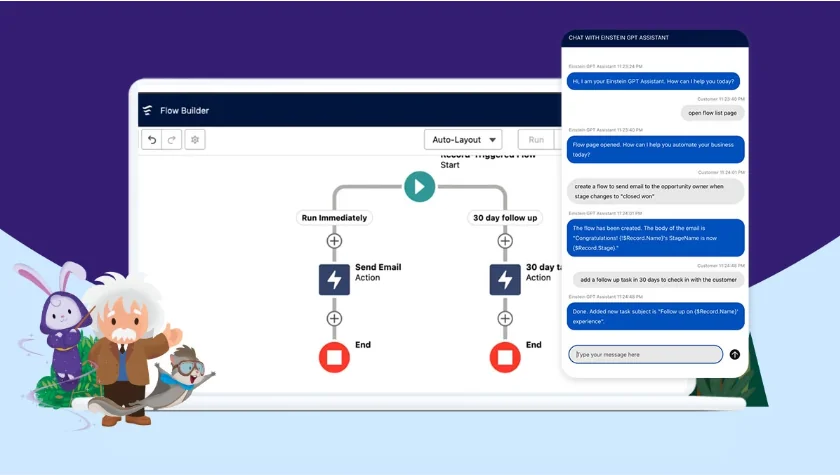
Einstein Copilot: Your AI Assistant
Einstein Copilot serves as the primary interface for Einstein AI interactions across all Salesforce applications. Launched at Dreamforce 2023, Copilot appears as a side panel in any Salesforce app, allowing users to interact with AI through natural language queries.
Key Copilot capabilities include:
- Conversational AI interface – Ask questions and receive contextual responses based on your Salesforce data
- Multi-step action plans – Receive detailed recommendations with customizable follow-up actions
- Universal access – Available to internal users and external customers through Experience Cloud portals
- Contextual awareness – Understands your current record, user permissions, and business processes
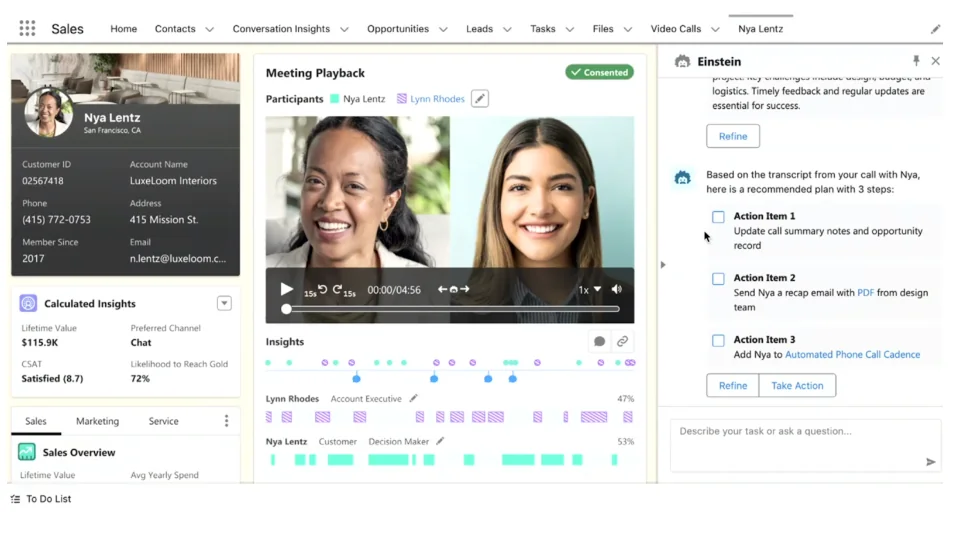
Copilot respects Salesforce security models, ensuring users only access information they have permission to view. When Copilot cannot respond to a query, administrators can use Skills Builder to extend its capabilities.
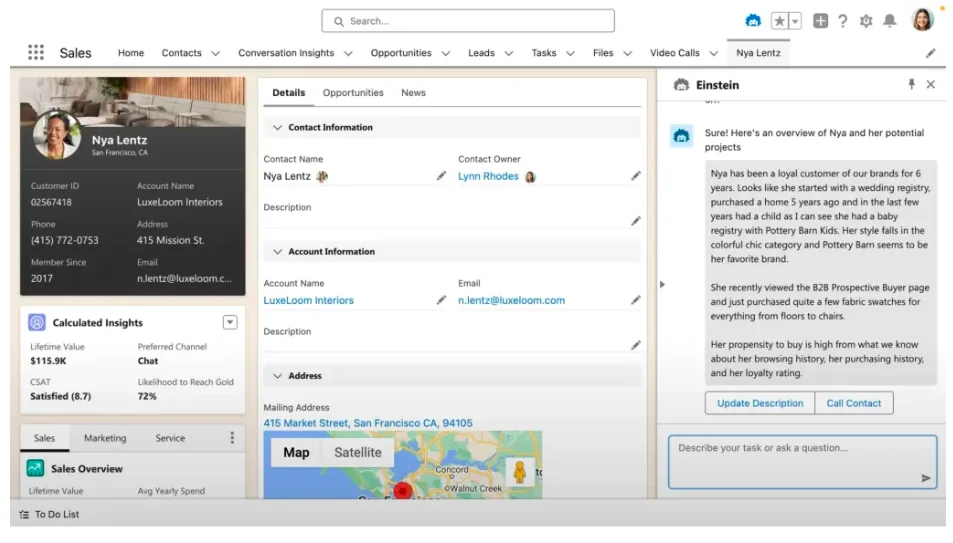
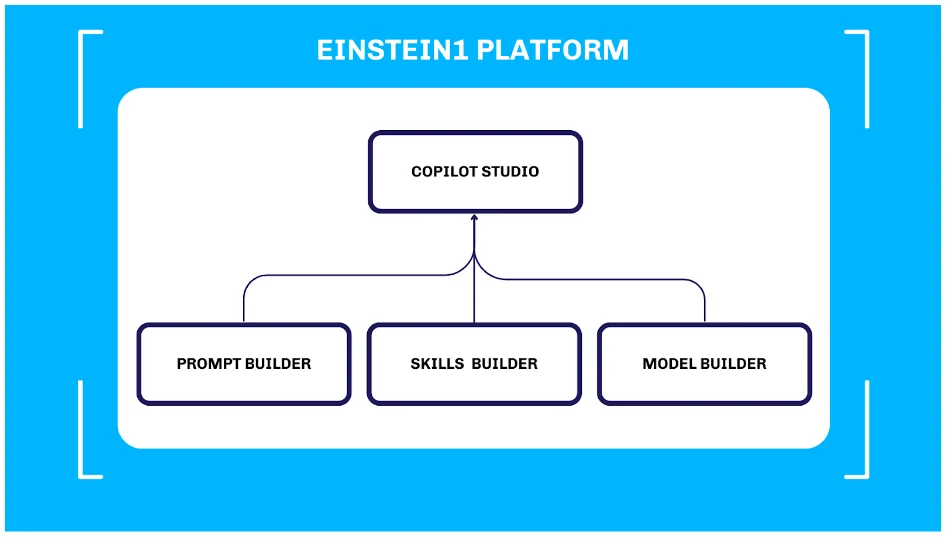
Einstein Copilot Studio: Building Custom AI Solutions
Einstein Copilot Studio provides administrators and developers with tools to customize and extend Einstein AI functionality. The studio includes three core components that work together to create tailored AI experiences.
Prompt Builder for Content Generation
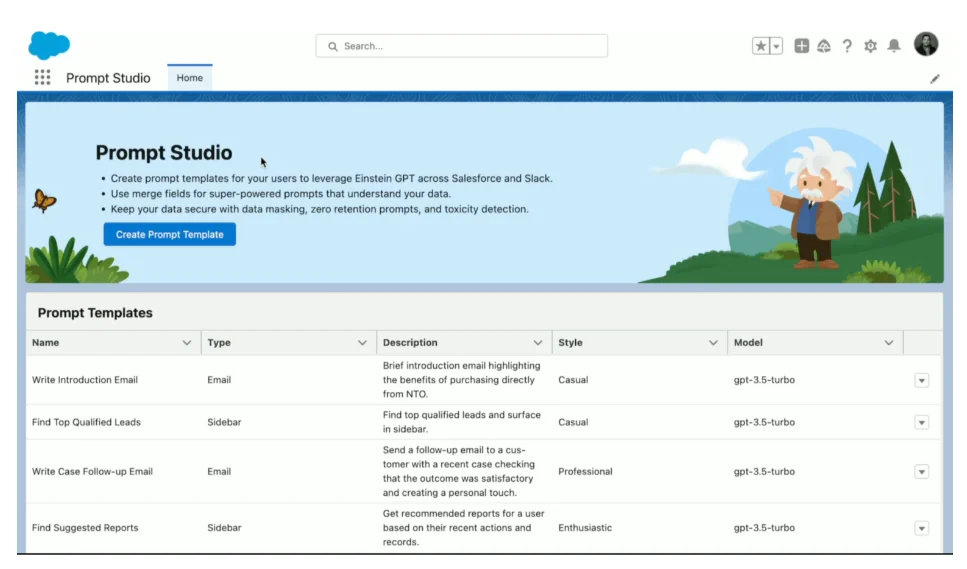
Prompt Builder enables administrators to create reusable AI prompts that generate consistent, branded content. Unlike generic AI tools, Prompt Builder uses templates designed for specific business scenarios.
Common Prompt Builder use cases:
- Email templates – Generate personalized customer emails using CRM data
- Case responses – Create consistent service replies based on case details
- Product descriptions – Generate marketing content for Commerce Cloud
- Social media posts – Create branded content for marketing campaigns
To create a prompt in Prompt Builder:
- Navigate to Setup → Einstein → Prompt Builder
- Select “New Prompt Template”
- Choose your target object (Account, Case, Opportunity, etc.)
- Write your prompt using merge fields for dynamic data insertion
- Test the prompt with sample records
- Deploy to users through permission sets
Skills Builder for Custom Actions
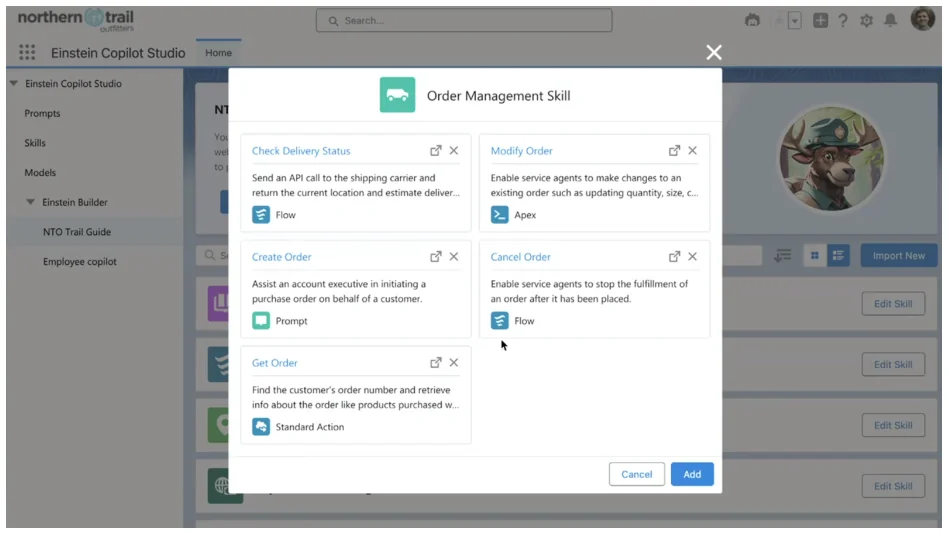
Skills Builder allows administrators to create custom AI-powered actions that complete specific business tasks. Think of skills as permission sets for AI functionality – they control which users can access which AI capabilities.
Skills Builder supports:
- Lead qualification – Automatically score and route leads based on AI analysis
- Customer churn prediction – Identify at-risk accounts using historical data patterns
- Product recommendations – Suggest relevant products based on customer behavior
- Service case routing – Direct cases to appropriate agents using AI classification
- Marketing campaign optimization – Personalize campaigns using AI-driven insights
Skills Builder uses a drag-and-drop interface that connects data sources, AI models, and custom logic without requiring code development.
Model Builder for Custom AI Models
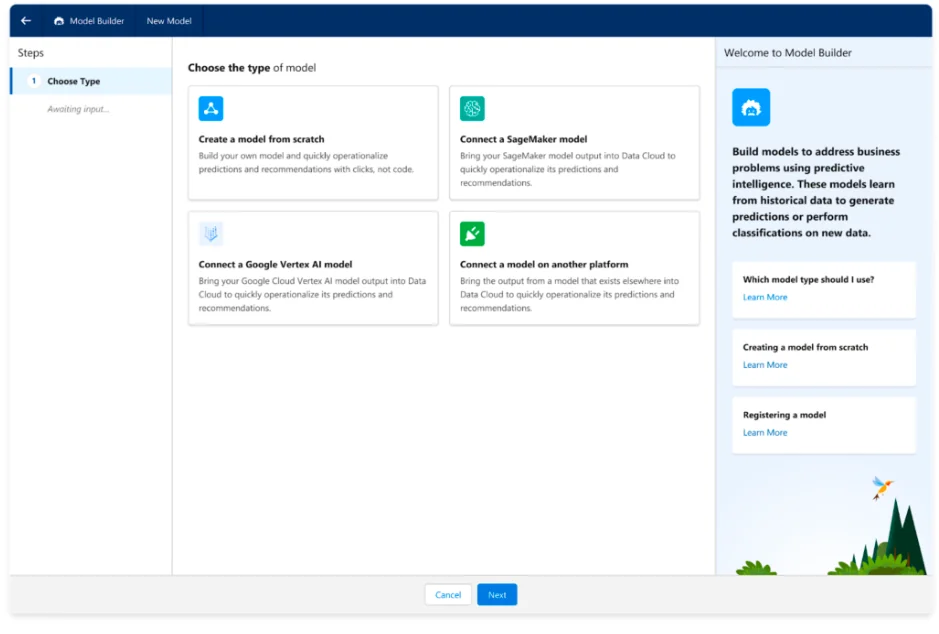
Einstein Model Builder enables organizations to integrate external AI models while maintaining data security and compliance. The Bring Your Own Model (BYOM) approach supports various AI providers and custom-trained models.
Model Builder integration options:
- Amazon SageMaker – Connect existing SageMaker models to Salesforce data
- Google Vertex AI – Integrate Google Cloud AI models with CRM workflows
- Custom APIs – Connect proprietary AI models through REST APIs
- Open-source models – Deploy community AI models in secure environments
Model Builder maintains data privacy by processing requests through the Einstein Trust Layer, ensuring sensitive information never leaves Salesforce infrastructure.
Einstein Trust Layer: Enterprise Security
The Einstein Trust Layer addresses enterprise security and compliance requirements for AI implementations. This architecture ensures organizations can leverage generative AI while maintaining data governance and privacy standards.
Trust Layer security features:
- Data isolation – Customer data never leaves Salesforce infrastructure
- Dynamic grounding – AI models understand context without storing sensitive information
- Data masking – Sensitive fields are automatically masked in AI interactions
- Toxicity detection – AI responses are filtered for harmful or inappropriate content
- Audit trails – All AI interactions are logged for compliance reporting
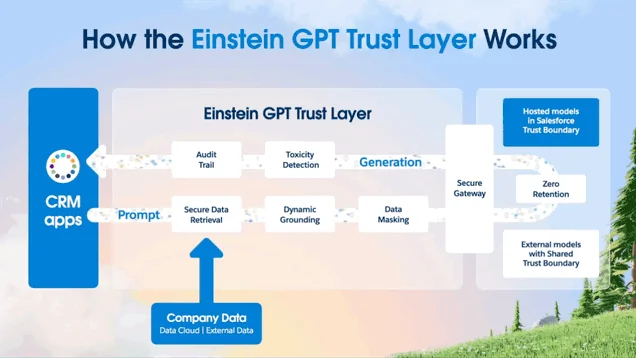
The Trust Layer processes AI requests at query time, passing minimal data to language models and immediately destroying temporary data after processing. This approach maintains the benefits of AI while ensuring customer data remains secure within Salesforce.
Einstein for Sales Implementation
Sales Einstein provides AI-powered tools specifically designed for sales teams, focusing on productivity, personalization, and pipeline management. These features integrate directly into Sales Cloud workflows.
Sales Assistant Capabilities
The Einstein Sales Assistant appears in the side panel of opportunity, account, and lead records, providing contextual AI support throughout the sales cycle:
- Account research – Summarize account history, recent activities, and key contacts
- Meeting preparation – Generate talking points and questions based on opportunity stage
- Contract assistance – Draft contract clauses and terms based on deal parameters
- CRM updates – Automatically update records based on email and call interactions
AI-Powered Email Generation
Sales Einstein generates personalized emails using CRM data, ensuring consistent messaging while maintaining individual customization:
- Prospect outreach – Create initial contact emails based on lead source and company information
- Follow-up sequences – Generate nurture emails based on previous interactions
- Proposal communications – Draft emails accompanying quotes and proposals
- Closing communications – Create urgency-based emails for end-of-quarter pushes
Automated Call Summaries
Einstein automatically transcribes and summarizes sales calls, extracting key information and suggesting follow-up actions:
- Call transcription – Convert speech to text with speaker identification
- Key moment extraction – Identify important discussion points and decisions
- Action item creation – Generate tasks based on call commitments
- CRM field updates – Update opportunity fields based on call content
Einstein Knowledge Creation and Management
Einstein knowledge creation capabilities help organizations build and maintain comprehensive knowledge bases that improve customer service and internal productivity.
Automated Article Generation
Einstein can generate knowledge articles from various sources:
- Case resolution patterns – Create articles from frequently resolved cases
- Product documentation – Transform technical specs into user-friendly articles
- Training materials – Convert internal processes into searchable knowledge
- FAQ compilation – Generate comprehensive FAQ sections from customer inquiries
Content Optimization
Einstein analyzes knowledge article performance and suggests improvements:
- Search optimization – Recommend keywords and tags for better discoverability
- Content gaps – Identify missing topics based on case patterns
- Article updates – Suggest revisions based on customer feedback and usage patterns
- Translation assistance – Generate multilingual versions of knowledge articles
Einstein GPT Implementation Best Practices
Successful Einstein GPT implementation requires careful planning, proper configuration, and ongoing optimization. Follow these best practices to maximize AI effectiveness in your organization.
Pre-Implementation Planning
Before enabling Einstein GPT features, assess your organization’s readiness:
- Data quality audit – Ensure CRM data is clean, complete, and properly structured
- User permission review – Verify field-level security and sharing rules are properly configured
- Use case identification – Define specific business processes that will benefit from AI automation
- Success metrics – Establish measurable goals for AI implementation
Configuration Strategy
Configure Einstein AI features incrementally to ensure successful adoption:
- Start with Prompt Builder – Create simple email templates for common scenarios
- Enable Copilot gradually – Roll out to pilot users before organization-wide deployment
- Build custom skills – Develop Skills Builder actions for specific business processes
- Integrate external models – Use Model Builder for specialized AI requirements
User Training and Adoption
Successful AI adoption requires comprehensive user education:
- AI literacy training – Educate users on AI capabilities and limitations
- Prompt engineering – Teach users how to write effective AI queries
- Security awareness – Ensure users understand data privacy and AI ethics
- Feedback collection – Establish channels for user feedback and improvement suggestions
Monitoring and Optimization
Continuously monitor AI performance and user satisfaction:
- Usage analytics – Track AI feature adoption and engagement metrics
- Quality assessment – Review AI-generated content for accuracy and relevance
- Performance tuning – Adjust prompts and skills based on user feedback
- Security monitoring – Ensure AI interactions comply with data governance policies
Common Implementation Challenges
Organizations often encounter specific challenges when implementing Einstein AI. Understanding these issues helps ensure smoother deployments.
Data Quality Issues
Poor data quality significantly impacts AI effectiveness:
- Incomplete records – Missing fields reduce AI context and accuracy
- Inconsistent formatting – Varied data formats confuse AI pattern recognition
- Duplicate records – Multiple versions of the same data create conflicting AI responses
- Outdated information – Stale data leads to irrelevant AI recommendations
User Adoption Barriers
Users may resist AI adoption for various reasons:
- Fear of job displacement – Address concerns about AI replacing human workers
- Complexity concerns – Simplify AI interfaces and provide clear instructions
- Trust issues – Demonstrate AI accuracy and explain decision-making processes
- Change resistance – Implement gradual rollouts with strong change management
Technical Integration Challenges
Technical issues can impede AI implementation:
- API limitations – Understand governor limits for AI API calls
- Performance impact – Monitor system performance with AI features enabled
- Integration complexity – Plan for external system integrations with AI workflows
- Customization requirements – Balance standard AI features with custom business needs
Future of Einstein AI
Salesforce continues expanding Einstein AI capabilities with regular updates and new features. Understanding the roadmap helps organizations plan long-term AI strategies.
Upcoming Features
Salesforce regularly announces new Einstein AI capabilities:
- Enhanced language models – Improved accuracy and context understanding
- Industry-specific AI – Specialized models for healthcare, financial services, and manufacturing
- Advanced analytics – AI-powered insights and predictive analytics
- Workflow automation – Deeper integration with Salesforce Flow and Process Builder
Integration Expansion
Einstein AI will integrate with more Salesforce products:
- Tableau AI – Natural language queries for data visualization
- MuleSoft AI – Intelligent integration pattern recommendations
- Slack AI – Enhanced collaboration with AI-powered insights
- Commerce AI – Personalized shopping experiences and product recommendations
Frequently Asked Questions
What is the difference between Einstein AI and Einstein GPT?
Einstein AI is the umbrella term for all artificial intelligence capabilities within Salesforce, while Einstein GPT specifically refers to the generative AI features that create content using large language models. Einstein GPT is a subset of the broader Einstein AI platform.
How much does Einstein AI cost?
Einstein AI pricing varies by feature and Salesforce edition. Basic Einstein features are included with Sales Cloud and Service Cloud Enterprise editions. Advanced features like Einstein GPT and Copilot require additional licenses, typically starting at $50 per user per month. Contact Salesforce for current pricing details.
Can Einstein AI work with external data sources?
Yes, Einstein AI can access external data through Salesforce Data Cloud, which ingests and harmonizes data from multiple sources. Additionally, Einstein Model Builder supports integration with external AI models and APIs while maintaining data security through the Trust Layer.
Is Einstein knowledge creation available in all Salesforce orgs?
Einstein knowledge creation features require specific licenses and may not be available in all Salesforce editions. Knowledge article generation typically requires Service Cloud Enterprise or higher, plus additional Einstein AI licenses. Check with your Salesforce administrator for feature availability in your org.
How does Einstein for sales improve sales team productivity?
Einstein for sales automates time-consuming tasks like email drafting, call summarization, and CRM updates. Sales teams report 20-30% time savings on administrative tasks, allowing more focus on customer interactions and deal progression. The AI assistant also provides contextual insights that improve meeting preparation and customer engagement.
What security measures protect data in Einstein GPT implementation?
The Einstein Trust Layer provides comprehensive security including data isolation, dynamic grounding, automatic data masking, toxicity detection, and complete audit trails. Customer data never leaves Salesforce infrastructure, and all AI processing occurs within Salesforce’s secure environment with enterprise-grade compliance certifications.