Salesforce Summer 25 Release Notes for Admins and Developers
The salesforce summer 25 release notes matter because Summer ’25 maps to Salesforce API version 64.0. For admins and developers, the useful work is not reading every item in isolation; it is finding the changes that affect integrations, Flow, Lightning Web Components, mobile users, dashboards, Knowledge, Marketing Cloud, and release-update enforcement.
This article explains the salesforce summer 25 release notes from an implementation view. It focuses on what to test, where Beta or Developer Preview labels apply, and how to avoid release-weekend issues in enterprise orgs.
Salesforce Summer 25 Release Notes: what changed?
The salesforce summer 25 release notes cover platform, automation, developer tooling, AI, mobile, service, sales, and marketing updates. Summer ’25 is the release that introduced or enforced several items that need direct technical review, including API version retirement, LWC local development changes, Flow email and approval updates, Salesforce Go setup discovery, and individual dashboard widget refresh.
In enterprise orgs, classify the release by risk. A user-interface update can still create support tickets if users cannot find list views. A retired API version can break middleware. A Flow email change can expose sender or recipient assumptions. Use the salesforce summer 25 release notes as a test-plan source, not as a feature list.
| Area | Summer ’25 item | Action |
|---|---|---|
| Platform API | API versions 21.0 through 30.0 retired | Audit REST, SOAP, and Bulk API clients before production testing. |
| LWC | Single-component Local Dev is Beta | Use in sandboxes, but keep CI deployment and test gates. |
| Flow | Send Email and Flow Approval Process changes | Retest recipients, senders, approval routing, and fault paths. |
| Service Cloud | Knowledge navigation and article editing updates | Validate article pages, permissions, and mobile behavior. |
| Sales Cloud | Individual dashboard widget refresh is Generally Available | Use where one widget needs current data without refreshing the full dashboard. |
How should admins read the salesforce summer 25 release notes?
Admins should start with Setup > Release Updates, then move to the features users touch daily. Review list views, record pages, mobile pages, dashboards, Knowledge, approvals, and email actions. Do not enable Beta features in production unless your governance process allows Beta use and the business accepts support limits.
Summer 25 release checklist for admins
- Open Release Updates and document enforced, due-soon, and overdue items.
- Test high-use list views for sales, service, and operations teams.
- Check Salesforce Mobile App Setup before exposing Dynamic Related Lists on mobile. This mobile experience is Beta in Summer ’25.
- Review dashboards that can benefit from individual widget refresh.
- Test Experience Cloud pages if Aura site record components are affected by modernized record experience updates.
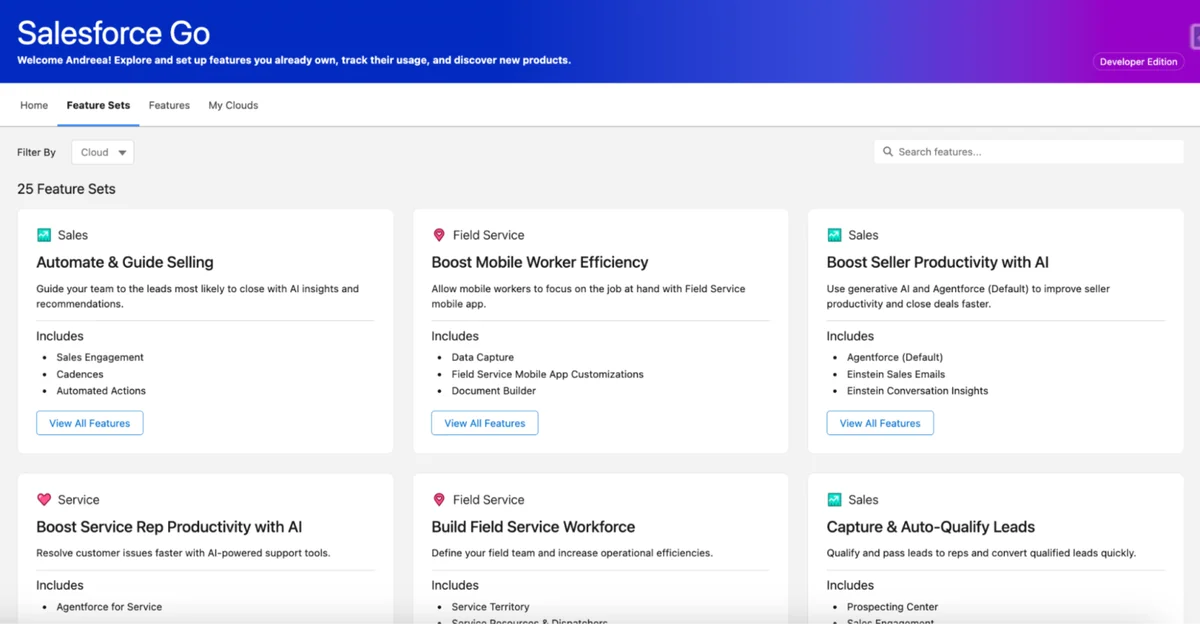
Salesforce Go gives admins a more direct route into setup discovery across supported products. In a multi-cloud org, keep separate release notes for Sales Cloud, Service Cloud, Marketing Cloud, Data Cloud, and Experience Cloud because each cloud can have product-specific behavior.
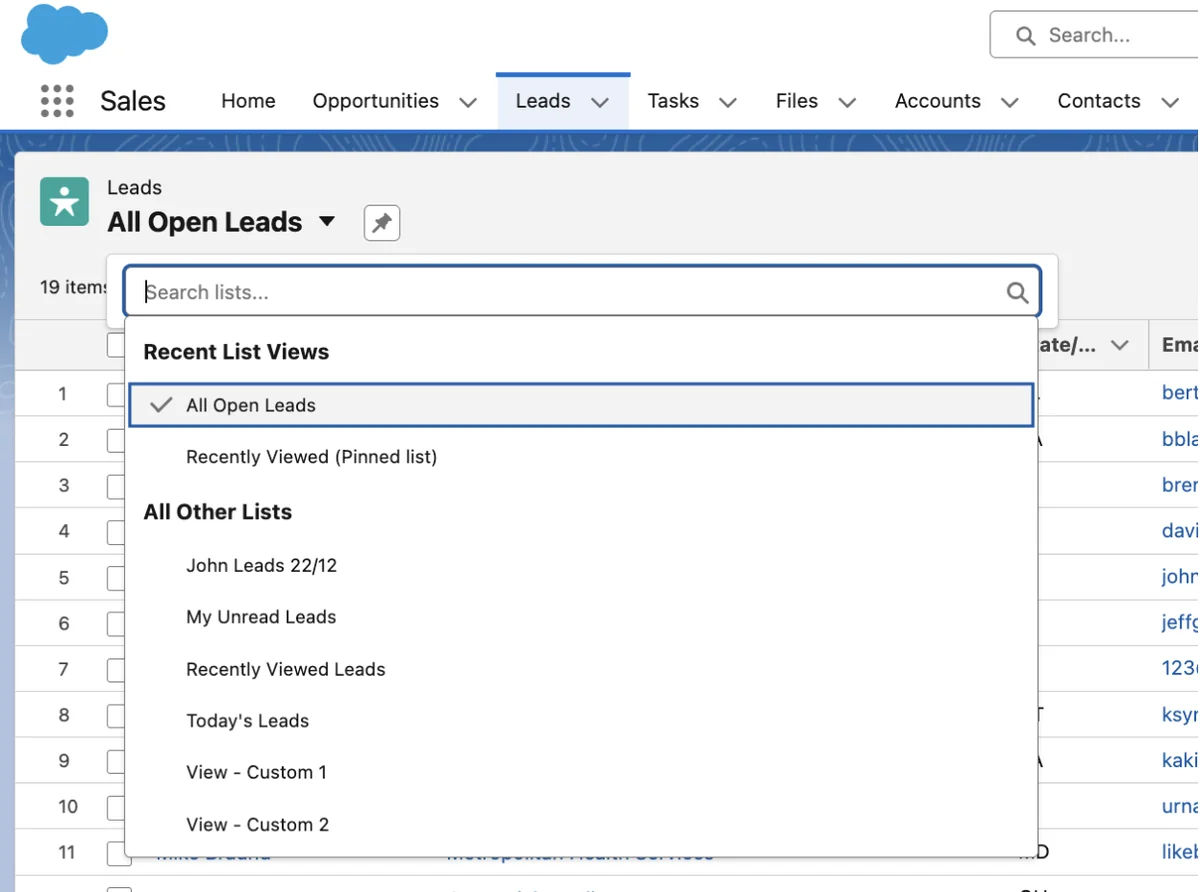
Summer release salesforce testing sequence
A practical summer release salesforce test sequence starts with access and navigation, then moves to automation, integration, and data. Ask each team to identify the screens and processes they cannot lose during a release weekend.
- Navigation: login, app launcher, record pages, list views, reports, dashboards, and mobile access.
- Automation: record-triggered flows, screen flows, scheduled flows, approvals, and email actions.
- Integration: connected apps, named credentials, middleware jobs, API endpoints, and retry behavior.
- Cloud features: Knowledge, Omni-Channel, Marketing Cloud journeys, dashboards, and quota planning.
What should developers test in the Salesforce Summer 25 Release Notes?
Developers should read the salesforce summer 25 release notes as a compatibility review for API version 64.0. Key areas include legacy API retirement, Local Dev for Lightning Web Components, SLDS validation, Agentforce LWC targets, dynamic formula evaluation, Salesforce CLI changes, and Code Analyzer v5. Some items are Beta or Developer Preview, so keep those labels in design notes and release approvals.
Salesforce current version: how to verify your org
The phrase salesforce current version depends on date and instance. Summer ’25 corresponds to API version 64.0, but by June 2026 Salesforce has later releases. To verify a live org, check the REST versions endpoint instead of relying on an article title.
curl -s $SF_INSTANCE/services/data/ -H 'Authorization: Bearer '$SF_ACCESS_TOKENFor metadata running inside Salesforce, use the Tooling API to find old Apex metadata. This is not the same as finding external REST or SOAP clients, but it helps you identify code that may need separate regression testing.
SELECT Id, Name, ApiVersion FROM ApexClass WHERE ApiVersion < 45 ORDER BY ApiVersion ASC, Name ASCAPI 64.0 and retired API versions
The highest-risk developer item in the salesforce summer 25 release notes is the retirement of Salesforce Platform API versions 21.0 through 30.0. Search source code, middleware, ETL tools, Postman collections, and vendor settings for retired endpoint paths.
grep -RInE 'services/data/v(2[1-9]|30)\.0|/services/(Soap|async)/(u|c)/(2[1-9]|30)\.0' . || trueDo not treat Apex class API versions as proof that integrations are safe. External API retirement affects inbound API calls made by external clients. Review HTTP endpoint paths, connected app logs, MuleSoft policies, gateway routes, and vendor connector configuration.
Local Dev and Agentforce LWC targets in the summer 25 release
The summer 25 release allows developers to preview a single Lightning Web Component with Local Dev in Beta. This shortens UI feedback loops, but deployed sandbox testing is still required for record access, Apex calls, CSP settings, packaging, and sharing behavior.
sf plugins install @salesforce/plugin-lightning-dev
sf lightning dev
Agentforce-related LWC targets can expose custom input and output surfaces for agent actions. Salesforce documents these targets in the Summer ’25 developer updates, while some related Agentforce capabilities are Beta or Developer Preview.
<LightningComponentBundle xmlns='http://soap.sforce.com/2006/04/metadata'>
  <apiVersion>64.0</apiVersion>
  <isExposed>true</isExposed>
  <targets>
    <target>lightning__AgentforceInput</target>
    <target>lightning__AgentforceOutput</target>
  </targets>
</LightningComponentBundle>
Official developer references include Salesforce Developer Guide to Summer ’25, FormulaBuilder Apex Reference, and Salesforce Code Analyzer release notes.
How do the salesforce summer 25 release notes affect Flow?
Flow changes in the salesforce summer 25 release notes affect Send Email actions, approval design, debugging, scheduled flows, and testing. Many Flow release issues are access issues: missing field-level security, inactive templates, sender restrictions, record locks, or approval assignment rules.
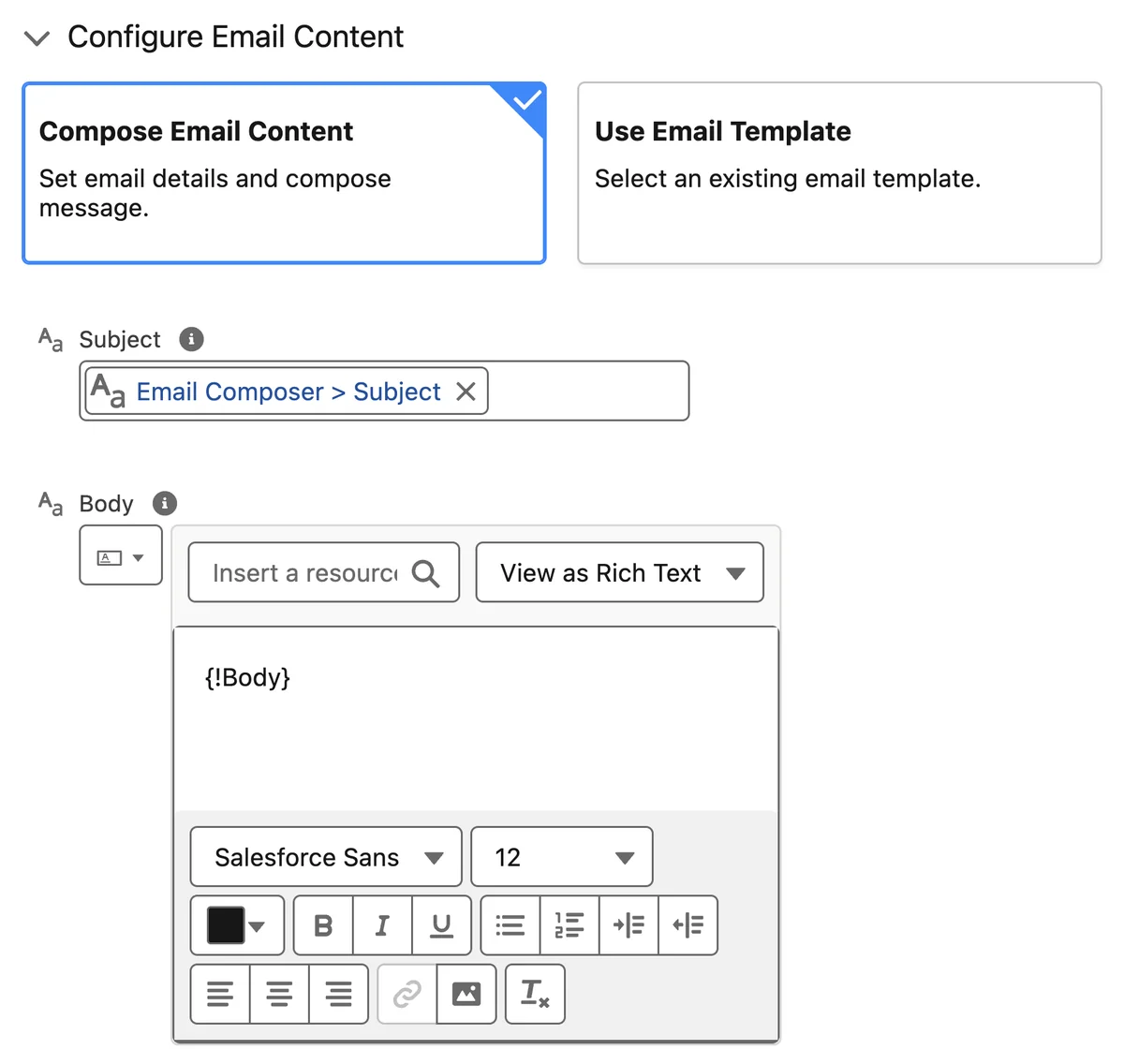
Send Email action checks
The Send Email action updates make configuration clearer, but admins still need to test runtime behavior. Confirm sender, recipient collection, template merge fields, org-wide email address access, and fault paths. For customer-facing email, log failures to an object that support teams can monitor.
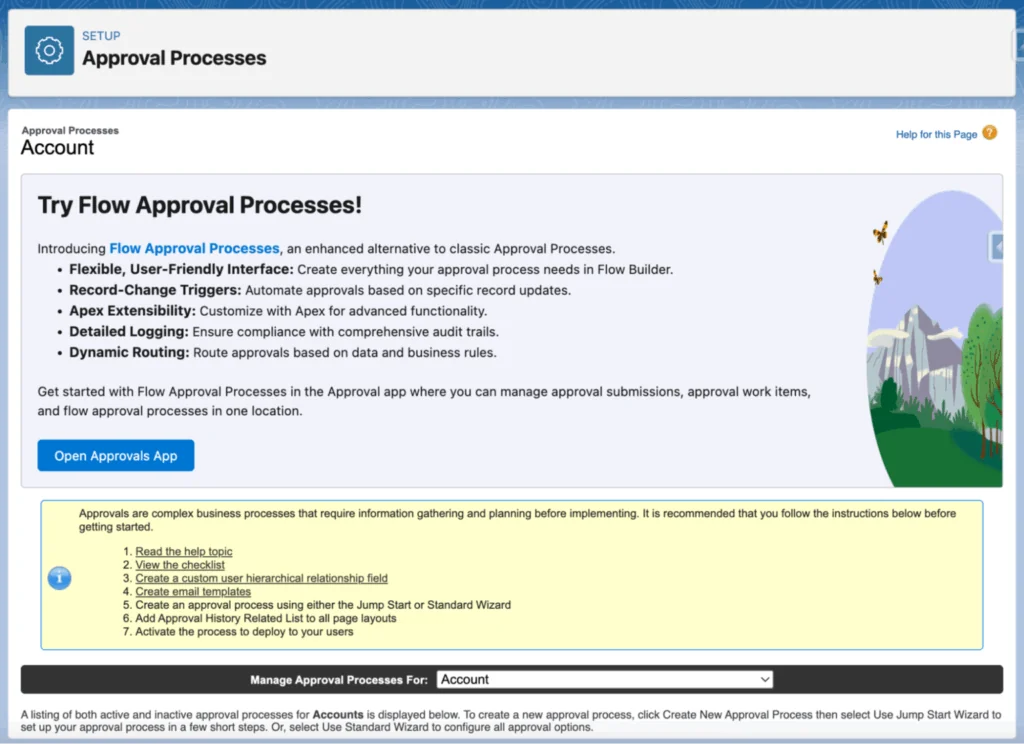
Flow Approval Processes
Flow Approval Processes move approval work closer to Flow tooling. Before replacing an existing approval process, compare entry criteria, approver selection, delegated approvers, recall behavior, final actions, reporting, and audit requirements.
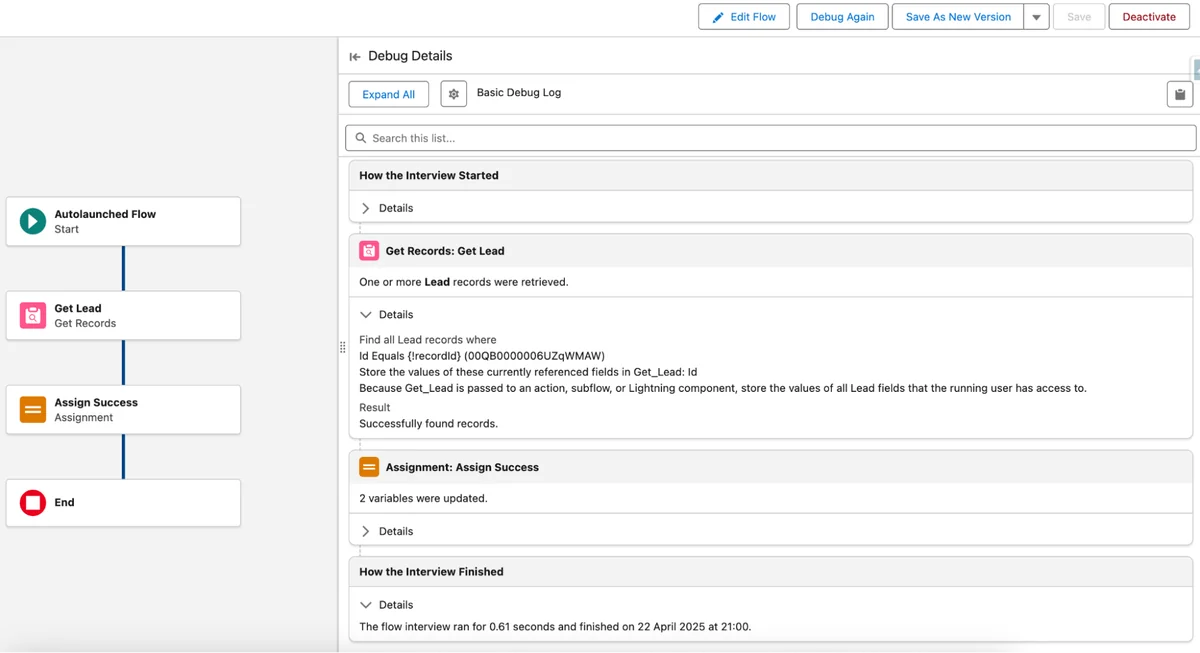
Flow debugging and CI
Debugging improvements do not remove the need for test data. Build tests for null values, users without optional permissions, records owned by queues, and bulk record changes. For related implementation topics, see Salesforce Flow automation guide, Lightning Web Components tutorial, and Salesforce reports and dashboards guide.
What changed for Service, Marketing, and Sales Cloud?
The salesforce summer 25 release notes include product changes that are often missed by central platform teams. Service Cloud teams should review Knowledge and routing. Marketing teams should review Einstein, campaign, WhatsApp, and Flow-connected journeys where licensed. Sales teams should review dashboard refresh, quota planning, and Outlook retirement planning.
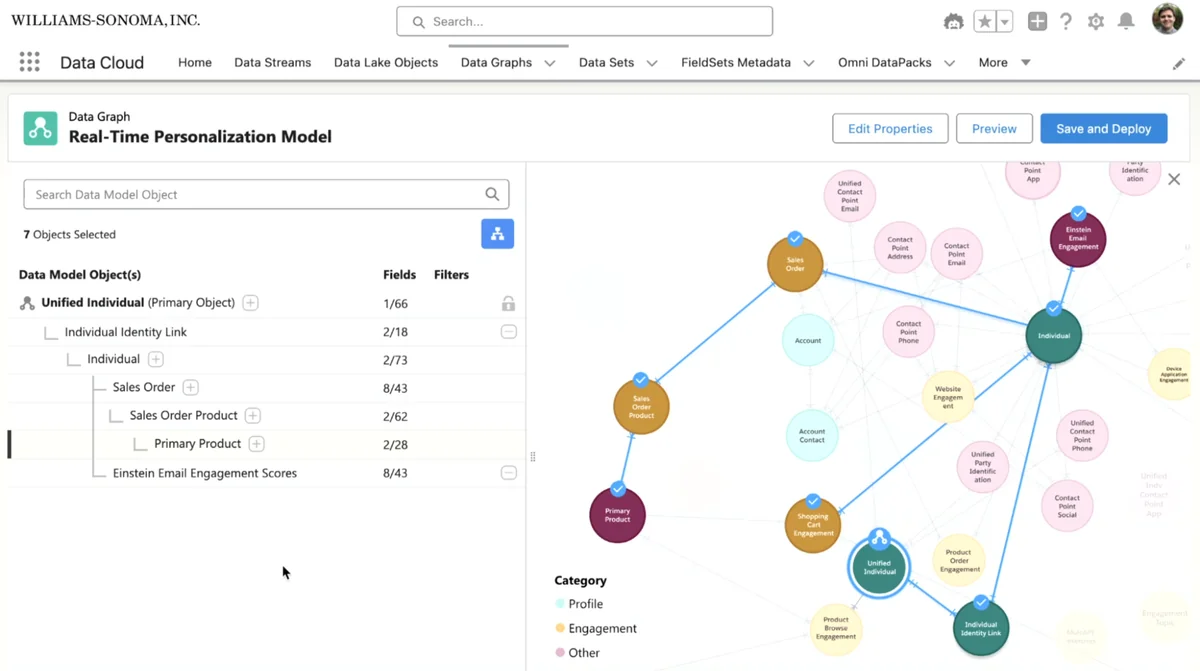
Marketing Cloud, Agentforce, and Einstein
Marketing Cloud updates include AI-related reporting and automation patterns built on Einstein and Data Cloud foundations. Do not enable an Einstein or Agentforce path without checking data consent, source data freshness, segmentation rules, user permissions, and licensing.
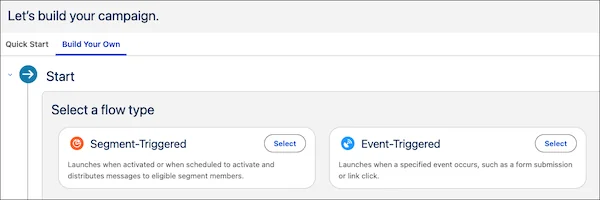
Custom campaign creation changes should be tested with naming rules, approval steps, journey entry criteria, and Sales Cloud campaign member mappings.
Salesforce einstein updates december 2025
The query salesforce einstein updates december 2025 points to a later release-note period, not the original Summer ’25 core release. Salesforce updates Einstein and Agentforce frequently, and the December 2025 release-note change logs included Agentforce and Einstein Platform model-support changes. Always check monthly release notes for AI features.
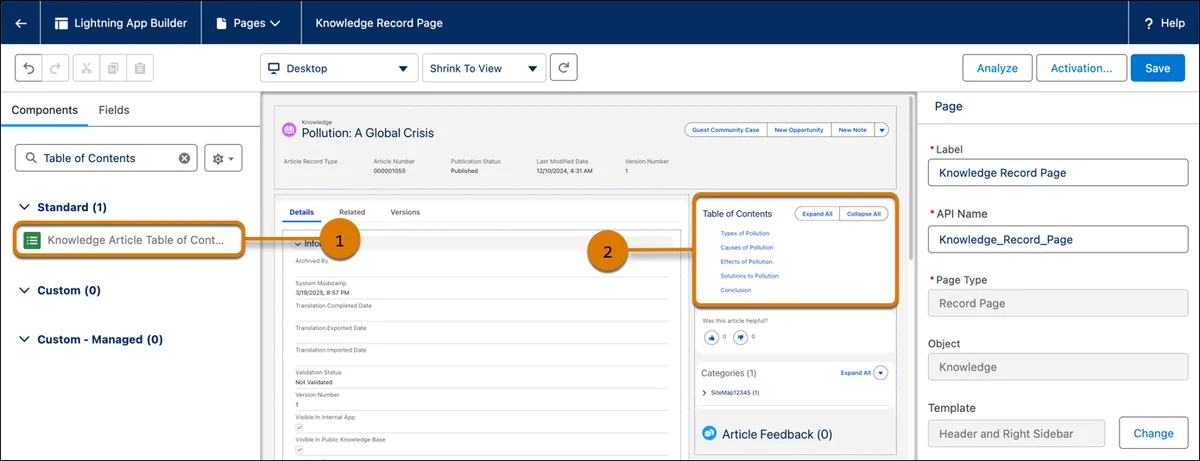
Service Cloud Knowledge and routing
Service Cloud teams should test Knowledge article navigation, Lightning Article Editor behavior, article feedback, and messaging supervision features that apply to their licenses. For Omni-Channel, test queues, skills, estimated wait time, and capacity with real service profiles.
Sales Cloud dashboards and Outlook retirement
Individual dashboard widget refresh is Generally Available in Summer ’25. Use it where one widget needs current data and a full dashboard refresh would be unnecessary. Salesforce also documented that Salesforce for Outlook is being retired in December 2027, so teams should plan replacement work with Outlook Integration or Einstein Activity Capture where those products meet compliance needs.
Which release updates need action after the Summer 25 release?
The salesforce summer 25 release notes include release updates that can be enforced automatically or become enforced later. Track these as backlog items with owners and dates. The common failure is not the release update itself; it is discovering an affected integration, Aura site, sharing rule, or locale-dependent process after release weekend.
| Release update | Why it matters | What to test |
|---|---|---|
| API versions 21.0 through 30.0 retirement | Old REST, SOAP, and Bulk clients can fail. | Endpoint paths, middleware jobs, vendor connectors, and monitoring. |
| Secure roles behavior for digital experiences | Sharing group behavior can affect external access. | External user visibility, sharing sets, and guest access. |
| Modernized record experience in Aura sites | Record components move toward LWC technology. | Create/edit flows, required fields, validation messages, and keyboard access. |
| ICU locale formats | Date, time, number, and currency formatting can change. | Hard-coded date strings, exports, Visualforce, and Apex parsing. |
| My Domain login URL enforcement | Instance-based API URLs can break during infrastructure changes. | Named credentials, OAuth callbacks, middleware base URLs, and documentation. |
Production release checklist
- Create a release-update register with owner, sandbox test date, production date, and rollback notes.
- Run integration smoke tests in preview sandbox and after production upgrade.
- Update API endpoint versions in source control, middleware, CI variables, and vendor screens.
- Check CRUD and FLS on Apex, Flow, and LWC paths touched by the release.
- Document Beta, Pilot, and Developer Preview use separately from Generally Available features.
Official Salesforce references include Salesforce Summer ’25 Release Notes, Salesforce Platform API versions 21.0 through 30.0 retirement, and REST API Versions resource.
Best practices for using the salesforce summer 25 release notes
Use the salesforce summer 25 release notes as a delivery artifact. Assign each item to a product owner, technical owner, test owner, and production approver. A platform architect should own cross-cloud risks such as API retirement, domain changes, security updates, and mobile behavior.
For related topics, see Salesforce Data Cloud implementation basics and Salesforce Agentforce certification overview.
Frequently Asked Questions
What API version is Salesforce Summer ’25?
Salesforce Summer ’25 maps to API version 64.0 for the core platform. When you review the salesforce summer 25 release notes, use API 64.0 as the reference version for LWC metadata, Apex metadata, REST examples, and Metadata API compatibility checks.
Is Summer ’25 the salesforce current version?
No. Summer ’25 is a historical release by June 2026. To find the salesforce current version for a specific org, check the Salesforce Trust maintenance calendar, your instance release, or the REST /services/data/ versions endpoint for the authenticated org.
What is the biggest risk in the salesforce summer 25 release notes?
The highest-risk item is the retirement of Salesforce Platform API versions 21.0 through 30.0. Older REST, SOAP, and Bulk API integrations can fail if they still call those endpoints. Search code and middleware configuration for retired version paths before production release windows.
Should admins enable Beta features from the summer 25 release?
Admins should enable Beta features only after reviewing Salesforce Beta terms, testing in sandbox, and getting business approval. Dynamic Related Lists on mobile and single-component LWC Local Dev were Beta areas in the Summer ’25 cycle, so production use needs a support decision.
Where do Salesforce Einstein updates from December 2025 fit?
Salesforce einstein updates december 2025 belong to later monthly or Spring ’26 release-note tracking, not the original Summer ’25 release. Einstein and Agentforce features can change monthly, so teams should verify model, region, license, and data-grounding notes before implementation.