Salesforce MCP is Salesforce support for the Model Context Protocol, an open standard that lets AI clients discover and call approved tools instead of guessing how to use your org. In Salesforce, MCP can mean hosted MCP servers for CRM data and business actions, the Salesforce DX MCP Server for developer workflows, or Agentforce MCP connections to third-party tools.
What is Salesforce MCP?
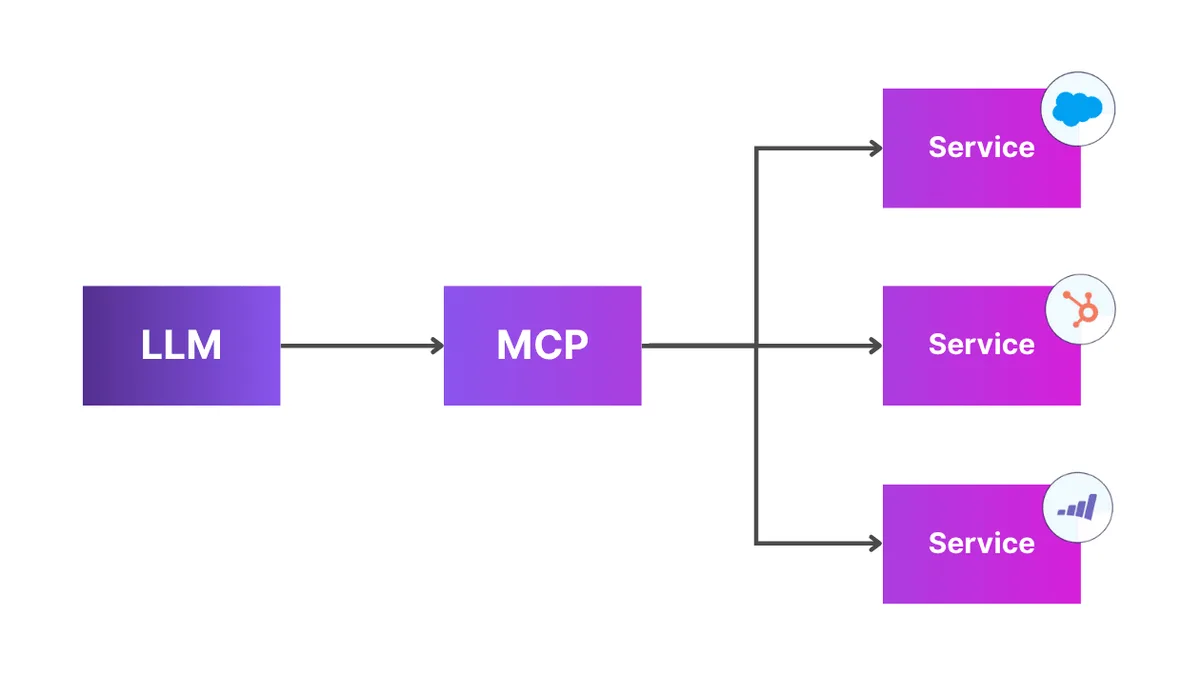
Salesforce MCP refers to Salesforce implementations of the Model Context Protocol solutions listed in Salesforce developer documentation. MCP gives an AI application a standard way to discover tools, understand tool inputs, call those tools, and return results to the user. The model does not need to know every Salesforce REST endpoint, CLI flag, or Flow detail in advance.
In a Salesforce org, the practical value is control. An admin or architect can expose a curated set of actions, such as reading Account fields, running a Flow, invoking an Apex action, or using a Named Query API. The AI client then asks the MCP server which tools are available and calls only those tools that the authenticated user can access.
Salesforce MCP is not a replacement for the Salesforce security model. Hosted MCP servers run through Salesforce authentication and permissions. If a user cannot see a record, field, object, or action through the configured access model, the MCP workflow should not become a bypass.
How does Salesforce MCP work?
MCP has three main parts: a host, a client, and one or more servers. The host is the user-facing application, such as Agentforce, Agentforce Vibes, or another MCP-compatible AI tool. The client manages the protocol connection. The server exposes tools and resources that the client can call.
| Component | Role in Salesforce MCP | Design concern |
|---|---|---|
| MCP host | Provides the chat or agent interface where the user asks for work to be done. | Make sure the host supports the Salesforce authentication flow and approval model you need. |
| MCP client | Connects the host to one or more MCP servers and passes tool calls. | Review timeout handling, tool approval, and logging before production use. |
| MCP server | Publishes Salesforce tools such as SObject operations, Apex actions, Flows, or product-specific tools. | Expose the least set of tools required for the user persona. |
| Salesforce org | Enforces authentication, permissions, sharing, and the configured business logic. | Use permission sets, field-level security, sharing, and tests to protect data. |
Salesforce model context protocol architecture
The phrase salesforce model context protocol is easiest to understand as an architecture question: which context should the AI client receive, and which actions may it execute? A weak design exposes too many generic operations and leaves the model to infer intent. A stronger design gives each persona a focused server: sales reporting users get read-only Account and Opportunity tools, support users get Case tools, and release engineers get Salesforce DX tools.
Salesforce documentation for custom hosted MCP servers explains this curation model clearly: standard servers expose fixed product capabilities, while custom servers let admins combine standard tools with Apex, Flow, API Catalog endpoints, and other org-specific tools. That distinction matters in enterprise orgs because an AI client with one hundred tools often selects tools less predictably than a client with ten well-described tools.
Salesforce model context protocol vs REST API
The salesforce model context protocol layer does not remove the need for REST API, Apex, Flow, or SOQL knowledge. It changes how an AI client discovers and uses approved capabilities. REST API is still the right interface for deterministic system-to-system integration where you control every request. MCP is better when a human asks for a task in natural language and the agent must choose from approved Salesforce tools at runtime.
| Use case | Prefer MCP | Prefer REST, Bulk API, or Apex integration |
|---|---|---|
| Sales rep asks an agent to summarize open opportunities. | Yes, if the server exposes a read-only pipeline summary tool. | No, unless a fixed dashboard or report already answers the question. |
| Nightly sync from ERP to Salesforce. | No. | Yes. Use a deterministic integration pattern with retries and monitoring. |
| Developer asks an IDE agent to run Salesforce DX tasks. | Yes, with Salesforce DX MCP Server where supported. | Use CLI directly when automation must be repeatable in CI. |
| Agent updates records based on vague instructions. | Only with approvals, scoped tools, and audit logging. | Use Apex or Flow with explicit validation when the business rule is fixed. |
MCP server Salesforce options in 2026
A search for mcp server salesforce usually points to one of four options. The right choice depends on whether you are building for business users, developers, Agentforce, or a third-party MCP-compatible client.
MCP server Salesforce option 1: Hosted MCP Servers
Salesforce Hosted MCP Servers are Salesforce-managed endpoints. Salesforce’s April 2026 developer announcement states that hosted MCP servers are generally available for Enterprise Edition orgs and above, and that Salesforce handles hosting, authentication, and permission enforcement. Hosted servers can expose Salesforce data, Flows, Apex actions, queries, and supported product capabilities to MCP-compatible clients.
Use hosted servers when your admin team wants Salesforce to manage the server endpoint and access enforcement. This is the safest starting point for production because it keeps the access path inside Salesforce controls rather than asking a separate server to hold credentials.
MCP server Salesforce option 2: Salesforce DX MCP Server
The Salesforce DX MCP Server is aimed at developers. Salesforce documents it as a Beta solution that lets agentic IDEs interact with Salesforce DX workflows. It is useful for local project context, orgs authenticated through Salesforce CLI, and developer tasks such as querying org metadata or running tests. Do not treat it as the same thing as a production business-user MCP server.
For related developer setup, see Apex code best practices for Salesforce developers and Lightning Web Components development patterns.
MCP server Salesforce option 3: Agentforce MCP client and Gateway
Agentforce can act as the governed host for MCP-based tools. Salesforce Trailhead explains that Agentforce can register MCP servers, make selected server tools available to an agent, and apply reasoning instructions. Trailhead also describes Agentforce Gateway policies for controlling MCP usage, such as limiting how often an agent can call a tool.
Use this path when the requirement is an agent workflow inside the Salesforce AI stack. For background, read Agentforce implementation guidance and Salesforce AI architecture basics.
MCP server Salesforce option 4: Custom servers
Custom hosted MCP servers let admins assemble a focused set of tools for a persona. Salesforce developer documentation says custom servers can include tools backed by Apex invocable actions, @AuraEnabled methods, Apex REST endpoints, autolaunched Flows, and API Catalog endpoints. Use this option when standard servers expose too much, too little, or the wrong shape of capability for the job.
How to set up Salesforce Hosted MCP Servers
The exact setup path depends on your edition, enabled features, and MCP client. Use Salesforce Setup and the current custom Salesforce Hosted MCP Servers documentation as the source of truth. A production setup usually follows this pattern.
- Confirm edition and API access. Salesforce troubleshooting guidance notes that the org must support API access, such as Developer or Enterprise Edition, or Professional Edition with API access enabled.
- Enable or activate the server in Salesforce UI. Hosted MCP troubleshooting guidance says to activate Salesforce Hosted MCP servers in the Salesforce UI before use.
- Create or select the server. Use a standard server for fixed Salesforce capabilities or create a custom server for a persona-specific tool set.
- Configure the MCP client. Vibes uses its own setup path. Other clients may require an external client app and an OAuth flow compatible with Salesforce Hosted MCP Servers.
- Test with a known server. Salesforce troubleshooting guidance recommends testing
sobject-allwhen isolating connection problems. - Move from sandbox to production using metadata governance. Treat custom server configuration like any other release artifact. Review changes, test in a sandbox, and document the tool list.
Common URL patterns in Salesforce troubleshooting documentation include https://api.salesforce.com/platform/mcp/v1/platform/sobject-all for a standard server in a non-sandbox org, https://api.salesforce.com/platform/mcp/v1/sandbox/platform/sobject-all for sandbox standard access, https://api.salesforce.com/platform/mcp/v1/custom/myserver for a custom server in a non-sandbox org, and https://api.salesforce.com/platform/mcp/v1/sandbox/custom/myserver for a sandbox custom server.
How to design a custom Salesforce MCP tool
A good Salesforce MCP tool does one job with clear inputs and outputs. Do not expose a broad method named runAutomation or updateAnything. Tool descriptions are part of the interface the AI client reads, so name the business action, explain when to use it, and keep the parameter list small.
Example Apex action for a custom MCP server
The following Apex class is written as an invocable action because Salesforce documentation allows @InvocableMethod Apex to become a custom tool in hosted MCP server configuration. The method is bulkified, limits the number of Account inputs, checks object access, strips inaccessible fields after query, and returns plain text that an agent can use without exposing raw records.
public with sharing class AccountPipelineMcpAction {
    public class Request {
        @InvocableVariable(required=true)
        public Id accountId;

        @InvocableVariable
        public Decimal riskThreshold;
    }

    public class Response {
        @InvocableVariable
        public Id accountId;

        @InvocableVariable
        public Integer openOpportunityCount;

        @InvocableVariable
        public Decimal openPipelineAmount;

        @InvocableVariable
        public Boolean exceedsRiskThreshold;

        @InvocableVariable
        public String message;
    }

    @InvocableMethod(
        label='Summarize Open Pipeline Risk'
        description='Returns open Opportunity count and amount for selected Accounts.'
    )
    public static List<Response> summarize(List<Request> requests) {
        List<Response> results = new List<Response>();

        if (requests == null || requests.isEmpty()) {
            return results;
        }

        Set<Id> accountIds = new Set<Id>();
        Map<Id, Decimal> thresholdByAccount = new Map<Id, Decimal>();

        for (Request req : requests) {
            if (req == null || req.accountId == null) {
                continue;
            }

            // Keep the tool bounded. Raise this only after load testing.
            if (accountIds.size() >= 50 && !accountIds.contains(req.accountId)) {
                continue;
            }

            accountIds.add(req.accountId);
            thresholdByAccount.put(
                req.accountId,
                req.riskThreshold == null ? 50000 : req.riskThreshold
            );
        }

        Map<Id, Response> responseByAccount = new Map<Id, Response>();
        for (Id accountId : accountIds) {
            Response item = new Response();
            item.accountId = accountId;
            item.openOpportunityCount = 0;
            item.openPipelineAmount = 0;
            item.exceedsRiskThreshold = false;
            item.message = 'No open opportunities found.';
            responseByAccount.put(accountId, item);
        }

        if (accountIds.isEmpty()) {
            return results;
        }

        if (!Schema.sObjectType.Opportunity.isAccessible()) {
            for (Response item : responseByAccount.values()) {
                item.message = 'The running user does not have access to Opportunity.';
                results.add(item);
            }
            return results;
        }

        List<Opportunity> queriedOpps = [
            SELECT AccountId, Amount
            FROM Opportunity
            WHERE AccountId IN :accountIds
            AND IsClosed = false
            LIMIT 2000
        ];

        SObjectAccessDecision decision = Security.stripInaccessible(
            AccessType.READABLE,
            queriedOpps
        );
        List<Opportunity> safeOpps = (List<Opportunity>) decision.getRecords();

        for (Opportunity opp : safeOpps) {
            Response item = responseByAccount.get(opp.AccountId);
            if (item == null) {
                continue;
            }

            Decimal amount = opp.Amount == null ? 0 : opp.Amount;
            item.openOpportunityCount++;
            item.openPipelineAmount += amount;
        }

        for (Response item : responseByAccount.values()) {
            Decimal threshold = thresholdByAccount.get(item.accountId);
            item.exceedsRiskThreshold = item.openPipelineAmount >= threshold;
            item.message = item.openOpportunityCount + ' open opportunities total ' +
                String.valueOf(item.openPipelineAmount) + '.';
            results.add(item);
        }

        return results;
    }
}
This code is intentionally narrow. It does not update data, does not run dynamic SOQL, and does not return every Opportunity field. In enterprise orgs, start read-only and add write actions only after you have approval rules, audit logging, and rollback steps.
Governor limit and test coverage notes
- The method performs one SOQL query regardless of the number of requests, so it follows the bulkification pattern expected for Apex actions.
- The
LIMIT 2000protects the agent tool from returning an unbounded dataset. For high-volume orgs, replace the row query with aggregate SOQL if the user does not need record-level detail. - Salesforce requires Apex unit tests to cover at least 75% of Apex code for deployment, and all tests must pass. Test the no-access branch, empty input, one Account, and multiple Accounts.
- Use a dedicated permission set for users who may invoke the tool. Do not depend on the agent prompt to enforce security.
Security and governance for Salesforce MCP
Salesforce MCP changes the user interface, not the responsibility model. Admins and architects still own data access, transaction design, error handling, and change control. Treat every MCP tool like an API surface because an AI client can call it repeatedly and combine it with other tools.
| Risk | What can go wrong | Control |
|---|---|---|
| Over-broad tools | The agent selects a write tool when the user only needed a summary. | Separate read, create, update, and delete tools. Disable destructive tools unless there is a business case. |
| Field exposure | A response includes fields the user should not see. | Use field-level security, Security.stripInaccessible, and output DTOs that include only required fields. |
| Prompt-based policy | The instruction says “never update closed records” but the tool can still do it. | Put validation in Apex, Flow, validation rules, or record-triggered automation. Prompts are not a security boundary. |
| Tool volume | The AI client has too many similar tools and chooses the wrong one. | Create persona-specific custom servers and write clear tool descriptions. |
| Untrusted remote server | A third-party server can execute code or send data outside the expected boundary. | Use approved providers, review scopes, use OAuth, and monitor calls. Salesforce developer docs warn that remote MCP servers should be trusted before connection. |
The most important Salesforce MCP design rule is simple: the server should expose business capabilities, not database freedom. A sales agent does not need generic update access to every Opportunity field. It needs a controlled action such as “create next step task” or “summarize renewal risk” with validation inside Salesforce.
Common errors with MCP server Salesforce setup
| Error | Likely cause | Fix |
|---|---|---|
| Server cannot connect | Wrong standard or custom server URL, sandbox URL used for production, or server not activated. | Use the Salesforce URL pattern for your org type and activate the server in Setup. |
| OAuth sign-in fails | Callback URL mismatch, unsupported OAuth flow, or missing external client app for a non-Vibes client. | Check the client callback URL and confirm that the client supports Salesforce Hosted MCP Server OAuth requirements. |
| Tool is visible but returns no records | The running user lacks object, field, sharing, or API access. | Test as the same user, review permission sets, and check field-level security. |
| Agent chooses the wrong tool | Tool descriptions are vague or the server exposes too many similar tools. | Rename tools around user intent and split servers by persona. |
| Result is technically correct but not useful | The tool returns raw records without business rules or definitions. | Add a governed Apex or Flow tool that applies your org’s definition of the metric. |
Best practices for Salesforce MCP projects
- Start with one read-only use case. Good first examples include Account summary, Case backlog summary, or Opportunity risk review.
- Curate tools by persona. A sales manager, service supervisor, and release engineer should not receive the same tool set.
- Use Apex and Flow for business rules. The MCP layer should call approved logic; it should not invent policy at runtime.
- Keep outputs small. Return summaries, IDs, and links instead of large record dumps.
- Write test prompts. Test positive cases, no-access cases, ambiguous requests, and attempts to exceed scope.
- Log and review usage. Store enough context to audit what tool was called, by whom, and with which inputs.
- Use sandbox validation. Test OAuth, permission sets, field visibility, and rollback behavior before production.
For data-heavy agent designs, review Salesforce Data Cloud architecture considerations before sending analytical workloads through an operational CRM server.
Salesforce MCP implementation checklist for enterprise orgs
Use this checklist before you move Salesforce MCP from proof of concept to a shared sandbox or production org. The goal is to make the salesforce model context protocol contract clear enough that admins, developers, security reviewers, and support teams can inspect it without reading the AI client’s internal prompts.
| Checklist item | Salesforce MCP decision | Owner |
|---|---|---|
| Persona | Define whether the Salesforce MCP server is for sales reps, service supervisors, developers, or data stewards. | Product owner |
| Tool scope | Limit the mcp server salesforce tool list to the minimum actions for that persona. | Salesforce architect |
| Data contract | Document each salesforce model context protocol input, output, object, field, and validation rule. | Developer |
| Authentication | Confirm the Salesforce MCP client uses the correct OAuth flow, callback URL, and org type. | Identity admin |
| Permissions | Map every mcp server salesforce tool to permission sets, CRUD, FLS, and sharing expectations. | Security admin |
| Testing | Run Salesforce MCP prompts for allowed users, blocked users, ambiguous requests, and high-volume records. | QA lead |
| Release control | Promote the Salesforce MCP server configuration through sandbox review before production activation. | Release manager |
| Monitoring | Review mcp server salesforce calls for failed authentication, denied access, and repeated tool execution. | Operations |
During architecture review, name each Salesforce MCP boundary in plain language. A salesforce model context protocol design should state which business question the server answers, which mcp server salesforce endpoint the client uses, and which Salesforce MCP tools are allowed to write data. For example, a salesforce model context protocol review for renewal management might approve read-only Account and Opportunity tools, one Salesforce MCP Flow for creating a follow-up Task, and no delete tools.
Repeat the review whenever the Salesforce MCP tool list changes. The salesforce model context protocol contract is only useful when it matches the active server configuration. If a new mcp server salesforce tool is added for Apex, Flow, or a REST endpoint, update the tool description, permission set mapping, test prompts, and rollback notes before users connect an AI client.
How to document salesforce model context protocol decisions
Use consistent naming in design records. Use Salesforce MCP for the overall Salesforce capability, salesforce model context protocol for the protocol contract, and mcp server salesforce for the server endpoint or server configuration. This makes change reviews easier because a Salesforce MCP change request can list the exact salesforce model context protocol inputs, the approved mcp server salesforce tools, and the permission set that grants access.
A second review should check whether the salesforce model context protocol description still matches production behavior, because Salesforce MCP failures often come from unclear salesforce model context protocol boundaries. If the mcp server salesforce endpoint calls an Apex action, the Salesforce MCP documentation should link to the Apex class, test class, permission set, and deployment record. If the salesforce model context protocol design calls a Flow, document the active Flow version and the fault path.
When should you not use Salesforce MCP?
Do not use Salesforce MCP when a fixed integration is enough. A nightly ERP sync, payment capture, or regulatory export should use deterministic integration patterns with retries, idempotency, and monitoring. MCP is a better fit for user-driven work where an AI client chooses from a controlled set of tools based on a request.
Also avoid MCP for high-risk write operations until you have explicit approvals. Examples include mass record updates, deletion, ownership reassignment, entitlement changes, and actions that trigger external commitments. Build those as separate, approval-driven tools or keep them outside the MCP surface.
Frequently Asked Questions
What is Salesforce MCP used for?
Salesforce MCP is used to let AI clients call approved Salesforce tools through the Model Context Protocol. Common use cases include asking an agent to summarize records, inspect metadata, run Salesforce DX tasks, invoke a Flow, or call an Apex action without giving the AI client unrestricted database access.
Is Salesforce Hosted MCP generally available?
Salesforce announced Salesforce Hosted MCP Servers as generally available in April 2026 for Enterprise Edition orgs and above. Some related pieces still have separate release labels. For example, Salesforce DX MCP Server is documented as Beta, so check the specific server or feature page before production use.
What is the difference between Salesforce model context protocol and REST API?
The salesforce model context protocol layer helps an AI client discover and call approved tools at runtime. REST API is a fixed integration interface for developers and systems. Use MCP for agent-driven work with controlled tools. Use REST API, Bulk API, or Apex integrations for repeatable system-to-system processes.
Can an MCP server Salesforce setup run Apex?
Yes, a custom mcp server salesforce setup can expose approved Apex capabilities when they are configured as supported tools, such as invocable Apex actions, @AuraEnabled methods, or Apex REST endpoints. The Apex code still needs tests, security checks, governor limit discipline, and permission review.
Does Salesforce MCP bypass field-level security?
No. Salesforce MCP should not bypass Salesforce security. Hosted MCP servers rely on Salesforce authentication and permission enforcement, and custom Apex tools should still enforce object access, field-level security, sharing, and safe output design. Prompts do not replace permission sets or validation logic.