B2C Commerce is Salesforce’s ecommerce platform for storefronts that sell directly to shoppers. A sound implementation separates storefront presentation, catalog and pricing logic, checkout, integrations, and post-purchase order processing so that each part can change without breaking the full buying journey.
This guide explains how Salesforce B2C Commerce differs from Salesforce B2B, how storefront architectures fit together, how fulfillment moves beyond order capture, and how to plan a SiteGenesis to SFRA migration without treating it as a cartridge copy exercise.
What is B2C Commerce in Salesforce?
Salesforce B2C Commerce provides the runtime, administration tools, APIs, and reference storefront options used to build and operate consumer ecommerce sites. Storefront code and configuration live in a B2C Commerce realm rather than in the same metadata model used by Sales Cloud and Service Cloud.
A typical implementation includes:
- Business Manager for catalog, site, customer, promotion, content, and operational configuration.
- Storefront code based on Storefront Reference Architecture (SFRA), Composable Storefront, or a hybrid design.
- B2C Commerce API, also called SCAPI, for REST-based storefronts, merchant tooling, and integrations.
- Script APIs and jobs for server-side logic, scheduled processing, imports, and exports.
- External services for payment, tax, fraud, search, shipping, loyalty, and order processing where the business requires them.
Salesforce documents the current developer workflow and storefront choices in the B2C Commerce developer guide. Teams should confirm supported features against the documentation for their active B2C Commerce release before adopting a cartridge or API behavior.
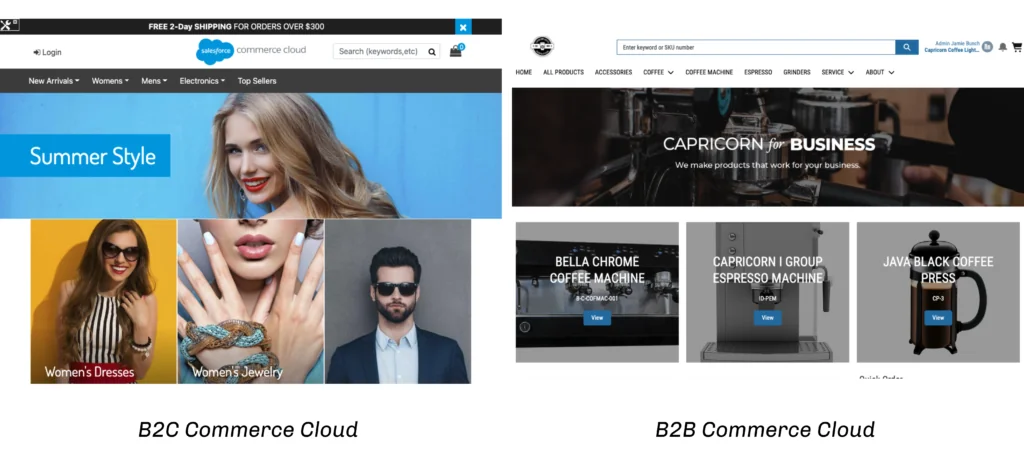
How does B2C Commerce differ from Salesforce B2B?
The main difference is architectural. B2C Commerce runs on the B2C Commerce platform and uses its own runtime, Business Manager, cartridge model, and APIs. Salesforce B2B Commerce is built on the Salesforce platform and uses core records, permissions, Experience Cloud, Lightning components, and commerce APIs.
| Design area | B2C Commerce | Salesforce B2B Commerce |
|---|---|---|
| Primary buyer | Individual shopper or household | Account-based business buyer |
| Platform | B2C Commerce realm and instances | Salesforce org and Experience Cloud store |
| Common storefront choices | SFRA, Composable Storefront, hybrid | B2B Commerce LWR storefront |
| Common development skills | JavaScript, ISML, CSS, cartridges, SCAPI | LWC, Apex, Salesforce data model, commerce APIs |
| Pricing pattern | Consumer price books, promotions, and coupons | Account entitlements, negotiated pricing, and buyer groups |
| Order pattern | Frequent consumer checkout with direct payment | Account purchasing, larger carts, negotiated terms, and purchase workflows |
| Administration | Business Manager | Salesforce Setup, Commerce app, and Experience Builder |
Salesforce B2B data and buyer context
Salesforce B2B stores use platform objects such as WebStore and WebCart, together with accounts, contacts, products, price books, buyer groups, and entitlements. This model supports account-specific catalogs and pricing without reproducing the B2C Commerce cartridge architecture. Review the official B2B Commerce data model before designing integrations or reporting.
B2B Commerce Lightning and LWR
The phrase B2B Commerce Lightning often refers to the B2B storefront product on the Salesforce platform, but implementation teams should distinguish older Aura storefronts from Lightning Web Runtime storefronts. Salesforce directs Aura storefront owners to migrate to the B2B Commerce LWR template. New components should follow the extension points documented for the selected template rather than assuming that Aura overrides transfer unchanged.
For an existing Aura store, use Salesforce’s B2B Commerce Aura-to-LWR migration guide. This migration is separate from a SiteGenesis to SFRA migration, which applies to B2C Commerce storefront code.
Which B2C Commerce storefront architecture should you use?
The storefront choice controls rendering, extension patterns, deployment, caching, and the skills needed to operate the site. It does not remove the need to design catalog, pricing, checkout, security, observability, and integration boundaries.
Storefront Reference Architecture
SFRA is Salesforce’s reference storefront for server-rendered B2C Commerce sites. It includes common flows such as product discovery, product detail, cart, checkout, account, and order history. SFRA uses cartridges, controllers, models, ISML templates, client-side JavaScript, and an extension model built around the app_storefront_base cartridge.
Do not edit app_storefront_base directly. Put custom behavior in a separate cartridge earlier in the cartridge path so upgrades can be compared and adopted with less merge risk.
'use strict';

var server = require('server');
var base = module.superModule;

server.extend(base);

server.append('Show', function (req, res, next) {
    var viewData = res.getViewData();

    // Add only presentation data needed by the template.
    viewData.showDeliveryMessage = Boolean(
        viewData.product && viewData.product.available
    );

    res.setViewData(viewData);
    next();
});

module.exports = server.exports();
This pattern extends an SFRA route rather than replacing the complete base implementation. Check the route and view-data contract in the SFRA version deployed by the project. Avoid remote service calls in frequently executed append handlers unless the result is cached and failure behavior is defined.
Composable Storefront and SCAPI
Composable Storefront separates the web application from the commerce runtime and uses B2C Commerce APIs for shopper operations. This approach fits teams that need an API-led storefront, independent front-end deployment, and React-based development. It also transfers more responsibility to the team for API efficiency, cache design, authentication, monitoring, and front-end release management.
SCAPI is REST-based and includes shopper and administrative capabilities. OAuth configuration, client permissions, site context, and endpoint versions must match the target realm. Never place a private client secret in browser code.
curl --request GET \
  "https://{short-code}.api.commercecloud.salesforce.com/product/shopper-products/{api-version}/organizations/{organization-id}/products/{product-id}?siteId={site-id}" \
  --header "Authorization: Bearer {shopper-access-token}"
The placeholders are intentional. Copy the current path and version from the official B2C Commerce API guide and API reference for the endpoint you use.
Hybrid storefront design
A hybrid design keeps selected journeys in SFRA while moving other experiences to API-driven components. This can reduce migration scope, but it introduces shared-session, routing, analytics, SEO, and operational concerns. Define which application owns cart state, authentication, consent, promotions, and error handling before splitting page ownership.
How does B2C Commerce fulfillment work?
B2C Commerce fulfillment starts after the storefront accepts an order, but B2C Commerce order capture alone is not a warehouse execution system. The implementation must decide where inventory is reserved, where orders are allocated, how fulfillment locations are selected, and which system owns shipment, cancellation, return, and refund state.
B2C Commerce fulfillment with Salesforce Order Management
Salesforce Order Management can receive orders from B2C Commerce and manage the order lifecycle through fulfillment and servicing. Salesforce documents a connection between the B2C Commerce instance and the Salesforce org where Order Management is configured. Product and pricing data required by the order flow must also be synchronized as directed by the implementation guide.
A fulfillment order groups products and delivery charges that share a fulfillment location, delivery method, and recipient. One order can therefore produce multiple fulfillment orders or shipments. This distinction matters when the storefront displays partial shipment, cancellation, or return status.
- Capture and validate the order in the storefront.
- Send the order to the order management system through the supported integration.
- Allocate items according to inventory and routing rules.
- Create fulfillment work for the selected location.
- Pick, pack, ship, and record tracking details.
- Synchronize status needed for customer self-service and support.
- Handle cancellations, returns, appeasements, and refunds in the system that owns those processes.
Use the B2C Commerce and Order Management integration guide and the Order Fulfillment documentation as the source of truth for setup and object behavior.
Failure and retry design
Production integrations must assume timeouts, duplicate messages, delayed status updates, and partial failures. Use a stable external order identifier, make consumers idempotent, record correlation IDs, and separate retriable transport failures from business validation errors. Do not mark an order as exported until the receiving system has acknowledged it according to the agreed contract.
How do you plan a SiteGenesis to SFRA migration?
A SiteGenesis to SFRA migration is a redesign of storefront extension points, not a line-by-line conversion. SiteGenesis pipelines or controllers, templates, forms, scripts, and custom cartridges must be inventoried and mapped to SFRA routes, models, templates, middleware, and current integrations.
SiteGenesis to SFRA migration phases
- Baseline the current storefront. Record revenue-critical journeys, integrations, scheduled jobs, custom objects, URL rules, redirects, analytics, consent, and SEO behavior.
- Classify customizations. Mark each feature as retire, replace with an SFRA capability, reconfigure, or rebuild.
- Create an extension map. Identify the SFRA route, model, template, form, or hook that owns each requirement.
- Separate integrations. Move payment, tax, fraud, shipping, and loyalty logic behind clear service boundaries where supported.
- Build in custom cartridges. Keep the base cartridge unchanged and document cartridge-path precedence.
- Test parity and intentional changes. Validate guest checkout, registered checkout, promotions, inventory, tax, payment failures, accessibility, redirects, structured data, and analytics events.
- Plan cutover and rollback. Freeze catalog and content changes as needed, rehearse configuration deployment, and define rollback triggers.
Migration risks teams often miss
- URL changes: preserve canonical URLs and prepare redirects before launch.
- Promotion behavior: compare qualification, exclusivity, coupon, and bonus-product cases.
- Session assumptions: remove code that depends on request order or undocumented session data.
- Cartridge collisions: verify which controller, template, hook, and static asset wins in the cartridge path.
- Third-party cartridges: confirm SFRA compatibility and supported versions with the provider.
- Observability gaps: add structured logging and integration correlation before cutover.
The official SFRA documentation and SFRA customization guidance describe the supported extension model.
How should security be handled in B2C Commerce?
B2C Commerce security differs from core-platform CRUD and field-level security. Protect shopper data by minimizing collection, using platform-supported authentication and session mechanisms, limiting Business Manager roles, securing service credentials, validating input, encoding output, and keeping secrets out of storefront JavaScript and source control.
For Salesforce B2B, core Salesforce access controls still matter. Apex and custom Lightning code must enforce object and field permissions where the execution context does not do so automatically. Do not transfer a B2C cartridge security assumption into a B2B LWC or Apex implementation.
Security review checklist
- Restrict Business Manager roles to required modules and sites.
- Store integration credentials in supported service credential configuration, not code.
- Validate redirect targets and reject untrusted external destinations.
- Encode dynamic values in HTML, JavaScript, and URL contexts.
- Apply rate limits, bot controls, and fraud controls according to the traffic and checkout risk model.
- Mask personal and payment-related data in logs.
- Rotate credentials and test revocation procedures.
What should an enterprise implementation test before launch?
In enterprise implementations, the defects with the highest impact often sit between systems: stale inventory, mismatched promotion totals, payment authorization without an accepted order, duplicate exports, and status updates that customer service cannot explain.
| Test area | Required scenarios |
|---|---|
| Catalog | Online and offline dates, variants, searchability, category assignment, locale, and currency |
| Pricing and promotions | Price books, coupons, exclusivity, thresholds, rounding, and tax interaction |
| Checkout | Guest and registered users, address validation, payment decline, retry, and duplicate submission |
| Inventory | Low stock, oversell prevention, reservation timeout, and multi-location availability |
| Fulfillment | Split shipment, partial cancellation, backorder, return, refund, and tracking updates |
| Operations | Job failure, API timeout, credential expiry, message replay, alerts, and rollback |
| Nonfunctional | Load, cache behavior, accessibility, SEO, privacy, security, and observability |
How do you choose between B2C Commerce and Salesforce B2B?
Choose from the transaction model and platform boundaries. B2C Commerce fits consumer storefronts that need B2C catalog, merchandising, promotion, and checkout capabilities on the B2C Commerce platform. Salesforce B2B fits account-based buying on the Salesforce platform where buyer entitlements, negotiated pricing, Experience Cloud, and CRM data are central to the purchase flow.
Some companies need both. A manufacturer can operate a consumer storefront in B2C Commerce and a dealer portal in Salesforce B2B. In that design, define the system of record for products, prices, inventory, customers, orders, and fulfillment status. Shared branding does not mean shared runtime or shared customization code.
Related SalesforceTutorial resources: Salesforce Commerce Cloud architecture, Salesforce integration patterns, Lightning Web Components development, and Salesforce security model.
Frequently Asked Questions
Is B2C Commerce built on the Salesforce platform?
No. B2C Commerce uses its own commerce runtime, instances, Business Manager, cartridge model, and APIs. It integrates with Salesforce products, but its storefront code is not Apex or Salesforce org metadata.
What is the difference between SFRA and Composable Storefront?
SFRA is a server-rendered reference storefront that runs through B2C Commerce cartridges, controllers, models, and ISML templates. Composable Storefront uses an independently deployed front end and B2C Commerce APIs. The choice changes deployment, caching, extension, and operational responsibilities.
Does B2C Commerce manage fulfillment?
B2C Commerce captures and manages storefront orders, but end-to-end B2C Commerce fulfillment normally requires an order management or fulfillment system. Salesforce Order Management can receive B2C Commerce orders and manage allocation, fulfillment, shipping, servicing, returns, and related lifecycle steps according to the configured implementation.
Can SiteGenesis cartridges be copied directly into SFRA?
Not safely as a general migration method. A SiteGenesis to SFRA migration should map each customization to SFRA routes, models, templates, middleware, hooks, and cartridge precedence. Reuse isolated business logic only after removing dependencies on SiteGenesis request flow and view contracts.
Is B2B Commerce Lightning the same as B2C Commerce?
No. B2B Commerce Lightning runs on the Salesforce platform and uses Experience Cloud, Lightning technologies, Salesforce records, and commerce APIs. B2C Commerce runs on the separate B2C Commerce platform and uses storefront architectures such as SFRA and Composable Storefront.