Salesforce DX is the development model and toolset Salesforce provides for source-driven application delivery. It combines Salesforce CLI, structured project files, source control, scratch orgs, metadata deployment commands, testing, and packaging so a team can treat the repository—not a production org—as the controlled record of change.
You do not have to adopt every DX feature at once. Many enterprise teams begin with a Salesforce DX project, Git, and repeatable CLI deployments, then add scratch orgs, continuous integration, and unlocked packages where those tools solve a clear release-management problem.
What Is Salesforce DX?
Salesforce DX is an approach to building and releasing Salesforce metadata from a local project under version control. The official Salesforce DX Developer Guide describes the model around source-driven development, configurable development environments, and tooling that supports automated delivery.
DX does not replace Salesforce Setup, Flow Builder, Lightning App Builder, or other declarative tools. An admin can still make a change in an org. The difference is that the team retrieves or captures that metadata in a project, reviews it, tests it, and promotes it through controlled environments.
| DX capability | What it controls | Typical user |
|---|---|---|
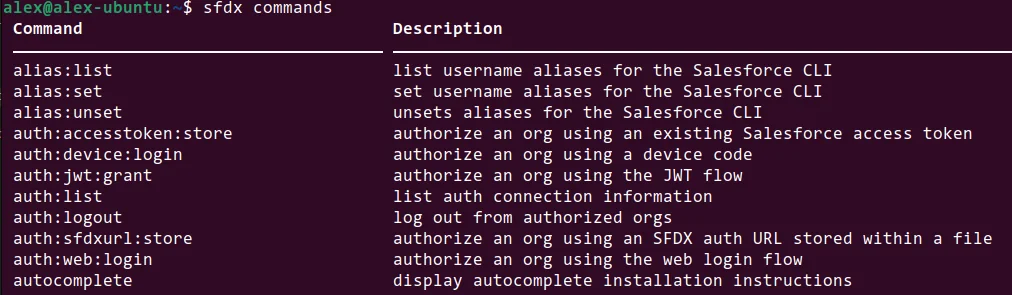
| Salesforce CLI | Authentication, metadata operations, org management, test execution, packaging, and automation | Developers, release engineers, CI jobs |
| DX project | Local metadata, project configuration, package directories, and API version | Whole delivery team |
| Scratch org | Short-lived, configurable Salesforce environment created from a definition file | Developers and automated test pipelines |
| Source tracking | Changes between a supported development org and local project | Developers and admins working in isolated environments |
| Unlocked package | Versioned metadata unit whose source is maintained in version control | Platform teams and modular product teams |
Why teams use SFDC DX
The term SFDC DX is an older shorthand for the same Salesforce Developer Experience toolset. Teams use it to reduce manual deployment steps, make metadata changes reviewable, reproduce development environments, and run the same commands locally and in continuous integration.
In an enterprise org, the main benefit is traceability. A pull request can show the exact Apex class, permission set, Flow, object field, or Lightning Web Component being changed. Reviewers can assess dependencies and security before the deployment reaches a shared test environment.
What Is a DX Project in Salesforce?
What is DX project in Salesforce?
A DX project in Salesforce is a directory with a defined structure and an sfdx-project.json file. It stores metadata in source format and provides the configuration Salesforce CLI needs to locate package directories, resolve namespaces, and select a source API version.
A generated project normally includes the following files and directories:
customer-service-app/
├── config/
│   └── project-scratch-def.json
├── force-app/
│   └── main/
│       └── default/
├── manifest/
├── scripts/
└── sfdx-project.json
The project configuration can define one or more package directories:
{
  "packageDirectories": [
    {
      "path": "force-app",
      "default": true
    }
  ],
  "name": "customer-service-app",
  "namespace": "",
  "sfdcLoginUrl": "https://login.salesforce.com",
  "sourceApiVersion": "65.0"
}
Version note: The example uses API version 65.0 for Summer ’26. Set sourceApiVersion to a version supported by your target orgs and CLI tooling. Changing this value does not automatically upgrade every metadata component; it controls how Salesforce CLI interprets project source for relevant operations.
Source format versus Metadata API format
Salesforce source format decomposes some large metadata types into smaller files. A custom object, for example, can be represented by separate files for fields, record types, validation rules, list views, and the object definition. This layout makes reviews and merges easier because unrelated changes are less likely to modify one large XML file.
When an external tool supplies Metadata API format, use the current sf project convert mdapi command documented in the Salesforce CLI project command reference.
How to Set Up Salesforce DX and Salesforce CLI
Install Salesforce CLI from the official Salesforce CLI download page. Salesforce now documents the unified sf command syntax. Older sfdx force:... commands may still appear in scripts and older training material, but new automation should use current sf commands where an equivalent exists.
- Install Salesforce CLI and confirm the installation.
- Generate a Salesforce DX project.
- Authorize the target org or Dev Hub.
- Retrieve existing metadata or create source locally.
- Commit the project to version control.
# Confirm the CLI is available
sf --version

# Create a Salesforce DX project
sf project generate --name customer-service-app

cd customer-service-app

# Authorize a production or sandbox org with a browser login
sf org login web --alias integration-sandbox \
  --instance-url https://test.salesforce.com
For unattended CI authentication, do not place usernames, passwords, access tokens, or private keys in the repository. Use a supported non-interactive authentication method and store credentials in the CI platform’s secret manager.
How Do Dev Hub and Scratch Orgs Work in Salesforce DX?
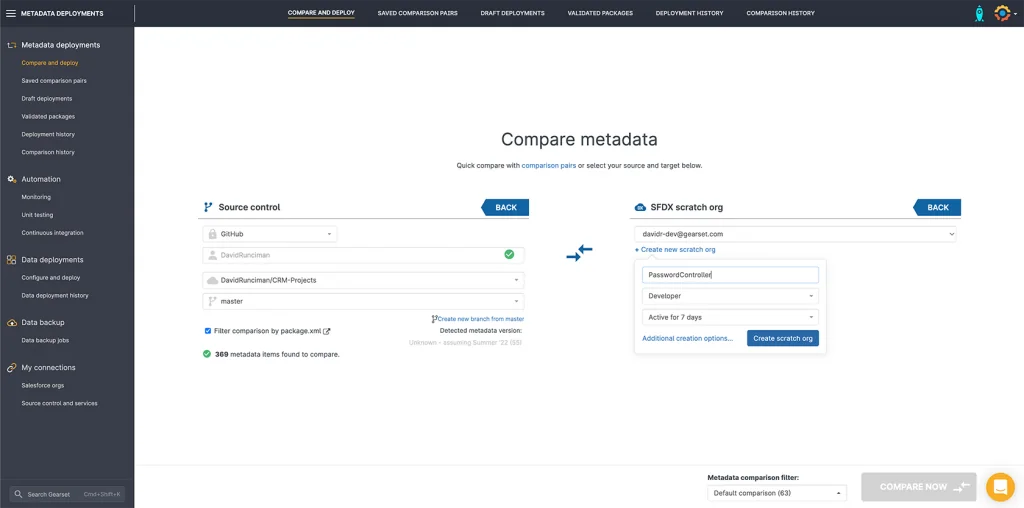
A Dev Hub is the org that manages scratch orgs and second-generation packages. A scratch org is a temporary, configurable Salesforce environment used for development or automated testing. Salesforce documentation states that scratch org duration can be set from 1 to 30 days, with 7 days as the default.
Enable Dev Hub in an appropriate permanent org, authorize it, and then create scratch orgs from a definition file. The definition file acts as a blueprint for edition, features, and settings.
{
  "orgName": "Customer Service Feature",
  "edition": "Enterprise",
  "features": ["ServiceCloud"],
  "settings": {
    "lightningExperienceSettings": {
      "enableS1DesktopEnabled": true
    }
  }
}
# Authorize and mark the Dev Hub
sf org login web --set-default-dev-hub --alias company-dev-hub
# Create a scratch org for seven days
sf org create scratch \
--definition-file config/project-scratch-def.json \
--alias case-routing-feature \
--duration-days 7 \
--set-default
# Open the scratch org
sf org open --target-org case-routing-featureThe CLI requires a Dev Hub for scratch-org creation. Salesforce documents the command and flags in the org create scratch reference.
Scratch org or sandbox?
| Decision factor | Scratch org | Sandbox |
|---|---|---|
| Lifetime | Temporary; maximum 30 days | Persistent until refreshed or deleted |
| Configuration | Created from a definition, shape, or snapshot-supported process | Copied from production according to sandbox type |
| Data | Starts without business data unless test data is imported | May contain copied production configuration and, for some types, data |
| Best fit | Feature isolation, automated tests, package development | Integration, UAT, training, and testing that needs production-like state |
Use a sandbox when the test depends on integrations, large data volumes, production-specific configuration, or a long-running shared environment. Use scratch orgs when the team can describe the required shape and load deterministic test data.
What Does a Salesforce DX Workflow Look Like?
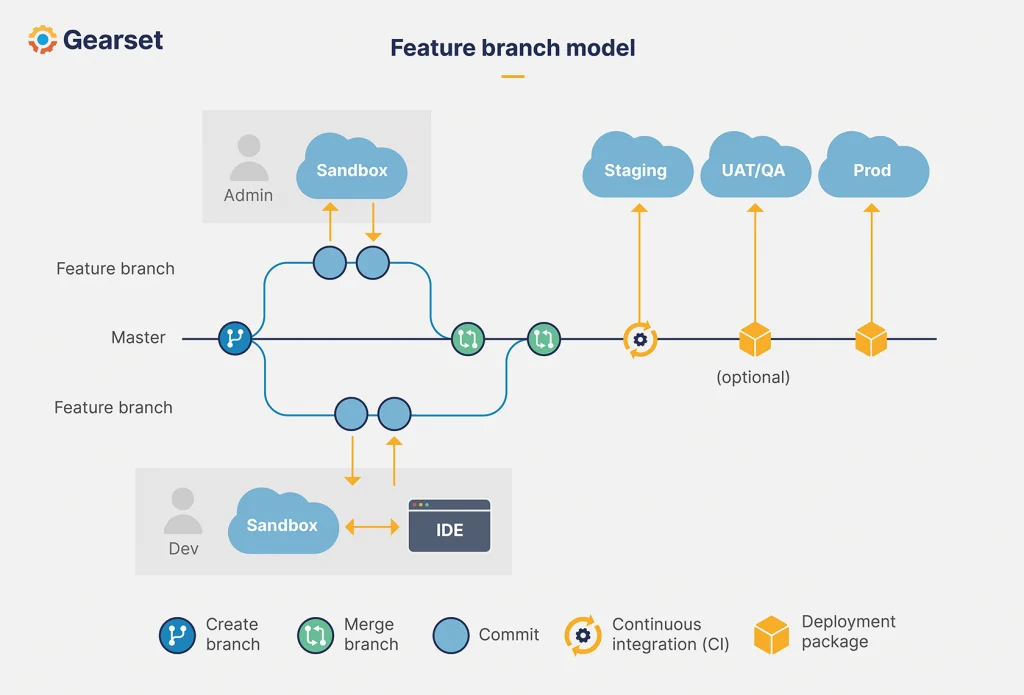
A practical workflow keeps each work item small and ties the code branch to an isolated environment. The exact branching model can vary, but the repository remains the source of truth.
- Create a feature branch from the team’s integration or main branch.
- Create or select an isolated development org.
- Deploy project source to that org.
- Assign permission sets and load test data.
- Develop with Apex, LWC, Flow, or declarative Setup tools.
- Retrieve tracked changes when applicable.
- Run tests and static analysis.
- Open a pull request and review metadata, code, permissions, and dependencies.
- Validate against the next environment before merging or releasing.
# Deploy local source to the default org
sf project deploy start --source-dir force-app

# Assign access required by the feature
sf org assign permset --name Case_Routing_User

# Run local Apex tests and wait for results
sf apex run test \
  --test-level RunLocalTests \
  --wait 30 \
  --result-format human

# Retrieve changes from a source-tracked org
sf project retrieve start --source-dir force-app
Source tracking helps synchronize local files with supported scratch orgs and source-tracked sandboxes, but it is not a substitute for Git. Git records reviewed history across the team; source tracking reports differences between one local project and one org.
How to Deploy and Validate Salesforce DX Metadata
Use sf project deploy start for metadata deployment. Before production, run a validation with the same test level and source set planned for release. A successful validation can then support a quick deployment when the org and deployment conditions remain eligible.
# Validate selected metadata without committing it
sf project deploy validate \
  --manifest manifest/package.xml \
  --target-org production \
  --test-level RunLocalTests \
  --wait 60

# Deploy to a sandbox
sf project deploy start \
  --manifest manifest/package.xml \
  --target-org qa-sandbox \
  --test-level RunLocalTests \
  --wait 60
Apex test and governor-limit checks
Salesforce requires at least 75% Apex code coverage for production deployment, and every trigger must have some coverage. Coverage alone is not a sufficient test standard. Tests should verify expected results, negative paths, sharing behavior, bulk execution, and asynchronous processing.
Production Apex must also respect governor limits. Avoid SOQL and DML inside loops, process trigger records in collections, and test with multiple records. For security-sensitive services, enforce sharing and object/field permissions through an appropriate pattern such as user-mode operations, WITH USER_MODE, or explicit checks, depending on the operation and API version.
public with sharing class OpenCaseService {
    @AuraEnabled(cacheable=true)
    public static List<Case> getOpenCases(Set<Id> accountIds) {
        if (accountIds == null || accountIds.isEmpty()) {
            return new List<Case>();
        }

        return [
            SELECT Id, CaseNumber, Subject, Status, AccountId
            FROM Case
            WHERE AccountId IN :accountIds
              AND IsClosed = false
            WITH USER_MODE
            ORDER BY CreatedDate DESC
            LIMIT 200
        ];
    }
}
This example performs one bounded SOQL query, accepts a collection for bulk use, and uses user-mode enforcement for object and field access. Confirm that the class API version and target org support the selected security syntax.
Common deployment failures
| Error pattern | Likely cause | Correction |
|---|---|---|
| Missing referenced component | The deployment omitted a field, permission set, class, Flow, or other dependency | Add the dependency to the source set or deploy in the required order |
| Invalid API name | A file references metadata that differs across environments | Compare org configuration and remove environment-specific assumptions |
| Insufficient code coverage | Selected tests do not cover changed Apex or a trigger has no coverage | Add assertions and tests for the deployed behavior |
| Permission metadata conflict | A profile or permission set references unavailable fields or classes | Deploy the referenced metadata together and prefer permission sets for scoped access |
| Flow activation failure | The active version has unresolved dependencies or invalid configuration | Validate dependencies and deploy the correct Flow definition/version metadata |
How Do Unlocked Packages Fit into Salesforce DX?
Unlocked packages are a second-generation packaging option intended for customers and system integrators that want to organize metadata into installable, versioned units. Salesforce states that unlocked packaging is the preferred package type when you do not plan to distribute a managed package to multiple customers.
Packaging is useful when a large org can be separated into domains with clear ownership and dependencies. It is not mandatory for every DX implementation. A monolithic org with unmanaged dependencies may need dependency analysis and metadata cleanup before package boundaries become stable.
# Create an unlocked package
sf package create \
  --name CaseRouting \
  --package-type Unlocked \
  --path force-app \
  --target-dev-hub company-dev-hub

# Create a package version
sf package version create \
  --package CaseRouting \
  --installation-key-bypass \
  --wait 30 \
  --target-dev-hub company-dev-hub
Review the official Unlocked Packages documentation before choosing package boundaries, version numbering, dependencies, and installation behavior.
Salesforce DX Best Practices for Enterprise Orgs
- Keep credentials outside Git. Store authentication material in protected secret stores and rotate it under the organization’s access policy.
- Use permission sets for deployable access changes. Profiles contain broad settings and often produce noisy changes. Keep profile edits only where the platform requires them.
- Separate environment configuration from deployable metadata. Use named credentials, external credentials, custom metadata, and post-deployment configuration patterns as appropriate.
- Make test data repeatable. Scripts should create or import the minimum records needed for automated tests and developer verification.
- Pin and review tool versions in CI. CLI and plugin changes can alter command behavior. Test upgrades before changing the release runner.
- Validate destructive changes explicitly. Field deletion, component removal, and package upgrades can affect data and dependencies.
- Review CRUD, FLS, and sharing. A successful deployment does not prove that Apex, Flow, and LWC access is secure for each user persona.
- Use small deployment units. Smaller pull requests are easier to test, review, and roll back than mixed releases containing unrelated changes.
When Salesforce DX is not enough
Salesforce DX provides platform tooling, but a complete delivery process also needs source-control governance, code review, backup and recovery, test strategy, release approvals, observability, and ownership. CI/CD services can call Salesforce CLI, but the team must still define which tests run, how secrets are managed, and who can promote a release.
Related tutorials: Salesforce CLI commands and setup, Salesforce scratch org configuration, Salesforce metadata deployment, and Salesforce DevOps workflow.
Frequently Asked Questions
Is Salesforce DX the same as Salesforce CLI?
No. Salesforce CLI is one tool within Salesforce DX. DX also includes the project structure, source format, scratch org model, source-driven workflow, and second-generation packaging capabilities.
Do I need a scratch org to use Salesforce DX?
No. A team can use a Salesforce DX project, Git, Salesforce CLI, and sandbox deployments without scratch orgs. Scratch orgs are useful when the team needs short-lived, reproducible environments for isolated work or automation.
How long does a Salesforce DX scratch org last?
A scratch org can be created for 1 through 30 days. The default duration is 7 days. Plan automated work so source and test data can be recreated after the org expires.
What is the difference between sfdx and sf commands?
sf is the current unified Salesforce CLI command style. Older scripts often use sfdx force:... commands. Salesforce publishes a command mapping, but teams should test migrations because flags and output can differ.
Does Salesforce DX require unlocked packages?
No. Unlocked packages are optional. Use them when versioned package boundaries and dependency management fit the org architecture; otherwise, an unpackaged source-driven project can still use Salesforce DX practices.