Salesforce DevOps Guide for Release Teams
Salesforce devops is the release model teams use to move Salesforce metadata from idea to production with source control, automated validation, testing, approval, and rollback planning. It helps admins, developers, and architects avoid overwritten changes, late test failures, missing dependencies, and untracked production edits.
This Salesforce DevOps guide explains the process, the deployment tools in Salesforce worth comparing, and the salesforce devops best practices that work in production orgs. Use it as a blueprint, then adjust the controls for your org size, release volume, compliance rules, and sandbox capacity.
What is Salesforce DevOps?
Salesforce DevOps is not a single product. It is a controlled way to plan, build, test, review, deploy, and monitor Salesforce metadata changes. The process covers declarative work such as Flow, fields, page layouts, permission sets, and validation rules, and programmatic work such as Apex, Lightning Web Components, custom metadata, APIs, and packages.
In a mature Salesforce DevOps setup, Git is the source history, sandboxes isolate work, pull requests create review points, CI validates changes before merge, and production deployments happen from approved source. Trailhead explains source-driven development with Salesforce DX projects, scratch orgs, and source control at Source-Driven Development with Salesforce DX.

Why does Salesforce DevOps matter in production orgs?
A Salesforce DevOps process gives the platform team a shared rulebook for releases. Small orgs can sometimes use change sets for a few setup changes, but enterprise orgs usually need more control because several teams change the same automation, security model, data model, and integration points.
Salesforce Help states that change sets can contain only changes that can be made through Setup. That makes change sets useful for some admin work but limited as the only enterprise release model. See Change Sets for the official scope.
- Lost changes: two builders edit the same Flow, permission set, or object metadata.
- Missing dependencies: a field moves without the record type, permission set, layout, custom metadata, or validation rule that makes it usable.
- Late failures: Apex tests or Flow behavior fail in UAT or production because the validation ran too late.
- Weak rollback: the team has Git history but no data backup or rollback decision owner.
- Audit gaps: an approver sees a ticket but not the exact metadata that reached production.
How Salesforce DevOps Center fits into release management
Salesforce DevOps Center gives teams a Salesforce-native UI for work items, source control, environments, pipeline stages, and promotions. Salesforce Help describes a DevOps Center project as a structure with work items, a repository pointer, work environments, pipeline stages, and a pipeline for moving changes toward production: Manage DevOps Center Projects.
Use DevOps Center when admins need a UI and the team wants source control behind the release process. A work item groups metadata changes for a feature or fix. Salesforce documents how users select changes and commit them to the source control repository in Commit Changes to the Source Control Repository.

DevOps Center does not remove the need for architecture decisions. You still need branch rules, pull request approvals, test levels, backup policy, destructive change controls, data migration planning, and post-deploy checks. In many orgs, DevOps Center is the release UI while Salesforce CLI and CI tools perform validation and static analysis.
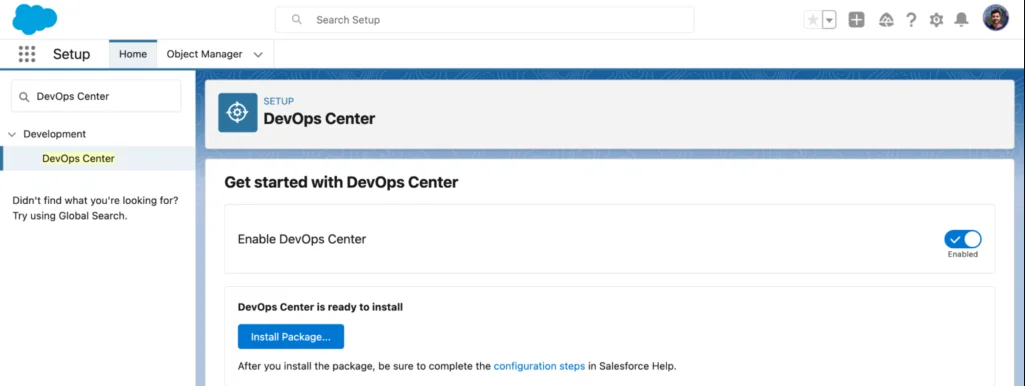
DevOps Center setup checks
- Map each pipeline stage to a real sandbox or production org.
- Decide whether a work item maps to a user story, defect, release task, or feature branch.
- Confirm source control support for your org using Salesforce Help: Set Up GitHub as Your Source Control.
- Limit who can commit, review, promote, and deploy.
- Require review for profiles, permission sets, sharing settings, named credentials, connected apps, and login flows.
Deployment tools in Salesforce: what to compare
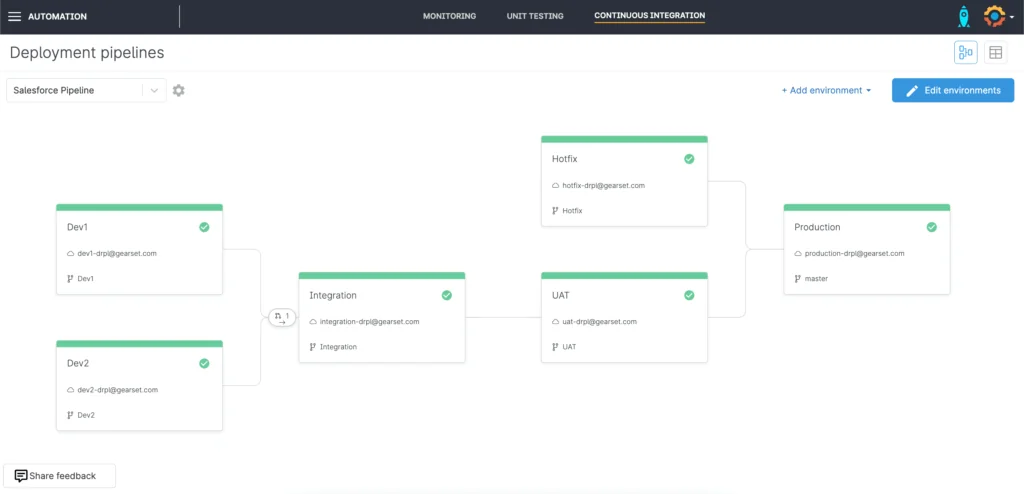
Deployment tools in Salesforce should be chosen by release risk, not by a feature checklist. A team that deploys one Flow per month has different needs than a product team that ships packages, runs CI on every pull request, and supports multiple production orgs.
| Tool or pattern | Best fit | Main strength | Main limit |
|---|---|---|---|
| Change Sets | Small admin changes between connected orgs | Available in Setup | Manual packaging and weak source control fit |
| DevOps Center | Admin and developer teams needing a UI | Work items, pipelines, source control, tracked promotion | Still needs CI, scans, backup, and release governance for complex orgs |
| Salesforce CLI with Metadata API | CI/CD pipelines and scripted validation | Repeatable deployment and validation from Git | Requires command-line and metadata knowledge |
| Unlocked packages | Modular internal apps | Versioned package delivery | Needs package architecture and dependency design |
| Managed packages | ISV or distributed product delivery | Versioned customer distribution | Requires namespace, packaging, and release discipline |
Deployment tools in Salesforce for CLI-based teams
For developers and release engineers, Salesforce CLI is usually the automation layer. The command reference includes project commands for deployment, validation, retrieval, manifest generation, and status checks: Salesforce CLI project commands. Metadata API handles many deployment operations and supports test-level controls: Metadata API deploy.
# Validate metadata before merge.
sf project deploy validate \
  --manifest manifest/package.xml \
  --target-org uat \
  --test-level RunLocalTests \
  --wait 60
For API-level automation, Salesforce documents the Tooling API DeployRequest object as available in API version 49.0. Most teams still use Salesforce CLI or Metadata API wrappers in CI because they are easier to operate and audit. See DeployRequest.
Deployment tools in Salesforce for admins
Admins need a safe path for configuration, not a command-line-only process. For admin-heavy teams, DevOps Center or a governed release UI is easier than asking every admin to run scripts. The key is that every Flow, field, validation rule, email template, permission set, and Lightning page must be tied to a work item and source history. For related Flow release issues, read Salesforce Flow deployment guidance.
Salesforce DevOps best practices for release design
These salesforce devops best practices reduce release risk whether the team uses DevOps Center, Salesforce CLI, packages, or a paid DevOps platform.
Salesforce devops best practices for branching
Keep branching simple. Use main for production-ready source, short-lived feature branches for work items, and release branches only when a release train needs stabilization. Protect the main branch with pull request approval, CI validation, and test results before merge.
Salesforce devops best practices for metadata ownership
Assign owners for shared metadata. Profiles, permission sets, Flows, record-triggered automation, global value sets, record types, and custom metadata often create conflicts. Prefer permission sets and permission set groups over large profile edits where possible because profile XML can be noisy and hard to review.
Salesforce devops best practices for testing
Run tests before merge, before UAT, and before production. Salesforce requires at least 75% Apex code coverage and passing tests for production deployment of Apex, as documented in Testing and Code Coverage. Treat 75% as a minimum gate. Good tests create their own data, assert outcomes, avoid broad org assumptions, and cover bulk behavior. For code patterns, see Apex code best practices.
Salesforce devops best practices for backup and rollback
Rollback has two parts: metadata and data. Git can help restore metadata to an earlier state, but it does not restore records changed by automation after deployment. Use Data Export, Salesforce Backup, or a backup product based on recovery needs. Salesforce Help documents data export behavior at Export Backup Data from Salesforce.
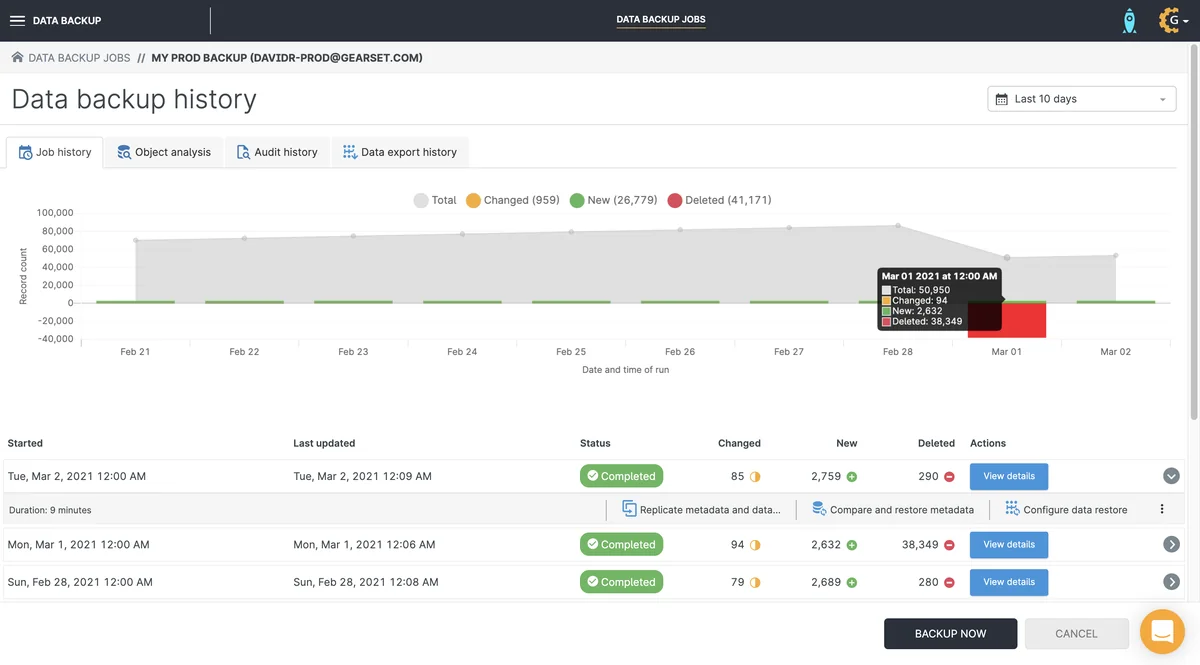
A release runbook should name the rollback owner, backup timestamp, decision deadline, rollback command, validation checks, and support contact. Without those details, rollback becomes a discussion instead of an action.
How to build a Salesforce CI/CD pipeline
A Salesforce DevOps pipeline should fail early when metadata, Apex tests, or code analysis show risk. Use a Salesforce DX project with sfdx-project.json at the repository root, keep source under package directories such as force-app, and exclude local files with .forceignore.
- Store metadata in Git. Do not treat the sandbox as the only source of truth.
- Validate pull requests. Run
sf project deploy validateagainst an integration or UAT org. - Run Apex tests. Use
RunLocalTestsunless your release policy supports a narrower, named test set. - Scan code. Add Salesforce Code Analyzer to the pull request gate.
- Deploy approved source. Production should receive a tagged commit, release branch, or approved DevOps Center promotion.
Static analysis with Salesforce Code Analyzer
Salesforce Code Analyzer is the official static analysis tool available through Salesforce CLI, VS Code, and CI/CD workflows. It brings scanners into one experience for source review. See Salesforce Code Analyzer.
# Run source analysis in CI.
sf code-analyzer run --workspace force-app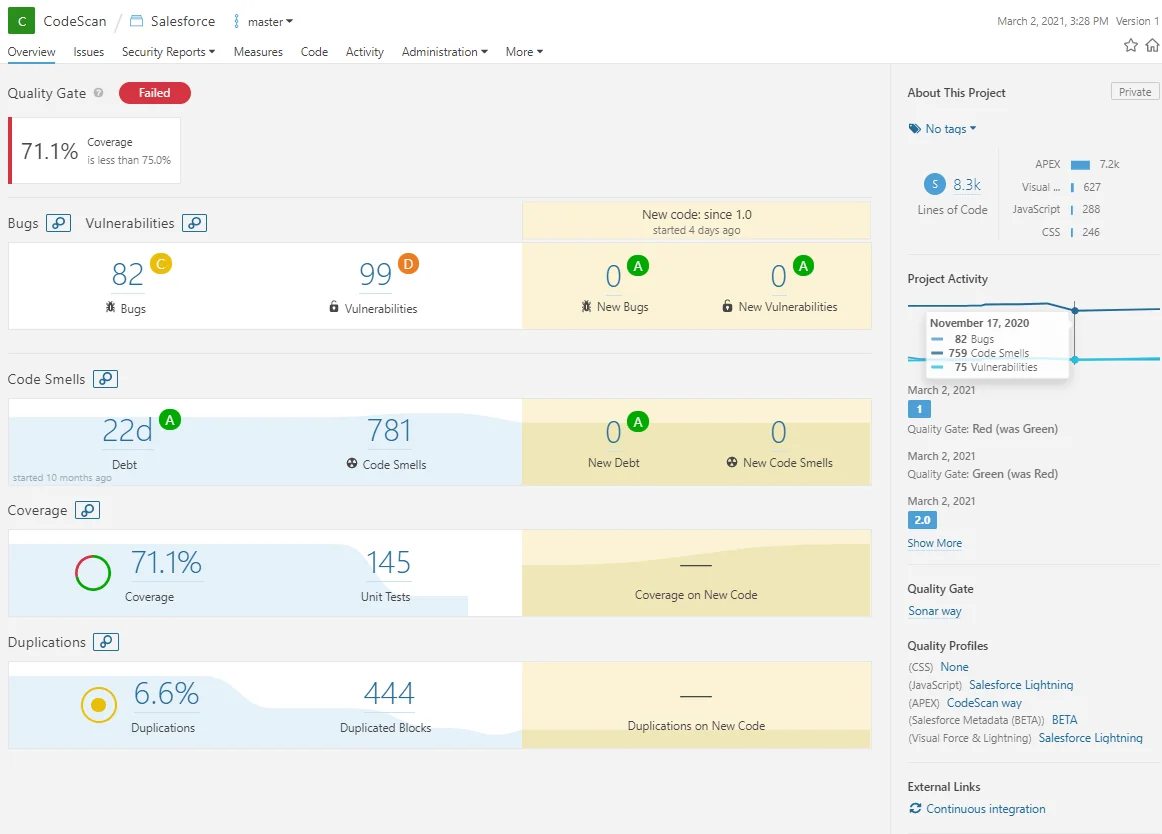
# Deploy approved source after validation and approval.
sf project deploy start \
  --manifest manifest/package.xml \
  --target-org production \
  --test-level RunLocalTests \
  --wait 60
Example Apex pattern for deployment-safe tests
Apex tests are part of Salesforce DevOps because production deployments with Apex depend on test results. The example below creates its own data, runs one SOQL query, and avoids existing org records.
public with sharing class AccountNameService {
    public static List<Account> findByNames(Set<String> names) {
        if (names == null || names.isEmpty()) {
            return new List<Account>();
        }
        List<Account> records = [
            SELECT Id, Name
            FROM Account
            WHERE Name IN :names
            LIMIT 200
        ];
        SObjectAccessDecision decision =
            Security.stripInaccessible(AccessType.READABLE, records);
        List<Account> output = new List<Account>();
        for (SObject row : decision.getRecords()) {
            output.add((Account) row);
        }
        return output;
    }
}
@IsTest
private class AccountNameServiceTest {
@IsTest
static void returnsMatchingAccounts() {
Account accountRecord = new Account(Name = 'DevOps Test Account');
insert accountRecord;
Test.startTest();
List<Account> results = AccountNameService.findByNames(
new Set<String>{'DevOps Test Account'}
);
Test.stopTest();
System.assertEquals(1, results.size(), 'Expected one matching account.');
}
}Governor-limit note: do not call this method inside a loop. Collect names first, then call the service once. For larger release design, review Salesforce API integration patterns when deployments affect integrations.
Common errors with Salesforce DevOps
| Error | Cause | Prevention |
|---|---|---|
| Field deploys without access | Permission metadata was missed | Review permission sets with every data model change |
| Flow fails after release | Record type, custom metadata, email alert, or invocable Apex dependency is missing | Review Flow dependencies before UAT |
| Apex passes locally but fails in production | Tests rely on org data or user context | Create data inside tests and run validation in an integration org |
| Profile diffs are unreadable | Large profile XML changes hide the real change | Use permission sets where possible and review profile edits separately |
| Source drift appears | Admins change production directly | Restrict setup access and retrieve emergency fixes into Git |
Devops salesforce roadmap for a new team
The phrase devops salesforce often appears when teams need a starting plan. Start with policy before tooling. In the first month, inventory release pain, define sandbox purpose, move source to Git, validate pull requests, and document rollback. In the second month, add Code Analyzer, release approvals, post-deploy checks, and dashboard reporting for deployment failures.
For planning around Salesforce seasonal releases, use Salesforce release schedule planning.
Salesforce devops for architects pdf download checklist
Many readers search for salesforce devops for architects pdf download because they need a governance checklist. Use the table below as the content for an internal PDF or architecture decision record.
| Area | Question | Evidence |
|---|---|---|
| Source control | Which branch represents production? | Repository URL and branch protection rule |
| Pipeline | Which stage validates before production? | Pipeline diagram and CI workflow |
| Testing | Which tests run at each gate? | Apex command, UI test suite, UAT script |
| Security | Who reviews access and integration secrets? | Approval matrix and permission diff |
| Rollback | How will metadata and data impact be reversed? | Git tag, backup timestamp, rollback owner |
A useful salesforce devops for architects pdf download is not a generic diagram. It should prove that the team knows the release path, the validation gates, the security review, and the rollback action.
Best practices for governance and security
Salesforce DevOps should support the Salesforce security model, not bypass it. CI credentials and production deployer access are sensitive because they can change Apex, authentication settings, flows, permission sets, sharing rules, and data model metadata. Use separate connected apps or authentication patterns for automation, store secrets outside Git, require review for access changes, and link release notes to work items. For authentication setup, see Salesforce connected app configuration. For command-line work, review Salesforce CLI commands for deployments.
Final Salesforce DevOps checklist before production
- The source branch or DevOps Center promotion matches the approved work items.
- Dependencies are included: permission sets, custom metadata, record types, layouts, Lightning pages, and Flow dependencies.
- Apex tests pass and production coverage remains above the Salesforce requirement.
- Code Analyzer findings are reviewed and exceptions are documented.
- Backup timing is confirmed for data and metadata.
- Rollback steps are written and owned.
- Post-deploy checks cover the main business paths affected by the release.
A sound Salesforce DevOps process makes releases predictable. The team should know what changed, how it was tested, who approved it, how it reached production, and what to do if it fails.
Official Salesforce documentation referenced
- Manage DevOps Center Projects
- Salesforce CLI project commands
- Metadata API deploy
- Apex testing and code coverage
- Salesforce Code Analyzer
Frequently Asked Questions
What is salesforce devops in simple terms?
salesforce devops is the release discipline used to plan, build, test, review, deploy, and monitor Salesforce metadata changes with source control, sandboxes, validation, and controlled production promotion.
Which deployment tools in Salesforce should architects compare first?
Compare Change Sets, DevOps Center, Salesforce CLI with Metadata API, unlocked packages, managed packages, and AppExchange DevOps platforms. The right choice depends on team size, metadata volume, compliance, rollback needs, and whether admins need a UI.
Do Salesforce deployments always require 75 percent Apex code coverage?
For production deployments that include Apex, Salesforce requires unit tests to pass and at least 75% Apex code coverage. Treat that as the minimum deployment gate, not the quality target.
What should a salesforce devops for architects pdf download include?
It should include the environment model, branch policy, validation gates, test plan, permission review, backup timing, rollback owner, approval matrix, and post-deploy checks.