The salesforce release schedule is the calendar Salesforce teams use to plan sandbox previews, production upgrades, release notes review, regression testing, and user communication. Salesforce publishes major seasonal releases three times each year, but your exact upgrade date depends on your Salesforce instance and the maintenance window shown on Salesforce Trust.
Use this guide as a practical release-readiness checklist for admins, developers, architects, and release managers. A clear salesforce release schedule gives each role the same calendar for preview testing, release notes review, and production support. It explains how to read the schedule, where to confirm your production date, how to prepare preview sandboxes, and how to use official sfdc release notes without guessing feature behavior.
Salesforce Release Schedule
The salesforce release schedule follows a seasonal model: Spring, Summer, and Winter. Salesforce Help states that seasonal releases occur in Spring, Summer, and Winter, and the upgrade aligns with the maintenance schedule for each instance. That makes the salesforce release schedule an instance-specific planning artifact. For day-to-day planning, do not treat a blog date as the final source for your org. Treat Salesforce Trust as the source for your exact production window.
In enterprise orgs, I use the salesforce release schedule as a deployment planning input, not as a feature checklist. A release date tells you when the runtime changes. The release notes tell you what changes. Your own regression suite tells you whether the change affects your users, automations, integrations, managed packages, and custom code.
| Release cycle | Typical production season | What admins should do | What developers should do |
|---|---|---|---|
| Spring | January to February windows | Review release updates, UI changes, Flow changes, and user permission impact. | Run Apex tests, check API versions, validate integrations, and review LWC behavior changes. |
| Summer | May to June windows | Use preview sandboxes for end-to-end testing before the main production wave. | Confirm deployments, test async jobs, and check metadata/API differences. |
| Winter | September to October windows | Plan around Dreamforce-era announcements, release readiness content, and user enablement. | Review developer release notes, Tooling API queries, and package compatibility. |
How to check your exact Salesforce release date
The salesforce release schedule shown in public release countdown posts gives the main release weekends. Your org may sit on a specific NA, EMEA, AP, CS, or Hyperforce instance that receives the release in one of those windows. To confirm the date, open Salesforce Trust Status, search for your instance or My Domain, and review the Maintenance tab.
- In Salesforce Setup, search for Company Information.
- Find the Instance value, or use your My Domain on Salesforce Trust.
- Open the instance on Salesforce Trust and select Maintenances.
- Look for the seasonal release maintenance event and record the start and end time in your deployment calendar.
- Compare that time with business-critical periods such as billing runs, campaign launches, CPQ quote cycles, and integration batches.
For related planning, see our internal guides on Salesforce updates and release planning, Salesforce outage checks, and Salesforce sandbox strategy.
What dates matter in the salesforce release schedule?
A release cycle has more than one useful date. The salesforce release schedule matters because admins and developers need different checkpoints before production changes. In a controlled org, these are the dates I put into the release plan.
| Milestone | Why it matters | Owner | Output |
|---|---|---|---|
| Pre-release org availability | Lets you explore new features in a clean Developer Edition org before your sandbox is upgraded. | Admin, architect | Feature shortlist and impact notes. |
| Release notes publication | Gives the official feature list, limits, availability notes, and Beta/Pilot/GA status. | Admin, developer, product owner | Release impact register. |
| Sandbox refresh deadline | Determines whether a sandbox moves to preview or stays on the current release. | Release manager | Preview and non-preview sandbox map. |
| Sandbox preview start | Allows testing with your metadata, data shape, automations, integrations, and packages. | QA, admin, developer | Regression test results and defect list. |
| Production release weekend | Marks the runtime upgrade for your production instance. | Release manager, business owner | Go-live monitoring and support plan. |
Summer 26 release schedule example
As of June 5, 2026, the current public Salesforce release readiness page points admins to Summer ’26 resources. The official Summer ’26 admin countdown lists April 16, 2026 for pre-release access, April 22, 2026 for release notes, May 7, 2026 before 5 p.m. PT as the sandbox refresh checkpoint, May 8, 2026 as sandbox preview start, and May 15, June 5, June 12, and June 13, 2026 as production arrival windows. Use those dates only as cycle-level guidance; verify your own instance on Trust. Record the verified salesforce release schedule in your change calendar.
The salesforce release schedule for Summer ’26 also shows why one test window is not enough. If a production org is on a later June window, your team can use preview sandboxes to find issues earlier, fix metadata or permission problems, and avoid changing production during the maintenance event itself.
How to use sandbox preview without breaking release testing
Sandbox preview is where the salesforce release schedule becomes operational. Salesforce separates sandboxes into preview and non-preview groups. A preview sandbox receives the upcoming release earlier. A non-preview sandbox stays on the current release until the later upgrade window.
Do not upgrade every sandbox to preview unless your salesforce release schedule testing plan needs it. In enterprise orgs, keep at least one non-preview sandbox available for urgent production support until production receives the release. Use one full or partial copy sandbox for release regression and one developer sandbox for admin/developer feature checks.
- Preview sandbox: test Flows, validation rules, Apex, integrations, managed packages, Lightning pages, reports, mobile navigation, and permission changes.
- Non-preview sandbox: reproduce current production issues without release differences.
- Pre-release org: explore new features without your metadata. Do not treat it as proof that your production build is safe.
Salesforce provides a sandbox preview guide and a Trailhead module for early access planning. Use the guide before the refresh cutoff because a refresh after the cutoff can place the sandbox in the wrong release track for your testing plan.
How admins should read sfdc release notes
Sfdc release notes: where to verify features
The official Salesforce Summer ’26 Release Notes connect the salesforce release schedule to the source for feature behavior, product availability, setup paths, limits, and status labels. The phrase sfdc release notes is common in search, but for implementation decisions you should use Salesforce Help release notes, Developer Docs, and Trailhead release modules rather than summaries.
When you read sfdc release notes, filter by product first. A Sales Cloud admin, a Service Cloud architect, and a developer maintaining Experience Cloud sites will not need the same list. Then mark each item as: no action, test only, admin configuration, code review, permission review, user communication, or managed package/vendor review.
Release note labels: Beta, Pilot, and Generally Available
Release notes often state whether a feature is Beta, Pilot, or Generally Available. Do not enable a Beta or Pilot feature in production without checking the official availability statement and your company’s risk process. A GA feature can still have edition, license, region, dependency, or API-version constraints.
Developer checklist for the salesforce release schedule
Developers should treat the salesforce release schedule as a trigger for dependency review. A documented salesforce release schedule prevents test execution from being left until release weekend. Seasonal upgrades can affect Apex, LWC, Flow runtime, APIs, managed package behavior, and security defaults. Salesforce versioning reduces risk, but it does not remove the need to test.
Check Apex, triggers, and LWC API versions
Use Tooling API queries to find components that target older API versions. For example, Spring ’25 included API version 63.0, Spring ’26 includes API version 66.0 for versioned Flow updates, and Summer ’26 release notes include LWC API v67.0 changes. Do not bulk-update API versions just to make a list look clean. Update versions only after tests confirm behavior.
-- Run with Tooling API in a sandbox, not directly in production change windows.
SELECT Id, Name, ApiVersion
FROM ApexClass
WHERE ApiVersion < 63.0
ORDER BY ApiVersion ASC
sf data query \
--target-org UAT \
--use-tooling-api \
--query "SELECT Id, Name, ApiVersion FROM ApexTrigger WHERE ApiVersion < 63.0 ORDER BY ApiVersion ASC"After a seasonal release, run local tests in a preview sandbox and compare failures with the same test set in a non-preview sandbox. Production deployments that include Apex must meet Salesforce code coverage requirements, including at least 75% org-wide Apex coverage. Do not use the seasonal release window to bypass test failures; fix the cause or adjust the deployment plan.
sf project deploy start \
  --target-org UAT \
  --test-level RunLocalTests \
  --wait 120
Test integration behavior before the production window
For integrations, test OAuth flows, connected apps, Named Credentials, external credentials, batch jobs, API clients, Platform Events, and Bulk API jobs. If an integration pins an older API version, check the official Developer Docs and REST API version resources before changing it. A version bump can change response payloads, security behavior, validation, or error handling.
For more developer context, review our internal guides on Salesforce API integration and Apex code best practices.
Historical dates: Winter 25 and Spring 25 release queries
Many teams still search older releases while auditing org changes, validating old test failures, or documenting when a feature became available. Keep historical dates separate from the current salesforce release schedule so your release plan does not mix old and current windows. This is why the salesforce release schedule should include the release label, instance, and maintenance date.
Salesforce winter 25 release date: production windows
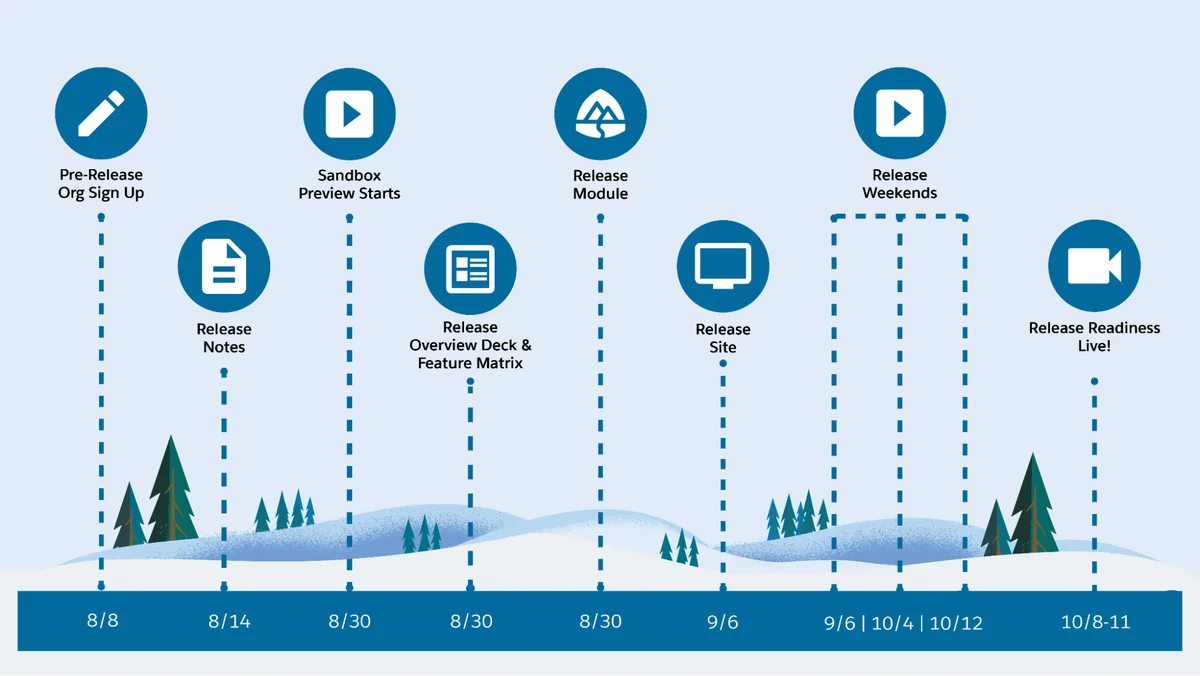
The official Winter ’25 admin countdown listed September 6, October 4, and October 12, 2024 as the main production arrival windows. If you are searching for salesforce winter 25 release date, use those dates as historical release windows and use the Winter ’25 release notes for feature-specific validation.
Winter release salesforce 2025: how the naming works
The search phrase winter release salesforce 2025 usually points to Winter ’25, even though the main production windows occurred in September and October 2024. Salesforce seasonal naming refers to the release label, not always the calendar year of every rollout date. When you document winter release salesforce 2025 decisions, include both the release label and the actual maintenance date for your instance.
Spring 25 release: production windows
The official Spring ’25 admin countdown listed January 10, February 7, and February 14, 2025 as the main production arrival windows. If you are researching a spring 25 release behavior, confirm the product area in the Spring ’25 release notes and check whether the feature was GA, Beta, Pilot, or controlled by a release update.
Best practices for release readiness in enterprise orgs
The salesforce release schedule should sit inside a change management process. The goal is not to read every release note. The goal is to identify the subset that affects your org, test it before production, and communicate changes to users who will notice them.
- Create a release impact register. Track feature, product, impact, owner, test case, risk, and go/no-go status.
- Segment by business process. Test lead capture, opportunity close, case routing, quote generation, order sync, user provisioning, and reporting separately.
- Test permission behavior. Review profiles, permission sets, permission set groups, sharing rules, restriction rules, and field-level security where release notes mention access changes.
- Run automation regression. Test record-triggered Flows, scheduled paths, approval processes, Apex triggers, Queueable Apex, Batch Apex, and platform events.
- Review managed packages. Check vendor release notes for CPQ, marketing, finance, document generation, ETL, and telephony packages.
- Plan user communication. Tell users what changes, when it changes, and where to report issues.
Common errors with the salesforce release schedule
- Using the wrong date source: A public countdown post gives main windows. Salesforce Trust gives the maintenance date for your instance.
- Refreshing a sandbox too late: Missing the refresh cutoff can put the sandbox on the wrong preview track.
- Testing only admin UI changes: Release impact can appear in Apex, LWC, integrations, security, reports, and mobile behavior.
- Ignoring release updates in Setup: Some release updates need review or activation before enforcement.
- Confusing release labels with calendar years: This is common with salesforce winter 25 release date and winter release salesforce 2025 searches.
Frequently Asked Questions
Where do I find the exact salesforce release schedule for my org?
Use Salesforce Trust Status and search for your instance or My Domain. Public release countdown posts show the main release weekends, but the exact salesforce release schedule for your production org is listed under the instance maintenance calendar.
What was the salesforce winter 25 release date?
The official Winter ’25 admin countdown listed September 6, October 4, and October 12, 2024 as main production arrival windows. For a specific org, the salesforce winter 25 release date depends on the instance maintenance entry that was shown on Salesforce Trust.
Why do people search for winter release salesforce 2025?
The phrase winter release salesforce 2025 usually refers to the Winter ’25 release label. Its rollout windows were in September and October 2024, so release documentation should include both the label and the actual maintenance date.
Where are the official sfdc release notes?
Official sfdc release notes are published in Salesforce Help. Use the product filters in the release notes, then verify setup paths, API version notes, availability, and Beta/Pilot/GA status before changing production configuration.
What was the spring 25 release production schedule?
The official Spring ’25 admin countdown listed January 10, February 7, and February 14, 2025 as main production arrival windows. If you are checking a spring 25 release feature, use the Spring ’25 release notes and your org’s historical Trust maintenance record where available.