A salesforce sandbox is a separate Salesforce environment copied from production so admins and developers can build, test, train users, and validate releases without changing live records. Every sandbox type copies production metadata, but only Partial Copy and Full sandboxes copy production data, and the amount copied depends on the sandbox type and template. Use a sandbox whenever a change needs testing before it reaches users, integrations, automations, or reports in production.
What is a salesforce sandbox?
A salesforce sandbox is not a backup and it is not a second production org. It is a development and test org linked to a production org. Salesforce copies configuration such as objects, fields, Lightning pages, flows, Apex classes, validation rules, profiles, permission sets, and other metadata into the sandbox. Depending on the sandbox type, Salesforce can also copy a sample or full set of records.
In enterprise orgs, teams usually treat production as the source of business truth and use sandboxes for change work. An admin can build a Flow in a Developer sandbox, a developer can write Apex in a developer pro sandbox, the release manager can test a package in a Partial Copy test environment, and business users can validate the final release in a Full sandbox or staging environment.
Salesforce Help documents sandbox types, templates, creation, refresh intervals, and storage limits in the official sandbox documentation. Review the current Salesforce Help pages before buying licenses or designing a release pipeline because edition entitlements and storage options can vary by contract.
Related reading on SalesforceTutorial: Salesforce change sets deployment steps, Salesforce Flow automation basics, and Apex in Salesforce for admins and developers.
Salesforce sandbox types and refresh limits
Salesforce provides four standard sandbox categories for most Platform release work: Developer, Developer Pro, Partial Copy, and Full. The right salesforce sandbox choice depends on how much data you need, how often you need to refresh, and whether the environment supports user acceptance testing, integration testing, or final release validation.
The table below summarizes the salesforce sandbox options and the sandbox salesforce types an architect normally evaluates during release planning.
| Sandbox type | Data copied from production | Default storage and refresh interval | Best use |
|---|---|---|---|
| Developer Sandbox | Metadata only | 200 MB data storage, 200 MB file storage, 1-day refresh interval | Admin configuration, Apex/LWC development, isolated feature work, and unit testing with seeded test data |
| Developer Pro Sandbox | Metadata only | 1 GB data storage, 1 GB file storage, 1-day refresh interval; Salesforce also offers data storage upgrades for eligible Developer and Developer Pro sandboxes | Shared development, QA with more sample data, automation testing, and longer-running build work |
| Partial Copy Sandbox | Metadata plus selected records through a sandbox template | 5 GB data storage, file storage based on the production org, 5-day refresh interval | UAT, integration testing, training, and testing features that depend on representative production data |
| Full Sandbox | Metadata plus production data | Storage mirrors production, 29-day refresh interval | Final regression testing, staging, performance testing, large data validation, and release rehearsals |
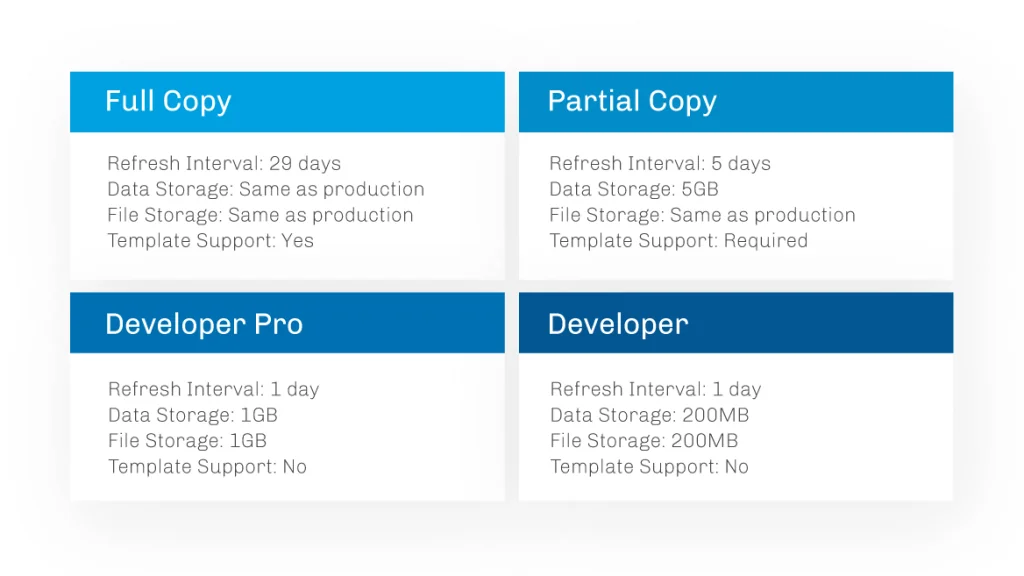
Developer sandbox
A salesforce sandbox of the Developer type copies metadata but does not copy production records. It works well when a developer or admin needs a clean space to build and test changes without production data. Because the data and file limits are small, teams usually seed only the records needed for the feature under test.
Use this salesforce sandbox environment for small configuration changes, Apex unit-test work, Flow experiments, Lightning page changes, and early proof-of-concept work. Do not use it for testing data volume, sharing behavior across large role hierarchies, or integrations that depend on real record relationships.
Developer pro sandbox
A developer pro sandbox also copies metadata only, but it provides more storage than a Developer sandbox. Use a developer pro sandbox when the team needs a shared QA space, more sample data, larger test files, or repeatable automated tests that would fill a smaller Developer sandbox.
In enterprise orgs, a developer pro sandbox often sits between individual development sandboxes and a Partial Copy test environment. Developers deploy source from Git into the developer pro sandbox, run Apex tests, execute UI smoke tests, and fix metadata dependency issues before a wider UAT cycle starts.
Partial Copy sandbox
A Partial Copy salesforce sandbox copies all metadata and a selected set of production records. Salesforce uses a sandbox template to decide which objects and related records to copy. This makes Partial Copy useful when test cases require realistic Accounts, Contacts, Opportunities, Cases, custom object records, files, or integration IDs, but a Full sandbox is too large or not available for frequent refreshes.
For example, a Service Cloud team validating a new Case assignment flow may select Accounts, Contacts, Cases, Entitlements, Milestones, and the custom objects that drive SLA logic. The template should include enough related data for the process to run, but not every object in the org.
Full sandbox
A Full salesforce sandbox is closest to production because it can copy production metadata and data. It is the right place for release rehearsals, role hierarchy testing, data-heavy batch Apex validation, external integration testing, and performance testing where record volume matters.
Because a Full sandbox has a 29-day refresh interval, do not depend on it for daily development. Treat it as a controlled staging environment. Deploy only release-candidate metadata into it, run planned tests, capture evidence, and avoid untracked manual changes.
Types of sandboxes Salesforce teams usually choose
The phrase types of sandboxes salesforce usually maps to one design question: which environment supports the risk level of the change? A validation rule can start in a Developer sandbox. A new integration should use a developer pro sandbox or Partial Copy sandbox. A release that changes sharing, automation, Apex, and external systems should end in a Full sandbox or an equivalent staging environment before production.
Sandbox Salesforce types comparison by release stage
The sandbox salesforce types decision becomes easier when you map each sandbox to a release stage rather than to a license name.
- Build stage: Developer sandbox for isolated work and source tracking.
- Team test stage: Developer Pro sandbox for shared QA and seeded test data.
- Business test stage: Partial Copy sandbox for realistic records and UAT.
- Release stage: Full sandbox for final regression, deployment rehearsal, and data-volume checks.
How do sandbox templates work?
A salesforce sandbox template controls which objects and records are copied into a Partial Copy or Full sandbox. Developer and Developer Pro sandboxes do not copy production data through templates because those sandbox types are metadata-only.
Salesforce sandbox templates matter because Salesforce record relationships can make a small testing requirement pull in more data than expected. If you select a child object without the needed parent objects, users may see incomplete test records. If you select too many related objects, refresh time and storage usage increase. Build the template from the business process backward: start with the object the user acts on, then include parent, child, and lookup records needed for that process.
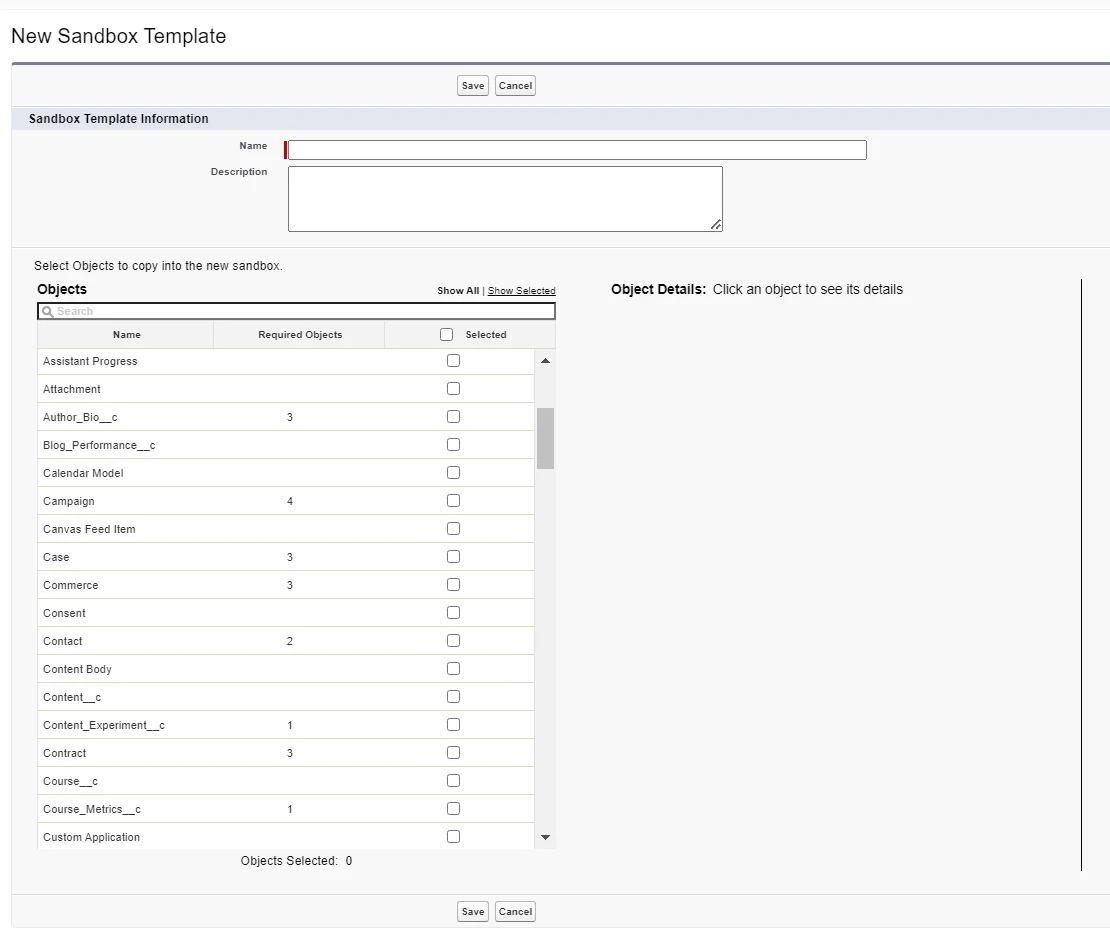
Template design example
Assume the salesforce sandbox release changes Opportunity approval routing and renewal quoting. A useful Partial Copy template might include Account, Contact, Opportunity, OpportunityLineItem, Product2, Pricebook2, PricebookEntry, Quote, QuoteLineItem, Contract, User, and the custom renewal objects used by the approval logic. It should not include unrelated objects such as archived marketing responses unless those records affect the test case.
For compliance-sensitive orgs, do not copy more personal data than the test requires. If testers only need record shape and relationships, seed masked or synthetic data after sandbox creation instead of copying live values. Salesforce also provides options such as data masking products and third-party data seeding approaches, but validate each tool against your security requirements before use.
How to plan sandbox creation in Salesforce
Sandbox creation in Salesforce starts in production Setup, not inside an existing sandbox. The admin who creates or refreshes a sandbox needs the appropriate permissions, available sandbox licenses, and a clear plan for template, access, post-copy actions, and integration settings.
Sandbox creation in Salesforce checklist
- Confirm the purpose. Decide whether the sandbox supports development, QA, UAT, training, staging, or performance testing.
- Check license availability. Review the Sandboxes page in Setup and the official Salesforce license and storage documentation.
- Select the sandbox type. Choose Developer, Developer Pro, Partial Copy, or Full based on data needs and refresh timing.
- Create the sandbox template first. Do this before creating a Partial Copy sandbox, and use a template for Full when you need only selected data.
- Name the sandbox clearly. Use names such as DEV_ALEX, QA01, UAT, or STAGE. Keep names short because Salesforce appends the sandbox name to usernames.
- Decide whether to run a post-copy Apex class. Use this for repeatable data seeding, disabling scheduled jobs, or marking the org as non-production.
- Plan user access. Give only the people who need the environment access, and review selective access options when available in your org.
- Document post-refresh tasks. Include named credentials, connected apps, email deliverability, integrations, scheduled jobs, and monitoring.
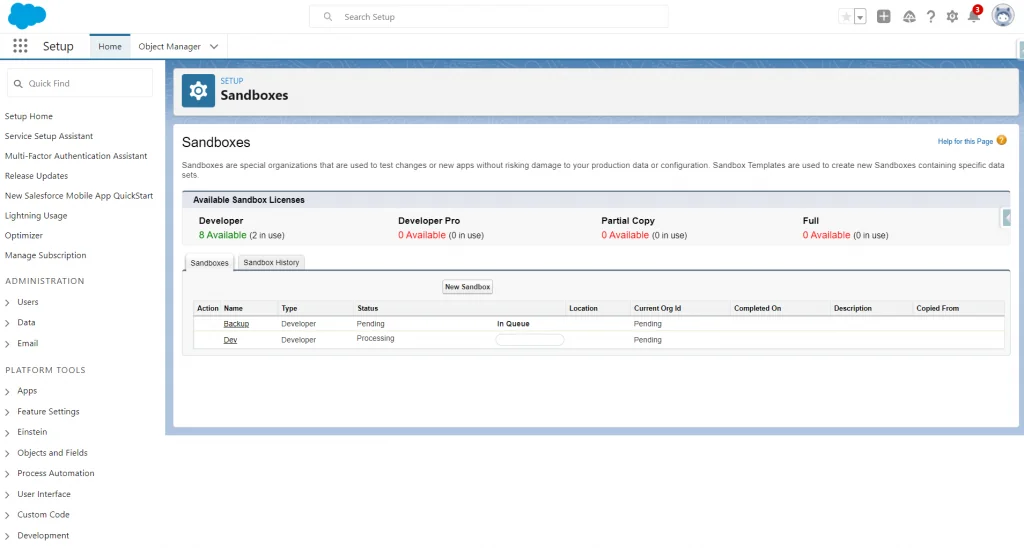
Click path to create a sandbox
- Log in to the production org.
- Open Setup.
- Enter Sandboxes in Quick Find.
- Select Sandboxes.
- Click New Sandbox.
- Enter the name and description.
- Select the sandbox type.
- Choose a template for Partial Copy or Full when needed.
- Optionally select a post-copy Apex class that implements
SandboxPostCopy. - Click Create and monitor the copy status.
Create a sandbox with Salesforce CLI
Salesforce CLI can create a salesforce sandbox from a definition file when your production org is authorized and has available sandbox licenses. This approach helps teams store environment intent in version control and reduce manual setup differences.
{
  "sandboxName": "QA01",
  "licenseType": "Developer_Pro",
  "description": "Shared QA sandbox for release validation",
  "autoActivate": true
}
sf org login web --alias prod
sf org create sandbox --target-org prod --definition-file config/qa01-sandbox-def.json --alias qa01 --wait 60
sf org open --target-org qa01Use the command reference for the exact flags supported by your installed Salesforce CLI version. In CI, do not hardcode production admin credentials. Use an approved authentication method, rotate secrets, and keep sandbox definition files in the same repository as the release process they support.
How to refresh a salesforce sandbox without losing work
Refreshing a salesforce sandbox replaces its metadata, and for data-copy sandboxes it also replaces the copied data. Any work that exists only in the sandbox can be lost. Before refreshing a salesforce sandbox, retrieve or deploy metadata into source control, export data that testers still need, and confirm that scheduled jobs or external integrations can be reconfigured after activation.
The refresh interval is based on sandbox type: Developer and Developer Pro can be refreshed after 1 day, Partial Copy after 5 days, and Full after 29 days. Salesforce calculates intervals from the create or refresh request. New or refreshed sandboxes may also require activation if auto-activation was not selected.
Refresh checklist
- Confirm that all metadata changes are committed to Git or already deployed to a higher environment.
- Export reference data that is not copied from production or not generated by scripts.
- Pause or document integrations that point to the sandbox.
- Confirm whether the sandbox should auto-activate after refresh.
- Run post-copy validation after activation.
- Notify users that previous test data and unsaved metadata changes will be replaced.
Post-refresh checks
After a salesforce sandbox activation, check email deliverability, user access, named credentials, remote site settings, external credentials, connected apps, scheduled Apex jobs, platform event subscribers, Experience Cloud domains, and integration endpoints. In many orgs, a refresh copies production configuration that is not safe to run as-is in a test environment. Replace production endpoints with sandbox endpoints before testers begin.
Salesforce appends the sandbox name to usernames. Salesforce also appends .invalid to many copied user email addresses so the system does not send email to those addresses. Keep this behavior in mind when testers need password resets, MFA verification, or email-based approvals.
How to seed test data after salesforce sandbox creation
Developer and Developer Pro salesforce sandbox environments do not copy production records, so most teams need a repeatable data setup process. You can create test data manually, import CSV files, use Salesforce CLI data commands, run an Apex post-copy script, or deploy a data seeding package maintained by the delivery team.
Manual setup works for one-off testing but fails when multiple developers need the same baseline. A better pattern is to store a small, versioned test dataset and a setup script with the project. The dataset should include only records required for smoke tests and automated tests.
Post-copy Apex example
The SandboxPostCopy interface lets Salesforce run one Apex class after sandbox creation or refresh. The class runs after the copy completes. Use it for safe, repeatable setup tasks, not for long data migrations. Keep SOQL outside loops, use partial-save DML where possible, and log failures because a post-copy script should not hide environment problems.
global class SandboxPostCopySetup implements SandboxPostCopy {
    global void runApexClass(SandboxContext context) {
        System.debug(LoggingLevel.INFO, 'Preparing sandbox: ' + context.sandboxName());
        seedSmokeTestAccount();
    }

    @TestVisible
    private static void seedSmokeTestAccount() {
        if (!Schema.sObjectType.Account.isCreateable()) {
            return;
        }

        Integer existingRecords = [
            SELECT COUNT()
            FROM Account
            WHERE Name = 'Sandbox Smoke Test Account'
        ];

        if (existingRecords > 0) {
            return;
        }

        Account accountRecord = new Account(
            Name = 'Sandbox Smoke Test Account'
        );

        Database.SaveResult result = Database.insert(accountRecord, false);

        if (!result.isSuccess()) {
            System.debug(
                LoggingLevel.WARN,
                'Sandbox seed failed: ' + result.getErrors()[0].getMessage()
            );
        }
    }
}
@IsTest
private class SandboxPostCopySetupTest {
@IsTest
static void runsPostCopyScript() {
Test.startTest();
Test.testSandboxPostCopyScript(
new SandboxPostCopySetup(),
UserInfo.getOrganizationId(),
UserInfo.getOrganizationId(),
'qa01'
);
Test.stopTest();
System.assert(
[SELECT COUNT()
FROM Account
WHERE Name = 'Sandbox Smoke Test Account'] <= 1,
'Post-copy setup should not create duplicate smoke test accounts.'
);
}
}This example uses one SOQL count query, performs no SOQL inside loops, and uses Database.insert(record, false) to avoid throwing an unhandled exception when org-specific Account validation prevents the seed record. In a production implementation, replace the sample Account with records that match your test process and required fields.
How to deploy from a salesforce sandbox to production
A salesforce sandbox does not automatically promote changes to production. You need a deployment method. Common choices include change sets, Salesforce CLI with Metadata API, unlocked packages, managed packages, DevOps Center, or a CI/CD pipeline that validates metadata before deployment.
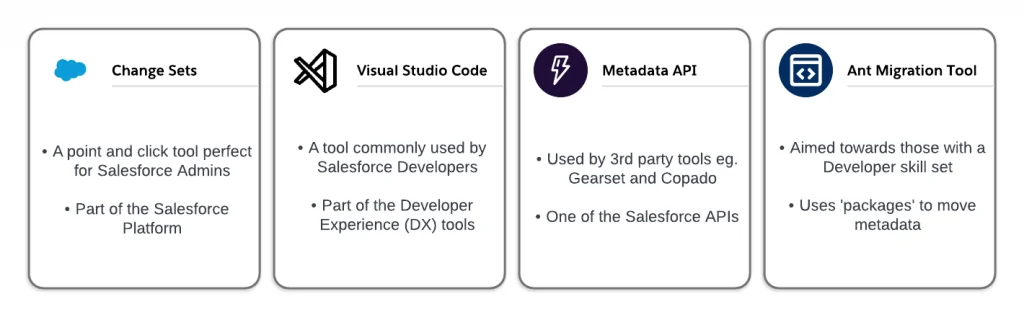
Change sets
Change sets work for many admin-led deployments from a salesforce sandbox to a related production org. They require deployment connections and can move supported metadata from a sandbox to production. They do not move business records. For profile and permission changes, review dependencies carefully because adding a component without dependent fields, record types, or permissions can create incomplete deployments.
Salesforce CLI and Metadata API
Salesforce CLI gives development teams a repeatable deployment path. A common pattern is to generate a manifest, validate the package against the target org, run specified Apex tests or local tests, then deploy the same artifact after approval.
sf project deploy validate \
  --manifest manifest/package.xml \
  --target-org production \
  --test-level RunSpecifiedTests \
  --tests AccountTriggerHandlerTest,OpportunityRenewalServiceTest

sf project deploy quick \
  --job-id 0Afxxxxxxxxxxxxxxx \
  --target-org production
Apex deployments must meet Salesforce test requirements. Salesforce requires at least 75% Apex code coverage for deployment, all tests must pass for the selected test level, and every trigger must have some coverage. Do not treat 75% as the goal. Test the behavior, limits, and security paths that can fail in production.
Deployment checks before production
- Run Apex tests with a test level appropriate to the release risk.
- Validate CRUD and field-level security for Apex controllers, LWC data access, Flow screens, and integrations.
- Check profile, permission set, permission set group, and sharing dependencies.
- Confirm named credentials and external endpoints differ between sandbox and production.
- Run rollback planning for metadata that cannot be deleted or reverted quickly.
- Document manual post-deployment tasks and assign owners.
Best practices for a salesforce sandbox release pipeline
A good salesforce sandbox pipeline reduces production risk by separating build, test, staging, and release activities. It also makes each change traceable. The goal is not to create as many sandboxes as possible. The goal is to give each environment a job and keep untracked work out of production.
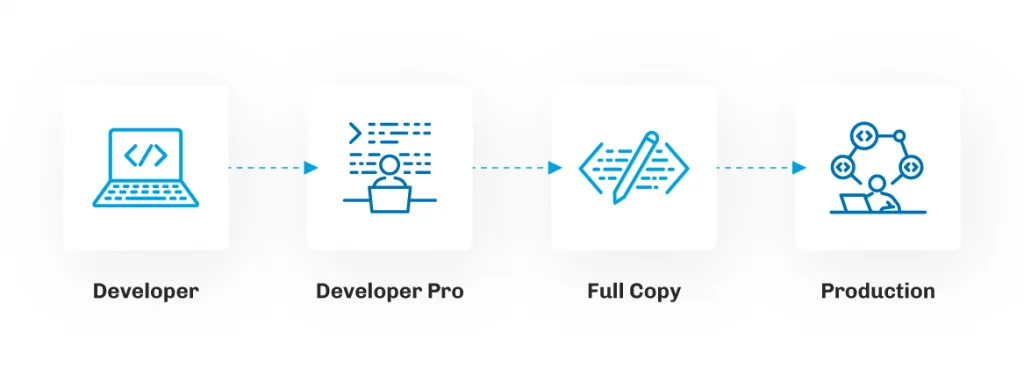
Recommended pipeline for medium and large orgs
- Developer sandboxes: Individual work, source tracking, unit tests, and early Flow/Apex validation.
- Developer Pro sandbox: Shared integration point for merged changes, regression scripts, and QA smoke tests.
- Partial Copy sandbox: UAT with representative data and integration scenarios.
- Full sandbox: Staging, final validation, release rehearsal, performance checks, and production deployment approval.
- Production: Deploy only validated metadata from the approved release artifact.
Security controls
Salesforce sandbox data still needs security controls. Use least-privilege access, limit who can export data, avoid copying sensitive fields unless tests require them, and mask or synthesize data where possible. If developers need admin permissions, keep those permissions in sandbox and avoid granting unnecessary production access.
Check email deliverability after each refresh. For many test environments, use system email only or no access until the release manager confirms that workflow alerts, Flow emails, and Apex email logic cannot contact customers.
Integration controls
Do not let refreshed salesforce sandbox environments call production payment gateways, ERP endpoints, marketing systems, or customer notification services. Store endpoints in named credentials, custom metadata, or environment-specific settings that your post-copy process can reset. For inbound integrations, use sandbox-specific connected apps and OAuth clients where the external system supports them.
Source control controls
Every salesforce sandbox metadata change should move through source control before deployment. If an admin changes a Flow directly in UAT, retrieve it, review the diff, and redeploy it through the same path as developer work. Mixing manual changes and source deployments is one of the fastest ways to lose track of what was tested.
Common errors with a salesforce sandbox
Users cannot log in after refresh
Check that users are using the sandbox login URL or the My Domain URL for that sandbox. Confirm that the username includes the sandbox suffix and that the email address can receive verification messages if a reset is needed. If SSO is required, validate SAML or OAuth settings after refresh because copied production settings may not match sandbox endpoints.
Tests pass in Developer but fail in Partial Copy
This usually means the code depends on existing records, data shape, sharing behavior, or validation rules that the Developer sandbox did not contain. Apex tests should create their own data unless a specific documented exception applies. For UAT failures, compare required fields, duplicate rules, active automation, and record ownership between environments.
Salesforce sandbox refresh overwrote changes
A refresh replaces sandbox metadata with a copy from production. Retrieve work before refresh, commit it to Git, and deploy it back after activation. Do not use a sandbox as the only storage location for unreleased work.
Emails or integrations fired from sandbox
Review deliverability, Flow email alerts, scheduled Apex, platform event triggers, named credentials, and endpoint settings. Post-copy scripts should disable or redirect risky processes where your release policy allows it.
Storage is full during test setup
Choose a larger sandbox type, reduce copied objects in the template, delete unnecessary files, or seed less data. Developer and Developer Pro environments are not designed for production-volume testing.
Salesforce sandbox documentation references
Use the following official Salesforce resources when you validate salesforce sandbox behavior for your org:
- Salesforce Help: Sandbox Types and Templates
- Salesforce Help: Sandbox Licenses and Storage Limits by Type
- Salesforce Help: Create a Sandbox
- Salesforce Help: Refresh Your Sandbox
- Salesforce Help: Create or Edit Sandbox Templates
- Apex Reference: SandboxPostCopy Interface
- Salesforce DX Developer Guide: Sandboxes
- Salesforce CLI Command Reference: org commands
- Apex Developer Guide: Testing and Code Coverage
Frequently Asked Questions
What is a salesforce sandbox used for?
A salesforce sandbox is used to build, test, train, and validate changes before those changes reach production. It protects live users and live data by giving admins and developers a separate org for configuration, code, automation, integration, and release testing.
What is the difference between Developer and developer pro sandbox?
A Developer sandbox and a developer pro sandbox both copy metadata only. The main difference is storage. Developer Pro provides more data and file storage, so it works better for shared QA, larger seeded datasets, and automated testing that needs more records than a Developer sandbox can hold.
Which types of sandboxes Salesforce teams need for testing?
The types of sandboxes Salesforce teams need depend on test risk. Use Developer for isolated build work, Developer Pro for shared QA, Partial Copy for UAT with selected production data, and Full for final staging or performance testing.
How often can I refresh a Salesforce sandbox?
Developer and Developer Pro sandboxes have a 1-day refresh interval, Partial Copy has a 5-day interval, and Full has a 29-day interval. Always check Salesforce Help for your org because license terms and storage upgrades can affect planning.
Does sandbox creation in Salesforce copy production data?
Sandbox creation in Salesforce always copies metadata, but production data is copied only for Partial Copy and Full sandboxes. Partial Copy uses a sandbox template to copy selected records. Developer and Developer Pro sandboxes start without production records.
How do I deploy from sandbox to production?
Deploy from sandbox to production by using change sets, Salesforce CLI with Metadata API, packages, DevOps Center, or a CI/CD pipeline. Validate the deployment first, run the required Apex tests, confirm metadata dependencies, and deploy the same tested artifact to production.
Why do sandbox user emails end with .invalid?
Salesforce appends .invalid to many copied sandbox user email addresses so the sandbox does not send messages to real user addresses by default. Update the email address only when that user needs to receive verification, password reset, or testing emails from the sandbox.