Salesforce Field Service transforms how organizations manage mobile workforces and on-site service delivery. This comprehensive platform extends Service Cloud capabilities to coordinate field technicians, optimize scheduling, and streamline customer service operations across multiple locations and time zones.
Field Service Lightning (FSL) provides real-time visibility into workforce management, from initial work order creation through service completion. Organizations use this platform to manage complex service scenarios involving multiple technicians, specialized equipment, and precise scheduling requirements.
What is Salesforce Field Service?
Salesforce Field Service is a workforce management platform that coordinates mobile service teams through integrated scheduling, dispatching, and mobile capabilities. The platform connects Service Cloud’s case management with territory-based resource allocation and real-time field operations.
The core architecture includes several interconnected components:
- Service Appointments: Central scheduling records that define when and where service occurs
- Work Orders: Define what work needs completion and link to Service Cloud cases
- Service Resources: Represent field technicians with skills, availability, and territory assignments
- Service Territories: Geographic or logical boundaries for service delivery
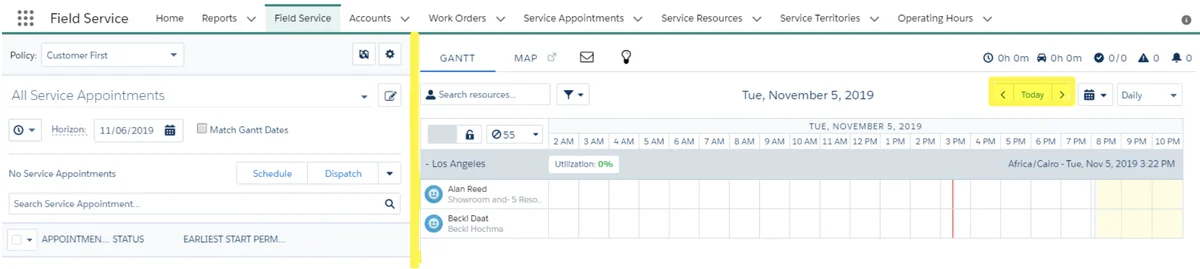
- Dispatcher Console: Real-time scheduling interface with Gantt chart visualization
- Field Service Mobile App: Offline-capable mobile interface for technicians
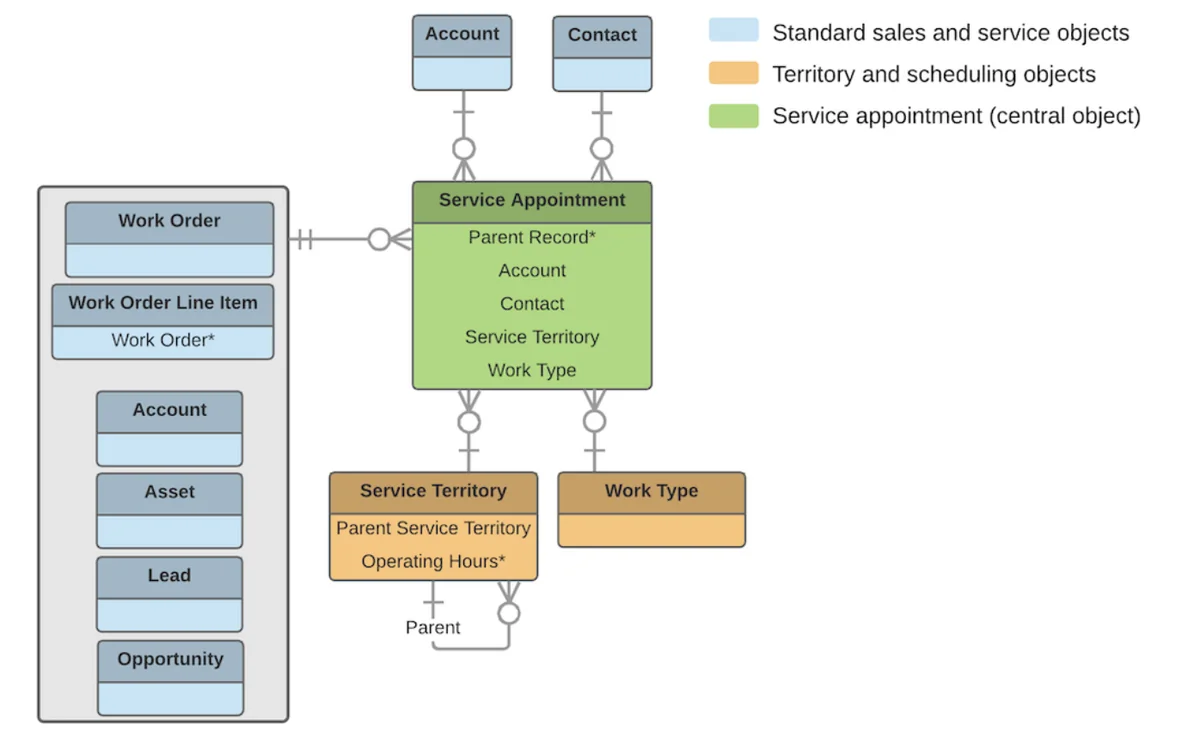
Field Service Lightning Architecture and Data Model
The Field Service Lightning data model centers on the relationship between Work Orders and Service Appointments. Work Orders define the scope of work, while Service Appointments represent scheduled visits to complete that work.
Core Objects and Relationships
Understanding object relationships is critical for successful FSL implementation:
| Object | Purpose | Key Relationships |
|---|---|---|
| Work Order | Defines work scope and requirements | Child of Case, Parent of Service Appointment |
| Service Appointment | Scheduled visit to complete work | Child of Work Order, Related to Service Resource |
| Service Resource | Field technician or crew | Related to User, Service Territory Member |
| Service Territory | Geographic or logical service area | Contains Service Territory Members |
| Work Type | Template for standardizing work | Applied to Work Orders and Line Items |
What is Field Service Lightning in Salesforce?
Field Service Lightning represents Salesforce’s modern approach to field service management, built on the Lightning Platform. FSL integrates with Einstein Analytics for predictive scheduling and includes mobile-first design principles for field technician productivity.
Key FSL capabilities include:
- Automated scheduling based on skills, location, and availability
- Real-time schedule optimization with travel time calculations
- Offline mobile app functionality for disconnected environments
- Integration with Service Cloud for seamless case-to-work-order workflows
- Configurable scheduling policies for different business scenarios
Field Service Use Cases and Industry Applications
Organizations across multiple industries implement Salesforce Field Service to address specific operational challenges:
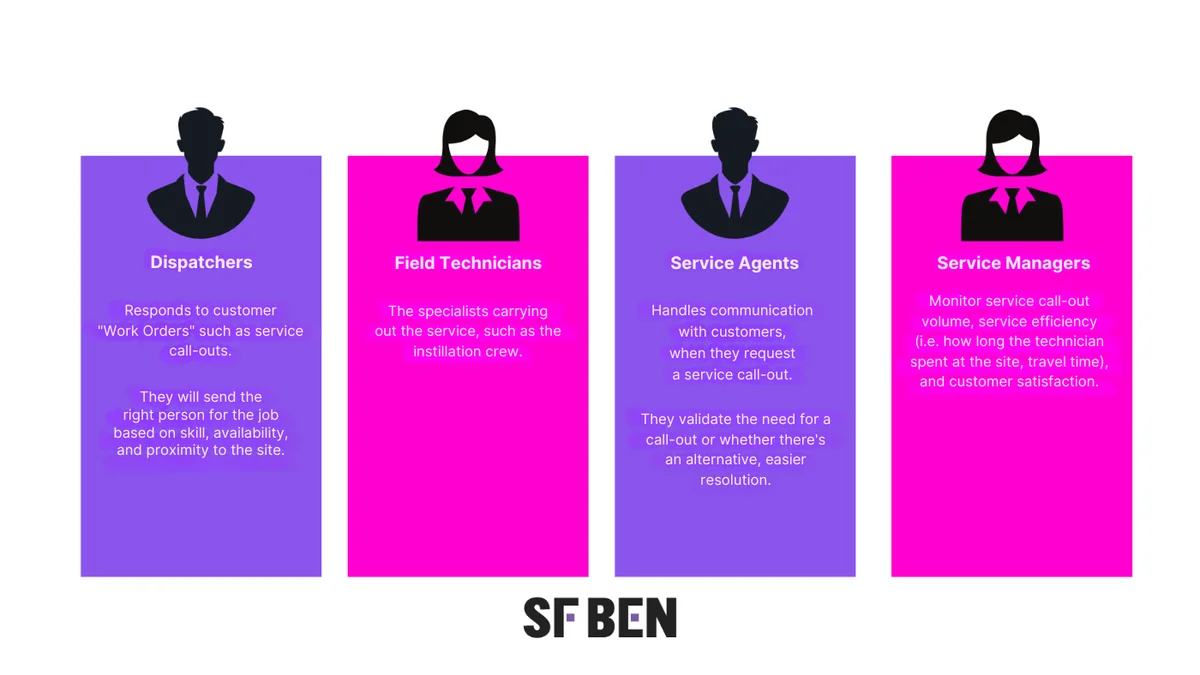
Common Implementation Scenarios
Equipment Maintenance and Repair: Scheduled preventive maintenance and emergency repair calls require coordinating technicians with specific skills and equipment. FSL tracks asset history, schedules recurring maintenance, and optimizes emergency response times.
Installation Services: Complex installations involving multiple technicians, delivery coordination, and customer approval workflows. Service appointments can be linked in sequences to ensure proper installation order.
Healthcare and Home Services: Regular patient visits, therapy sessions, and home healthcare delivery require flexible scheduling with patient preferences and caregiver availability.
Utilities and Infrastructure: Power line maintenance, water system repairs, and telecommunications installations involve safety protocols, specialized equipment, and regulatory compliance tracking.
Dispatcher Console and Scheduling Interface
The Dispatcher Console provides real-time visibility into field operations through an integrated Gantt chart interface. Dispatchers use this console to assign work, optimize schedules, and respond to schedule changes.
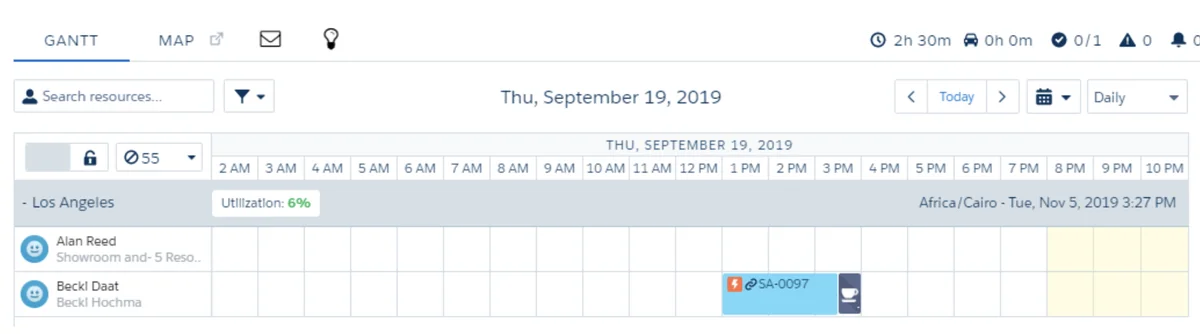
Console Features and Functionality
The Dispatcher Console includes several key components:
- Gantt Chart View: Visual timeline showing resource schedules and appointments
- Service Appointment List: Filterable list of unscheduled and scheduled appointments
- Resource Utilization: Real-time view of technician availability and workload
- Map Integration: Geographic view of appointments and technician locations
- Drag-and-Drop Scheduling: Direct manipulation of appointments on the timeline
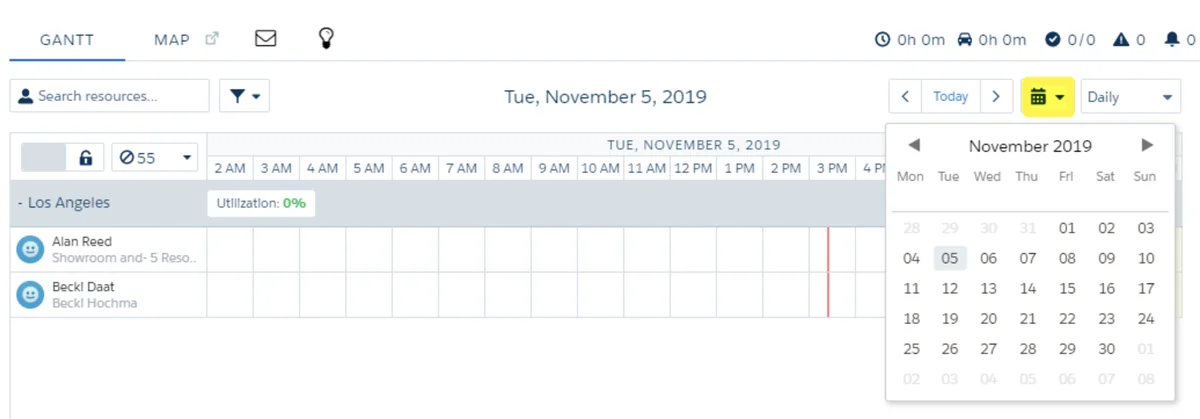
Scheduling Policies and Optimization
FSL includes four standard scheduling policies that determine how appointments are automatically assigned:
- Exact Appointments: Schedules at specific times with no flexibility
- Customer First: Prioritizes customer preferences over operational efficiency
- Minimize Travel: Optimizes for shortest travel time between appointments
- High Intensity: Maximizes resource utilization by scheduling back-to-back appointments
Service Territory Design and Management
Service Territories define geographic or logical boundaries for service delivery. Proper territory design directly impacts scheduling efficiency and technician productivity.
Territory Types and Configuration
FSL supports three territory types for different operational scenarios:
- Primary Territory: Technician’s main service area where most appointments occur
- Secondary Territory: Adjacent areas where technicians occasionally work
- Relocation Territory: Distant areas requiring extended assignments or specialized skills
Territory design considerations include:
- Geographic boundaries based on travel time, not just distance
- Skill-based territories for specialized services
- Workload balancing across territories
- Seasonal or temporary territory adjustments
Appointment Scheduling Methods
FSL provides multiple approaches for creating and scheduling service appointments, from manual dispatcher assignment to fully automated scheduling.
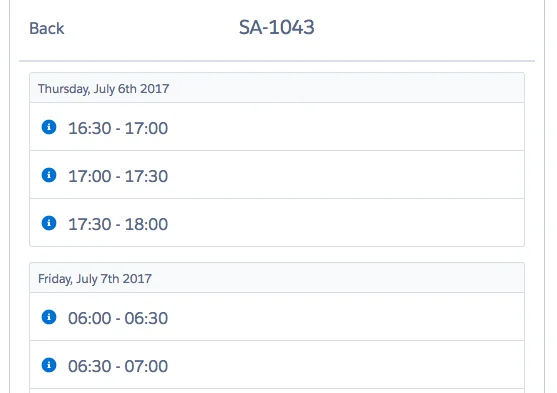
Book Appointment Action
The Book Appointment action presents time windows to service agents rather than specific appointment times. This approach balances customer expectations with operational flexibility.
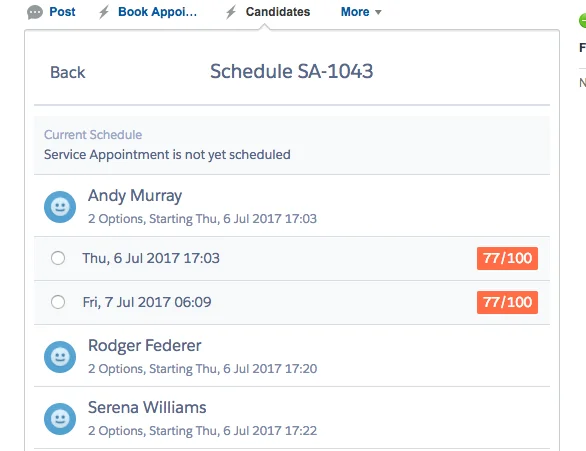
Get Candidates Action
Get Candidates allows service agents to evaluate specific technicians based on availability and slot ratings. This method provides more control over resource selection compared to automated booking.
Automated Scheduling Options
FSL supports several automated scheduling approaches:
- Work Type Auto-Creation: Automatically generates Service Appointments when Work Orders are created from specific Work Types
- Maintenance Plan Automation: Creates recurring appointments based on maintenance schedules
- Custom API Integration: Uses GetSlots API for custom booking interfaces
Field Service Mobile App
The Field Service Mobile app provides offline-capable functionality for technicians working in areas with limited connectivity. The app synchronizes data when connection is available and stores critical information locally.
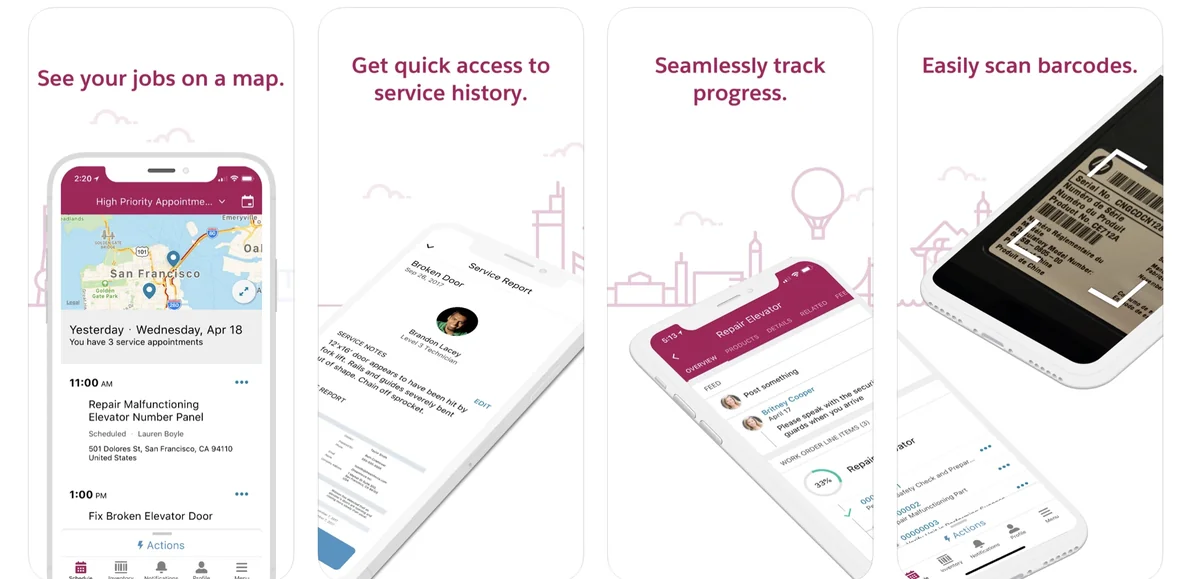
Mobile App Features
Key mobile app capabilities include:
- Offline Data Access: View appointment details, customer information, and work instructions without connectivity
- Real-Time Updates: Sync appointment status, time tracking, and completion data
- Navigation Integration: Direct integration with device GPS and mapping applications
- Photo and Signature Capture: Document work completion with visual evidence
- Inventory Management: Track parts usage and request additional inventory
What is FSL in Mobile Context?
FSL mobile functionality extends beyond basic appointment viewing to include comprehensive field operations management. Technicians can update work order status, capture customer signatures, and access knowledge articles for troubleshooting.
Integration with Service Cloud
Field Service Lightning integrates seamlessly with Service Cloud to provide end-to-end service management from initial customer contact through field service completion.
Case-to-Work-Order Workflow
The typical workflow progression follows this pattern:
- Customer creates case through Service Cloud channels
- Service agent attempts remote resolution
- If on-site service is required, agent creates Work Order from Case
- Work Order generates Service Appointment based on Work Type configuration
- Dispatcher assigns appointment to appropriate technician
- Technician completes work and updates appointment status
- Case is automatically updated with field service completion details
Implementation Best Practices
Successful FSL implementations require careful planning around data model design, user training, and change management.
Data Model Considerations
- Work Type Standardization: Create consistent Work Types for common service scenarios
- Skill-Based Routing: Define Service Resource Skills to match technicians with appropriate work
- Territory Optimization: Design territories based on actual travel patterns, not just geographic proximity
- Operating Hours Configuration: Set realistic service windows that account for travel time and work complexity
User Adoption Strategies
- Role-Specific Training: Customize training for dispatchers, technicians, and service agents
- Gradual Rollout: Implement FSL in phases, starting with simple use cases
- Mobile Device Management: Ensure technicians have appropriate devices and connectivity
- Performance Monitoring: Track key metrics like first-time fix rate and schedule adherence
Common Implementation Challenges
Organizations frequently encounter specific challenges when implementing Field Service Lightning:
Scheduling Complexity
Complex scheduling requirements involving multiple skills, equipment dependencies, and customer preferences can overwhelm standard scheduling policies. Custom scheduling logic may be required for specialized scenarios.
Mobile Connectivity Issues
Technicians working in areas with poor cellular coverage need robust offline functionality. Proper mobile app configuration and data synchronization strategies are essential.
Integration Complexity
Integrating FSL with existing ERP, inventory management, or legacy field service systems requires careful API design and data mapping.
Performance Optimization and Governor Limits
FSL implementations must consider Salesforce platform limits and optimization strategies:
Key Governor Limits
- API Calls: Scheduling operations consume API calls; batch operations where possible
- SOQL Queries: Complex territory and resource queries can hit query limits
- Data Storage: Service Appointment and Work Order records accumulate quickly
Optimization Strategies
- Use bulk scheduling APIs for multiple appointments
- Implement data archiving for completed work orders
- Optimize SOQL queries with selective filters and indexes
- Consider platform events for real-time updates
Frequently Asked Questions
What is the difference between Salesforce Field Service and Service Cloud?
Service Cloud handles customer service cases and support workflows, while Salesforce Field Service extends these capabilities to manage mobile technicians and on-site service delivery. FSL adds scheduling, dispatching, territory management, and mobile app functionality to Service Cloud’s case management foundation.
Can Field Service Lightning work offline?
Yes, the Field Service Mobile app includes offline capabilities. Technicians can view appointment details, update work order status, and capture photos without internet connectivity. Data synchronizes automatically when connection is restored.
How does FSL scheduling optimization work?
FSL uses scheduling policies that consider factors like technician skills, location, availability, and travel time. The platform calculates optimal assignments based on configured business rules and can automatically schedule appointments or provide recommendations to dispatchers.
What industries benefit most from Salesforce Field Service?
Industries with mobile service teams see the greatest benefit, including utilities, telecommunications, healthcare, HVAC, equipment maintenance, and installation services. Any organization coordinating multiple technicians across different locations can leverage FSL capabilities.
How do Service Territories affect scheduling?
Service Territories define where technicians can work and influence scheduling optimization. Primary territories represent a technician’s main service area, while secondary and relocation territories handle overflow and specialized assignments. Proper territory design reduces travel time and improves scheduling efficiency.