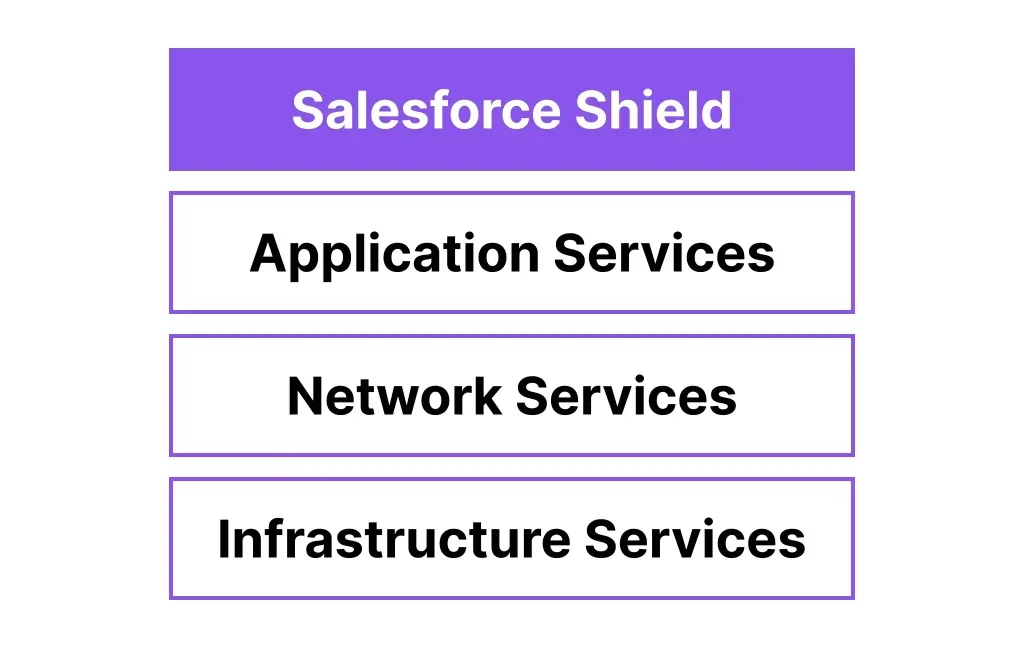
Salesforce Shield provides enterprise-grade security and compliance capabilities for organizations handling sensitive data or operating in regulated industries. This comprehensive security platform includes four core components: Platform Encryption, Field Audit Trail, Event Monitoring, and Data Detect, each designed to address specific compliance and security requirements beyond standard Salesforce offerings.
Organizations implementing Salesforce Shield gain native data encryption, extended audit capabilities, real-time threat monitoring, and sensitive data discovery tools. These features work together to help meet regulatory requirements like GDPR, HIPAA, SOX, and industry-specific compliance standards.

What is Salesforce Shield?
Salesforce Shield is an add-on security platform that extends Salesforce’s native security model with advanced compliance and monitoring capabilities. Unlike standard Salesforce security features, Shield addresses the shared responsibility model by providing customer-controlled security layers.
The platform consists of four integrated components:
- Platform Encryption: AES 256-bit field-level encryption with customer-managed keys
- Field Audit Trail: Extended field history tracking up to 10 years
- Event Monitoring: Real-time user activity monitoring and threat detection
- Data Detect: Automated sensitive data discovery and classification
Organizations can purchase the complete Shield bundle or individual components based on specific compliance requirements. Shield capabilities extend across all Salesforce clouds, including Sales Cloud, Service Cloud, Marketing Cloud, and Data Cloud.
Shield Platform Encryption
Platform Encryption provides native field-level encryption using AES 256-bit encryption standards. This component encrypts data at rest within Salesforce data centers, converting plaintext into ciphertext that remains unreadable to database administrators and unauthorized users.
Key Encryption Features
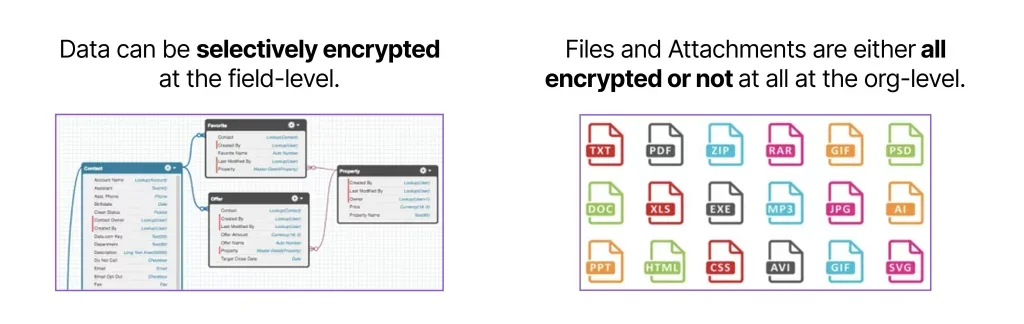
Platform encryption operates at the field level, allowing selective encryption of sensitive data fields while maintaining standard Salesforce functionality. The encryption process is transparent to authorized users but provides an additional security layer for data storage.
- Field-level granularity: Encrypt specific fields containing sensitive data
- Transparent operation: Encrypted fields appear normal to authorized users
- At-rest protection: Data encrypted when stored in Salesforce databases
- File encryption: All-or-nothing encryption policy for attachments and files
Encryption Key Management Options
Salesforce Shield offers three key management approaches to meet different organizational security requirements:
| Key Management Type | Description | Use Case |
|---|---|---|
| Salesforce-Generated | Keys managed entirely by Salesforce | Quick implementation, standard security needs |
| Bring Your Own Key (BYOK) | Customer-managed keys with existing infrastructure | Enterprise customers with key management systems |
| Cache-Only | Customer-controlled keys never stored by Salesforce | Maximum security requirements, air-gapped scenarios |
Probabilistic vs Deterministic Encryption
Platform encryption supports two encryption schemes with different security and functionality trade-offs:
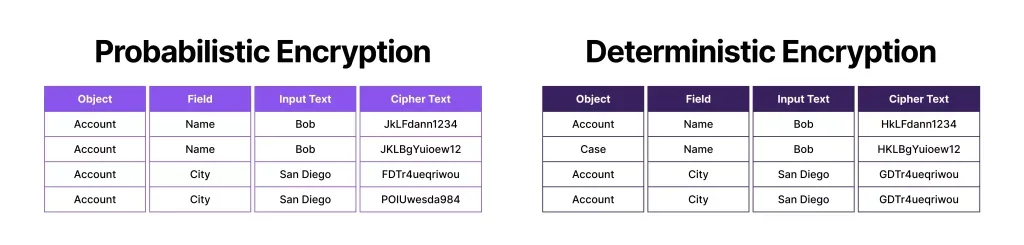
Probabilistic Encryption uses fully randomized initialization vectors, providing maximum security but limiting filtering capabilities. Each encryption operation produces unique ciphertext even for identical plaintext values.
Deterministic Encryption uses static initialization vectors per field, enabling exact-match filtering while maintaining strong security. This scheme allows reports and list views to function with encrypted fields using exact match criteria.
Platform Encryption Limitations
Understanding encryption limitations helps plan implementation strategies:
- File encryption applies to all files and attachments (not selective)
- Existing files require Salesforce Support assistance for encryption
- Some Salesforce features have reduced functionality with encrypted fields
- SOQL queries against encrypted fields support limited operators
Field Audit Trail
Field Audit Trail extends Salesforce’s standard field history tracking from 18-24 months to up to 10 years. This component provides comprehensive change tracking for compliance requirements and forensic analysis.
Enhanced Tracking Capabilities
Shield’s audit trail significantly expands tracking capacity and retention compared to standard field history:
| Feature | Standard Field History | Shield Field Audit Trail |
|---|---|---|
| Fields per object | 20 fields | 60 fields |
| Retention period | 18-24 months | 1 month to 10 years |
| Retention policies | Org-wide only | Object-specific policies |
| Archive access | Standard UI/API | UI + dedicated archive API |
Audit Trail Configuration
Field tracking policies define what data to track, retention periods, and deletion schedules. These policies use Salesforce’s Metadata API for configuration and management.
Organizations can set different retention policies per object type, allowing flexible compliance strategies. For example, financial records might require 7-year retention while marketing data needs only 2 years.
Event Monitoring
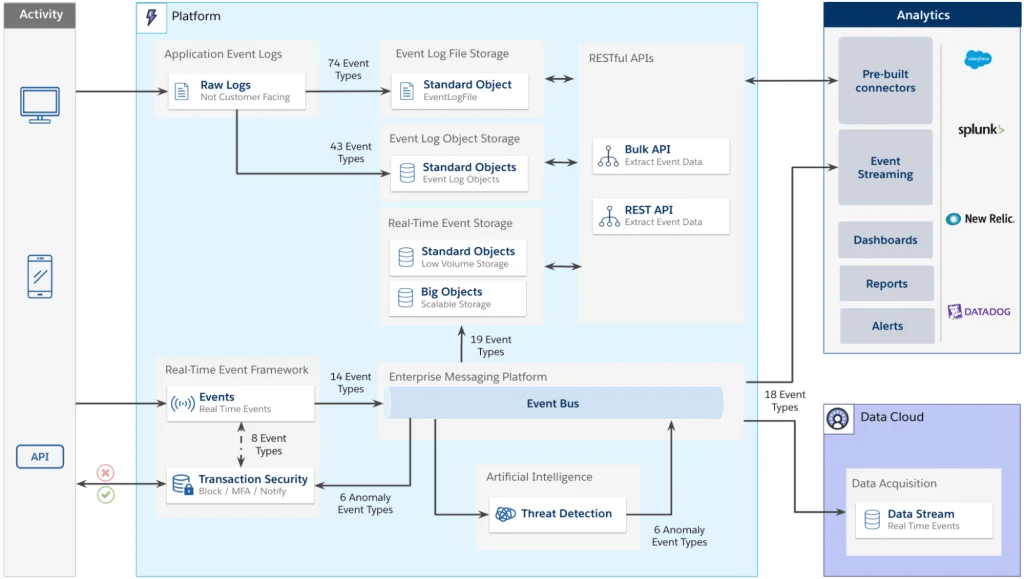
Event Monitoring provides real-time visibility into user activities across Salesforce interfaces, including web browsers, mobile apps, and API access. This component enables proactive threat detection and policy enforcement.
Core vs Real-Time Monitoring
Core Event Monitoring captures user activities in event logs updated every few hours. These logs provide comprehensive activity history for analysis and reporting.
Real-Time Event Monitoring processes events as they occur, enabling immediate response through Transaction Security Policies. Administrators can block suspicious activities and trigger alerts in real-time.
Transaction Security Policies
Transaction Security Policies define automated responses to specific user behaviors or system events. These policies can:
- Block user actions based on defined criteria
- Require additional authentication for sensitive operations
- Generate alerts for security teams
- Log detailed information for forensic analysis
Event Monitoring Use Cases
Event monitoring serves both security and performance optimization purposes:
Security Monitoring:
- Detect unusual login patterns or locations
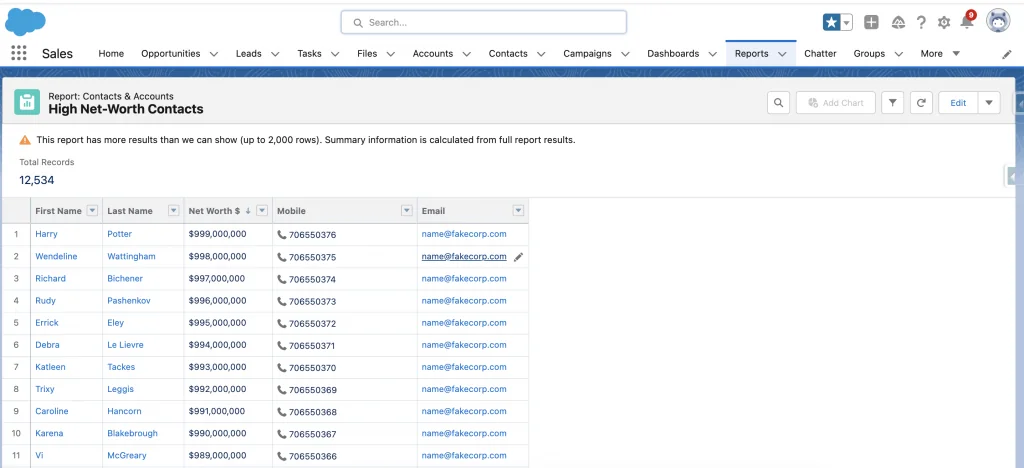
- Monitor bulk data exports or report downloads
- Track access to sensitive records or fields
- Identify potential insider threats
Performance Monitoring:
- Identify slow-running reports or queries
- Monitor API usage patterns
- Track system resource consumption
- Optimize user experience based on activity patterns
Data Detect
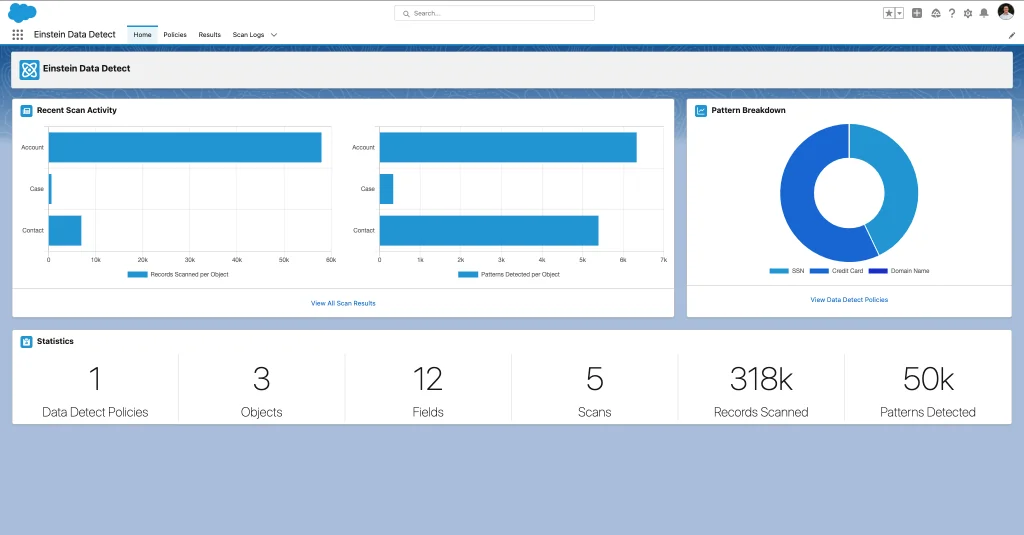
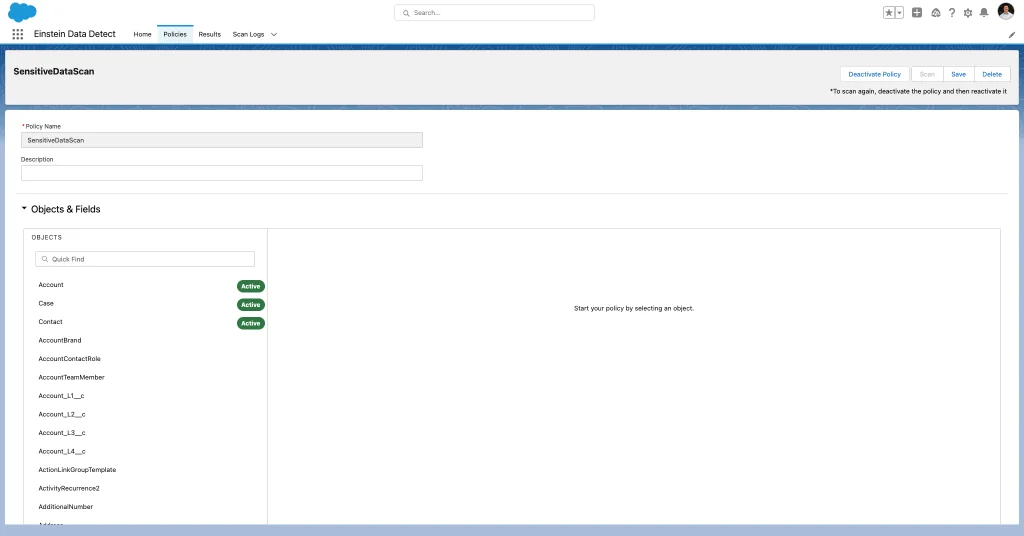
Data Detect automatically scans Salesforce data to identify and classify sensitive information. This component helps organizations understand their data landscape and implement appropriate protection measures.
Data Detect integrates with Platform Encryption and Field Audit Trail to provide comprehensive data protection workflows. The tool identifies personally identifiable information (PII), financial data, health records, and other sensitive content based on configurable patterns and rules.
Salesforce Shield Implementation Guide
Implementing Salesforce Shield requires careful planning to balance security requirements with user functionality. Follow this structured approach for successful deployment.
Pre-Implementation Assessment
Before enabling Shield components, conduct a thorough assessment of your organization’s requirements:
- Compliance Requirements: Identify specific regulatory standards (GDPR, HIPAA, SOX)
- Data Classification: Catalog sensitive data types and locations
- User Impact Analysis: Assess how encryption will affect existing workflows
- Integration Dependencies: Review third-party integrations and API usage
Implementation Phases
Phase 1: Data Discovery and Classification
Use Data Detect to identify sensitive data across your Salesforce org. This baseline assessment informs encryption and audit trail strategies.
Phase 2: Platform Encryption Deployment
Start with non-critical fields in sandbox environments. Test functionality impact before production deployment. Consider deterministic encryption for fields used in reports and list views.
Phase 3: Field Audit Trail Configuration
Configure retention policies based on compliance requirements. Set up object-specific policies to optimize storage costs while meeting regulatory needs.
Phase 4: Event Monitoring Setup
Implement core event monitoring first, then add real-time policies gradually. Start with high-risk scenarios like bulk data exports or unusual login patterns.
Best Practices for Shield Implementation
- Start Small: Begin with pilot groups and non-critical data
- Test Thoroughly: Validate all integrations and custom code with encrypted fields
- Document Everything: Maintain detailed records of encryption policies and key management procedures
- Train Users: Educate teams on any functional changes from encryption
- Monitor Performance: Track system performance impact and optimize as needed
Shield CRM Integration
Salesforce Shield integrates seamlessly with all Salesforce CRM products, extending security capabilities across Sales Cloud, Service Cloud, and custom applications built on the Salesforce Platform.
Cross-Cloud Security
Shield’s security model spans multiple Salesforce clouds:
- Sales Cloud: Encrypt opportunity data, account information, and lead details
- Service Cloud: Protect case data, customer communications, and knowledge articles
- Marketing Cloud: Secure customer journey data and campaign information
- Data Cloud: Encrypt unified customer profiles and analytics data
API and Integration Considerations
Shield components affect API behavior and third-party integrations:
- Encrypted fields return ciphertext via API unless properly authenticated
- SOQL queries against encrypted fields have operator limitations
- Bulk API operations may require special handling for encrypted data
- Integration users need appropriate permissions for encrypted field access
Advanced Shield Configuration
Advanced Shield configurations address complex enterprise requirements and edge cases.
Custom Metadata Encryption
Winter ’26 introduced comprehensive database encryption capabilities, including custom metadata, Apex code, and configuration data while maintaining full functionality.
External Key Management
Enterprise customers can integrate external key management systems for maximum control over encryption keys. This approach requires careful architecture planning and ongoing key lifecycle management.
Performance Optimization
Shield implementations require performance monitoring and optimization:
- Monitor query performance on encrypted fields
- Optimize report filters to work with deterministic encryption
- Plan for increased storage requirements with audit trail data
- Configure event monitoring to balance security and system performance
Frequently Asked Questions
What is the difference between Salesforce Shield and standard Salesforce security?
Salesforce Shield provides advanced security capabilities beyond standard Salesforce features. While standard Salesforce includes field-level security, sharing rules, and basic audit trails, Shield adds native encryption, extended audit retention (up to 10 years), real-time event monitoring, and automated sensitive data discovery. Shield addresses enterprise compliance requirements that standard security cannot meet.
Can I encrypt existing data with Platform Encryption?
Yes, but the process varies by data type. For field data, you can enable encryption on existing fields and the data will be encrypted during the next update. For files and attachments, you must contact Salesforce Support to encrypt existing files after enabling the encryption policy. New files and attachments are automatically encrypted once the policy is active.
How does Shield platform encryption affect SOQL queries and reports?
Platform encryption impacts query functionality depending on the encryption scheme. Probabilistic encryption prevents most filtering operations, while deterministic encryption supports exact match queries only. Operators like LIKE, CONTAINS, greater than, and starts with don’t work with encrypted fields. Reports and list views using encrypted fields may have limited filtering capabilities.
What are the storage implications of Field Audit Trail?
Field Audit Trail significantly increases storage requirements as it retains field history data for up to 10 years compared to 18-24 months for standard field history. The exact storage impact depends on the number of tracked fields, record volume, and change frequency. Organizations should plan for substantial storage increases and associated costs when implementing extended audit retention.
Can I use Salesforce Shield with third-party integrations?
Yes, but integrations require careful planning. Third-party systems accessing encrypted fields via API will receive ciphertext unless properly authenticated with decrypt permissions. Integration users need specific permissions to access encrypted data. Some integration patterns may need modification to work with encrypted fields, particularly those relying on field-level filtering or data manipulation.
What compliance standards does Salesforce Shield help meet?
Salesforce Shield helps organizations meet various compliance requirements including GDPR (data protection and audit trails), HIPAA (healthcare data encryption), SOX (financial audit requirements), PCI DSS (payment data protection), and industry-specific regulations. The combination of encryption, extended audit trails, and event monitoring provides controls required by most major compliance frameworks.