A Salesforce Trailblazer is a learner, builder, administrator, developer, consultant, or architect who uses Trailhead and the Trailblazer Community to build Salesforce skills. Trailhead gives you guided learning, hands-on practice, points, badges, ranks, and superbadges, so a salesforce trailblazer can show learning progress without needing access to a production org.
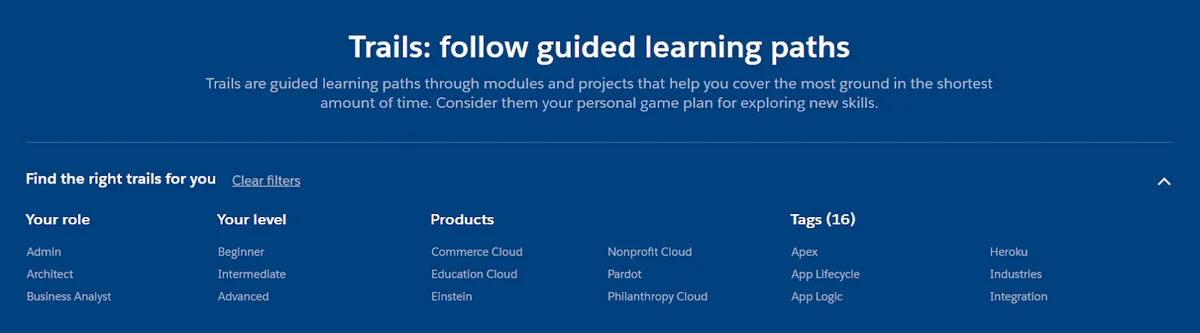
This salesforce trailblazer guide explains how Trailhead works, how badges in Salesforce appear on your Trailblazer profile, how trailblazer ranks are calculated, and how to use Trailhead for Salesforce job preparation. The advice is written for people who need a plan, not a pile of random modules, so a salesforce trailblazer can connect learning to work.
What is a Salesforce Trailblazer?
A Salesforce Trailblazer is someone who learns and applies Salesforce skills through Trailhead, Salesforce credentials, Trailblazer Community participation, or project work. A salesforce trailblazer can be new to the platform or already responsible for an org. In practice, the term covers beginners learning Sales Cloud setup, admins studying Flow and security, developers practicing Apex and Lightning Web Components, and architects validating design decisions against Salesforce documentation.
Trailhead is Salesforce’s learning platform. Salesforce describes Trailhead content as a mix of badges, trails, projects, superbadges, trailmixes, role-based paths, and certifications. For an official starting point, use Salesforce Trailhead and the Trailhead basics module.
The important point is simple: a salesforce trailblazer profile is not the same thing as a Salesforce certification record. A salesforce trailblazer should separate learning evidence from credential evidence when presenting skills. Badges show completed Trailhead learning activities. Salesforce certifications show passed proctored credential exams and can be verified through the official credential verification page.
How does Trailhead for Salesforce learning work?
Trailhead for Salesforce works best when a salesforce trailblazer chooses a role first, then follows a path. Random modules can still teach you something, but they often leave gaps in security, data modeling, automation, integration, and release management. In enterprise orgs, those gaps matter because a small permission mistake or an unbulkified trigger can affect many users.
Trailhead for Salesforce terminology
| Trailhead item | What it means | When to use it |
|---|---|---|
| Module | A short learning unit with readings, quizzes, and sometimes hands-on challenges. | Use modules to learn a focused topic such as users, reports, Flow, SOQL, or permission sets. |
| Project | A guided build exercise with step-by-step tasks in a practice org. | Use projects when you need to configure a feature instead of only reading about it. |
| Trail | A guided learning path made from modules and projects. | Use a trail when you want an ordered route through a product area. |
| Trailmix | A custom playlist of trails, modules, projects, or superbadges. | Use a trailmix for certification prep, team onboarding, or a company-specific learning plan. |
| Superbadge | A scenario-based assessment that asks you to solve requirements in a hands-on org. | Use superbadges after you understand the underlying feature and want practice with less hand-holding. |
| Certification | A Salesforce credential earned by passing an official exam. | Use certifications to validate a role such as Administrator, Platform Developer, Consultant, or Architect. |
Salesforce Help describes trailmixes as custom learning paths that can include trails, modules, projects, or superbadges. Salesforce also provides curated exam-prep trailmixes, but a trailmix should support your exam guide; it should not replace reading the official exam objectives.
How do badges in Salesforce work?
Badges in Salesforce are Trailhead achievements that appear when you complete modules, projects, or other learning content. A badge usually represents a narrow skill area, such as setting up users, building reports, writing SOQL, creating flows, or understanding a Salesforce product.
A salesforce trailblazer should not treat badges in Salesforce as proof that someone can run a production implementation alone. A badge confirms completion of the learning unit. Real delivery still requires judgment: security review, data migration planning, deployment control, testing, rollback planning, and stakeholder validation.
Badges in Salesforce vs real project skills
| Signal | What it proves | What it does not prove |
|---|---|---|
| Trailhead badge | You completed a specific learning item and passed its quiz or challenge. | It does not prove you can design a full solution under business constraints. |
| Superbadge | You applied skills to a scenario with build requirements. | It does not replace code review, admin review, or production deployment experience. |
| Salesforce certification | You passed an official credential exam for a defined role or product. | It does not guarantee recent hands-on work unless paired with projects. |
| Implementation evidence | You delivered configuration, code, migration, automation, or support in a real org. | It may be hard to verify unless you can explain the design and tradeoffs clearly. |
What are Trailhead badges?
These badges are the visible completion records on Trailhead. Salesforce says learners earn points and badges as they complete modules and projects, and those points contribute to trailblazer ranks. You can review Salesforce’s rank explanation on the official Trailblazer Ranks page.
For a salesforce trailblazer, badges are useful when they form a pattern. Ten unrelated badges may show curiosity. A focused set on data security, Flow, reports, Apex, or Service Cloud shows a clearer learning direction.
Trailhead badges to prioritize by role
| Role goal | Start with these topics | Then add | Avoid at first |
|---|---|---|---|
| Salesforce Admin | Data model, users, profiles, permission sets, record access, reports, dashboards, Flow basics. | Screen flows, record-triggered flows, approval process troubleshooting, data import practice. | Deep Apex before you understand declarative automation and sharing. |
| Platform Developer | Object model, SOQL, Apex classes, triggers, tests, Lightning Web Components, deployment basics. | Integration, async Apex, platform events, secure coding, unit testing, source-driven development. | Writing code that bypasses CRUD, FLS, or sharing requirements. |
| Consultant | Sales or Service Cloud process design, requirements discovery, reports, automation, user adoption. | Omni-Channel, Knowledge, Experience Cloud, forecasting, territory planning, implementation lifecycle. | Collecting product badges without learning business-process design. |
| Architect | Data architecture, sharing and visibility, integration, identity, lifecycle management, governance. | Scalability patterns, large data volume design, event-driven integration, security review habits. | Skipping admin fundamentals because architecture choices depend on platform behavior. |
How do trailblazer ranks work?
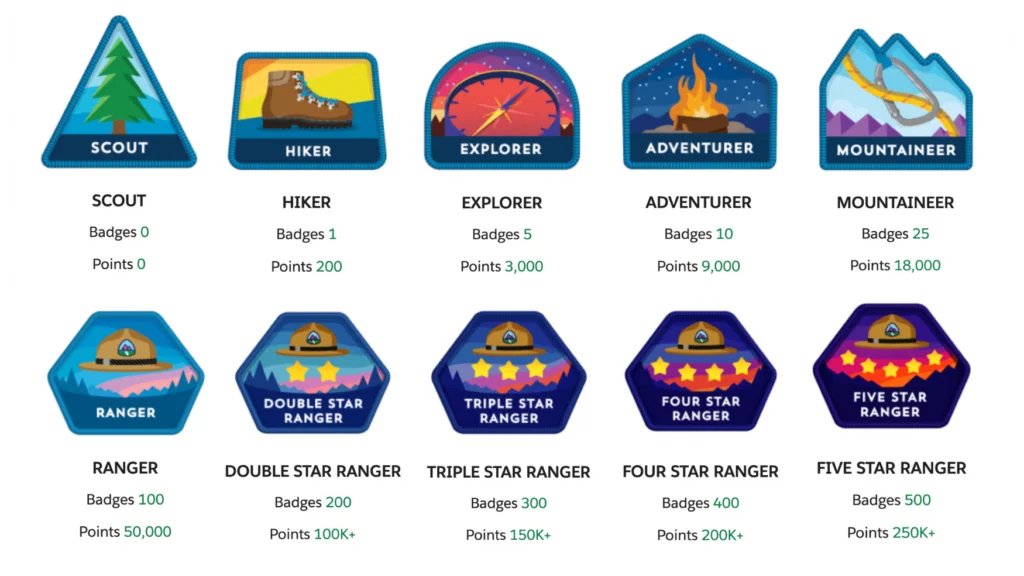
Trailblazer ranks show progress on Trailhead. Salesforce explains that each completed module or project earns a badge and points, and those points move you through the rank structure. Ranger requires 100 badges and 50,000 points. Salesforce later added ranks above Ranger, with each rank adding another 100 badges and 50,000 points.
Trailblazer ranks and what they mean
| Rank area | Typical interpretation | How to read it in hiring or team planning |
|---|---|---|
| Early ranks | The learner has started Trailhead and completed basic learning content. | Ask which topics they studied and whether they practiced in a playground. |
| Ranger | The learner has reached at least 100 badges and 50,000 points. | Look for a focused learning path, not only badge count. |
| Ranks above Ranger | The learner has continued beyond Ranger as Trailhead content expanded. | Ask for depth: superbadges, projects, production work, and recent release learning. |
A salesforce trailblazer should use rank as a progress signal, not as the whole resume. A salesforce trailblazer also needs examples of applied work. In a production team, I would rather interview a Ranger who can explain record access, bulkification, test strategy, and deployment risk than someone with many badges but no clear implementation reasoning.
How should a Salesforce Trailblazer build a study plan?
A Salesforce Trailblazer study plan should start with the work you want to do. Choose one track for 30 to 60 days, finish the core modules, complete at least one project, and then test the skill in a Trailhead Playground or Developer Edition org. A salesforce trailblazer should use Trailhead for Salesforce learning as a lab, not as a checklist.
Step-by-step plan for a new salesforce trailblazer
- Pick one role goal. Admin, developer, consultant, business analyst, and architect paths need different practice.
- Read the official skill or exam outline. For certification preparation, start with the Salesforce credential page and exam guide, not a third-party checklist.
- Build a trailmix. Add only the modules, projects, and superbadges that match your goal.
- Use one practice org per learning area. Keep admin, developer, and integration experiments separate so old metadata does not hide errors.
- Write down mistakes. Track setup paths, error messages, failed challenge checks, and the final fix.
- Review release changes. For 2026 learning, check current release notes before copying old Apex, Flow, or security guidance.
30-day Trailhead for Salesforce plan
| Week | Admin track | Developer track | Output you should keep |
|---|---|---|---|
| Week 1 | Platform basics, object model, fields, page layouts, users. | Platform basics, object model, SOQL basics, Developer Console or VS Code setup. | One-page notes on objects, relationships, and record ownership. |
| Week 2 | Profiles, permission sets, role hierarchy, sharing rules, reports. | Apex classes, triggers, collections, SOQL outside loops. | A diagram of who can see which records and why. |
| Week 3 | Flow basics, record-triggered flows, validation rules, approvals. | Unit tests, test data setup, governor limits, secure Apex. | A working automation with test cases or screenshots. |
| Week 4 | Data import, dashboards, change management, superbadge preparation. | LWC basics, deployment, user-mode data access, superbadge preparation. | A small portfolio note explaining one build decision and one tradeoff. |

How do Superbadges help a Salesforce Trailblazer?
Superbadges help a salesforce trailblazer move from reading to applying. Salesforce describes superbadges as hands-on work where you solve real-world challenges. The official Superbadges page lists current superbadges across admin, developer, flow, security, Agentforce, and platform topics.
Start a superbadge only after you understand the concepts it tests. If the superbadge covers Flow loops, collections, and error handling, finish those prerequisite badges first. If it covers Apex REST or callouts, practice the Apex Developer Guide examples first and understand test mocking before you open the challenge. That sequence helps a salesforce trailblazer move from guided learning to scenario work.
Superbadge preparation checklist
- Create the required special org or Trailhead Playground exactly as the challenge instructs.
- Do not reuse an old playground with leftover metadata unless the superbadge explicitly allows it.
- Read every requirement twice and map each requirement to metadata, code, data, or security.
- Verify field names, object names, permission sets, and automation entry criteria before checking the challenge.
- Keep a change log so you can reverse the last change when a challenge verifier fails.
How can Trailhead badges support certification prep?
Badges can support certification preparation, but they should not be your only source. A salesforce trailblazer should compare each badge topic with the official exam guide. Salesforce certification exams test judgment across scenarios. Trailhead teaches many of the skills, but you still need the official exam guide, hands-on practice, release-note review, and weak-area revision.
For example, a new admin studying for the Salesforce Administrator credential should use the official preparation trailmix, then map every exam objective to a setup task. A developer studying Platform Developer I should pair those badges with Apex Developer Guide sections on triggers, testing, governor limits, and secure data access.
Trailhead badges, exams, and work evidence
| Goal | Trailhead role | Extra work required |
|---|---|---|
| Pass an entry credential | Use curated exam-prep trailmixes and foundational badges. | Study the exam guide, review setup paths, and complete practice scenarios without notes. |
| Get project-ready | Use projects and superbadges to practice configuration and troubleshooting. | Build a sample app, document requirements, and explain your access model. |
| Prepare for architecture work | Use data, sharing, identity, integration, and lifecycle management badges. | Create diagrams, compare options, and validate limits against official docs. |
What should developers practice beyond Trailhead badges?
Developer-focused badges often introduce the syntax, but production development requires bulkification, tests, security enforcement, and deployment discipline. A salesforce trailblazer developer should practice the same requirement with multiple records and restricted users. Salesforce documents governor limits in the Apex Developer Guide and states that Apex code deployed to production must have at least 75% test coverage and passing tests.
The following practice example uses standard objects only. It demonstrates habits a salesforce trailblazer should use while learning Apex: one SOQL query, no DML inside a loop, partial-save handling, and user-mode data access. In API v67.0 and later, Salesforce release notes state that database operations run in user mode by default; explicit access mode is still useful when you want code behavior to be clear during review.
public with sharing class TrailheadPracticeService {
    public static void markHotAccountsReviewed() {
        List<Account> accounts = [
            SELECT Id, Name, Rating, Description
            FROM Account
            WHERE Rating = 'Hot'
            WITH USER_MODE
            LIMIT 200
        ];

        for (Account acct : accounts) {
            acct.Description = 'Reviewed during Trailhead developer practice';
        }

        Database.SaveResult[] results = Database.update(
            accounts,
            false,
            AccessLevel.USER_MODE
        );

        for (Database.SaveResult result : results) {
            if (!result.isSuccess()) {
                System.debug(LoggingLevel.WARN, result.getErrors()[0].getMessage());
            }
        }
    }
}
@IsTest
private class TrailheadPracticeServiceTest {
@IsTest
static void marksHotAccountsReviewed() {
Account acct = new Account(
Name = 'Trailhead Practice Account',
Rating = 'Hot'
);
insert acct;
Test.startTest();
TrailheadPracticeService.markHotAccountsReviewed();
Test.stopTest();
Account saved = [
SELECT Description
FROM Account
WHERE Id = :acct.Id
LIMIT 1
];
System.assertEquals(
'Reviewed during Trailhead developer practice',
saved.Description
);
}
}Use this kind of small exercise after developer badges. Then change one condition at a time: add multiple accounts, add a user without edit access, add a validation rule, and run tests again. That practice teaches you more than only collecting badges.
Common errors with Trailhead and Trailblazer profiles
Many Trailhead problems come from org mismatch, profile mismatch, browser sessions, or old metadata. A salesforce trailblazer can save time by checking the connected org before changing the solution. Before assuming the platform is wrong, check the basics.
| Problem | Likely cause | Practical fix |
|---|---|---|
| Challenge does not verify | You built in the wrong playground or used a different connected org. | Open the challenge, confirm the selected hands-on org, and reconnect the intended playground. |
| Badge appears missing | The completion has not refreshed or you are signed in with another Trailblazer account. | Check your profile while signed in, then confirm the email/account used for Trailhead. |
| Superbadge step fails without a clear reason | A field API name, automation condition, permission, or data record does not match the requirement. | Compare each requirement with metadata names. Do not rename items after a verifier expects them. |
| Certification does not show on profile | Your Webassessor or credential account may not be linked, or the update has not completed. | Use Salesforce credential verification and account linking guidance from the official credentials pages. |
| Team trailmix has poor completion | The trailmix is too broad or not tied to a job task. | Split it by role and include only the modules needed for that team’s next release or support queue. |
Best practices for enterprise Trailhead programs
In enterprise orgs, Trailhead works best when it supports a delivery standard. A salesforce trailblazer program should not reward only badge count. It should connect learning to access control, release readiness, support quality, and implementation patterns.
Use trailmixes for roles, not departments
A Sales Operations team may contain admins, analysts, product owners, and support users. Give each role a trailmix that matches the work. An admin trailmix should include security, Flow, data quality, and deployment basics. A sales user trailmix should focus on leads, opportunities, forecasting, activities, and dashboards.
Connect learning to governance
- Require security badges before granting setup permissions in a sandbox.
- Require Flow debugging practice before a user edits production automation.
- Require Apex testing and governor limit learning before code review access.
- Review badges during onboarding, but validate skill through a sandbox task.
Track skill gaps, not only trailblazer ranks
Trailblazer ranks help motivate learners, but skill coverage matters more. A team with high ranks can still have weak knowledge in sharing, integration, or data lifecycle management. Use a skills matrix that maps each salesforce trailblazer to the Salesforce features they actually support.
Related SalesforceTutorial resources
Use these SalesforceTutorial resources with this guide: Salesforce Admin role and skills, Salesforce Flow configuration guide, Apex code examples and best practices, Salesforce AI Specialist certification guide, and Salesforce Developer Edition setup.
Official Salesforce references
- Salesforce Trailhead home
- Trailhead basics: learning paths and certifications
- Trailblazer Ranks
- Trailhead Superbadges
- Salesforce credential verification
- Apex trigger and bulk request best practices
- Apex testing and code coverage
- Salesforce release notes: database operations run in user mode by default
Frequently Asked Questions
What is a Salesforce Trailblazer?
A Salesforce Trailblazer is a person who learns, builds, supports, or advises on Salesforce using Trailhead, the Trailblazer Community, Salesforce credentials, and hands-on practice. The term can describe a beginner, admin, developer, consultant, architect, partner, or customer user.
Are badges in Salesforce the same as certifications?
No. Badges in Salesforce usually refer to Trailhead badges earned by completing learning content. Certifications are official Salesforce credentials earned through proctored exams and verified through Salesforce credential verification.
How many Trailhead badges do I need to become Ranger?
Salesforce states that Ranger rank requires 100 badges and 50,000 points. Trailblazer ranks above Ranger continue in larger steps, but rank should support your learning plan rather than replace role-based skill practice.
Do Trailhead badges help with Salesforce jobs?
Trailhead badges help when they show focused learning in an area such as admin setup, Flow, Apex, security, reports, or Service Cloud. For jobs, pair trailhead badges with superbadges, certification preparation, sandbox projects, and clear explanations of the choices you made.
Is Trailhead for Salesforce enough to pass an exam?
Trailhead for Salesforce is useful for exam preparation, but it is not enough by itself for many learners. Use the official exam guide, curated trailmixes, hands-on practice, release-note review, and mock scenarios that test your weak areas.
What should I do after earning trailhead badges?
After earning trailhead badges, apply the skill in a Trailhead Playground or Developer Edition org. Build a small use case, document the access model, test edge cases, and explain what would change before moving the same idea to production.