Salesloft Drift became a Salesforce security concern after compromised OAuth tokens tied to the Drift integration were used to access customer Salesforce data in August 2025. This guide explains what happened, how to investigate exposure, and how Salesforce admins should harden connected app access without treating the incident as a core Salesforce platform vulnerability.
Use this article as an implementation checklist for Salesforce admins, security architects, and developers who manage connected apps, API access, Event Monitoring, and third-party integrations.
On this page
Salesloft Drift: what Salesforce teams need to know
Salesloft Drift is a sales and marketing engagement product that can integrate with Salesforce through OAuth. In a normal implementation, OAuth lets the application receive an access token and, when configured, a refresh token so it can call Salesforce APIs without storing a user’s Salesforce password.
For Salesforce teams, a Salesloft Drift review starts with OAuth design, not with page layout or chatbot configuration. Salesloft Drift controls belong in the same review cycle as other API integrations.
The risk is not OAuth itself. The risk appears when a third-party application, an integration user, or a token store is compromised. In enterprise orgs, the blast radius depends on the scopes granted to the connected app, the permissions assigned to the integration user, IP policies, session policies, and how much credential material users have stored inside Salesforce records.
For background on connected app governance, review the official Salesforce guidance for managing current OAuth connected app sessions and Trailhead’s external client app basics. Salesforce also published a dedicated Drift App unauthorized access incident advisory.
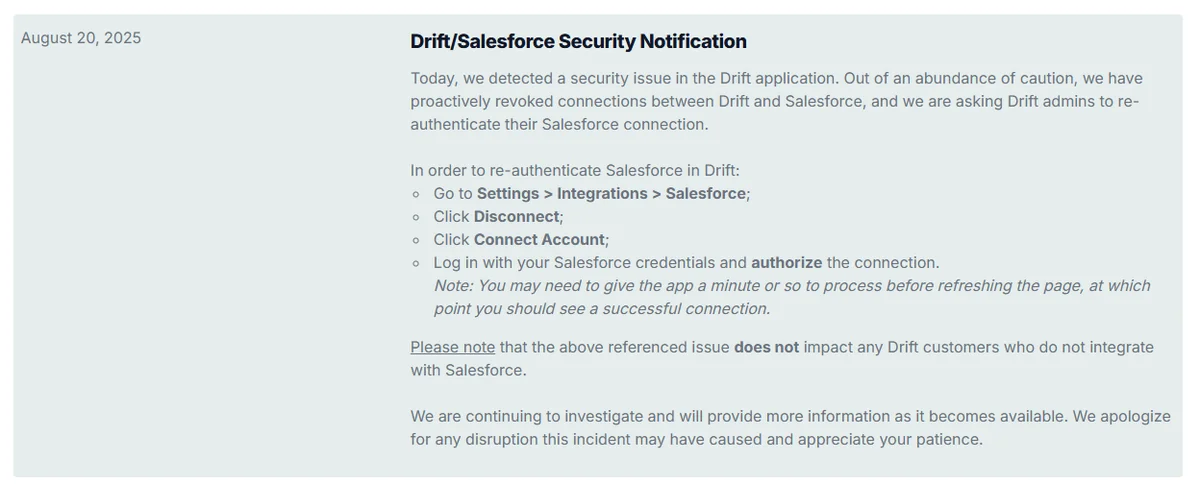
What happened in the Drift Salesforce breach?
The Drift Salesforce breach refers to the August 2025 campaign in which a threat actor used compromised OAuth tokens associated with Salesloft Drift to access Salesforce customer instances. Google Threat Intelligence Group reported activity from August 8, 2025 through at least August 18, 2025, and Salesforce’s advisory states that Salesloft and Salesforce invalidated active access and refresh tokens for the Drift application and removed Drift from AppExchange while the investigation continued.
Drift Salesforce breach: confirmed timeline
| Date | What Salesforce teams should record | Why it matters |
|---|---|---|
| August 8-18, 2025 | Review Salesforce API, login, and query activity during this window. | This is the period publicly identified for the main Salesforce data theft activity. |
| August 20, 2025 | Confirm whether your org had active Salesloft Drift OAuth sessions before token revocation. | Token invalidation reduces future access, but it does not answer what data was already read. |
| August 28, 2025 | Check whether the Drift connection was disabled in your environment and whether any related integrations remained active. | Google later advised all Drift customers to review connected integrations, not only the Salesforce integration. |
For most admins, the Salesloft Drift timeline should become a case study in third-party app governance.
Salesforce and Google both framed the issue as abuse of a third-party application connection, not a vulnerability in the core Salesforce platform. That distinction matters for remediation. Patching Salesforce is not the main action. The main actions are token revocation, credential rotation, log review, connected app restriction, and secret removal from Salesforce records.
What “salesloft breached to steal oauth tokens for salesforce data-theft attacks” means
The search phrase “salesloft breached to steal oauth tokens for salesforce data-theft attacks” describes the practical risk: an attacker does not need a user’s password if an already-authorized OAuth token can call Salesforce APIs. If that token belongs to a user with broad access, the attacker can query objects such as Case, Account, Contact, Opportunity, and User within the permissions available to that session.
For Salesforce admins, the useful question is not only whether Salesloft Drift was present. Ask which user authorized the app, which scopes were granted, whether the app had refresh-token access, and whether that user could read sensitive fields. A connected app with limited scopes and a tightly permissioned integration user has a different risk profile from an app approved by a system administrator profile.
Salesforce hackers: how to describe the activity accurately
Many searches use the phrase Salesforce hackers, but the more precise description is third-party OAuth token abuse against Salesforce customer orgs. The attacker used Salesforce APIs because the connected app authorization made that access possible. That does not mean every Salesforce org was breached, and it does not mean Salesforce credentials were always stolen directly.
A Salesloft Drift incident review should separate vendor compromise, token compromise, and Salesforce data access because each layer has different evidence.
Use precise wording in executive summaries. Say, “We are investigating whether a third-party OAuth token connected to Salesloft Drift was used to read Salesforce data.” Avoid saying “Salesforce was hacked” unless your evidence shows a direct compromise of your Salesforce tenant or Salesforce identity controls.
How to assess your exposure after Salesloft Drift
Salesloft Drift exposure must be assessed from your org telemetry, not from assumptions. A Salesloft Drift decision should be based on evidence from your own tenant.
Start with facts from your own org. A public report, a vendor notice, or a drift customers list cannot replace log evidence. In production investigations, the right sequence is to identify whether the integration existed, determine the user context, preserve logs, scan for secrets, and rotate anything that may have been exposed.
Drift customers list: what it can and cannot prove
A drift customers list may show which companies used Drift publicly, but it cannot prove whether a specific Salesforce org was connected, whether OAuth tokens existed, or whether data was accessed. Treat vendor notification, Salesforce OAuth usage, Drift admin settings, and Event Monitoring as stronger evidence than any public drift customers list.
In a Salesloft Drift review, a customer reference is only a lead for investigation, not proof of OAuth use.
If leadership asks whether the company appears on a drift customers list, answer with care. A public customer reference does not equal technical exposure. The investigation should focus on your Salesforce connected app records, OAuth sessions, integration users, and event logs.
Immediate containment checklist
- Preserve evidence first. Export relevant Event Monitoring files, Setup Audit Trail, connected app configuration, and identity logs before making broad changes.
- Revoke or confirm revocation of Drift OAuth sessions. Use Salesforce Setup pages for OAuth Connected Apps Usage, or follow Salesforce’s token revocation documentation where programmatic revocation is required.
- Disable unused integrations. Remove or block third-party connected apps that are not currently approved by your security review process.
- Rotate secrets found in Salesforce data. Search for AWS keys, private keys, Snowflake tokens, passwords, webhook secrets, and SSO bypass credentials. Rotate them in the source system, not only in Salesforce.
- Reset affected integration users. Change passwords, review MFA posture, revoke sessions, and reduce permissions before reconnecting any application.
- Notify data owners. Case data, support comments, and description fields often contain customer-specific information that business teams must assess.
How to investigate Salesloft Drift access in Salesforce
A Salesloft Drift investigation should be run like any other API data exposure review: define scope, collect evidence, contain access, then rotate credentials.
Salesforce investigation work should combine Setup review, Event Monitoring, SOQL analysis, and business validation. The exact steps vary by edition, licenses, retention period, and whether Event Monitoring is enabled. If you do not have the required logs, open a Salesforce support case and preserve any logs available from your identity provider, SIEM, proxy, and Drift admin console.
Step 1: Review connected app sessions
For Salesloft Drift, connected app session review is usually the fastest way to confirm whether Salesforce OAuth access existed.
In Setup, search for Connected Apps OAuth Usage. Look for Salesloft, Drift, Drift Email, and related application names. Salesforce’s OAuth usage page can show current OAuth app connections, and admins can revoke sessions or block org-wide access for apps from that area.
Record the app name, authorizing user, last used date, and whether users self-authorized the app. Then review Salesforce connected app OAuth policies for permitted users, refresh token policy, session policy, and IP relaxation.
Step 2: Query available EventLogFile records
Event Monitoring gives Salesforce teams access to detailed security and usage data across Salesforce apps. If Event Monitoring is enabled, start with the EventLogFile object and then download the relevant logs for parsing in your SIEM or a controlled workstation.
-- Find available event log files for the incident period.
-- Run in Workbench, Developer Console Query Editor, or your approved SOQL client.
SELECT Id, EventType, LogDate, LogFileLength
FROM EventLogFile
WHERE LogDate >= 2025-08-08T00:00:00Z
AND LogDate <= 2025-08-19T00:00:00Z
ORDER BY LogDate DESC
LIMIT 2000
Depending on your org and API version, useful event types can include API activity, login activity, and Unique Query events. Salesforce Developer Docs list supported EventLogFile event types, and the Unique Query event type is documented for capturing processed SOQL queries, filter IDs, report IDs, and related database query information. Use API v61.0 or later when you rely on Unique Query event documentation.
Step 3: Look for query patterns without copying attacker logic
Do not rerun suspicious broad extraction queries in production unless your incident commander approves the action. Instead, use count queries and targeted reads to understand what sensitive objects contain, then use downloaded logs to determine what the OAuth session accessed.
-- Inventory high-risk object volume before deeper review.
SELECT COUNT() FROM Case;
SELECT COUNT() FROM Account;
SELECT COUNT() FROM Contact;
SELECT COUNT() FROM Opportunity;
SELECT COUNT() FROM User;
-- Example: review recent cases that may contain credential material.
-- Keep LIMIT values bounded. Do not export more data than the investigation requires.
SELECT Id, CaseNumber, Subject, CreatedDate
FROM Case
WHERE CreatedDate >= 2025-08-08T00:00:00Z
AND CreatedDate <= 2025-08-19T00:00:00Z
ORDER BY CreatedDate DESC
LIMIT 2000 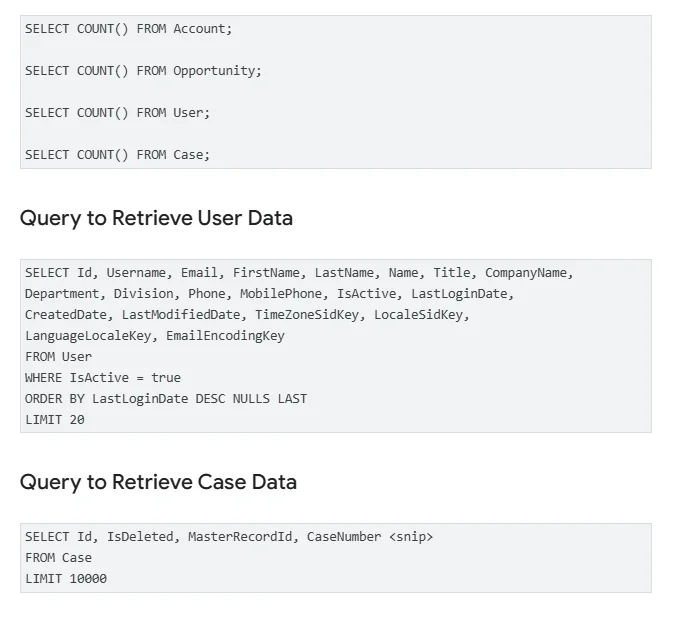
Step 4: Scan Salesforce records for exposed secrets
After Salesloft Drift, many teams found that the hardest work was not revoking an app; it was finding credentials users had pasted into support records.
Secrets do not belong in Salesforce text fields, email bodies, case comments, tasks, or Chatter posts. In real orgs, support teams sometimes paste API keys, bearer tokens, database URLs, and temporary passwords into Case records. The Salesloft Drift incident is a reason to remove that pattern, not only to rotate one vendor token.
The Apex example below is a bounded admin utility for checking recent Case text. It avoids debug logging the secret value and limits the number of rows. For larger orgs, use Batch Apex, Event Monitoring exports, or an approved DLP tool instead of a synchronous scan.
public with sharing class SecretPatternScanner {
    public class Finding {
        @AuraEnabled public Id recordId;
        @AuraEnabled public String objectName;
        @AuraEnabled public String fieldName;
        @AuraEnabled public String patternName;

        public Finding(Id recordId, String objectName, String fieldName, String patternName) {
            this.recordId = recordId;
            this.objectName = objectName;
            this.fieldName = fieldName;
            this.patternName = patternName;
        }
    }

    private static final Map<String, String> PATTERNS = new Map<String, String>{
        'AWS access key marker' => 'akia',
        'password marker' => 'password',
        'secret marker' => 'secret',
        'Snowflake host marker' => 'snowflakecomputing.com'
    };

    @AuraEnabled(cacheable=false)
    public static List<Finding> scanRecentCases(DateTime startDate, Integer requestedLimit) {
        if (startDate == null) {
            throw new AuraHandledException('startDate is required.');
        }

        Integer rowLimit = 200;
        if (requestedLimit != null && requestedLimit > 0 && requestedLimit <= 2000) {
            rowLimit = requestedLimit;
        }

        List<Finding> findings = new List<Finding>();

        List<Case> casesToReview = [
            SELECT Id, Subject, Description
            FROM Case
            WHERE CreatedDate >= :startDate
            WITH SECURITY_ENFORCED
            ORDER BY CreatedDate DESC
            LIMIT :rowLimit
        ];

        for (Case c : casesToReview) {
            addMatches(findings, c.Id, 'Case', 'Subject', c.Subject);
            addMatches(findings, c.Id, 'Case', 'Description', c.Description);
        }

        return findings;
    }

    private static void addMatches(
        List<Finding> findings,
        Id recordId,
        String objectName,
        String fieldName,
        String value
    ) {
        if (String.isBlank(value)) {
            return;
        }

        String normalized = value.toLowerCase();
        for (String patternName : PATTERNS.keySet()) {
            if (normalized.contains(PATTERNS.get(patternName))) {
                findings.add(new Finding(recordId, objectName, fieldName, patternName));
            }
        }
    }
}
Governor limit note: this sample intentionally caps the query at 2,000 rows and scans only two Case fields. Do not expand it into a full-org synchronous scanner. For production scanning, split work by object and date range, run as Batch Apex, avoid storing discovered secret values, and review CRUD/FLS behavior with your security team before exposing results in LWC or Flow.
Best practices for Salesloft Drift and connected app controls
The best long-term response to Salesloft Drift is a connected app governance model. Treat every OAuth integration as an identity boundary. A third-party app should have an owner, a business purpose, a permission design, a token policy, a logging requirement, and a removal plan.
Connected app settings to review
| Control | Recommended admin review | Common mistake |
|---|---|---|
| Permitted Users | Prefer admin-approved users for sensitive integrations, then assign access through a permission set or profile policy. | Allowing broad self-authorization for apps that can read CRM data. |
| OAuth Scopes | Grant only the scopes required by the integration. Avoid broad access unless the vendor design truly requires it. | Approving full API access because it is easier during setup. |
| IP Relaxation | Use trusted IP ranges and IP restriction enforcement where the integration supports predictable egress IPs. | Relaxing IP restrictions for an app that runs from known infrastructure. |
| Refresh Token Policy | Set expiry and revocation behavior that matches the business risk and vendor reconnect process. | Leaving long-lived tokens active for users who no longer own the integration. |
| API Enabled | Grant API access through permission sets to named integration users and approved admin roles. | Leaving API Enabled on broad profiles used by regular business users. |
Design a least-privilege integration user
For any Salesloft Drift replacement or reconnection, require a named owner and a least-privilege access model before approval.
For high-risk integrations, create a named integration user rather than letting a human admin authorize the app. Assign only the objects and fields the vendor needs. If Drift only needs lead routing and conversation sync, do not give the user access to unrelated finance, security, or implementation objects.
Use permission sets, permission set groups, object permissions, field-level security, and sharing rules deliberately. If the org-wide default is Public Read/Write for a sensitive object, an integration user may inherit more access than expected. Review sharing at the object level, not only the connected app screen.
Salesforce API and SOQL practices during incident response
Incident response queries must be bounded. Use selective filters, date windows, LIMIT clauses, and object-specific review. The Salesforce SOQL SELECT documentation defines the supported query structure, and admins should avoid large, repeated exports unless the investigation requires them.
When you query records for investigation, do not create a second data exposure. Store exports in an approved case workspace, encrypt evidence where required, and delete temporary working files after retention requirements are met.
How to prevent another third-party OAuth incident
A Salesloft Drift response should end with changes to operating procedure. The same weakness can appear in chat tools, enrichment tools, middleware, data loaders, browser extensions, and AI assistants that request Salesforce API access.
Monthly connected app review
- Export or review all OAuth connected app usage.
- Identify apps with no owner, no ticket, or no recent business justification.
- Block or uninstall apps that are not approved.
- Review users who have authorized each app.
- Confirm that integration users still belong to the right permission sets.
Secret-handling rules for support and implementation teams
- Never paste passwords, API keys, private keys, or bearer tokens into Case, Task, EmailMessage, Chatter, or custom long text fields.
- Use a vault such as your approved enterprise secrets manager for credential exchange.
- Create a Salesforce validation or Flow prompt only when it guides users away from storing secrets without blocking legitimate support work.
- Train admins to search for secret markers during post-incident review.
Monitoring signals to send to your SIEM
Salesloft Drift showed why connected app monitoring must be part of normal Salesforce operations, not only incident response.
At minimum, route Salesforce login, API usage, connected app, and relevant Event Monitoring logs to your SIEM. Add alerts for a new connected app authorization by a privileged user, API calls from unexpected geographies, large data reads by an integration user, and query activity against Case Description, Comments, User, and credential-like custom fields.
Common errors with Salesloft Drift remediation
| Error | Why it is risky | Better action |
|---|---|---|
| Only disconnecting the app | Disconnection stops future access but does not rotate secrets that were already read. | Revoke tokens, rotate credentials, and investigate accessed objects. |
| Trusting a drift customers list | A public list cannot prove OAuth exposure or data access. | Use Salesforce OAuth usage, vendor notices, and logs. |
| Running broad SOQL exports during review | The investigation can create another sensitive data copy. | Use bounded queries and evidence handling controls. |
| Leaving admin users as app owners | Compromised tokens inherit broad access. | Use least-privilege integration users and permission sets. |
| Ignoring non-Salesforce integrations | Google advised Drift customers to review all third-party integrations connected to Drift. | Review email, data warehouse, enrichment, and support integrations too. |
Related SalesforceTutorial resources
After a Salesloft Drift review, most teams need to document connected app ownership and API monitoring as standing controls.
Use these guides to continue the remediation work: Salesforce connected app setup and security, Salesforce API integration basics, Salesforce Event Monitoring, and Salesforce data migration security checks.
Official references
- Salesforce Help: Drift App unauthorized access incident
- Google Threat Intelligence Group: data theft targeting Salesforce instances via Salesloft Drift
- Salesloft Trust Center: Drift/Salesforce security notification
- Salesforce Help: Event Monitoring overview
- Salesforce Developer Docs: Unique Query Event Type
Frequently Asked Questions
Is Salesloft Drift a Salesforce vulnerability?
No. Public guidance from Salesforce and Google describes the Salesloft Drift issue as abuse of compromised OAuth tokens tied to a third-party application connection. Salesforce admins should still investigate their own orgs because a valid OAuth token can read Salesforce data within the authorizing user's permissions.
Should I use a drift customers list to decide if my company was impacted?
No. A drift customers list can be incomplete, outdated, or based on marketing references. Use Salesforce OAuth usage, Salesloft or Salesforce notification, Drift admin settings, and Event Monitoring logs to determine whether your org had technical exposure.
What is the first admin task after the drift Salesforce breach?
Preserve logs and confirm OAuth exposure before making broad changes. Then revoke active sessions, rotate any exposed secrets, review connected app policies, and reduce the permissions assigned to the integration user.
How can Salesforce hackers read data without a password?
Salesforce hackers can read data without a password when they hold a valid OAuth access token or refresh token for an authorized connected app. The token represents an approved session and can call Salesforce APIs until it expires, is revoked, or is blocked by policy.
What logs should I review for Salesloft Drift activity?
Review connected app OAuth usage, identity provider logs, Salesforce login history, Setup Audit Trail, and Event Monitoring files where available. If your org has Unique Query events, use them to help identify SOQL activity processed during the investigation window.
Does token revocation remove Salesforce investigation logs?
No. Revoking OAuth tokens stops future use of those tokens, but it does not by itself delete Salesforce logs. Log availability still depends on your edition, Event Monitoring licenses, retention settings, and how quickly the team preserved evidence.