The SOQL ORDER BY clause in Salesforce Object Query Language (SOQL) is used to sort query results in ascending (ASC) or descending (DESC) order. This essential clause helps retrieve and organize data from Salesforce objects like Account, Contact, or Opportunity in a structured manner for better data analysis and reporting.
Understanding the ORDER BY clause is fundamental for Salesforce Administrators and Developers who need to present data in meaningful sequences. Whether you’re building reports, creating list views, or developing Apex applications, proper sorting ensures your users see data in the most logical order.
How SOQL ORDER BY Clause Works
The ORDER BY clause processes query results after the WHERE clause filters have been applied but before LIMIT restrictions are enforced. This sequence ensures you’re sorting the complete filtered dataset before truncating results.
Basic Syntax Structure
SELECT [fields]FROM [object]WHERE [conditions]ORDER BY [field1] [ASC|DESC], [field2] [ASC|DESC], ...LIMIT [number]The ORDER BY clause supports sorting by multiple fields, with each field able to have its own sort direction. Fields are processed left to right, creating hierarchical sorting patterns.
ORDER BY ASC (Ascending Order)
When sorting in ascending order, query results are arranged from smallest to largest values. For string fields, this means alphabetical order (A-Z), while numeric fields sort from lowest to highest values. If no sort direction is specified, ASC is the default behavior.
Example:
SELECT Id, Name, AnnualRevenueFROM AccountWHERE Industry = 'Technology'ORDER BY Name ASCThis query retrieves Technology accounts sorted alphabetically by account name.
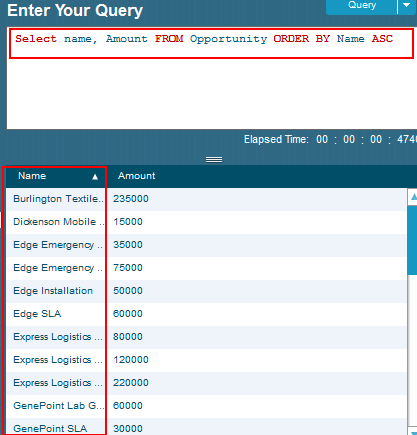
The screenshot above demonstrates how ORDER BY ASC arranges opportunity records in ascending alphabetical order by name, with corresponding amount values displayed.
ORDER BY DESC (Descending Order)
Descending order arranges records from largest to smallest values. String values appear in reverse alphabetical order (Z-A), while numeric fields sort from highest to lowest values.
Example:
SELECT Id, Name, AnnualRevenueFROM AccountWHERE AnnualRevenue != nullORDER BY AnnualRevenue DESC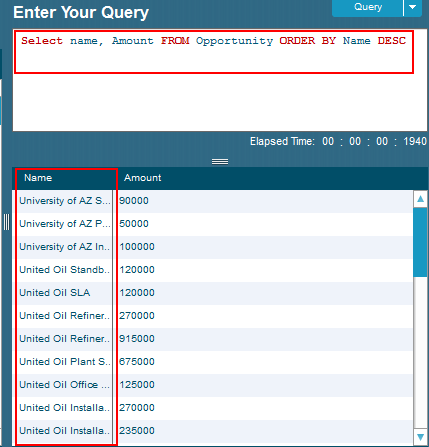
This example shows opportunity records sorted in descending order by name, demonstrating how DESC reverses the alphabetical sequence.
Ordering by Multiple Fields in SOQL
Multiple field sorting enables precise data organization by creating hierarchical sort criteria. When multiple fields are specified, Salesforce processes them sequentially in the order they appear in the ORDER BY clause.
Multi-Field Sorting Syntax
SELECT Id, Name, CreatedDate, PriorityFROM CaseWHERE Status = 'Open'ORDER BY Priority DESC, CreatedDate ASC, Name ASCThis query demonstrates three-level sorting:
- Primary sort: Cases by Priority in descending order (High, Medium, Low)
- Secondary sort: Within each priority level, cases sorted by CreatedDate ascending (oldest first)
- Tertiary sort: Cases with same priority and date sorted alphabetically by Name
Production Example: Account Territory Management
SELECT Id, Name, Industry, AnnualRevenue, BillingStateFROM AccountWHERE BillingCountry = 'United States'AND AnnualRevenue > 1000000ORDER BY BillingState ASC, Industry ASC, AnnualRevenue DESCLIMIT 1000This enterprise-level query organizes high-value accounts by geographic territory, then by industry sector, and finally by revenue size for territory planning.
Using ORDER BY with LIMIT Clause
Combining ORDER BY with LIMIT returns only the top records according to your sorting criteria. This pattern is essential for performance optimization and creating “top N” result sets.
Recent Records Pattern
SELECT Id, Name, CreatedDate, StageName, AmountFROM OpportunityWHERE StageName IN ('Prospecting', 'Qualification')AND CreatedDate = LAST_N_DAYS:30ORDER BY CreatedDate DESC, Amount DESCLIMIT 10This query retrieves the 10 most recently created high-value opportunities from the last 30 days, sorted by creation date and then by amount.
Governor Limit Considerations
When using ORDER BY with LIMIT, consider these performance factors:
- SOQL queries are limited to 50,000 rows per execution context
- ORDER BY operations consume additional CPU time
- Indexed fields (Id, Name, CreatedDate, SystemModstamp) sort faster
- Custom field indexes improve ORDER BY performance on high-volume objects
SOQL WHERE Clause Integration with ORDER BY
The WHERE clause filters records before ORDER BY processing, making your sorting operations more efficient. Always apply selective filters to reduce the dataset size before sorting.
Optimized Query Pattern
// Efficient: Filter first, then sortSELECT Id, Name, Email, CreatedDateFROM ContactWHERE CreatedDate >= LAST_N_DAYS:90AND Email != nullORDER BY CreatedDate DESC, LastName ASCLIMIT 200This pattern demonstrates best practices by filtering on indexed fields (CreatedDate) and non-null values before applying sort operations.
Null Value Handling in SOQL Sorting
SOQL handles null values consistently in sorting operations, with placement depending on sort direction:
Null Placement Rules
- ASC (Ascending): Null values appear first in the result set
- DESC (Descending): Null values appear last in the result set
Null Handling Example
SELECT Id, Name, AnnualRevenue, IndustryFROM AccountORDER BY AnnualRevenue DESC, Industry ASCIn this query:
- Accounts with null AnnualRevenue appear at the end (DESC puts nulls last)
- Accounts with null Industry appear first within their revenue group (ASC puts nulls first)
Advanced SOQL ORDER BY Patterns
Date-Based Sorting with CreatedDate
SELECT Id, Subject, CreatedDate, Priority, StatusFROM CaseWHERE CreatedDate >= LAST_N_MONTHS:6ORDER BY CreatedDate DESC, Priority DESCThis pattern is commonly used in service cloud implementations to show recent cases with high-priority items appearing first within each date group.
Relationship Field Sorting
SELECT Id, Name, Account.Name, Account.IndustryFROM ContactWHERE Account.Industry != nullORDER BY Account.Industry ASC, Account.Name ASC, LastName ASCYou can sort by fields from parent objects using dot notation, enabling complex hierarchical data organization.
Performance Optimization for ORDER BY Queries
Index Utilization
Salesforce automatically indexes these standard fields for optimal ORDER BY performance:
- Id (always indexed)
- Name (indexed on most standard objects)
- CreatedDate and LastModifiedDate
- SystemModstamp
- OwnerId
Custom Field Indexing
For custom fields used frequently in ORDER BY clauses, consider requesting custom indexes through Salesforce Support. Custom indexes significantly improve query performance on objects with large record volumes (>1 million records).
Common ORDER BY Use Cases
Report Generation
SELECT Id, Name, StageName, Amount, CloseDate, Owner.NameFROM OpportunityWHERE CloseDate >= THIS_QUARTERAND StageName NOT IN ('Closed Won', 'Closed Lost')ORDER BY Owner.Name ASC, CloseDate ASC, Amount DESCList View Recreation
SELECT Id, Name, Email, Phone, Account.Name, CreatedDateFROM ContactWHERE CreatedDate >= LAST_N_DAYS:30ORDER BY CreatedDate DESC, Account.Name ASCSOQL IN Clause with ORDER BY
The SOQL IN clause works seamlessly with ORDER BY to filter specific record sets and then sort them appropriately.
IN Clause Filtering with Sorting
SELECT Id, Name, StageName, Amount, CloseDateFROM OpportunityWHERE StageName IN ('Prospecting', 'Qualification', 'Proposal')AND Amount > 50000ORDER BY StageName ASC, Amount DESCThis query demonstrates how the IN clause in SOQL filters opportunities to specific stages, then ORDER BY organizes them by stage and amount.
Subquery with IN Clause and ORDER BY
SELECT Id, Name, Industry, AnnualRevenueFROM AccountWHERE Id IN ( SELECT AccountId FROM Opportunity WHERE StageName = 'Closed Won' AND CloseDate = THIS_YEAR)ORDER BY Industry ASC, AnnualRevenue DESCHAVING Clause Integration
When using aggregate functions, the HAVING clause in SOQL filters grouped results before ORDER BY processing.
Aggregate Query with ORDER BY
SELECT Industry, COUNT(Id) AccountCount, AVG(AnnualRevenue) AvgRevenueFROM AccountWHERE AnnualRevenue != nullGROUP BY IndustryHAVING COUNT(Id) > 10ORDER BY COUNT(Id) DESC, AVG(AnnualRevenue) DESCThis query shows industries with more than 10 accounts, sorted by account count and average revenue.
Frequently Asked Questions
What is the default sort order in SOQL ORDER BY clause?
The default sort order is ASC (ascending). If you don't specify ASC or DESC, Salesforce automatically sorts results in ascending order from smallest to largest values.
Can I use ORDER BY with SOQL IN clause queries?
Yes, ORDER BY works perfectly with IN clause queries. The IN clause filters records first, then ORDER BY sorts the filtered results according to your specified criteria.
How does ORDER BY handle null values in SOQL?
Null values appear first in ASC (ascending) sorts and last in DESC (descending) sorts. This consistent behavior helps predict where empty fields will appear in your results.
What's the maximum number of fields I can use in ORDER BY?
While Salesforce doesn't specify a hard limit, practical performance considerations suggest limiting ORDER BY to 3-5 fields. More fields increase query complexity and execution time.
Does ORDER BY work with relationship fields in SOQL?
Yes, you can sort by parent object fields using dot notation (e.g., Account.Name, Owner.Email). This enables sorting child records by parent object attributes.
How does ORDER BY affect SOQL query performance?
ORDER BY adds processing overhead, especially on large datasets. Use indexed fields when possible and combine with selective WHERE clauses to optimize performance.
Can I use ORDER BY with aggregate functions in SOQL?
Yes, ORDER BY works with aggregate functions like COUNT(), SUM(), AVG(), MIN(), and MAX(). You can sort grouped results by aggregate values or grouping fields.
What happens when I use ORDER BY with LIMIT in SOQL?
ORDER BY processes first, sorting all qualifying records, then LIMIT restricts the result set to the specified number of top records based on the sort criteria.
Conclusion
The SOQL ORDER BY clause is essential for organizing query results in meaningful sequences. Whether sorting by single fields with ASC and DESC directions or implementing complex multi-field hierarchies, proper use of ORDER BY enhances data presentation and user experience. Combined with WHERE clause filtering, IN clause selections, and HAVING clause aggregations, ORDER BY enables sophisticated data retrieval patterns that support enterprise Salesforce implementations. Remember to consider performance implications, leverage indexed fields, and use selective filtering to optimize your ORDER BY queries for production environments.