Where does lead come from is a Salesforce Lead Source governance question. The answer should identify the first trusted channel that created or introduced the prospect, then store that answer in a consistent field model so Sales, Marketing, and Operations report from the same definition.
Salesforce provides a standard LeadSource picklist on the Lead object. The field is useful, but it cannot answer every attribution question by itself. In enterprise orgs, define one canonical source value, one detail value, and separate fields for later campaign or opportunity influence.
Where Does Lead Come From in Salesforce?
The phrase where does lead come from has two common meanings in Salesforce projects. One team may mean which channel created the record. Another team may mean which interaction caused the person to respond. Both questions matter, but they should not always use the same field.
Salesforce Help describes Lead Source as the source of the lead, with values selected from an administrator-controlled picklist. See the official Salesforce Lead fields documentation. That definition gives the field a starting point; your org still needs a written rule for what counts as the source.
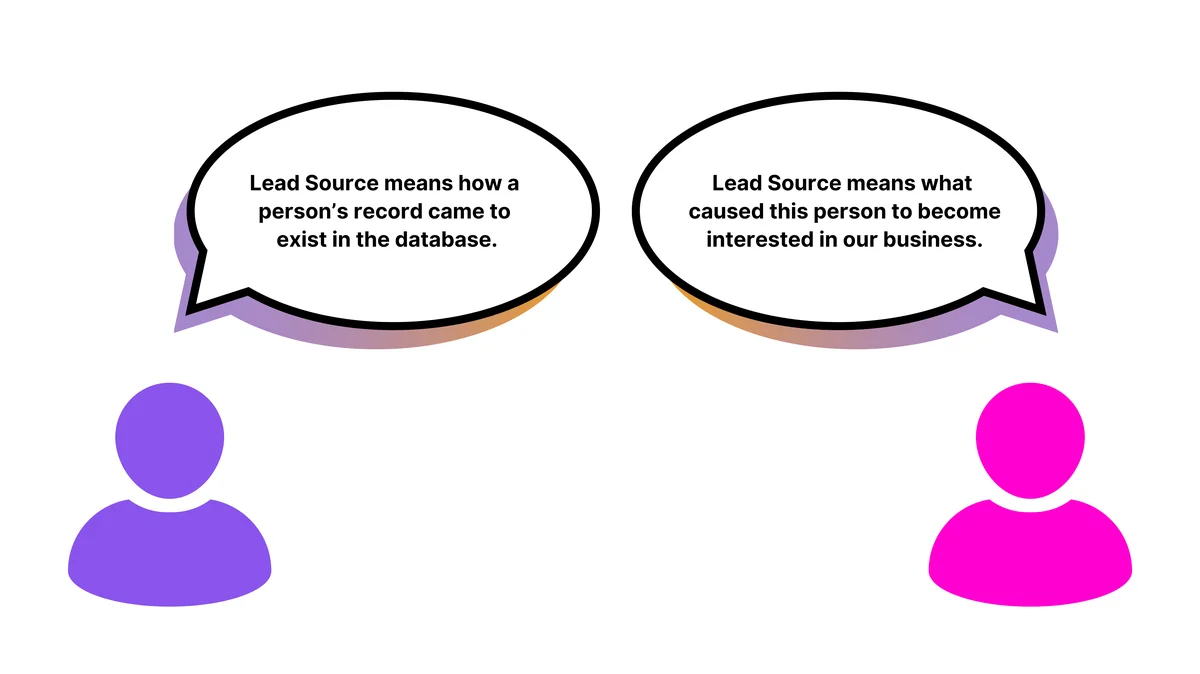
What Should Lead Source Mean?
For most Sales Cloud implementations, define Lead Source as the first reliable acquisition or creation channel. That means Web, Partner Referral, Trade Show, Purchased List, or another controlled value that explains how the prospect entered your sales database.
Do not make Lead Source carry every marketing touch. Campaigns, Campaign Members, Primary Campaign Source, and Campaign Influence are better suited for campaign-level attribution. When users ask where does lead come from, the Lead Source answer should be stable enough to survive conversion and reporting.
Lead Source Canonical Name Definition
The lead source canonical name definition is the approved reporting name for a source category. It is not every raw value sent by a website, form vendor, ad network, list provider, or sales engagement tool. It is the normalized value your Salesforce org accepts as the source of record.
For example, a form may send google, google_ads, paid_search, or cpc. Your canonical Lead Source value may be Paid Search. The lead source canonical name definition tells admins, developers, and integration owners which incoming values map to the same Salesforce picklist value.
Canonical Name Lead Source Definition for Admins
The canonical name lead source definition should include four parts: the picklist value label, the API or metadata value used in deployments, the business meaning, and examples of raw inputs that map into it. This prevents reports from splitting the same channel into several spellings.
| Canonical Lead Source | Use when | Example raw inputs | Do not use when |
|---|---|---|---|
| Paid Search | A paid search ad first brought the person to a form or landing page. | google_ads, bing_cpc, utm_medium=cpc |
The rep found the person later in a prospecting tool. |
| Partner Referral | A registered partner introduced the prospect. | partner_portal, referral_partner |
The partner only influenced a later opportunity. |
| Outbound Prospecting | A seller or SDR created the lead through approved outbound research. | salesloft, sales_nav, manual_sdr |
The person submitted an inbound form first. |
| Event | The first trusted acquisition came from an event list, badge scan, or event form. | trade_show, conference_scan |
The event was only one touch after an existing lead already existed. |
How Lead Source Moves During Lead Conversion
Lead conversion creates or relates records on Contact, Account, and optionally Opportunity. Salesforce states that standard Lead fields map to standard fields on converted records, while custom Lead fields need administrator-defined mappings. Review the official Lead Conversion Field Mapping documentation before you change this design in production.
The important design point is that Account Source is not the same API field as Lead Source. Account uses AccountSource; Lead, Contact, and Opportunity use LeadSource. Salesforce metadata also exposes standard picklist values through standard value sets, which matters when retrieving or deploying Lead Source values.
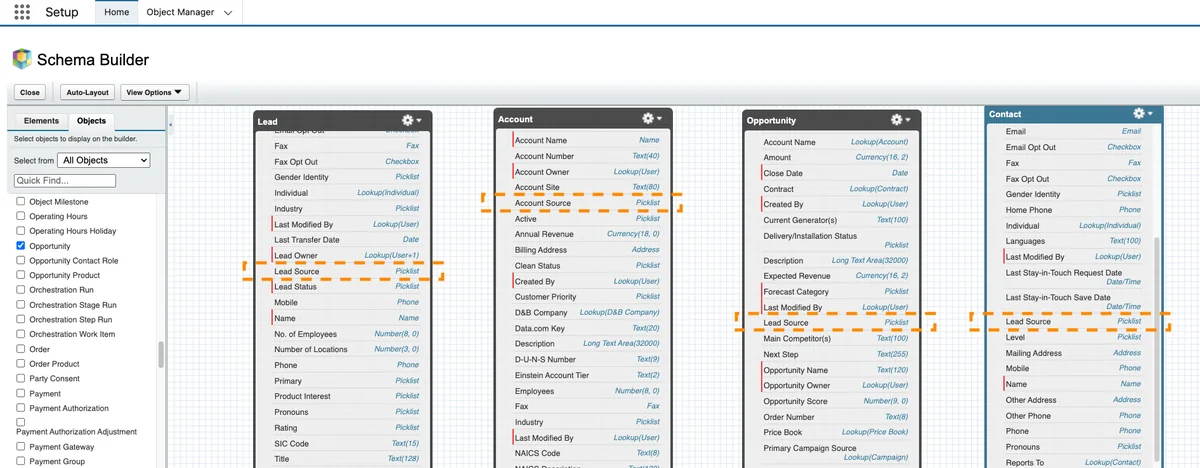
How to Design Lead Source Fields Without Breaking Reports
A single picklist works for a small org, but it usually fails once Marketing Operations, Sales Operations, and Finance ask different questions. Use the standard field for the canonical source, then add detail fields only where the business needs them.
| Field | Object | Type | Purpose |
|---|---|---|---|
LeadSource |
Lead | Standard picklist | Stores the canonical answer to where does lead come from. |
Lead_Source_Detail__c |
Lead | Text or restricted picklist | Stores the vendor, campaign group, form name, or list source detail. |
Original_Lead_Source__c |
Lead and Contact | Restricted picklist | Locks the first trusted source after creation. |
Latest_Source__c |
Lead and Contact | Restricted picklist | Stores the most recent qualified source event when your process requires it. |
Opportunity_Source__c |
Opportunity | Restricted picklist | Identifies the source that created the selling motion, if different from the original lead. |
This model lets the lead source canonical name definition remain stable while still giving teams room to track campaign, vendor, and opportunity detail. It also keeps the canonical name lead source definition clear for integration mapping.
How to Configure Lead Source Values
- Open Setup, then go to Object Manager.
- Select Lead, then open Fields & Relationships.
- Open Lead Source and review the active picklist values.
- Deactivate unclear values instead of deleting them when old records still use the value.
- Add canonical values only after the business owner approves the lead source canonical name definition.
- Update lead assignment, Flow, Web-to-Lead, form integration, and marketing automation mappings so they send the approved value.
- Test Lead conversion in a sandbox and confirm Contact, Account, and Opportunity behavior before deployment.
If you deploy standard picklist values through metadata, use the StandardValueSet metadata type. Salesforce Developer documentation defines StandardValueSet as the metadata type for a set of values in a standard picklist field, and the StandardValueSet names reference includes LeadSource.
<!-- package.xml excerpt to retrieve the LeadSource standard value set -->
<types>
    <members>LeadSource</members>
    <name>StandardValueSet</name>
</types>
How to Normalize Incoming Lead Source Data
Normalize source data before it reaches reporting. A website form, Experience Cloud site, API integration, or marketing tool may send raw tracking values that users should not see in the standard picklist.
Use Salesforce Flow for low-code mapping when the mapping table is small. Use Apex or middleware when mappings change often, when multiple systems send leads, or when you need a governed dictionary outside Salesforce. For related automation patterns, see Salesforce Flow automation examples and Salesforce API integration basics.
trigger LeadSourceDefaultTrigger on Lead (before insert) {
    LeadSourceDefaultService.applyDefaults(Trigger.new);
}

public inherited sharing class LeadSourceDefaultService {
    public static void applyDefaults(List<Lead> leadsToInsert) {
        if (leadsToInsert == null || leadsToInsert.isEmpty()) {
            return;
        }
        for (Lead candidate : leadsToInsert) {
            if (String.isBlank(candidate.LeadSource)) {
                candidate.LeadSource = 'Web';
            }
        }
    }
}
The trigger above is bulk-safe because it does not run SOQL or DML inside the loop. Use it only as a fallback. In production, prefer to send the correct value from the source system and keep a mapping table that explains the canonical name lead source definition for each raw input.
Security note: triggers run in system context. If you expose Lead Source updates through Apex controllers, REST resources, or Lightning components, enforce object permissions and field-level security before reading or writing fields. Use the official SOQL and SOSL Developer Guide when you build queries that run from Apex.
How to Report on Lead Source Quality
Reports should answer a specific question. A dashboard that asks where does lead come from should not mix original source, latest source, and opportunity source in the same chart. Start with data quality reports, then build pipeline reports.
SELECT LeadSource, COUNT(Id)
FROM Lead
WHERE CreatedDate = THIS_FISCAL_QUARTER
GROUP BY LeadSource
ORDER BY COUNT(Id) DESC
SELECT Id, Name, Company, LeadSource, CreatedDate
FROM Lead
WHERE LeadSource = NULL
AND IsConverted = false
ORDER BY CreatedDate DESC
LIMIT 200After the data quality checks pass, build dashboards that compare created leads, converted leads, opportunities created, pipeline amount, and closed-won amount by the same source definition. See Salesforce dashboard reporting patterns for dashboard structure, and review Leads vs opportunities in Salesforce if your team mixes lead and opportunity metrics.
Best Practices for Lead Source Governance
- Write the definition before changing fields. A picklist value without a definition creates inconsistent data.
- Use restricted picklists for canonical fields. Free-text source values create reporting cleanup work.
- Separate source and source detail. Use
Paid Searchas the source andGoogle Brand Campaignas detail. - Do not overwrite original source without a rule. If the business needs latest source, store it in a separate field.
- Test Lead conversion. Confirm how standard and custom fields populate Contact, Account, and Opportunity records in a sandbox.
- Include legal and consent owners. Some orgs must explain where contact data came from, especially when purchased lists or outbound enrichment are used.
- Document the lead source canonical name definition. Put the source dictionary where admins, developers, RevOps, and integration owners can find it.
Common Errors With Lead Source
| Error | Why it causes problems | Fix |
|---|---|---|
| Using vendor names as top-level source values | Reports compare tools instead of channels. | Use the channel as Lead Source and the vendor as detail. |
| Letting users add free-text source values | Dashboards split the same source into many spellings. | Use restricted picklists and approved integration mappings. |
| Overwriting original source on every campaign touch | First-touch reporting becomes impossible. | Store latest touch or campaign influence separately. |
| Skipping lead conversion testing | Converted records may not show the source values users expect. | Test conversion with new and existing Account, Contact, and Opportunity records. |
Frequently Asked Questions
What does where does lead come from mean in Salesforce?
In Salesforce, where does lead come from usually means the approved Lead Source value that identifies the first trusted channel that created or introduced the prospect. The standard field is LeadSource on Lead records, but your org should document whether it means record creation source, first engagement source, or another approved definition.
What is lead source canonical name definition?
Lead source canonical name definition means the normalized source value your org uses for reporting and integrations. For example, several raw inputs such as google_ads, cpc, and paid_search may map to one canonical Salesforce value: Paid Search.
What is canonical name lead source definition in Salesforce metadata?
Canonical name lead source definition can refer to the approved business value, but in metadata work you also need the deployable standard value set name. For standard Lead Source picklist values, use the LeadSource StandardValueSet when retrieving or deploying values through Metadata API.
Should Lead Source be changed after a lead converts?
Do not change original Lead Source after conversion unless your governance rule explicitly allows it. If users need to track a later touch, create a latest source, campaign source, or opportunity source field instead. That keeps the answer to where does lead come from consistent over time.
Is Account Source the same as Lead Source?
No. Account Source uses the AccountSource field on Account. Lead, Contact, and Opportunity use LeadSource. The picklist values can be shared through the LeadSource standard value set, but admins should still test lead conversion and reporting behavior in their org.