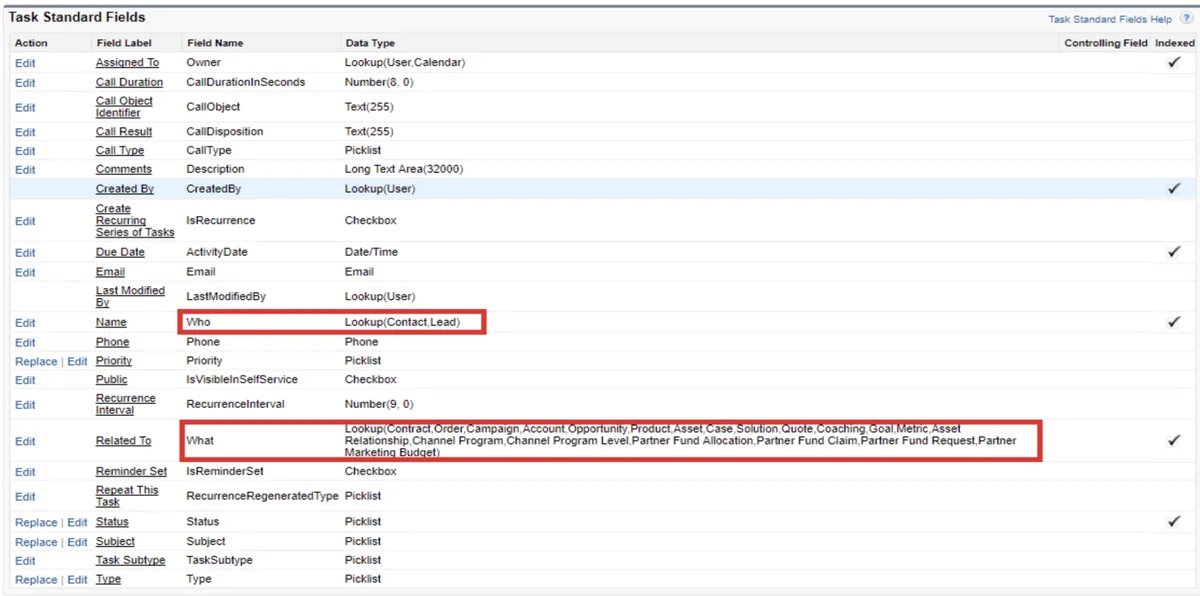
Whoid is the API field that stores the person linked to a Salesforce Task or Event. In the Salesforce user interface, the same field appears as Name, and it can reference a Lead or Contact record depending on the activity you are logging.
Use this field when the activity answers the question, “Who did the user speak with, meet, email, or follow up with?” Use WhatId when the activity answers, “What business record was the activity about?” Getting this mapping right affects activity timelines, reports, automation, integrations, and data cleanup jobs.
What is whoid in Salesforce?
WhoId is a polymorphic lookup field on the Task and Event objects. A polymorphic relationship can point to more than one object type, so the same field can hold a Contact Id in one activity and a Lead Id in another. Salesforce documents polymorphic relationship fields in the official SOQL and SOSL guide: Understanding Relationship Fields and Polymorphic Fields.
In setup, layouts, reports, and the activity composer, users usually see the label Name. In APIs, Apex, Flow formulas, Data Loader mappings, and SOQL, developers work with WhoId. That label/API mismatch is the main reason this field causes confusion during migrations and automation reviews.
| Salesforce UI label | API field | Objects it can reference | Use it when |
|---|---|---|---|
| Name | WhoId |
Lead or Contact | You need to store the person involved in the activity. |
| Related To | WhatId |
Account, Opportunity, Case, Campaign, Contract, and supported custom objects | You need to store the business record the activity belongs to. |
In enterprise orgs, this distinction matters for more than page layout clarity. Sales teams expect calls to appear on Contact, Account, and Opportunity timelines. Service teams expect Case activity history to stay tied to the correct customer issue. Developers expect automations to receive an Id that can be resolved to a known object type before any object-specific fields are queried.
How does the person field differ from WhatId?
The person relationship stores the human side of an activity. WhatId stores the record the activity is about. A Task can therefore say, “Follow up with Meera Rao” through the person relationship and “about the Q3 Renewal Opportunity” through WhatId.
The official object references for Task and Event list these fields and their relationship behavior. Treat those pages as the source of truth before you design an integration or data load.
| Comparison point | Person field | WhatId |
|---|---|---|
| UI label | Name | Related To |
| Primary purpose | Identifies the Lead or Contact involved. | Identifies the business record connected to the activity. |
| Common Id prefixes | 003 for Contact, 00Q for Lead. |
001 for Account, 006 for Opportunity, 500 for Case, 701 for Campaign, plus others. |
| Typical admin mistake | Leaving it blank on logged calls, which hides who the interaction was with. | Pointing the activity only to a Contact and not to the Opportunity, Case, or Account that needs reporting. |
| Typical developer mistake | Assuming it always points to Contact and querying Contact-only fields. | Assuming every related record has an AccountId field. |
A simple rule works well in design sessions: The person field identifies the human; WhatId identifies the context. Do not make users choose between them if both are needed. For example, an opportunity follow-up Task should normally store the Contact in the Name field and the Opportunity in WhatId.
How is AccountId derived from whoid and WhatId?
Task and Event also include AccountId, but admins should not treat it as a normal data-entry field. Salesforce derives it from the activity relationships. In the object reference, Salesforce states that when WhatId points to Account, Opportunity, Contract, or a custom object that is a child of Account, Salesforce uses that related record’s account. If that rule does not apply and the person field points to a Contact, Salesforce can use the Contact’s Account. Otherwise, AccountId can be null.
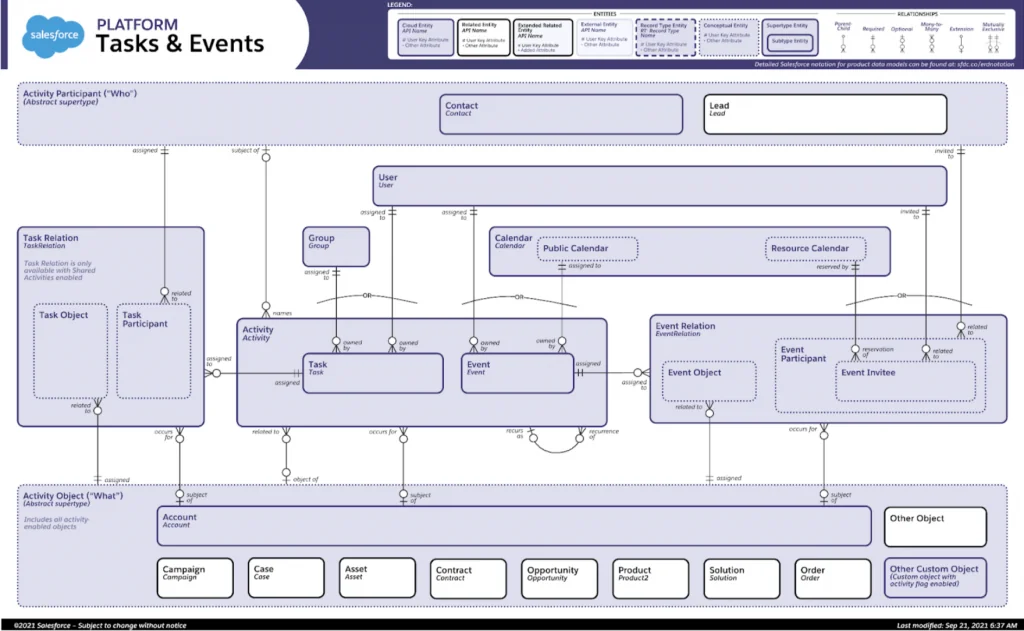
This behavior becomes important in reports. An Account activity timeline can include Tasks that were not created directly from the Account page. It can show them because Salesforce derived the account relationship from the Contact, Opportunity, Contract, or supported account child record.
For data loads, do not use a placeholder Id when you have no person or related record. Load a real Contact or Lead into the Name field, load a supported business record into WhatId, or leave the field blank. Fake Id values create records that are hard to fix later and can break automation that expects real references.
How do you query WhoId with SOQL?
SOQL can return the raw Id, the display name, and the runtime object type for a polymorphic relationship. When you only need activity fields and the related record names, use the relationship names Who and What.
SELECT Id, Subject, ActivityDate,
       Who.Name, Who.Type,
       WhatId, What.Name, What.Type
FROM Task
WHERE ActivityDate = LAST_N_DAYS:30
AND WhoId != null
WITH USER_MODE
Use TYPEOF when you need fields that differ by object type. Salesforce documents TYPEOF for polymorphic SOQL and lists it as available in API version 46.0 and later: TYPEOF in SOQL.
SELECT Id, Subject,
       TYPEOF Who
         WHEN Contact THEN Name, Email, AccountId
         WHEN Lead THEN Name, Company, Email
       END,
       TYPEOF What
         WHEN Account THEN Name, Industry
         WHEN Opportunity THEN Name, StageName, Amount
         WHEN Case THEN CaseNumber, Subject
       END
FROM Task
WHERE CreatedDate = LAST_N_DAYS:30
WITH USER_MODE
For automation audits, filter by Id lists instead of running broad activity queries. Activity tables grow quickly in orgs that log emails, calls, Einstein Activity Capture records, or integration-created follow-ups. Querying selective date ranges and indexed Id fields helps avoid long-running jobs.
How to identify the object type from an Id in Apex
Apex can resolve the object type without checking hard-coded Id prefixes. Use Id.getSObjectType(), which Salesforce documents in the Apex Reference Guide: Id Class.
Id relatedPersonId = '003000000000001AAA';
Schema.SObjectType relatedType = relatedPersonId.getSObjectType();

if (relatedType == Contact.SObjectType) {
    System.debug('The person field points to a Contact');
} else if (relatedType == Lead.SObjectType) {
    System.debug('The person field points to a Lead');
} else {
    System.debug('This Id should not be used for the person field');
}
This approach is safer than prefix checks because it uses Salesforce metadata. It also keeps test data readable when your org includes managed packages or custom objects with prefixes that developers do not memorize.
How do you create Tasks with WhoId in Apex?
The code below bulk-creates follow-up Tasks and validates that the person Id points only to Lead or Contact. It also rejects Contact or Lead values in WhatId, avoids SOQL inside loops, and uses Security.stripInaccessible before DML so fields the running user cannot create are removed before insert.
public with sharing class ActivityTaskService {
    public class ActivityTaskException extends Exception {}

    public class TaskRequest {
        public Id personId;
        public Id whatId;
        public String subject;
    }

    public static List<Id> createFollowUpTasks(List<TaskRequest> requests) {
        if (requests == null || requests.isEmpty()) {
            return new List<Id>();
        }

        List<Task> tasksToInsert = new List<Task>();

        for (TaskRequest request : requests) {
            if (request == null || request.personId == null) {
                continue;
            }

            Schema.SObjectType whoType = request.personId.getSObjectType();

            if (whoType != Contact.SObjectType && whoType != Lead.SObjectType) {
                throw new ActivityTaskException('The person Id must reference a Contact or Lead.');
            }

            if (request.whatId != null) {
                Schema.SObjectType whatType = request.whatId.getSObjectType();

                if (whatType == Contact.SObjectType || whatType == Lead.SObjectType) {
                    throw new ActivityTaskException('Use the person field for Contact or Lead records.');
                }

                if (whoType == Lead.SObjectType) {
                    throw new ActivityTaskException('Do not set WhatId when the person field points to a Lead.');
                }
            }

            tasksToInsert.add(new Task(
                Subject = String.isBlank(request.subject) ? 'Follow up' : request.subject,
                Status = 'Not Started',
                Priority = 'Normal',
                ActivityDate = Date.today().addDays(2),
                WhoId = request.personId,
                WhatId = request.whatId
            ));
        }

        if (tasksToInsert.isEmpty()) {
            return new List<Id>();
        }

        SObjectAccessDecision decision =
            Security.stripInaccessible(AccessType.CREATABLE, tasksToInsert);

        insert decision.getRecords();

        List<Id> insertedIds = new List<Id>();
        for (SObject insertedRecord : decision.getRecords()) {
            insertedIds.add((Id) insertedRecord.get('Id'));
        }
        return insertedIds;
    }
}
In production code, pair this class with tests for Contact, Lead, Account, Opportunity, and invalid Id combinations. Salesforce requires at least 75% Apex code coverage for deployment, but coverage alone is not the goal. Assert the relationship fields that matter to reporting and automation.
@IsTest
private class ActivityTaskServiceTest {
    @IsTest
    static void createsTaskForContactAndAccount() {
        Account accountRecord = new Account(Name = 'Acme Services');
        insert accountRecord;

        Contact contactRecord = new Contact(
            LastName = 'Rao',
            AccountId = accountRecord.Id
        );
        insert contactRecord;

        ActivityTaskService.TaskRequest request =
            new ActivityTaskService.TaskRequest();
        request.personId = contactRecord.Id;
        request.whatId = accountRecord.Id;
        request.subject = 'Renewal follow up';

        Test.startTest();
        List<Id> taskIds = ActivityTaskService.createFollowUpTasks(
            new List<ActivityTaskService.TaskRequest>{ request }
        );
        Test.stopTest();

        Task createdTask = [
            SELECT Id, WhoId, WhatId, AccountId
            FROM Task
            WHERE Id = :taskIds[0]
        ];

        System.assertEquals(contactRecord.Id, createdTask.WhoId);
        System.assertEquals(accountRecord.Id, createdTask.WhatId);
        System.assertEquals(accountRecord.Id, createdTask.AccountId);
    }
}
How do Shared Activities change WhoId behavior?
Shared Activities lets users relate one Task or Event to multiple people. Salesforce Help states that users can relate up to 50 contacts, but only one lead, to a task or event when Shared Activities is enabled: Enable Shared Activities.
With Shared Activities, WhoId still matters because it represents the primary person relationship on the activity. Additional person relationships are stored through relationship objects such as TaskWhoRelation and EventWhoRelation. For calendar invitees and event participants, review EventRelation as well; users and resources invited to an Event are not the same thing as the activity’s primary WhoId.
Before enabling Shared Activities in an established org, test reports, integrations, and custom Apex that query only WhoId. Code that assumes one person per activity can miss additional contacts after the feature is enabled.
How should admins use WhoId in Flow and page layouts?
Admins usually touch this field through the Name field, not the API name. On Task and Event layouts, place Name near Related To so users understand both parts of the relationship. For sales activity capture, make the user decision clear: the person goes in Name; the account, opportunity, case, campaign, or custom record goes in Related To.
In Flow, check the Id type before updating fields on related records. A record-triggered Flow on Task can receive a WhoId that points to Lead or Contact, so a Contact update path must not run against a Lead Id. Use Decision elements that inspect Id prefixes only when you cannot use a Get Records element safely; for more complex logic, move the type resolution to Apex.
For more automation patterns, see the SalesforceTutorial guides on Salesforce Flow design, Apex code best practices, and Salesforce API integration.
Best practices for WhoId in enterprise orgs
- Store both relationship fields when the business process needs both. A call with a buyer about an opportunity should usually have the Contact in Name and the Opportunity in
WhatId. - Do not infer object type from a field label. The label Name does not mean the value is a text name. It is an Id reference to Lead or Contact.
- Validate imports before loading activity history. Data Loader files often contain names instead of Ids. Resolve them to real Salesforce record Ids before insert.
- Keep activity queries selective. Filter by date, owner, person Id, or related record Id. Activity objects become large in long-running orgs.
- Enforce CRUD and field-level security. Apex that creates or reads activities for Lightning components should respect user permissions through user-mode queries, sharing, and field access checks.
- Audit blank relationships. Tasks without a person or related record may still be valid for internal reminders, but they usually provide less reporting value for sales and service teams.
For related record design, you may also find the SalesforceTutorial articles on Salesforce records and Service Cloud implementation useful when mapping activities to Cases and Accounts.
Common errors with WhoId and how to fix them
| Error or symptom | Likely cause | Fix |
|---|---|---|
FIELD_INTEGRITY_EXCEPTION on insert or update |
The value does not match the allowed object type for the field. | Use Contact or Lead for WhoId. Use supported business records for WhatId. |
| Activity appears on Contact but not Opportunity | The Task has WhoId only and no Opportunity in WhatId. |
Populate WhatId with the Opportunity Id where the process requires opportunity reporting. |
| Apex query fails when reading related fields | The code assumes every WhoId is Contact. | Use TYPEOF in SOQL or Id.getSObjectType() in Apex before reading object-specific fields. |
| AccountId is blank after activity creation | The activity cannot be traced to an Account through supported relationship rules. | Populate a Contact with an Account, an Account, an Opportunity, a Contract, or a supported account child record where appropriate. |
| Additional contacts are missing from custom reports | Shared Activities stores extra person relationships outside the primary field. | Review TaskWhoRelation, EventWhoRelation, and report type behavior before changing reports. |
Frequently Asked Questions
What does whoid mean in Salesforce?
whoid means the API field that links a Task or Event to a Lead or Contact. In the Salesforce user interface, users usually see the same field as Name.
Can WhoId point to an Account?
No. WhoId is for Lead or Contact records. Use WhatId when the activity must relate to an Account or another supported business record.
What is the difference between WhoId and WhatId?
WhoId identifies the person involved in the activity. WhatId identifies the business record the activity is about, such as an Account, Opportunity, Case, Campaign, Contract, or supported custom object.
Why is Related To unavailable when a Lead is selected?
A Lead is not tied to an Account in the same way a Contact is. In standard activity entry, Salesforce restricts the Related To relationship when the activity is related to a Lead as the person record. Convert the Lead or relate the activity to a Contact when the business process requires account or opportunity context.
How do I query the Contact or Lead behind WhoId?
Use the polymorphic relationship name Who in SOQL. For simple output, query Who.Name and Who.Type. For object-specific fields, use TYPEOF Who WHEN Contact THEN ... WHEN Lead THEN ... END.
Does Shared Activities replace WhoId?
No. Shared Activities keeps the primary person relationship while allowing additional contact relationships. Developers should review TaskWhoRelation and EventWhoRelation when they need every related person, not only the primary WhoId.