Salesforce Winter 26 Release Notes help admins, developers, and architects decide which Winter ’26 changes need testing, enablement, or user communication. This guide focuses on release updates, list views, Field History Tracking, permission set licenses, Flow, Lightning Web Components, and deployment readiness.
Use this Salesforce Winter 26 Release Notes guide with the official Salesforce Winter ’26 Release Notes. Always verify behavior in your own sandbox because edition, license, feature enablement, API version, and org security settings can change what users see.
Salesforce Winter 26 Release Notes: what should teams check first?
The Salesforce Winter 26 Release Notes are broad, so start with changes that can stop work: enforced release updates, verified email requirements, Flow runtime permissions, domains, custom code, and integrations. After that, review usability updates such as list view improvements and Setup pages that reduce admin clicks.
| Area | Winter ’26 item | Production impact |
|---|---|---|
| Admin | List view type-ahead search and multi-column sorting | Users can manage large list views faster, but business-critical list views need regression testing. |
| Security | Verified email enforcement for older users | Users created on or before November 1, 2016 can lose the ability to send email from Salesforce if their address is not verified. |
| Automation | Restrict User Access to Run Flows | Users must have the correct permission to run flows. |
| Developer | LWC Trusted Mode and API version 65.0 | Browser-side libraries and versioned behavior need code review before enablement. |
| Release management | Legacy host names | Hard-coded instance URLs in integrations, templates, and bookmarks can fail after redirection changes. |
Winter 26 release salesforce timeline and readiness
Teams searching for winter 26 release salesforce dates should check Salesforce Trust for their own instance. Salesforce releases are staggered, so another org’s upgrade date is not a reliable deployment plan. Your release owner should track sandbox preview, production upgrade window, Release Updates due, smoke-test owner, and user communication.
The winter 26 release salesforce checklist should live beside your internal Salesforce release schedule. In enterprise orgs, release notes become useful only when each item maps to a business process, owner, test case, and deployment decision.
Sfdc release notes scope for admins and architects
The phrase sfdc release notes usually means “what changed and what can break.” Admins should focus on Setup, permissions, page behavior, and Flow. Developers should focus on API version 65.0, Apex tests, Lightning Web Components, packaging, and integration URLs. Architects should read across clouds because Sales, Service, Marketing, Data Cloud, and Experience Cloud can share identity, data, and automation dependencies.
How admins should use Salesforce Winter 26 Release Notes
Admins should read Salesforce Winter 26 Release Notes with a test script beside them. Each item should answer four questions: who can use it, whether it is GA, Beta, or enforced, where it is configured, and what regression test proves it will not disrupt users.
List view changes: type-ahead search and multi-column sorting
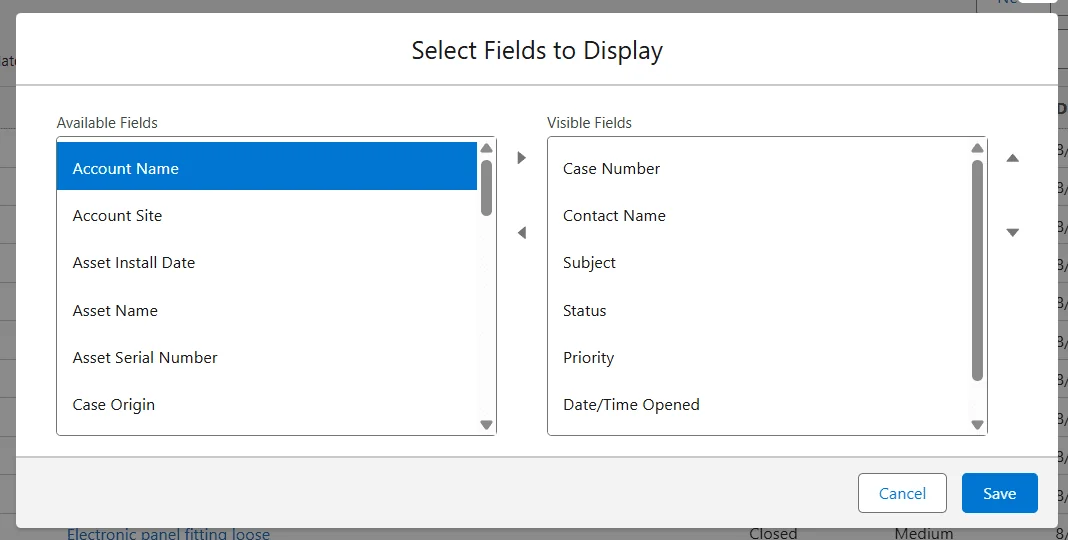
In Salesforce Winter 26 Release Notes, list view updates are not only UI changes. Type-ahead search helps admins find fields while choosing visible list view columns, and multi-column sorting helps users sort list views by more than one column.
Test high-use list views after the release. Confirm the primary sort field, secondary sort field, blank value behavior, and mobile usability. Opportunity list views sorted by Close Date, Stage, and Amount can change how sales teams prioritize pipeline work.
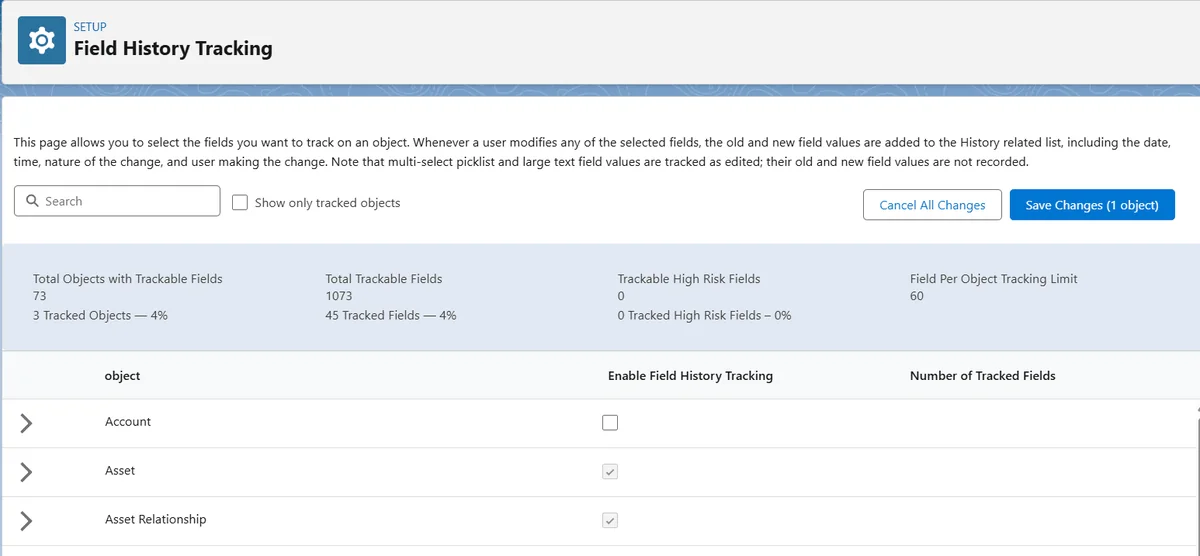
Field History Tracking management in Setup
In Salesforce Winter 26 Release Notes, Field History Tracking should be reviewed with audit, support, and data-governance owners. Salesforce lists User object field history tracking as Beta in Winter ’26, with tracking for up to 20 User fields. Treat Beta functionality as test-first and do not build compliance commitments on it until your org validates availability and limits.
Field history is not a replacement for Shield Field Audit Trail, Event Monitoring, or a retention policy. It answers “what changed on this record field,” not every access or security question.
Permission Set License cleanup after unassignment
Winter ’26 removes related Permission Set License assignments after a user is unassigned from a related permission set or permission set group in most cases. This helps during offboarding and role changes, but it does not replace access reviews.
Run a post-release sample check on users who moved roles recently. Confirm assigned permission sets, permission set groups, Permission Set Licenses, managed package licenses, and profile. For access design, see our Salesforce permission sets guide.
How marketers should read the Winter 26 Release Salesforce updates
Marketing teams should scan Salesforce Winter 26 Release Notes before changing templates, journeys, forms, or approval processes. For teams that call the same cycle winter 26 release salesforce, the key point is to validate consent, personalization, and publishing behavior before production use.
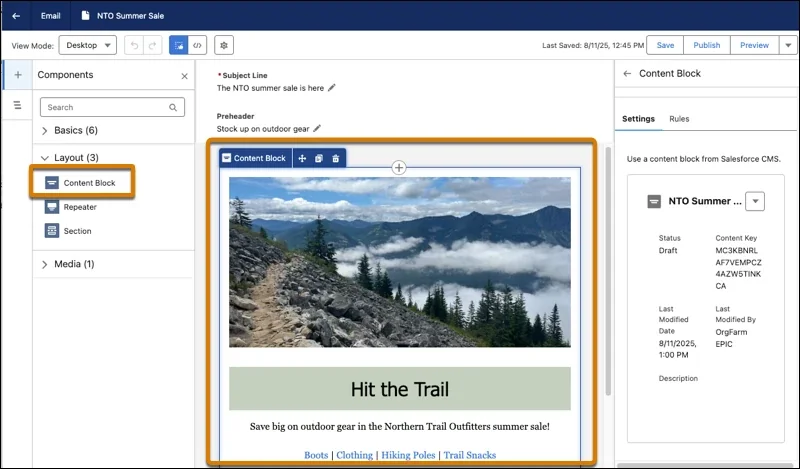
Reusable content blocks can reduce copy drift across emails and pages, but only if the team assigns owners, approval rules, and a versioning process.
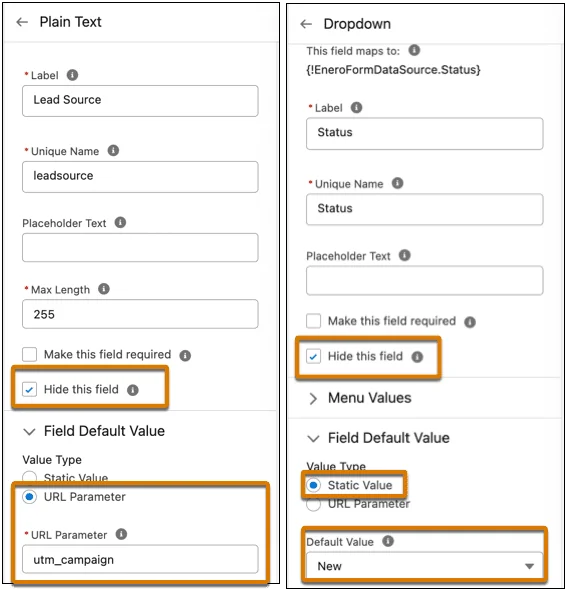
Landing page updates should be tested with real form data. Check hidden fields, default values, merge field behavior, consent capture, and external form handler mappings.
How developers should test Salesforce Winter 26 Release Notes
Developers should read Salesforce Winter 26 Release Notes by API version and runtime surface. Winter ’26 maps to API version 65.0, so a component, Apex class, Flow, or package may behave differently only after its version is raised. Do not mass-upgrade API versions without testing.
LWC Trusted Mode and third-party JavaScript review
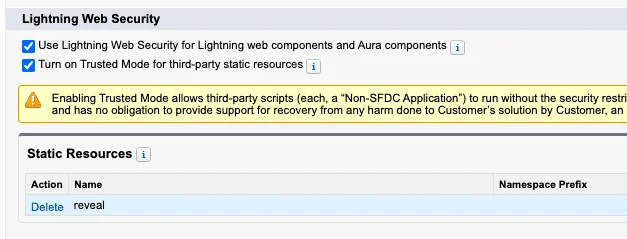
In Salesforce Winter 26 Release Notes, Trusted Mode is a developer feature that also needs security approval. Winter ’26 adds Trusted Mode options for third-party JavaScript loaded as static resources. The purpose is to let vetted libraries access browser APIs that Lightning Web Security normally limits or wraps.
Before enabling Trusted Mode, confirm the library source, version, license, security history, static resource packaging, Content Security Policy requirements, and whether the same result can be built with a native Lightning base component. Salesforce’s Lightning platformResourceLoader documentation still recommends uploading third-party libraries as static resources and loading them through lightning/platformResourceLoader.
Unified testing for Apex and Flow
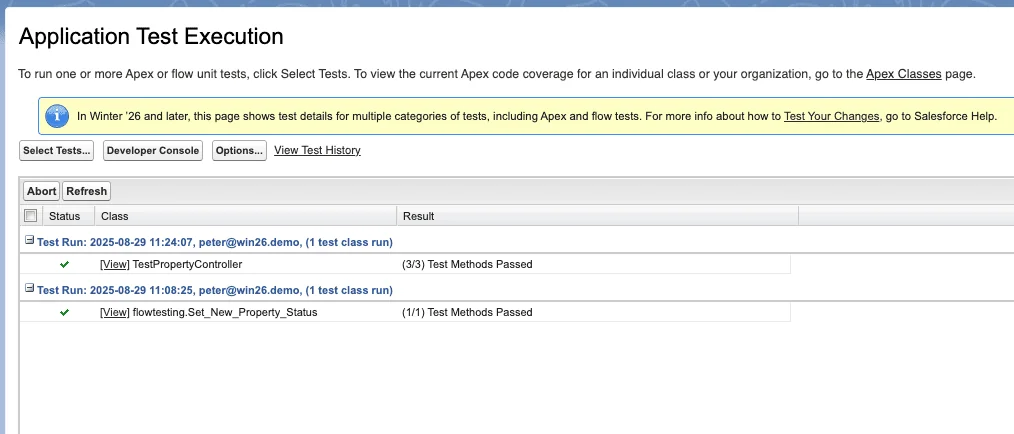
In Salesforce Winter 26 Release Notes, unified testing supports a release process where Apex and Flow evidence are reviewed together. Application Test Execution in Setup gives teams a central place to work with Apex and Flow tests.
For production deployments, do not rely on the platform minimum of 75% Apex coverage as a quality target. It is only the deployment gate. Cover trigger paths, permission assumptions, bulk records, null values, mixed data ownership, and integration error responses. See our Apex code best practices checklist.
Invocable Apex example for Flow and Action Hub review
Action Hub helps admins find invocable actions and where they are used. When developers create invocable Apex for Flow, the code should be bulk-safe and enforce user-mode data access where appropriate. This example returns one result per input request, performs one SOQL query, and avoids querying inside a loop.
public with sharing class AccountRevenueBandAction { public class Request { @InvocableVariable(required=true) public Id accountId; } public class Result { @InvocableVariable public Id accountId; @InvocableVariable public String revenueBand; } @InvocableMethod(label='Classify Account Revenue Band' description='Returns a revenue band for each Account Id.') public static List<Result> classify(List<Request> requests) { Set<Id> accountIds = new Set<Id>(); for (Request requestItem : requests) { if (requestItem != null && requestItem.accountId != null) { accountIds.add(requestItem.accountId); } } Map<Id, Account> accountsById = accountIds.isEmpty() ? new Map<Id, Account>() : new Map<Id, Account>([ SELECT Id, AnnualRevenue FROM Account WHERE Id IN :accountIds WITH USER_MODE ]); List<Result> results = new List<Result>(); for (Request requestItem : requests) { Result output = new Result(); output.accountId = requestItem == null ? null : requestItem.accountId; Account accountRecord = accountsById.get(output.accountId); Decimal revenue = accountRecord == null ? null : accountRecord.AnnualRevenue; if (revenue == null) { output.revenueBand = 'Unknown'; } else if (revenue >= 10000000) { output.revenueBand = 'Enterprise'; } else if (revenue >= 1000000) { output.revenueBand = 'Mid Market'; } else { output.revenueBand = 'Small Business'; } results.add(output); } return results; } }Governor limit note: this pattern uses one SOQL query for the whole Flow interview batch. If you add more objects, keep queries outside loops and decide whether the action should run in user mode or system mode based on the business process and security model.
What Flow builders should validate in sfdc release notes
Flow owners should connect Salesforce Winter 26 Release Notes to the flows that actually run in production. A winter 26 release salesforce Flow review should include screens, actions, permissions, and fault paths. Flow changes in sfdc release notes deserve a separate test pass because Flow often sits between admin configuration and developer logic.
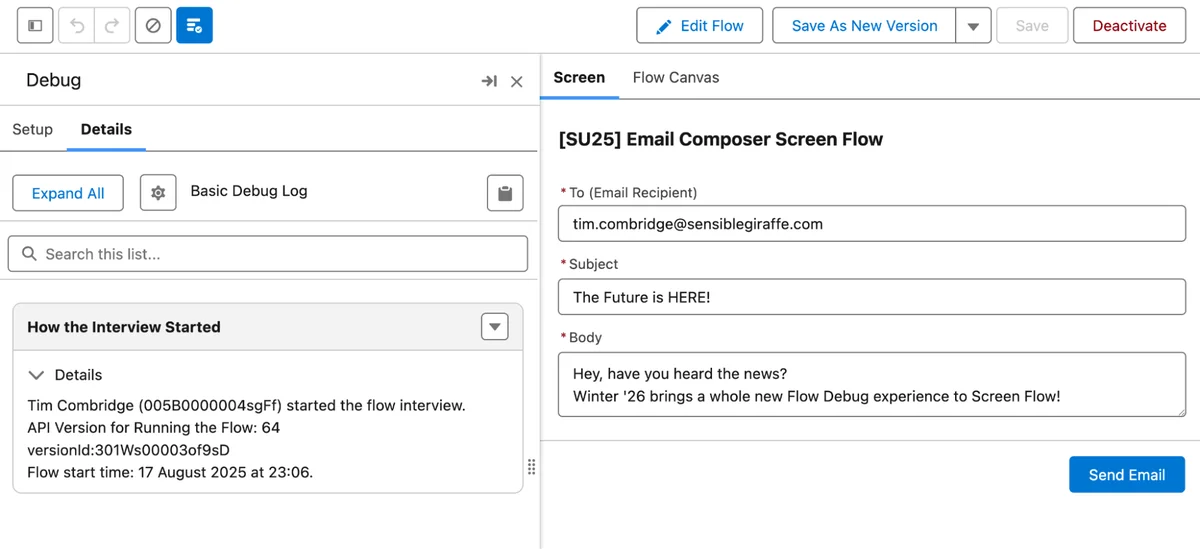
Screen Flow debugger updates
In Salesforce Winter 26 Release Notes, the Screen Flow debugger changes are most useful when teams already keep repeatable test inputs. Winter ’26 extends the newer debug experience to Screen Flow, including screen-focused and canvas-focused review. Use this to inspect variable values, screen navigation, and branch conditions before activating a new version.
A screen flow that works for a System Administrator can still fail for a service user because of CRUD, FLS, record access, or missing permission sets.
Action Hub in the Automation app
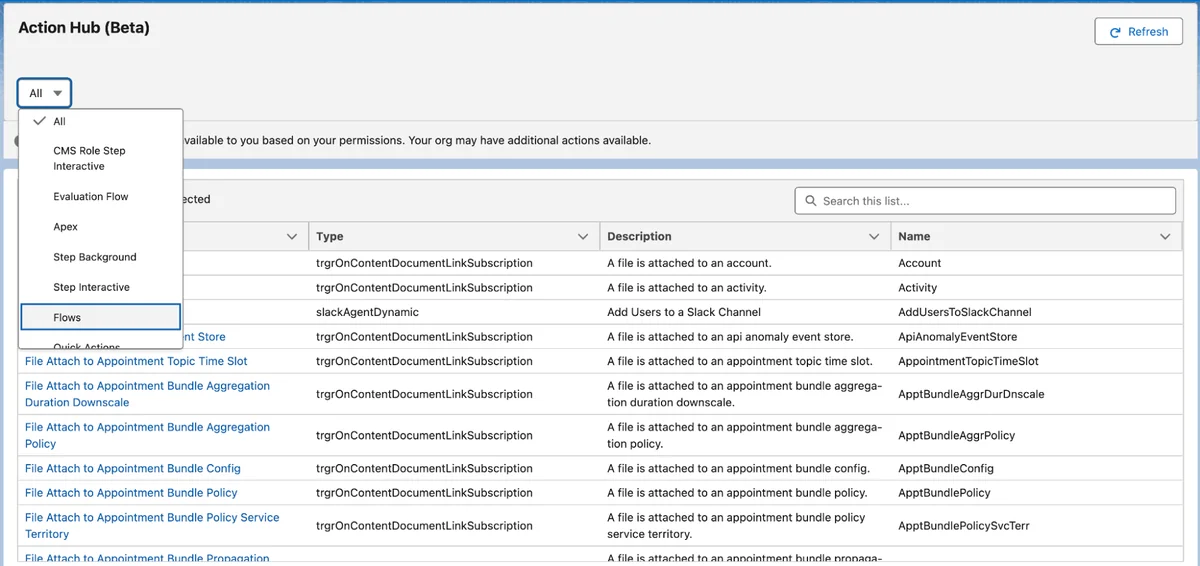
Action Hub is listed as Beta in Winter ’26. It helps teams search invocable actions and inspect where actions are used. This matters when old Apex actions, Slack actions, approval actions, or package-provided actions remain in flows after redesign.
Use Action Hub during release cleanup. Identify actions with no references, actions used by inactive flows, and actions used by critical flows. For Flow design basics, use our Salesforce Flow tutorial.
Which release updates need action before production?
The Salesforce Winter 26 Release Notes include release updates that need a different workflow from optional features. Optional features can wait for adoption. Enforced or automatically enabled updates require testing before the production upgrade window.
Verified email addresses for users created in 2016 and earlier
In Salesforce Winter 26 Release Notes, this email verification item belongs in the release risk register because it can block outbound email. Salesforce states that only users with verified email addresses can send email from Salesforce, and the change affects user accounts created on or before November 1, 2016.
SELECT Id, UserId, User.Name, User.Email, User.CreatedDate, HasUserVerifiedEmailAddress FROM TwoFactorMethodsInfo WHERE User.IsActive = true AND User.CreatedDate <= 2016-11-01T23:59:59Z AND HasUserVerifiedEmailAddress = falseThe newer User.HasUserVerifiedEmail field is available in API version 63.0 and later, according to the Salesforce object reference. If your tooling uses API v63.0 or later, confirm whether it meets your reporting need before relying on TwoFactorMethodsInfo.
Restrict User Access to Run Flows
The Restrict User Access to Run Flows release update requires users to have the correct profile or permission set access to run flows. Test screen flows, Experience Cloud flows, autolaunched flows launched from buttons, and flows invoked by packages. Review the official Salesforce Release Updates page for current enforcement details.
Legacy host names and integration URLs
In Salesforce Winter 26 Release Notes, legacy host name updates should be owned jointly by admins, developers, and integration teams. Winter ’26 automatically disables legacy host name redirections in production and demo orgs unless the org opts out before receiving the release. Salesforce’s timeline also points to Spring ’26 as the permanent enforcement period for the end of legacy redirections.
Search metadata for old instance patterns and non-enhanced domain patterns. Replace them with My Domain or the stable host name pattern recommended by Salesforce.
Best practices for a Salesforce Winter 26 Release Notes test plan
A practical Salesforce Winter 26 Release Notes test plan should be short enough to run and specific enough to prove business safety. Keep the Salesforce Winter 26 Release Notes checklist in the same system where your team tracks deployments.
- Inventory: list critical objects, flows, Apex entry points, integrations, packages, Experience Cloud sites, and email-sending processes.
- Map release items: tag each item as optional, Beta, GA, enforced, automatically enabled, or API-version-specific.
- Test in preview: use a sandbox on a preview instance where available.
- Run regression scripts: create records, update records, send emails, run flows, execute Apex tests, check list views, and validate reports.
- Check security: test with non-admin users, external users, and integration users. Confirm CRUD, FLS, sharing, and permission set behavior.
- Monitor after release: review login errors, Flow errors, email send failures, integration failures, and user support tickets.
Common errors after reading sfdc release notes too quickly
When teams read Salesforce Winter 26 Release Notes too quickly, especially when they treat sfdc release notes as a skim-read task, they miss sfdc release notes entries that change runtime behavior.
- Flow access failures: users can open a record page but cannot run the embedded flow.
- Email failures: automation sends email as a user whose email address is not verified.
- List view confusion: saved multi-column sorting changes queue or pipeline work order.
- LWC library failures: a static-resource JavaScript library behaves differently under Lightning Web Security or Trusted Mode.
- Integration URL failures: old instance host names remain inside middleware or custom metadata.
Frequently Asked Questions
Where can I read the official Salesforce Winter 26 Release Notes?
You can read the official Salesforce Winter 26 Release Notes in Salesforce Help at the Winter ’26 release notes page. Use the official page for final availability, edition notes, Beta labels, and release update enforcement details.
What is the safest way to test winter 26 release salesforce changes?
Test winter 26 release salesforce changes in a sandbox that matches production as closely as possible. Run smoke tests as real profiles, execute Apex tests, run critical flows, check email-sending automation, and confirm integrations use supported host names.
Which sfdc release notes items are most likely to break an org?
The sfdc release notes items most likely to cause disruption are enforced release updates, Flow runtime permissions, email verification, domain and host name changes, API-version-specific code behavior, and managed package compatibility changes.
Is every Salesforce Winter 26 feature enabled automatically?
No. Some features are optional, some are Beta, some are generally available but still require configuration, and some release updates are enforced or automatically enabled. Read each Salesforce Winter 26 Release Notes entry for availability and setup requirements.
What API version is Salesforce Winter 26?
Salesforce Winter ’26 corresponds to API version 65.0. Versioned behavior affects items such as Flow updates, Apex behavior, Metadata API, and LWC changes only when the artifact uses the relevant API version.
Final checklist for release owners
Before production upgrade, confirm the Salesforce Winter 26 Release Notes items that apply to your org, test them with non-admin users, document release update decisions, and prepare a short communication for affected teams.