Salesforce telephony integration connects phone calls, call routing, caller context, and call records with Salesforce. In practice, an admin or architect chooses between Salesforce Voice, Sales Dialer, or a partner CTI approach, then designs how agents place calls, receive screen pops, log activity, and report on call outcomes.
The decision is no longer only about adding a softphone. A Salesforce telephony integration also changes how teams measure response time, follow-up quality, and record ownership. Salesforce has announced that Open CTI is in maintenance mode and scheduled for retirement on February 28, 2028, so any new computer telephony integration Salesforce design should include a migration path to Salesforce Voice or another supported vendor model. See the official Open CTI support policy at Salesforce Developers.
Salesforce Telephony Integration Architecture
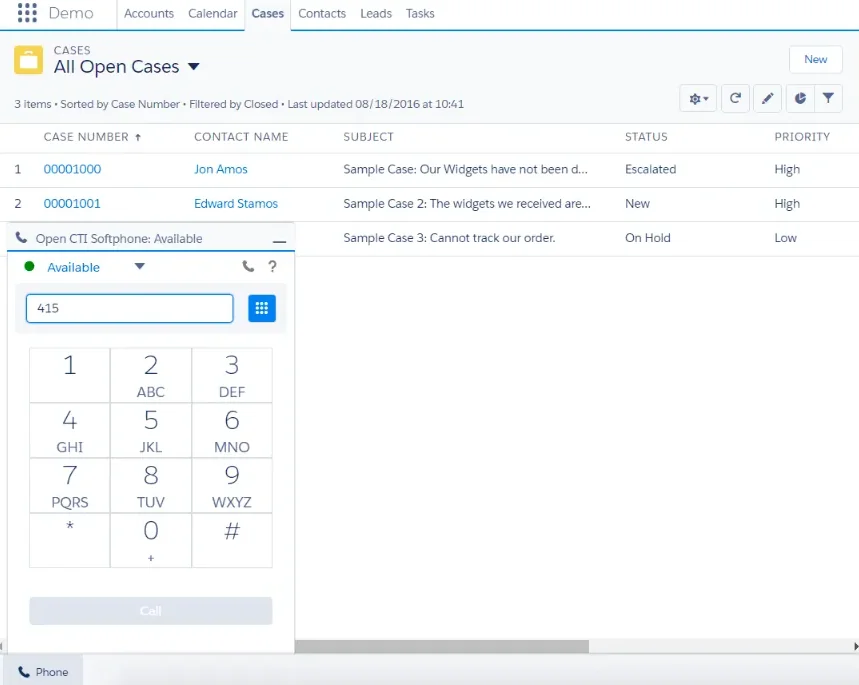
A Salesforce telephony integration has four layers: the carrier or contact-center platform, the Salesforce integration layer, the agent user interface, and the data model used for reporting. In enterprise orgs, a Salesforce telephony integration design fails when these layers are treated as one package. A phone vendor can connect calls, but Salesforce still needs the correct user permissions, console app configuration, automation rules, and reporting objects.
Core components in a Salesforce phone system
| Component | What it controls | Design question |
|---|---|---|
| Telephony provider | Phone numbers, routing, IVR, recording, queues, and carrier connectivity | Do you need Salesforce Voice, a partner contact center, or an existing PBX/CCaaS platform? |
| Salesforce console app | Agent workspace, utility bar, tabs, record pages, and Omni-Channel placement | Will calls be handled inside Service Console, Sales Console, or a custom Lightning app? |
| Call data | Task, VoiceCall, related records, dispositions, notes, and analytics | Which object is the source of truth for call reporting? |
| Security model | Profile, permission set, record access, CRUD/FLS, and recording access | Who can place calls, listen to recordings, view transcripts, and edit call notes? |
| Automation | Flows, Apex, assignment rules, follow-up tasks, and notifications | Which updates must happen synchronously, and which can run async? |
Computer telephony integration Salesforce considerations
Computer telephony integration Salesforce projects historically used Open CTI to add a browser-based softphone, click-to-dial, screen pops, and call logging. Open CTI methods for Lightning Experience, including click-to-dial event handling, are documented for API v38.0 or later, but Open CTI should now be treated as a legacy migration topic rather than a first-choice architecture for new builds.
For existing Open CTI orgs, do not wait until the retirement window. Inventory every dependency: utility bar components, managed packages, call center definition files, screen pop rules, custom JavaScript, Task field mappings, voice recording links, and reports. That inventory becomes the migration backlog for Salesforce Voice or a vendor-supported replacement.
How to choose a Salesforce phone system for Salesforce telephony integration
A Salesforce phone system should match the calling pattern, not the org chart. Sales teams need outbound speed, disposition tracking, callback discipline, and manager review. Service teams need queue routing, case context, transcripts, escalation paths, and supervisor visibility. A mixed contact center often needs both, but not always in the same tool.
Salesforce phone system option 1: Salesforce Voice
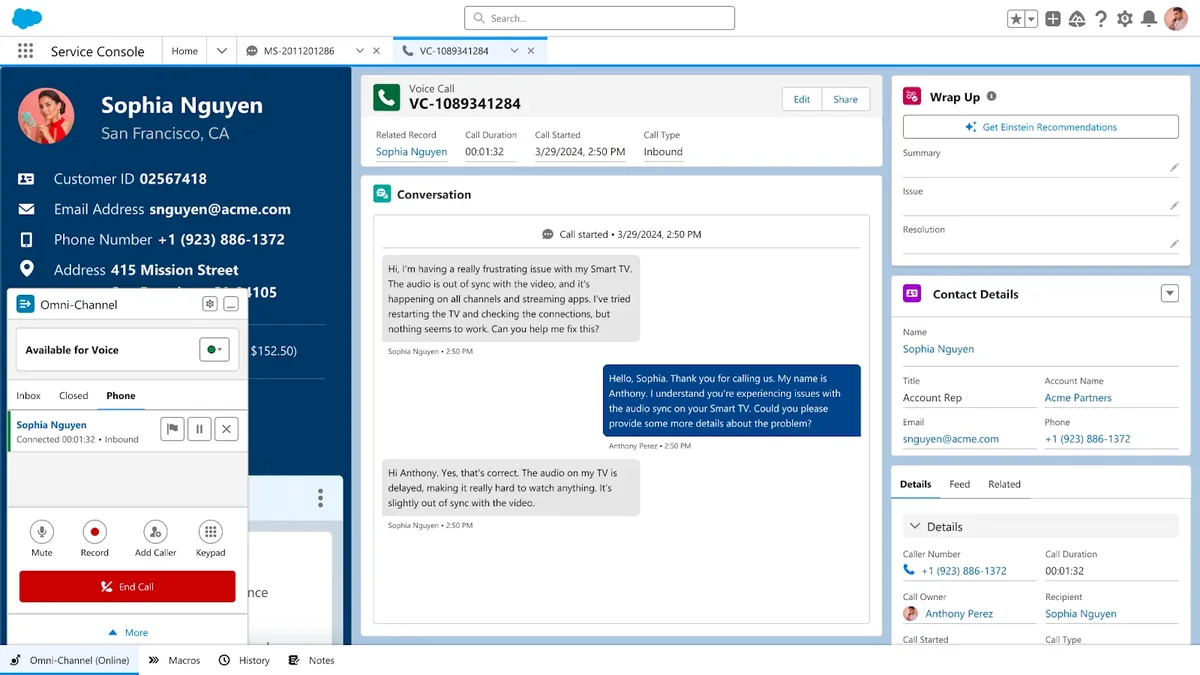
Salesforce Voice, referenced in many older materials as Service Cloud Voice, connects phone work with Salesforce service records and Omni-Channel routing. Salesforce documentation describes Salesforce Voice with Telephony Providers as a model where you use a telephony provider with a Salesforce Voice contact center. Review the current setup documentation at Salesforce Help.
Use this Salesforce telephony integration path when agents need a service console experience with cases, voice calls, routing, and supervisor workflows in one place. It also fits teams that want future alignment with Salesforce voice roadmap items instead of building more Open CTI dependencies.
Salesforce phone system option 2: partner CTI or CCaaS
A partner CTI or contact-center-as-a-service package can be the right Salesforce telephony integration choice when the business already runs a mature phone platform. The practical question is whether the vendor has a supported path beyond Open CTI. Ask for the vendor’s Open CTI retirement plan, Salesforce Voice roadmap, data model, managed package dependencies, and approach to screen pops after February 2028.
For regulated environments, confirm where call audio, transcripts, and call metadata are stored. Salesforce record access does not automatically secure recordings stored outside Salesforce. Your design should map recording access to the same roles or permission sets used for cases, accounts, and quality review.
Salesforce phone system option 3: custom LWC with click-to-dial
Custom Lightning Web Components can support a narrow Salesforce telephony integration requirement by displaying phone numbers using the official lightning-click-to-dial component. Salesforce documents that this component works in Lightning Experience with Open CTI and Voice, and it works with the Open CTI methods enableClickToDial, disableClickToDial, and onClickToDial. See the component reference at Salesforce Developers.
<template>
  <lightning-card title="Call Contact">
    <div class="slds-p-around_medium">
      <p>Primary Phone</p>
      <lightning-click-to-dial
        value={phoneNumber}
        record-id={recordId}>
      </lightning-click-to-dial>
    </div>
  </lightning-card>
</template>
import { LightningElement, api } from 'lwc';
export default class ContactClickToDial extends LightningElement {
@api recordId;
@api phoneNumber;
}This component does not replace a telephony provider. It renders a clickable phone number and hands the click to the enabled phone system. It is useful on custom record pages, account workspaces, renewal consoles, or guided call screens where agents need a focused interface.
How an sfdc dialer fits into Salesforce telephony integration
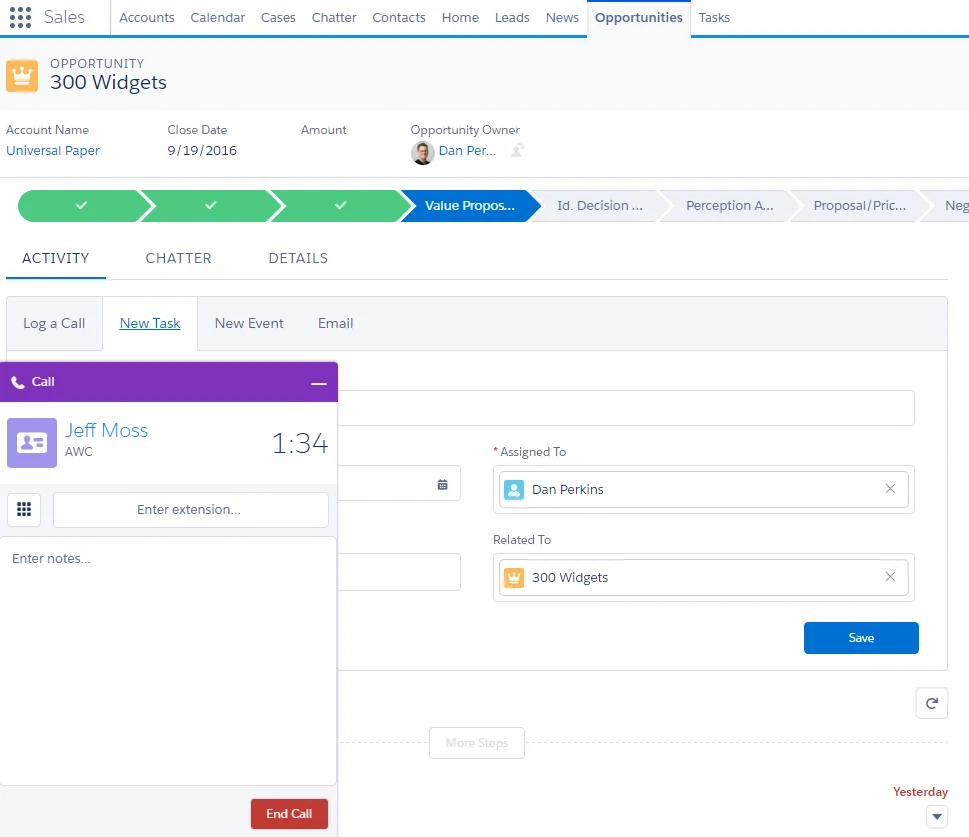
An sfdc dialer is usually an outbound sales tool, not a full contact-center replacement. Salesforce Sales Dialer lets sales users make and receive calls from Salesforce, add notes, and log call information. Salesforce lists limitations for Dialer, including outgoing calls to the United States and Canada only, so global teams must validate coverage before choosing it. Review the official Sales Dialer documentation and limitations at Salesforce Help and Salesforce Help Dialer Limitations.
Sfdc dialer use cases for sales teams
Use an sfdc dialer when reps work from lead lists, opportunities, cadences, or follow-up queues. A sales manager usually cares about call attempts, connect rates, dispositions, voicemail usage, and next-step creation. The implementation should keep those metrics on standard Salesforce activity reports where possible, because sales operations teams already use Activity, Lead, Contact, Account, and Opportunity data.
Do not force an sfdc dialer into service use cases where agents need IVR context, case routing, supervisor assist, or cross-channel workload balancing. Those requirements point toward Salesforce Voice or a contact center platform integrated with Service Cloud.
Sales Dialer versus Salesforce Voice
| Requirement | Sales Dialer | Salesforce Voice |
|---|---|---|
| Primary team | Sales representatives | Service and contact center agents |
| Main pattern | Outbound and sales follow-up | Inbound, outbound, routing, and service handling |
| Common records | Leads, Contacts, Accounts, Opportunities, Tasks | Cases, Contacts, Accounts, VoiceCall records, Tasks where applicable |
| Routing need | Usually light | Often central to the design |
| Best fit | Sales call execution | Service voice operations |
How to set up Salesforce telephony integration
The Salesforce telephony integration setup path depends on the product, but the project sequence is similar. Start with the call journey, then configure the phone system, then connect users, then validate data. Admins often start with package installation and miss the harder questions: who owns the phone number, what record opens on an inbound call, what happens when no match is found, and which fields supervisors use for reporting.
Prerequisites before configuration
- Confirm Salesforce editions, licenses, and add-ons for the selected voice product.
- Document phone numbers, queues, IVR menus, operating hours, holidays, and escalation rules.
- Define how inbound caller ID maps to Lead, Contact, Person Account, Case, or custom records.
- Create permission sets for agents, supervisors, administrators, and quality reviewers.
- Decide whether the reporting source is Task, VoiceCall, UnifiedVoiceCall, vendor objects, or a combination.
- Review data retention rules for call recordings, transcripts, and notes with legal and security teams.
Configuration sequence for admins
- Create a sandbox proof of concept. Use a full or partial-copy sandbox when record matching, case context, or managed package behavior depends on production-like data.
- Install or enable the voice package. Follow the official setup path for Salesforce Voice, Sales Dialer, or the vendor package. Do not reuse an old Open CTI package without confirming retirement support.
- Add the phone utility to the Lightning app. Place it in the console app where agents already work. Keep the workspace simple during the first pilot.
- Assign permission sets. Give only required access to call controls, recordings, transcripts, and reporting objects. Use separate supervisor permissions for monitoring and quality review.
- Map call outcomes. Standardize dispositions such as Connected, Left Voicemail, No Answer, Wrong Number, Escalated, and Follow-Up Required.
- Configure screen pops. Define exact matching order. For example: open an active Case first, then Contact, then Lead, then a search page when no unique match exists.
- Test call logging. Verify WhoId, WhatId, duration, direction, disposition, notes, owner, and timestamps on every supported call path.
- Build reports before go-live. Managers should approve daily call volume, missed calls, abandoned calls, average duration, disposition quality, and follow-up task reports before rollout.
VoIP integration with Salesforce checklist
A voip integration with Salesforce must handle more than call buttons. A Salesforce telephony integration should record the whole call lifecycle, not only the first click. VoIP calls can move between a browser, desk phone, mobile app, queue, and transfer destination. Each transition can break activity logging if the integration only records the original click.
| Checklist item | Why it matters |
|---|---|
| Number format normalization | Caller matching fails when one system stores E.164 format and another stores local formatting. |
| Retry logic | Call data should not be lost when Salesforce API calls fail or hit a transient network error. |
| Duplicate prevention | Transferred calls can create duplicate Tasks or VoiceCall records if the vendor sends multiple events. |
| Consent and recording controls | Recording laws and customer consent rules vary by location. Do not make recording globally available without review. |
| Agent identity mapping | The phone user, Salesforce user, and workforce management user must resolve to the same person for reporting. |
| Async enrichment | Sentiment, transcript summaries, and external data sync should run async unless the agent needs it before answering. |
Call data model for Salesforce telephony integration
The Salesforce telephony integration data model decides whether the integration becomes useful after go-live. A Salesforce telephony integration that only opens a softphone may save clicks, but managers still need reliable call records. Salesforce provides standard activity fields on Task, and Salesforce Voice includes the VoiceCall object. The VoiceCall object represents a phone or VoIP call for Salesforce Voice and is available in API v40.0 and later; see the official object reference at Salesforce Developers.
Task-based call logging
Task is still common for Salesforce telephony integration activity reporting because it relates naturally to Leads, Contacts, Accounts, Opportunities, and other records. Salesforce documents Task call fields such as CallDisposition, CallDurationInSeconds, CallObject, and CallType in the Task object reference at Salesforce Developers. If a CTI adapter logs Tasks, confirm which fields it controls and which fields your automation can safely update.
public with sharing class CallActivityLogger {
    public class CallLogRequest {
        @AuraEnabled public Id whoId;
        @AuraEnabled public Id whatId;
        @AuraEnabled public String direction;
        @AuraEnabled public String disposition;
        @AuraEnabled public Integer durationSeconds;
        @AuraEnabled public String notes;
    }

    @AuraEnabled
    public static Id logCompletedCall(CallLogRequest request) {
        if (request == null) {
            throw new AuraHandledException('Call log details are required.');
        }
        if (request.whoId == null && request.whatId == null) {
            throw new AuraHandledException('Relate the call to a Lead, Contact, or business record.');
        }

        Task callTask = new Task();
        callTask.Subject = 'Call';
        callTask.Status = 'Completed';
        callTask.Priority = 'Normal';
        callTask.ActivityDate = Date.today();
        callTask.WhoId = request.whoId;
        callTask.WhatId = request.whatId;
        callTask.CallType = String.isBlank(request.direction) ? 'Outbound' : request.direction;
        callTask.CallDisposition = request.disposition;
        callTask.CallDurationInSeconds = request.durationSeconds == null ? 0 : request.durationSeconds;
        callTask.Description = request.notes;

        Database.SaveResult result = Database.insert(callTask, AccessLevel.USER_MODE);
        if (!result.isSuccess()) {
            throw new AuraHandledException(result.getErrors()[0].getMessage());
        }
        return result.getId();
    }
}
This Apex example uses user-mode DML so the insert respects the running user’s object and field permissions. Salesforce documents user-mode database operations through AccessLevel.USER_MODE in the Apex Developer Guide. For bulk call imports or nightly reconciliation, pass a list of Tasks to one DML statement instead of inserting inside a loop.
VoiceCall and reporting objects
Use VoiceCall when Salesforce Voice is the source of the Salesforce telephony integration call event. Do not create a parallel custom call object unless there is a reporting requirement that standard voice records cannot meet. A separate object adds synchronization work, data retention questions, and duplicate dashboards. If the business asks for a single reporting layer across Task and VoiceCall, evaluate UnifiedVoiceCall for reporting and dashboards where available in your org.
Common data mapping errors
- Matching only on phone number. Phone numbers are shared by households, offices, call queues, and old records. Use status, account relationship, and recent case context where possible.
- Logging every ring as a completed call. Separate missed, abandoned, transferred, and connected calls so managers do not overcount productivity.
- Overwriting agent notes. Vendor updates should append structured metadata or write to controlled fields, not replace human notes after the call.
- Ignoring timezone rules. Store timestamps consistently and test reporting for teams that work across regions.
- Letting every automation run synchronously. Post-call summaries, external warehouse sync, and QA sampling can usually run with Queueable Apex, Flow async paths, or platform events.
Security and compliance for Salesforce telephony integration
Phone data in a Salesforce telephony integration is often more sensitive than standard CRM activity. A Salesforce phone system can expose caller identity, call content, recordings, call summaries, sentiment, and supervisor comments. Treat voice records as customer data, not as harmless productivity metadata.
Permission design
Use permission sets rather than broad profile changes. Create separate permission sets for agents, supervisors, voice administrators, integration users, and audit users. If a user should log calls but not listen to recordings, separate those capabilities. Also check field-level security for disposition, transcript summary, recording URL, external call ID, and QA score fields.
For Apex that reads or writes call records, use user-mode SOQL/DML where the code serves an end-user action. Use system mode only for controlled integration logic that has been reviewed. The Apex security documentation explains user-mode database operations at Salesforce Developers.
Recording and transcript governance
Before enabling call recording or transcript analysis in a Salesforce telephony integration, document consent handling, retention period, deletion process, legal hold process, and access review. If recordings live in the telephony platform and only links appear in Salesforce, include the external platform in the access review. A Salesforce permission set cannot protect an audio file that the vendor platform exposes to a broader group.
Best practices for Salesforce telephony integration and VoIP
VoIP integration with Salesforce is easier to operate when the broader Salesforce telephony integration is designed in phases. Keep the first release narrow. Start with the highest-volume call path, define how records match, and prove that reporting is correct. Then add transcription, summaries, coaching, or advanced routing after the call data is stable.
Implementation practices that reduce rework
- Define call states. Agree on Created, Ringing, Connected, Held, Transferred, Completed, Missed, and Failed before configuring automation.
- Standardize dispositions. Keep the picklist short. Long disposition lists cause poor data quality.
- Use one owner rule. Decide whether the Task or VoiceCall owner is the answering agent, queue owner, original rep, or case owner.
- Design for no-match calls. Agents need a search or create flow when the caller does not match an existing record.
- Monitor API usage. High-volume contact centers can generate many create, update, and search calls per interaction.
- Build exception reports. Track calls without related records, calls without dispositions, failed log attempts, and duplicate external call IDs.
Performance and governor limit notes
Salesforce governor limits still apply when telephony events call Apex. Do not query inside loops when enriching call records. Do not make long synchronous callouts from a screen pop event if the agent is waiting for the record to open. For high call volume, use Platform Events, Change Data Capture, Bulk API jobs, or Queueable Apex to move non-critical enrichment outside the agent interaction.
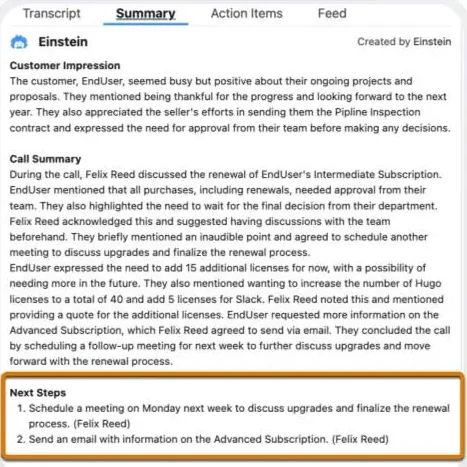
Einstein Conversation Insights and call intelligence
Einstein Conversation Insights is not the same as the phone system. It analyzes conversations for sales coaching and insights when the required licenses, data sources, and supported integrations are in place. Treat it as an analytics layer on top of captured conversations, not as the telephony carrier or dialer itself.
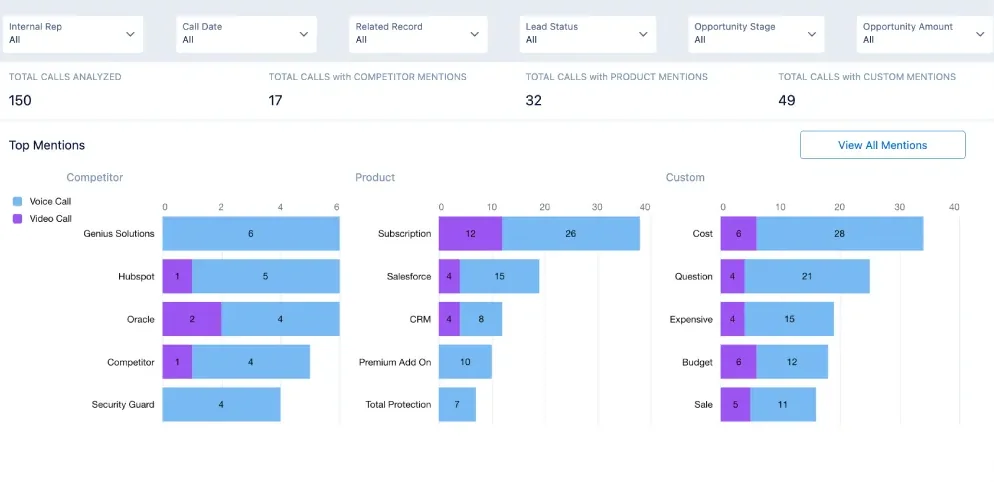
In enterprise orgs, the key architecture question is whether the conversation data can be tied back to the correct seller, opportunity, contact, account, and sales stage. If the source call record is wrong, the summary and coaching dashboards will also be wrong.
Common errors with Salesforce telephony integration projects
Most Salesforce telephony integration production issues come from unclear ownership, not from the phone button itself. The telephony vendor owns call routing. Salesforce owns record security, automation, and reporting. The implementation partner owns integration behavior. The business owns disposition definitions and operating process. Put those ownership lines in the design document.
Errors to catch before go-live
- Open CTI dependency in a new design. With Open CTI scheduled for retirement on February 28, 2028, new work should avoid adding fresh dependencies unless Salesforce or the vendor provides a documented transition path.
- No fallback when screen pop matching fails. Agents need a search view, create flow, or guided fallback. A blank screen wastes handle time.
- Voice user permissions copied from admins. Pilot users should receive production-like permissions so the test catches FLS and object access problems.
- Reports built after launch. Reporting fields must be agreed before call dispositions and field mappings are locked.
- No UAT script for transfers. Test warm transfer, cold transfer, internal transfer, callback, voicemail, missed call, and after-call work.
Salesforce telephony integration decision matrix
Use this Salesforce telephony integration matrix to narrow the first design. It does not replace vendor due diligence, but it prevents the common mistake of choosing a tool because it can place a call rather than because it fits the operating model.
| Scenario | Recommended starting point | Reason |
|---|---|---|
| Sales team needs outbound calling inside Salesforce | Sales Dialer or sales-focused partner dialer | Prioritizes click-to-call, call notes, dispositions, and sales activity reporting. |
| Service team handles inbound cases by phone | Salesforce Voice with Telephony Providers | Aligns voice work with Service Console, case context, and routing design. |
| Existing contact center is deeply integrated with workforce tools | Vendor-supported Salesforce integration with Open CTI retirement plan | Reduces replacement risk while preserving contact center operations. |
| Custom record page needs clickable phone fields | lightning-click-to-dial plus enabled phone system |
Improves the UI without pretending the LWC is the phone system. |
| Global service center needs recording, transcripts, and compliance controls | Salesforce Voice or enterprise CCaaS with formal compliance review | Requires governance across data storage, retention, consent, and access. |
Salesforce telephony integration go-live checklist
Before launch, confirm that the Salesforce telephony integration works for real users, not only for administrators. A clean Salesforce telephony integration pilot should prove call controls, caller matching, activity logging, permissions, and reports with production-like data.
- Run a Salesforce telephony integration test script for inbound, outbound, transfer, voicemail, missed call, and no-match caller scenarios.
- Verify that the Salesforce telephony integration creates or updates only the intended Task, VoiceCall, or vendor records.
- Ask supervisors to sign off on Salesforce telephony integration dashboards before wider rollout.
Frequently Asked Questions
What is Salesforce telephony integration?
Salesforce telephony integration connects phone capabilities with Salesforce records and workflows. A well-designed Salesforce telephony integration can support click-to-dial, inbound screen pops, call logging, routing, recordings, transcripts, and reports, depending on the product or provider used.
Is Open CTI still safe to use for computer telephony integration Salesforce projects?
Open CTI can still exist in current orgs, but Salesforce states that it is in maintenance mode and scheduled for retirement on February 28, 2028. For a new computer telephony integration Salesforce project, design around Salesforce Voice or a vendor-supported roadmap instead of adding new Open CTI dependencies.
What is the difference between Sales Dialer and Salesforce Voice?
Sales Dialer is aimed at sales calling from Salesforce, while Salesforce Voice is aimed at service and contact center voice work. Sales Dialer fits outbound sales follow-up and activity logging. Salesforce Voice fits case context, routing, service console work, and voice records.
Can I build my own sfdc dialer in Apex?
Apex should not be treated as the phone engine. You can use Apex to log call activity, validate data, or run post-call automation, but the actual dialing must come from Salesforce Voice, Sales Dialer, Open CTI while supported, or a telephony provider. For custom Lightning pages, use lightning-click-to-dial only with an enabled phone system.
What should I test before a voip integration with Salesforce goes live?
Test inbound calls, outbound calls, missed calls, transfers, voicemail, duplicate phone matches, no-match callers, permission errors, disposition rules, call duration, recording access, and reporting. A voip integration with Salesforce should also be tested for retry behavior when Salesforce API calls fail.
Related SalesforceTutorial resources