Service Cloud Voice is the Salesforce voice channel that brings phone calls, call controls, caller context, transcripts, and supervisor visibility into the Service Console. Salesforce documentation now uses the name Salesforce Voice for what many admins still search as Service Cloud Voice, so this guide uses both terms where needed.
Use this article when you need a practical implementation view: what the product does, how it differs from CTI, how service cloud voice with amazon connect fits into the architecture, and what to validate before a production rollout.
What is Service Cloud Voice?
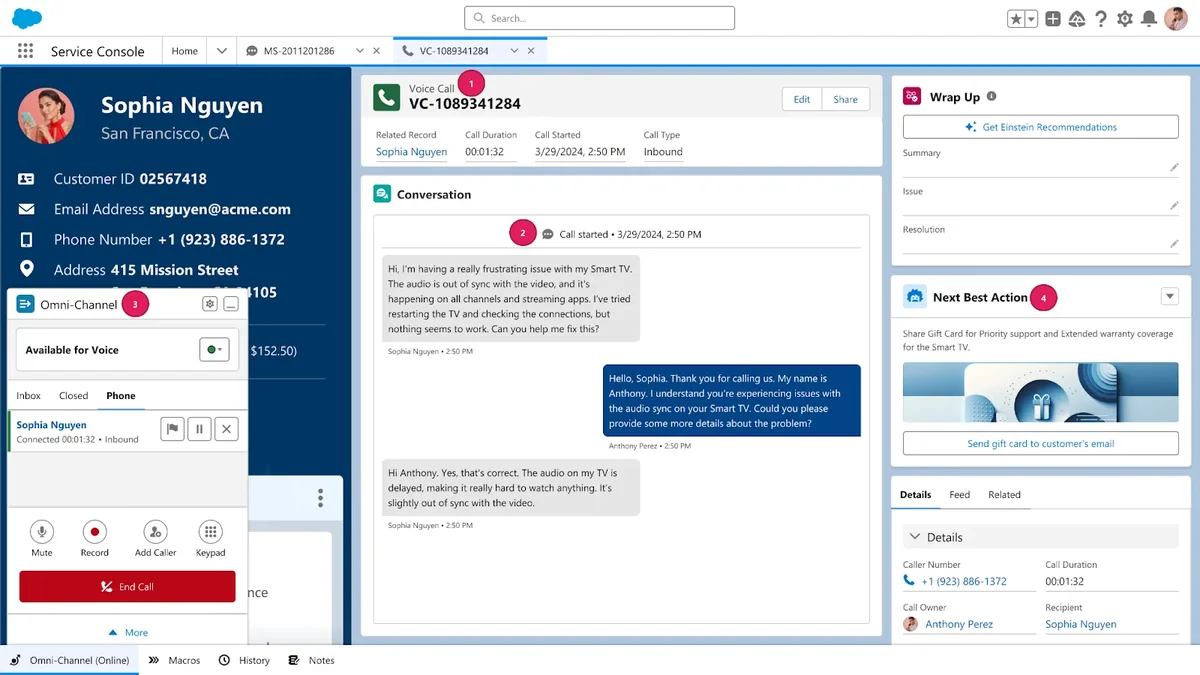
Service Cloud Voice connects telephony to Salesforce so agents can answer calls from the Service Console, see CRM records, work from Omni-Channel, and review voice activity on Salesforce records. In current Salesforce Help and Trailhead content, the product is described as Salesforce Voice, formerly Service Cloud Voice.
The main difference from a basic softphone integration is that calls become part of the service workspace. A call can create or relate to a VoiceCall record, appear beside cases and contacts, route through Omni-Channel, and support transcripts or recordings depending on the telephony model and licenses.
What is Service Cloud in this context?
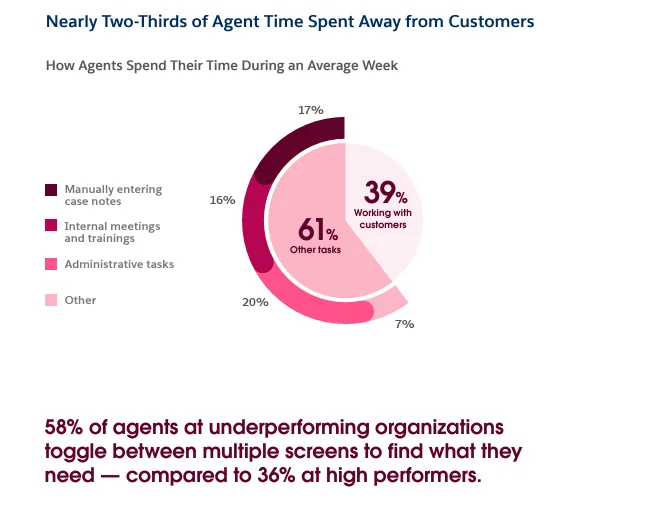
What is Service Cloud for this topic? It is the Salesforce service application layer where teams manage cases, channels, knowledge, entitlements, queues, and service analytics. Voice is not a replacement for case management. It adds a phone channel to that service operating model.
In enterprise orgs, the voice project usually fails when teams treat it as a phone migration only. The safer sequence is to confirm case fields, queue ownership, presence statuses, routing rules, and knowledge articles first. Then add the voice channel.
Salesforce voice naming and console experience
The phrase salesforce voice now appears in official documentation, while many orgs, packages, and implementation plans still use Service Cloud Voice. For admins, the key point is the same: agents work in Lightning Experience, usually from a Service Console app, with phone work routed together with other service work.
Trailhead lists browser and setup considerations for Salesforce Voice, including Lightning Experience, an add-on license, supported browsers, cookies for SSO, My Domain or custom domain setup, and Omni-Channel preparation. Confirm these constraints in your target org before you build contact flows or migrate numbers.
How Service Cloud Voice Works in Salesforce
The voice architecture joins four layers: the telephony provider, Salesforce routing, the Service Console, and voice data stored in Salesforce. The exact behavior depends on whether you choose Amazon Connect, partner telephony, or Partner Telephony from Amazon Connect.
| Layer | What it does | Implementation note |
|---|---|---|
| Telephony provider | Receives inbound calls, runs IVR/contact flows, manages phone numbers, and connects callers to agents. | Amazon Connect uses AWS services; partner telephony depends on the provider package and supported feature set. |
| Omni-Channel | Routes voice work to agents based on presence, capacity, queues, and skills where configured. | Voice routing should be tested with the same capacity model used for chat, messaging, and cases. |
| Service Console | Shows call controls, customer records, case context, and related work in one workspace. | Design the console app and record pages before user training. |
| Voice data | Stores call records, timestamps, call status, duration, recordings, and transcript data where supported. | The VoiceCall object is available from API v40.0 and later. Salesforce recommends the Telephony Integration REST API for managing VoiceCall records. |
Salesforce voice data model: VoiceCall, transcripts, and recordings
The VoiceCall object represents a phone or VoIP call in Salesforce Voice, Sales Dialer, and supported voice connectors. The object reference lists it as available from API v40.0 and later. Common reporting fields include call connected time, call end time, call disposition, and call duration in seconds.
Do not design a custom telephony integration that inserts and updates VoiceCall records with normal Apex DML as the first choice. Salesforce Developer documentation points implementers to the Telephony Integration REST API for real-time voice call lifecycle operations. For transcripts, Salesforce Developer documentation provides Connect REST API resources for uploading and updating transcript content.
Service cloud voice with amazon connect: setup decisions
Service cloud voice with amazon connect is the model most teams evaluate first because Salesforce provides setup paths that connect Voice to Amazon Connect. Salesforce Help states that Amazon Connect can be used with related AWS services such as Amazon Transcribe for real-time transcription, subject to the selected configuration and licensing.
There are two Amazon-related paths to separate during discovery:
- Amazon Connect native model: Salesforce provisions and connects the contact center experience through the guided setup path.
- Partner Telephony from Amazon Connect: the business keeps or uses an Amazon Connect instance while integrating it through the partner telephony path.
The choice affects billing, AWS ownership, IAM work, feature support, test environment design, and support ownership. Write this decision into the architecture document before number porting begins.
Service Cloud Voice Implementation Guide for Salesforce Teams
This service cloud voice implementation guide is written for admins and architects who must turn a phone requirement into a supportable Salesforce design. Start with org readiness, then configure the contact center, then validate call behavior in a sandbox before production cutover.
Service cloud voice implementation guide: prerequisites
Before setup, confirm these items against Salesforce Help, Trailhead, and your Salesforce contract:
- Licensing: Salesforce Voice is an add-on license to Service Cloud or Sales Cloud in the current Trailhead setup guidance.
- Lightning Experience: Voice is supported in Lightning Experience; do not plan a Classic console rollout.
- Browser support: Trailhead setup guidance names Google Chrome and Mozilla Firefox as supported browsers for Voice.
- Authentication: cookies must be enabled for SSO, and Salesforce recommends custom domain and SSO URL preparation before enabling Voice.
- Omni-Channel: enable and test Omni-Channel before adding calls to the routing model.
- Telephony model: choose Amazon Connect, partner telephony, or Partner Telephony from Amazon Connect before you design IVR and reporting.
- Phone numbers: open number porting requests early. Porting can be regulated and can take longer than a sprint.
- AWS quotas: if Amazon Connect is involved, review concurrent active calls, transcription jobs, outbound countries, and network rules.
Step-by-step setup path
- Document call scenarios. List inbound support, outbound service calls, callbacks, transfers, after-hours handling, emergency messages, and voicemail behavior.
- Map the Salesforce records. Decide when a call should relate to Contact, Account, Case, Work Order, or a custom object. Keep the first release narrow.
- Choose the telephony model. Compare Amazon Connect and partner telephony based on required countries, recording rules, transcript support, reporting, and support model.
- Prepare Omni-Channel. Define presence statuses, capacity, queues, skills, routing priority, and supervisor visibility.
- Enable Voice in Setup. Follow Salesforce Help for the selected model. For Amazon Connect, use the Amazon Connect setup path. For partner telephony, install and configure the provider package as documented by the provider and Salesforce.
- Create the console experience. Add the phone utility, Voice Call record page, case highlights, contact panels, quick actions, and knowledge search where agents need them.
- Configure call flows. Build IVR prompts, queue selection, business-hours logic, fallback routing, and data lookups. Keep PII collection rules aligned with legal and compliance requirements.
- Assign permissions. Assign Voice permission sets, Service Console access, Omni-Channel access, Knowledge access, report folders, and object access needed for related case work.
- Test end to end. Validate inbound calls, outbound calls, transfers, missed calls, wrap-up, transcript creation, recording access, supervisor monitoring, and reporting.
- Cut over in phases. Pilot with one queue, monitor call errors, then migrate more numbers and queues after support teams prove the operating process.
What to test before go-live
| Test area | What to validate | Owner |
|---|---|---|
| Routing | Correct queue, skill, priority, and fallback when no agent is available. | Service admin and contact center lead |
| Record matching | Known callers open the right Contact, Account, or Case context. Unknown callers get a safe default flow. | Salesforce admin |
| Transcripts and recordings | Transcript and recording behavior matches the selected telephony model, consent wording, and data retention policy. | Architect, compliance, and telephony owner |
| Security | Agents see only the cases, contacts, recordings, and reports they are allowed to use. | Security admin |
| Reporting | Dashboards show the right business metrics: call volume, duration, abandoned or missed calls, wrap-up quality, and case outcome. | Service operations |
Voice vs CTI: Which Should You Use?
Traditional CTI can still be enough when the requirement is click-to-dial, screen pop, and basic call logging. Service Cloud Voice is a better fit when the service team needs voice work inside Omni-Channel, real-time supervisor visibility, voice analytics, and transcript-driven service workflows.
| Requirement | Traditional CTI | Service Cloud Voice |
|---|---|---|
| Call controls | Usually embedded through Open CTI or a managed package. | Embedded in the Service Console and aligned to the Voice setup model. |
| Routing | Often controlled mainly by the telephony platform. | Can work with Omni-Channel so voice and digital work use one service routing model. |
| AI and transcript use | Depends on the vendor and custom integration. | Supports voice transcript and assistance patterns where the selected model supports them. |
| Data model | Often logs tasks or vendor-specific records. | Uses Salesforce voice records such as VoiceCall and related transcript or recording data. |
| Best fit | Simple telephony integration with limited Salesforce routing needs. | Contact centers that want voice, cases, channels, analytics, and supervision in one Salesforce service design. |
Best Practices for Security, Routing, and Performance
The voice channel touches customer identity, phone numbers, recordings, transcripts, routing rules, and service reports. Treat it as a service architecture project, not a utility bar change.
Secure voice records and related case data
- Use permission sets for agents, supervisors, and admins instead of broad profile changes.
- Review access to
VoiceCall, Case, Contact, Account, Knowledge, recordings, transcript data, and report folders. - Mask or avoid storing sensitive customer data in transcript text when your legal policy requires it. Salesforce Developer documentation includes Connect REST API resources for transcript upload and update use cases, including redaction scenarios.
- Confirm recording consent, retention, and access rules by country before enabling recording for production queues.
Use Apex for reporting helpers, not call lifecycle control
Apex is useful for read-only summaries, post-call automation on related records, and admin dashboards. Do not use Apex to replace the Telephony Integration REST API for real-time call lifecycle operations. The following example reads recent VoiceCall records in a governor-limit-aware way for an LWC dashboard.
public with sharing class VoiceCallSummaryController {
    public class VoiceMetric {
        @AuraEnabled public String disposition;
        @AuraEnabled public Integer totalCalls;
        @AuraEnabled public Decimal averageSeconds;

        public VoiceMetric(String disposition, Integer totalCalls, Decimal averageSeconds) {
            this.disposition = disposition;
            this.totalCalls = totalCalls;
            this.averageSeconds = averageSeconds;
        }
    }

    @AuraEnabled(cacheable=true)
    public static List<VoiceMetric> getLastSevenDayMetrics() {
        if (!Schema.sObjectType.VoiceCall.isAccessible()
            || !Schema.sObjectType.VoiceCall.fields.CallDisposition.isAccessible()
            || !Schema.sObjectType.VoiceCall.fields.CallDurationInSeconds.isAccessible()) {
            throw new AuraHandledException('You do not have access to voice call metrics.');
        }

        List<AggregateResult> rows = [
            SELECT CallDisposition, COUNT(Id) totalCalls, AVG(CallDurationInSeconds) averageSeconds
            FROM VoiceCall
            WHERE CreatedDate = LAST_N_DAYS:7
            GROUP BY CallDisposition
            ORDER BY COUNT(Id) DESC
            LIMIT 20
        ];

        List<VoiceMetric> metrics = new List<VoiceMetric>();
        for (AggregateResult row : rows) {
            metrics.add(new VoiceMetric(
                (String) row.get('CallDisposition'),
                ((Decimal) row.get('totalCalls')).intValue(),
                (Decimal) row.get('averageSeconds')
            ));
        }
        return metrics;
    }
}
This code runs one aggregate query, avoids SOQL in loops, checks object and field access before querying, and uses @AuraEnabled(cacheable=true) because the method is read-only. In a production org, add a test class that creates or loads suitable test data for the fields available in the target org and covers access-denied behavior. Salesforce still requires at least 75% Apex test coverage for deployment, but enterprise teams should cover the security branch and data branch explicitly.
Design routing before building IVR menus
Start from routing outcomes, not prompt wording. For each queue, define who can receive calls, what capacity a call consumes, when calls overflow, and how supervisors intervene. Then build IVR branches that map to those outcomes. This prevents a common error where the IVR offers options that no live support team owns.
Monitor the first release daily
After go-live, monitor missed calls, disconnected calls, time to assign, transcript creation, agent status sync, routing errors, and voice data sync errors. Use Salesforce reports, Voice dashboards where available, telephony provider logs, and support cases for problems that cross the Salesforce and telephony boundary.
Common errors with voice setup
| Symptom | Likely cause | Fix |
|---|---|---|
| Agent cannot receive calls | Presence status, capacity, queue membership, browser, or SSO issue. | Check Omni-Channel status, assigned permission sets, queue membership, cookies, and supported browser. |
| Caller context does not appear | Phone format mismatch or missing record matching configuration. | Normalize phone data, test caller matching, and define a safe unknown-caller screen flow. |
| Transcript is missing | Transcription is not supported, not enabled, delayed, or failing in the telephony/AWS path. | Check the telephony model, AWS service configuration, transcript API behavior, and provider logs. |
| Reports show incomplete data | Fields are not populated at the expected call lifecycle stage. | Confirm which fields your model updates, then design dashboards around reliable fields. |
| Sandbox test differs from production | Different phone numbers, AWS instances, service quotas, packages, or data volumes. | Document environment differences and run a production-readiness test with real numbers before cutover. |
Official Salesforce documentation to review
Use these Salesforce sources before making release or licensing decisions:
- Salesforce Help: Set Up Salesforce Voice
- Salesforce Help: Set Up Salesforce Voice with Amazon Connect
- Salesforce Help: Salesforce Voice Limits and Limitations
- Salesforce Developer Docs: VoiceCall Object Reference
- Salesforce Developer Docs: Telephony Integration API
- Trailhead: Salesforce Voice
Related SalesforceTutorial resources
- Salesforce Service Cloud setup concepts
- Salesforce Omni-Channel routing guide
- Salesforce reports for service operations
- Salesforce AI features for service teams
Frequently Asked Questions
Is Service Cloud Voice the same as Salesforce Voice?
Yes, in current Salesforce documentation, Salesforce Voice is the current name used for the product many admins still call Service Cloud Voice. Search results, older project documents, and some package references may still use the older term.
What is Service Cloud Voice used for?
Service Cloud Voice is used to bring phone support into the Salesforce Service Console. Agents can handle calls, view customer records, work with cases, and use Omni-Channel routing from the same service workspace.
How does service cloud voice with amazon connect work?
Service cloud voice with amazon connect connects Salesforce Voice to Amazon Connect so calls can be received, routed, and represented in Salesforce. Depending on the model, related AWS services can support transcription and contact center operations. Always verify the exact feature set for your license and telephony model.
Do I still need Omni-Channel for Salesforce Voice?
Yes. Salesforce setup guidance expects Omni-Channel preparation for Voice so calls can be routed to agents with the correct presence and capacity model. Build and test Omni-Channel before you ask agents to take production calls.
Can Apex create or update VoiceCall records?
For voice integrations, use the Salesforce Telephony Integration REST API for real-time VoiceCall lifecycle operations. Apex is better suited for read-only dashboards, post-call business automation, and work on related records after the voice data exists.
What should a service cloud voice implementation guide include?
A service cloud voice implementation guide should include licensing, telephony model selection, Omni-Channel design, phone number planning, IVR flows, console page design, permissions, transcript and recording rules, sandbox testing, cutover steps, and operational monitoring.