Salesforce licenses determine what features and functionality users can access in your org. Understanding the different Salesforce license types is essential for admins managing user access and developers building solutions. This guide covers all current license types, their capabilities, and best practices for license management in 2026.
What are Salesforce Licenses?
A Salesforce license grants specific permissions and access rights to platform features. Each license type defines what objects, applications, and functionality a user can access. Salesforce uses a tiered licensing model where different license types provide different levels of platform access and feature availability.
License assignment affects:
- Object and field access permissions
- Application and tab visibility
- API access and limits
- Storage allocations
- Feature availability (Einstein, Communities, etc.)
Salesforce License Categories
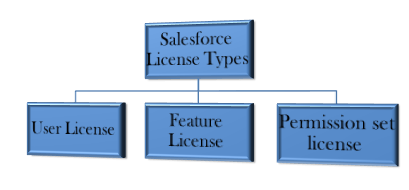
Salesforce organizes licenses into three main categories:
- User Licenses – Core platform access
- Feature Licenses – Additional functionality add-ons
- Permission Set Licenses – Granular feature permissions
User License Types
User licenses provide baseline platform access. Each user must have exactly one user license assigned.
Salesforce License (Full Platform Access)
The standard Salesforce license provides complete platform access including:
- All standard and custom objects
- Apex, Visualforce, and Lightning development
- Workflow, Process Builder, and Flow
- Reports, dashboards, and analytics
- API access with standard limits
- Mobile app access
API Limits: 1,000 API calls per user per 24 hours (Winter ’26)
Storage: 20 MB data storage + 20 MB file storage per user
Lightning Platform License
Designed for custom applications built on the Salesforce platform:
- Access to custom objects and applications
- Limited standard object access (Account, Contact for lookup only)
- Apex and Lightning development capabilities
- Workflow and process automation
- API access with reduced limits
API Limits: 200 API calls per user per 24 hours
Use Case: Internal applications, employee portals, custom business processes
Salesforce Platform Starter
Entry-level license for simple custom applications:
- Up to 10 custom objects
- Basic workflow and approval processes
- Reports and dashboards
- Mobile access
- Limited API access
API Limits: 200 API calls per user per 24 hours
Community Licenses
For external users accessing Salesforce Communities (Experience Cloud):
Customer Community License
- Read access to accounts and contacts
- Case management
- Knowledge base access
- Chatter collaboration
Customer Community Plus License
- All Customer Community features
- Custom objects (up to 10)
- Opportunity and quote access
- Enhanced reporting
Partner Community License
- Lead and opportunity management
- Account and contact access
- Custom objects and applications
- Advanced sharing and collaboration
Chatter Licenses
Chatter Free
- Chatter collaboration only
- Profile and people management
- File sharing
- No CRM object access
Chatter Plus
- All Chatter Free features
- Account and contact access
- Up to 10 custom objects
- Basic reports and dashboards
Feature Licenses
Feature licenses provide access to specific Salesforce products and capabilities beyond the base user license.
Sales Cloud Feature Licenses
- Sales Cloud Einstein: AI-powered sales insights and predictions
- High Velocity Sales: Inside sales productivity tools
- Pardot: B2B marketing automation (now Marketing Cloud Account Engagement)
Service Cloud Feature Licenses
- Service Cloud Einstein: AI case classification and routing
- Field Service: Mobile workforce management
- Live Agent: Real-time chat support
Platform Feature Licenses
- Marketing Cloud: Email marketing and journey builder
- Commerce Cloud: E-commerce platform integration
- Analytics Cloud: Advanced analytics and Einstein Discovery
- Integration: MuleSoft Composer and additional API capacity
Industry-Specific Feature Licenses
- Health Cloud: Healthcare relationship management
- Financial Services Cloud: Wealth management and banking
- Education Cloud: Student lifecycle management
- Nonprofit Cloud: Donor and program management
Permission Set Licenses
Permission set licenses grant access to specific features that can be assigned through permission sets. Unlike feature licenses, these provide granular control over individual capabilities.
Common Permission Set Licenses
- Einstein Analytics Plus: Advanced analytics capabilities
- Flow: Advanced process automation features
- Knowledge: Knowledge base creation and management
- Live Agent: Chat functionality for service agents
- Marketing User: Campaign and marketing automation features
Managing Permission Set Licenses
Permission set licenses can be:
- Assigned to users through permission sets
- Monitored for usage and availability
- Removed when no longer needed
To check available permission set licenses: Setup → Users → Permission Set Licenses
License Management Best Practices
License Optimization
- Regularly audit user licenses for inactive users
- Use Community licenses for external users instead of full Salesforce licenses
- Implement permission set licenses for feature-specific access
- Monitor API usage to prevent limit overages
Cost Management
- Deactivate unused user accounts to free licenses
- Use Lightning Platform licenses for custom app users
- Evaluate feature license ROI regularly
- Consider seasonal license adjustments for temporary users
Security Considerations
- Apply principle of least privilege when assigning licenses
- Regular license compliance audits
- Monitor external user access through Community licenses
- Implement proper user provisioning and deprovisioning processes
License Limits and Quotas
Each license type has specific limits that affect org performance:
| License Type | API Calls/Day | Data Storage | File Storage |
|---|---|---|---|
| Salesforce | 1,000 | 20 MB | 20 MB |
| Lightning Platform | 200 | 20 MB | 20 MB |
| Customer Community | 200 | 1 MB | 1 MB |
| Chatter Plus | 200 | 1 MB | 1 MB |
Note: Limits are per user and reset every 24 hours. Additional capacity can be purchased separately.
Salesforce License Integration Patterns
When integrating external systems with Salesforce, license types affect integration approaches:
API Integration Considerations
- Named User Integration: Uses individual user API limits
- Integration User Pattern: Dedicated integration user with appropriate license
- Connected App OAuth: System-to-system integration without user context
Data Synchronization Patterns
- Real-time integration requires sufficient API capacity
- Bulk operations may require Data Loader or Bulk API access
- Streaming API access depends on user license type
Frequently Asked Questions
What happens when a user license expires?
When a user license expires, the user loses access to Salesforce immediately. Their data remains in the system, but they cannot log in or access any platform features. Reactivating the license restores full access.
Can I change a user’s license type after assignment?
Yes, you can change user license types, but this may affect their permissions and data access. Some license downgrades require removing certain permissions first. Always test license changes in a sandbox environment.
How do Community licenses affect my org limits?
Community licenses have separate storage and API limits from internal user licenses. They don’t count against your internal user limits but have their own quotas for data storage, file storage, and API calls.
What’s the difference between feature licenses and permission set licenses?
Feature licenses provide access to entire products or major functionality (like Marketing Cloud). Permission set licenses grant specific capabilities that can be assigned granularly through permission sets (like Einstein Analytics features).
How do I monitor license usage in my org?
Use Setup → Company Information to view license usage summary. For detailed analysis, go to Setup → Users → Licenses to see available and used licenses by type. The License Management app provides advanced usage analytics.
Understanding Salesforce license types is crucial for effective platform administration and development. Regular license audits and optimization ensure cost-effective user management while maintaining security and compliance requirements.