Salesforce Education Cloud is the Salesforce industry solution for institutions that need one learner record across recruitment, admissions, academic operations, student support, and alumni engagement. It uses education-specific objects, apps, automation, and integrations so teams can work from the same data instead of stitching together records from a student information system, advising tool, email platform, and spreadsheets.
This guide explains the current Education Cloud Salesforce architecture, how the education cloud data model works, where Salesforce HEDA and EDA fit, and when higher education data cloud patterns with Data 360 belong in the design. It is written for admins, developers, architects, and consultants who must make implementation choices that will survive releases, integrations, and governance reviews.
What is Salesforce Education Cloud?
Salesforce Education Cloud is not one object or one managed package. It is an education industry solution on the Salesforce Platform. Salesforce describes Education Cloud as a way to support the learner experience across applications, scheduling, courses, facilities, recruitment, admissions, and student success. See the official Education Cloud Developer Guide and Salesforce Help overview for Education Cloud.
In enterprise orgs, the value comes from a shared operating model. Admissions can see an applicant’s program interest, student success can see support cases and appointments, academic operations can manage learning catalogs, and advancement can keep alumni engagement connected to the same person record strategy. The design choice is not “CRM versus SIS.” The usual pattern is to keep the SIS as the system of record for official academic transactions while Salesforce manages engagement, service, workflow, communication, and cross-department visibility.
Education Cloud Salesforce use cases
Education Cloud Salesforce projects usually start with one domain, then expand. Do not start by copying every SIS field into Salesforce. Start with a process that needs shared work: enquiry routing, application review, advising case management, course registration support, appointment scheduling, alumni outreach, or learner progress tracking.
| Institution process | Education Cloud fit | Architecture note |
|---|---|---|
| Recruitment and admissions | Prospect records, applications, program interest, portals, review workflows | Integrate with SIS or application systems only where official records are created. |
| Academic operations | Learning programs, program plans, courses, course offerings, schedules, and outcomes | Use standard Education Cloud objects before adding custom curriculum objects. |
| Student success | Cases, care plans, action plans, appointments, alerts, referrals, and support teams | Design sharing carefully because advising data can include sensitive information. |
| Advancement and alumni | Alumni profiles, relationships, giving interests, events, campaigns, and engagement | Keep identity matching rules clear when alumni also appear as students, parents, or donors. |
| Analytics and AI | Unified learner views, segmentation, dashboards, and Agentforce actions | Use Data 360 when data must be harmonized from multiple systems at scale. |
How does the Education Cloud data model work?
The education cloud data model is the part of the solution that architects must understand first. Salesforce documents Education Cloud standard objects for learning programs, courses, course offerings, schedules, learner programs, credentials, student success, fundraising, and related domains. The Education Cloud Standard Objects reference is the source to verify object availability and field behavior before building Apex, Flow, or integration mappings.
Education cloud data model objects to know
The object names below are common design anchors. Always confirm field-level details in your org because enabled features, licenses, regions, and release versions affect available metadata.
| Object or area | What it represents | Minimum API version noted by Salesforce docs |
|---|---|---|
| LearningProgram | A set of training or learning required to obtain a credential | API v57.0 and later |
| LearningProgramPlan | A plan used to execute a learning program | API v57.0 and later |
| LearnerProgram | A learner-specific instance of a learning program plan | API v57.0 and later |
| LearningCourse | A course required in a learning framework | API v57.0 and later |
| CourseOffering | A scheduled instance of a course with date and location context | API v57.0 and later in Education Cloud docs |
| CourseOfferingSchedule | The schedule defined for a course offering | API v57.0 and later |
| CourseOfferingParticipant | A learner’s enrollment in a course offering | API v57.0 and later |
| AcademicCredential | A credential that can be earned by learners | API v59.0 and later |
| MentoringProfile | A participant profile for mentoring | API v61.0 and later |
A typical academic design separates catalog structure from learner activity. A course catalog describes what the institution offers. A course offering describes a specific term, section, location, instructor assignment, or capacity rule. A participant record connects a learner to that offering. This separation prevents a common custom-build error: overwriting the catalog when only the current term changed.
Student success data model
Student success designs often include Case, action plans, success teams, appointments, assessments, benefits, record alerts, watchlists, program enrollments, and related support records. Salesforce publishes a Student Success Data Model in the Data Model Gallery. Use it during solution design workshops to check whether a need belongs on a standard object, a related standard feature, or a custom extension.
For example, do not create a custom “Advisor Case” object just because the advising team wants a different page layout. Start with Case, Record Types, queues, case teams, permission sets, and sharing rules. Add custom objects only when the standard service model cannot express the process or data retention requirement.
How does Salesforce HEDA relate to EDA and Education Cloud?
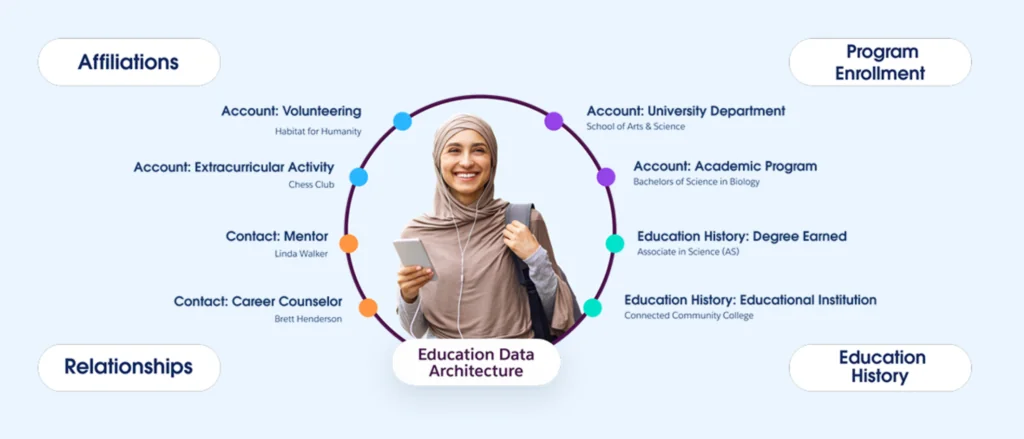
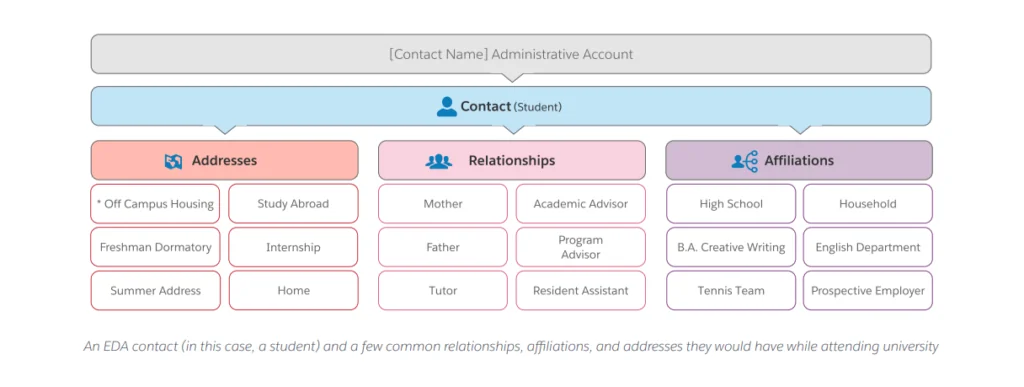
Salesforce HEDA appears in many older Trailhead paths, implementation notes, and orgs. HEDA stands for Higher Education Data Architecture. Salesforce now documents Education Data Architecture, or EDA, as the community-driven data architecture for education institutions. The official Education Data Architecture documentation and EDA objects and fields dictionary should be your source when maintaining an existing EDA org.
The practical distinction is this: EDA and Salesforce HEDA projects usually center on the Account and Contact model, relationships, affiliations, addresses, and education package objects. Current Education Cloud projects can include newer standard Education Cloud objects and apps for academic operations, student success, advancement, admissions, Data 360, and Agentforce. A migration or expansion project must inventory both sets of metadata before anyone designs new automation.
Salesforce HEDA account model choices
The EDA account model uses standard Account and Contact records differently from a sales org. Trailhead documents administrative accounts and household accounts. An administrative account has a one-to-one relationship with a contact, while a household account can contain multiple contacts. Your choice affects naming, address management, sharing design, integrations, and duplicate rules.
In production, decide the account model before loading people. Changing it later is possible, but it creates rework in deduplication, reports, portal sharing, integrations, and user training. If the institution supports both actively enrolled learners and alumni families, test the account model with real lifecycle examples, not only with one student sample.
How do you implement Salesforce Education Cloud?
Salesforce Education Cloud implementation should start with business boundaries, not object creation. Create a release plan around one process, one data owner, and one measurable handoff. Then expand after the team has proven record ownership, security, integration error handling, and reporting.

Implementation checklist for admins and architects
- Confirm product scope and licensing. Check whether the org uses Education Cloud, EDA, Agentforce Education features, Data 360, Experience Cloud, or a mix.
- Define systems of record. Decide whether Salesforce, SIS, LMS, ERP, marketing tools, or finance systems own each field.
- Map personas. Applicant, student, faculty, staff, advisor, parent, alumni, donor, and partner may all need different access.
- Model the lifecycle. Prospect to applicant, applicant to enrolled learner, learner to alumni, alumni to donor or mentor.
- Design security before pages. Use org-wide defaults, roles, permission sets, permission set groups, sharing rules, restriction rules where appropriate, and field-level security.
- Build integration contracts. Include external IDs, retry handling, delete behavior, data residency, and audit logging.
- Use sandboxes with representative data. Test duplicate rules, ownership, bulk loads, and reporting with realistic volumes.
- Document release ownership. Education teams need a data steward, product owner, admin owner, and integration owner.
Education Cloud Salesforce configuration sequence
A safe sequence is to set up people and account strategy, then learning structure, then engagement processes, then analytics. Portals and AI should come after permissions, data quality, and escalation paths are working.
| Phase | Configuration work | Common failure |
|---|---|---|
| Foundation | Users, roles, permission sets, record types, fields, account model, duplicate rules | Loading student records before deciding identity rules |
| Academic model | Learning programs, program plans, courses, offerings, schedules, credentials | Using one custom object for catalog, term, and enrollment data |
| Service model | Cases, queues, routing, support teams, action plans, appointments, alerts | Giving every advisor access to every sensitive case |
| Experience layer | Experience Cloud portals, OmniStudio screens, forms, notifications | Publishing a portal before testing sharing and FLS |
| Analytics and AI | Reports, dashboards, Data 360, Agentforce actions, governance reviews | Turning on summaries or agents before source data is trusted |
For related setup skills, see our guides to Salesforce Data Loader for migration, Salesforce reports and dashboards, and Salesforce Admin certification preparation.
When should higher education data cloud use Data 360?
The phrase higher education data cloud usually points to Data 360, formerly called Data Cloud. Salesforce states that Data Cloud was rebranded to Data 360 on October 14, 2025, while documentation and UI labels may still show the older name during the transition. Data 360 can ingest, harmonize, unify, query, and activate data from Salesforce products and external systems. See Get Started with Data 360 Development and the Data 360 Query Guide.
Use Data 360 when Salesforce needs a harmonized view across SIS, LMS, identity, website, marketing, advising, donation, and engagement data. Do not use it as a shortcut for poor CRM modeling. Core Education Cloud records still need owners, validation rules, permissions, and operational workflows.
Higher education data cloud design pattern
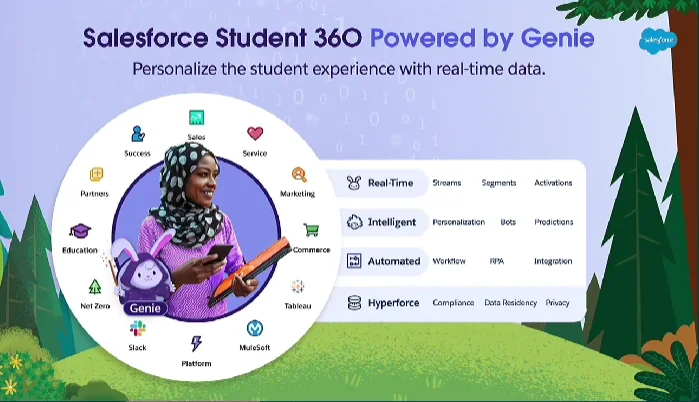
A common higher education data cloud pattern is to keep operational records in Education Cloud, ingest external events and profile data into Data 360, map source fields to Data Model Objects, run identity resolution, create segments or insights, and activate those insights back into Salesforce flows, dashboards, or Agentforce actions.
For example, an advisor should not manually check five systems before a meeting. A design can surface a summary based on open cases, recent LMS activity, attendance risk, financial holds, appointment history, and program progress. The implementation must also define consent, data minimization, retention, and audit controls. Student support data can be sensitive even when it is not stored in a medical system.
Packaging and deployment warning for Data 360
Data 360 metadata uses different packaging rules than normal Salesforce Platform metadata. Salesforce states that starting in Winter ’25, Data 360 metadata and non-Data 360 metadata can’t be included in the same package. Use separate deployment planning for CRM metadata and Data 360 data kits. This matters in education programs because curriculum, portal, case, and Data 360 work often happen in the same project plan.
For more background, read our Salesforce Data Cloud and Data 360 guide and Salesforce AI overview.
What should developers know before building on Education Cloud?
Developers should not hardcode assumptions from one demo org. Education Cloud metadata differs by product enablement, release, edition, region, and package history. Use the official object reference, source control, scratch or sandbox validation, and deployment checks before writing code that depends on a specific object.
Apex example: query Education Cloud objects safely
The following Apex example lists learning programs by using dynamic describe checks. It avoids compile-time dependency on the Education Cloud object in orgs where the feature is not enabled, enforces object and field read access, caps row count, and runs with sharing. It is intentionally narrow: use it as a pattern, not as a complete catalog API.
public with sharing class EducationCloudCatalogService {
    public class CatalogRow {
        @AuraEnabled public Id id;
        @AuraEnabled public String objectApiName;
        @AuraEnabled public String name;
    }

    @AuraEnabled(cacheable=true)
    public static List<CatalogRow> listLearningPrograms(Integer requestedLimit) {
        Integer safeLimit = requestedLimit == null ? 50 : requestedLimit;
        safeLimit = Math.max(1, Math.min(safeLimit, 200));
        return queryNamedRecords('LearningProgram', safeLimit);
    }

    private static List<CatalogRow> queryNamedRecords(String objectApiName, Integer safeLimit) {
        Map<String, Schema.SObjectType> typesByName = Schema.getGlobalDescribe();

        if (!typesByName.containsKey(objectApiName)) {
            return new List<CatalogRow>();
        }

        Schema.DescribeSObjectResult objectDescribe =
            typesByName.get(objectApiName).getDescribe();

        if (!objectDescribe.isAccessible()) {
            throw new AuraHandledException('You do not have read access to ' + objectApiName + '.');
        }

        Map<String, Schema.SObjectField> fieldsByName = objectDescribe.fields.getMap();
        if (!fieldsByName.containsKey('Name') ||
            !fieldsByName.get('Name').getDescribe().isAccessible()) {
            throw new AuraHandledException('You do not have read access to the Name field.');
        }

        String soql = 'SELECT Id, Name FROM ' + objectApiName + ' ORDER BY Name LIMIT :safeLimit';
        List<CatalogRow> rows = new List<CatalogRow>();

        for (SObject record : Database.query(soql)) {
            CatalogRow row = new CatalogRow();
            row.id = (Id) record.get('Id');
            row.objectApiName = objectApiName;
            row.name = (String) record.get('Name');
            rows.add(row);
        }

        return rows;
    }
}
Governor limit note: the method uses one SOQL query and returns at most 200 rows. Do not call it inside a loop. If you expand it to multiple objects, aggregate object names first and keep queries predictable. For LWC, keep the method cacheable only while it performs no DML and has no user-specific side effects.
Test class pattern
Apex must meet Salesforce’s 75% org-wide coverage requirement for deployment, but coverage alone does not prove the implementation is safe. Test behavior when the feature is disabled, when no records exist, and when limit inputs are null or too high. In packaging or shared-code scenarios, dynamic describe helps you test the disabled-feature path without requiring Education Cloud metadata in every org.
@IsTest
private class EducationCloudCatalogServiceTest {
    @IsTest
    static void returnsRowsOrEmptyListWithoutFailing() {
        Test.startTest();
        List<EducationCloudCatalogService.CatalogRow> rows =
            EducationCloudCatalogService.listLearningPrograms(500);
        Test.stopTest();

        System.assertNotEquals(null, rows, 'The service should return an empty list or rows.');
        System.assert(rows.size() <= 200, 'The service must enforce the row cap.');
    }
}
SOQL and security rules
- Use
with sharingfor user-facing services unless you have a documented reason not to. - Check CRUD and FLS in Apex when returning data to LWC, Aura, Flow, or an external API.
- Use selective filters for high-volume objects such as cases, appointments, enrollments, or activity history.
- Use Bulk API 2.0 or staged integration jobs for large historical loads rather than synchronous Apex.
- Use external IDs for SIS, LMS, and ERP references; never rely on names as integration keys.
- Log integration failures in a supportable object or platform event pattern that admins can monitor.
Best practices for Salesforce Education Cloud governance

Education Cloud programs fail when each department treats Salesforce as a private database. They succeed when the institution defines shared records and clear stewardship. A registrar may own course catalog accuracy. Admissions may own applicant stage definitions. Student success may own advising case taxonomy. Advancement may own alumni engagement segmentation. IT should own integration reliability, identity rules, security reviews, and release management.
Set up a recurring data governance review with admins, architects, security, and business owners. Review duplicate rates, failed integrations, permission changes, report definitions, stale fields, and automation errors. For sensitive advising or wellbeing data, document who can see the record, why they can see it, and how long the data remains available.
Common errors with Education Cloud projects
- Skipping source-of-truth decisions. This creates two versions of enrollment, program, or contact status.
- Using custom objects too early. First confirm whether Education Cloud, EDA, Case, Account, Contact, Program Enrollment, or Action Plan records already cover the need.
- Ignoring sharing impact. A portal, advisor console, or department queue can expose data if sharing, role hierarchy, and field permissions are not tested together.
- Loading data without duplicate strategy. A learner can later become an alumni contact, donor, parent, employee, or mentor.
- Building AI before data quality. Agentforce and summaries depend on trusted source data, permissions, and grounded actions.
Salesforce Education Cloud FAQ
What is Salesforce Education Cloud used for?
Salesforce Education Cloud is used to manage education processes such as recruitment, admissions, academic operations, student success, advising, appointments, alumni engagement, and analytics on the Salesforce Platform. It helps institutions connect learner data and workflows across teams while integrating with systems such as SIS, LMS, ERP, identity, and marketing platforms.
Is Education Cloud the same as Salesforce HEDA?
No. Salesforce HEDA is older terminology around Higher Education Data Architecture. EDA, or Education Data Architecture, is the current education architecture documentation for many existing orgs. Salesforce Education Cloud is broader because it can include current Education Cloud standard objects, apps, Data 360, Agentforce, Experience Cloud, and education workflows beyond the original HEDA model.
What is the education cloud data model?
The education cloud data model is the set of Salesforce objects and relationships used to represent learners, programs, courses, course offerings, enrollments, student success records, credentials, and related education processes. Architects should use the official Education Cloud Developer Guide and Data Model Gallery before adding custom objects.
When should an institution use Data 360 with Education Cloud?
Use Data 360 when the institution needs to harmonize and activate data from several systems, such as SIS, LMS, website behavior, marketing engagement, advising notes, and alumni systems. For a higher education data cloud design, keep operational records in Salesforce and use Data 360 for unification, segmentation, calculated insights, and activation where scale requires it.
Can Salesforce Education Cloud replace a student information system?
Usually, no. Education Cloud can manage engagement, workflows, support, academic structures, and cross-team visibility, but many institutions keep the SIS as the official source for registration, grades, transcripts, billing, and compliance records. The right design depends on institutional policy, integrations, and regulatory requirements.
Which Salesforce skills matter most for an Education Cloud implementation?
Admins need data modeling, security, Flow, reports, duplicate management, and release skills. Developers need Apex, SOQL, integration, test classes, and CRUD/FLS enforcement. Architects need identity, sharing, data ownership, integration, Data 360, and governance skills. Education projects also require strong discovery because each department may use the same word, such as program or enrollment, with different meanings.
Official Salesforce references