Leads vs in Salesforce means comparing an unqualified prospect record with the qualified sales records that come after conversion. A Lead tracks early interest, a Contact represents a known person, and an Opportunity tracks a qualified deal with stage, close date, amount, and forecast impact.
Use Leads when your team still needs to qualify fit, budget, timing, authority, or product interest. Convert a Lead when the buyer is ready to become a real Account and Contact, with an optional Opportunity for the deal your sales team will work.
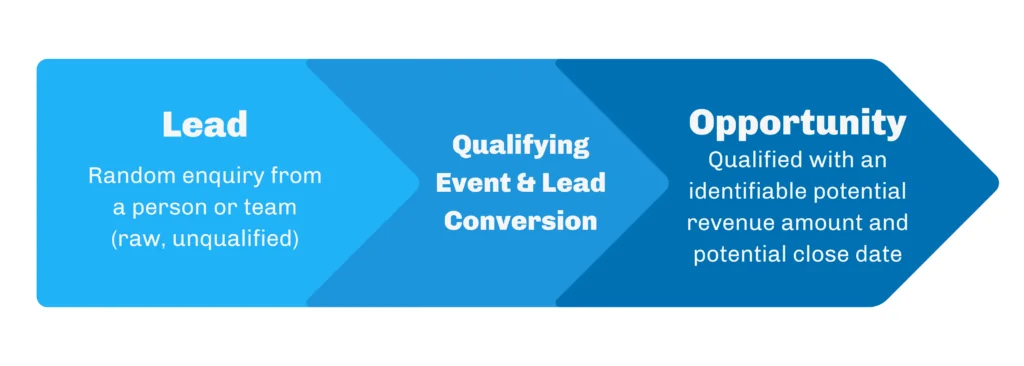
Leads Vs in Salesforce: the object-level difference
The practical leads vs decision is not about which object is more important. It is about where the record belongs in your revenue process. Salesforce Help describes Leads as records for prospects that are tracked separately from Contacts and Opportunities until they are qualified. Salesforce Trailhead explains that conversion uses Lead information to create a business Account, a Contact, and an Opportunity unless your conversion choice or org configuration changes that outcome.
| Record | Best use | Typical owner | Important fields | What happens next |
|---|---|---|---|---|
| Lead | Unqualified person or company that has shown interest | SDR, BDR, marketing operations, partner team | Status, Company, Name, Email, Lead Source, Rating, Campaign History | Convert, disqualify, nurture, merge, or reassign |
| Contact | Known person related to an Account | Account owner, sales rep, customer success, service team | AccountId, Email, Phone, Title, Contact Owner, communication preferences | Added to activities, campaigns, cases, opportunities, or account planning |
| Opportunity | Qualified revenue motion or deal | AE, channel rep, sales manager | AccountId, StageName, CloseDate, Amount, OwnerId, Forecast Category | Moves through stages until Closed Won, Closed Lost, or another final state |
In enterprise orgs, the boundary between these objects must be written down. A vague rule such as “convert when the lead looks good” creates duplicate Accounts, Contacts without context, and pipeline that managers cannot trust. A clear rule defines the required Lead Status, minimum qualification data, duplicate-checking behavior, and whether an Opportunity should be created during conversion.
What is a Lead in Salesforce?
A leads vs review starts with the Lead object because it controls where unqualified demand enters Salesforce.
A Lead is the workspace for early qualification. It can come from a web form, event list, partner referral, imported spreadsheet, paid campaign, or manual entry. The Lead object lets sales development and marketing teams work the record without immediately adding it to the customer account model.
That separation matters. A marketing webinar attendee may not belong under an Account yet. A student using a trial email may not have a buying company. A partner-sourced inquiry may need routing before a direct sales owner can work it. In those cases, the leads vs answer is simple: keep the record as a Lead until your business has enough evidence to create account-level data.
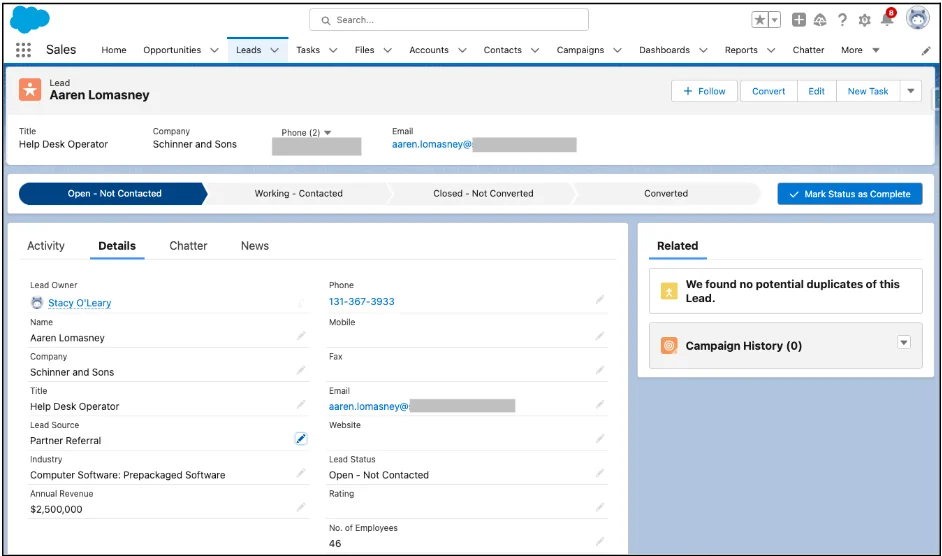
Lead opportunity Salesforce rule of thumb
The phrase lead opportunity Salesforce is often searched by admins who are deciding when a Lead should become an Opportunity. Use this rule: a Lead is a question, and an Opportunity is a committed sales pursuit. A Lead asks, “Is this person or company worth sales time?” An Opportunity asks, “What deal are we working, when could it close, and how much might it be worth?”
A common qualification checklist includes verified company, reachable person, buying need, expected timeline, product fit, and ownership. Your org may add budget, region, partner involvement, consent status, or industry-specific checks. Put these checks in required fields, Path guidance, validation rules, or a screen flow so conversion does not depend only on memory.
What is an Opportunity in Salesforce?
A leads vs review then checks whether the Opportunity represents a real deal or only early interest.
An Opportunity represents a deal in progress. Salesforce object documentation defines Opportunity as a standard object for sales or pending deals, and the record normally belongs to an Account. Unlike a Lead, an Opportunity carries pipeline fields such as StageName, CloseDate, and Amount. Those fields feed reports, forecasts, pipeline inspection, and sales leadership reviews.
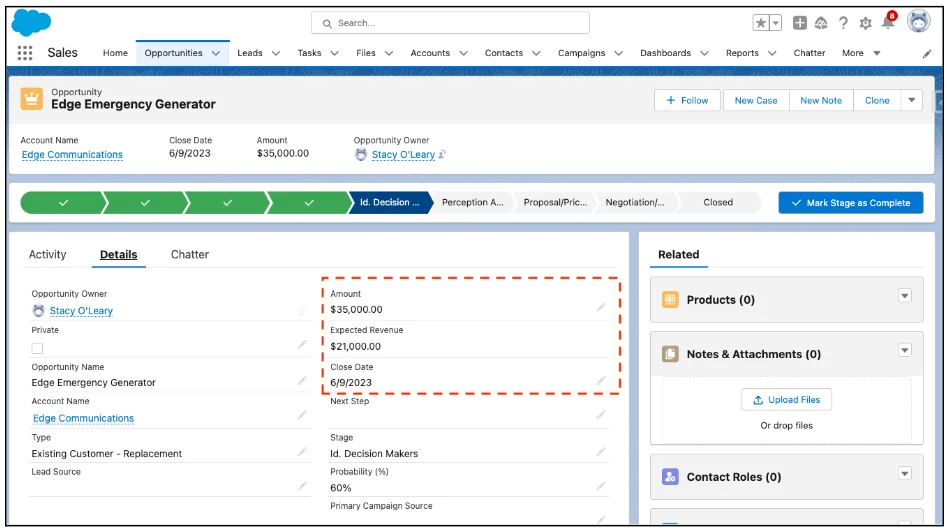
SFDC opportunity fields that matter after conversion
An sfdc opportunity created from lead conversion should have enough data to support the first sales stage. At minimum, review Opportunity Name, Account, Owner, Stage, Close Date, Amount if known, Primary Campaign Source if your attribution process uses it, and any custom qualification fields your sales process requires.
Do not force an Opportunity for every converted Lead. Salesforce conversion supports creating a Contact and Account without creating a new Opportunity. That option is useful for support contacts, vendor contacts, existing customers, students, partners, or records that must leave the Lead object for data hygiene but do not represent a new deal.
When should a Lead become an Opportunity?
The leads vs decision should happen at the same qualification point for every team, channel, and region.
A Lead should become an Opportunity only when the sales process has moved from qualification to pursuit. The leads vs boundary should be owned by sales operations, not left to individual style. A clean conversion policy protects forecasting because Opportunity records appear in revenue reports that Leaders use to inspect stage aging, close dates, amounts, and owner accountability.
Salesforce lead opportunity data model after conversion
The salesforce lead opportunity relationship is stored through converted Lead fields and the records produced during conversion. The Lead object includes conversion-related fields such as IsConverted, ConvertedAccountId, ConvertedContactId, ConvertedOpportunityId, and ConvertedDate. These fields help admins report on conversion rates and help developers trace a converted Lead to the Account, Contact, and Opportunity created or selected during conversion.
Conversion is permanent. Salesforce Help states that after a Lead is converted into a Contact, Account, or Opportunity, the conversion cannot be undone. If a user converted a Lead without an Opportunity, create the Opportunity later from the Account or Contact. Do not try to “re-convert” the original Lead.
How to convert a Lead to an Opportunity in Lightning Experience
Use the standard Convert action when the leads vs decision is complete and the rep has checked duplicate records.
Salesforce Trailhead documents the standard conversion path in Lightning Experience: open the Lead, click Convert, choose or create the Account and Contact, decide whether to create an Opportunity, check owner and status, and finish conversion. The exact page layout and visible fields depend on your org’s record types, permissions, field-level security, and enabled features.
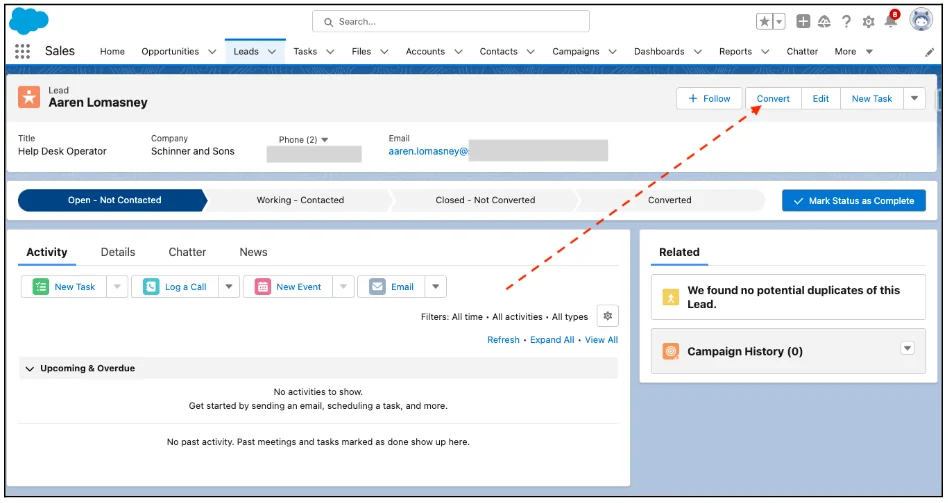
- Open the qualified Lead record from the Leads tab or a list view.
- Review duplicates before conversion, especially if the Company already exists as an Account.
- Click Convert.
- Select an existing Account when the company already exists, or create a new Account from the Lead company value.
- Select an existing Contact when the person already exists, or create a new Contact from the Lead name.
- Create a new Opportunity, select an existing Opportunity if your org supports that option for the Account context, or choose not to create an Opportunity.
- Confirm the converted status, owner, and required opportunity fields.
- Click Convert and verify the resulting Account, Contact, and Opportunity records.
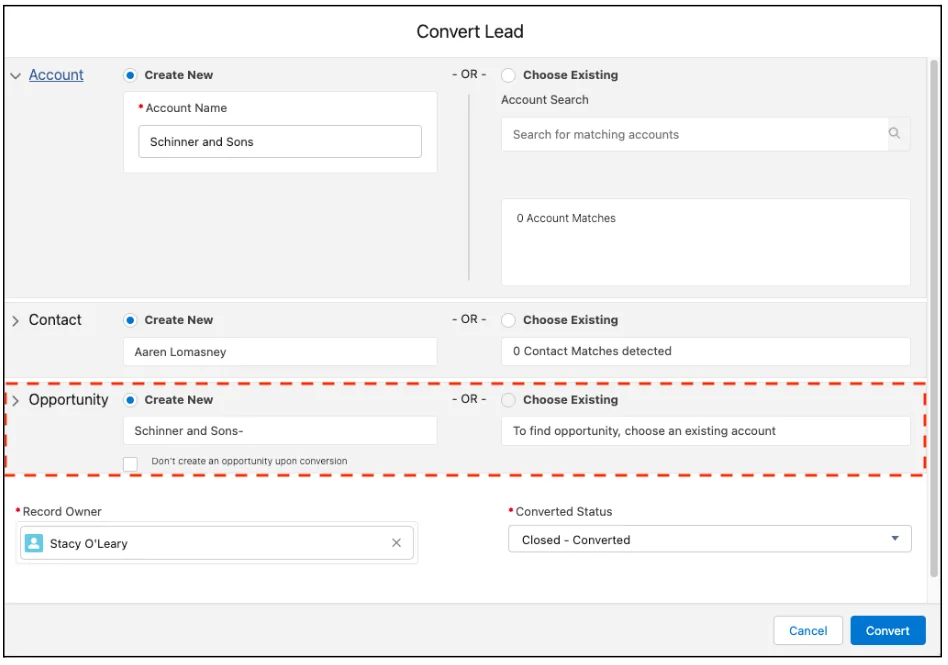
Before production rollout, test conversion with common scenarios: net-new company, existing Account and new Contact, existing Contact, no Opportunity, person accounts, duplicate Leads, inactive owners, queues, campaigns, files, activities, and required custom fields. Lead conversion touches multiple objects, so one validation rule on Account, Contact, or Opportunity can block the whole transaction.
Leads vs contacts in Salesforce
Leads vs contacts in Salesforce is a separate but related design question. A Lead is not attached to an Account in the same way a Contact is. A Contact belongs to the customer account model and can participate in account planning, cases, opportunities, contact roles, activities, and customer lifecycle reporting.
Use Contacts for people your company recognizes as part of an Account relationship. Use Leads for people who still need routing, qualification, duplicate review, or consent validation before becoming part of that model. In some orgs, existing customers should bypass Leads and be created directly as Contacts because sales already knows the Account. In other orgs, all inbound records start as Leads so marketing attribution and SDR routing stay consistent.
Leads vs contacts in Salesforce: common enterprise patterns
| Scenario | Recommended record | Reason |
|---|---|---|
| Unknown inbound demo request from a new company | Lead | Qualification and duplicate review are still required. |
| Known buyer at an existing Account asks about a new product | Contact plus new Opportunity | The person already belongs to the account model; the new motion is the deal. |
| Customer support user submits a non-sales form | Contact or Case, depending on process | Creating a sales Lead can pollute conversion reporting. |
| Trade show badge scan with incomplete company data | Lead | The record needs enrichment and assignment before conversion. |
| Partner identifies a named deal at a customer account | Opportunity with Contact Role, if the account and buyer already exist | The sales team is pursuing a specific deal, not merely qualifying interest. |
Leads Vs decision rules for admins
Use these leads vs rules as a starting point for governance. They keep the model predictable without forcing every company into the same sales process.
- Leads vs rule 1: if the company and buyer are unknown, keep the record as a Lead.
- Leads vs rule 2: if the person already works with an existing Account, use a Contact and create an Opportunity only when there is a deal.
- Leads vs rule 3: if no amount, timeline, product need, or buying process exists, avoid creating an Opportunity.
- Leads vs rule 4: if marketing attribution depends on Lead Source and Campaign History, map the fields before conversion.
- Leads vs rule 5: if a partner or channel team owns the first conversation, define whether they convert the Lead or hand it to direct sales first.
How Lead conversion maps fields and related records
Field mapping turns the leads vs design into data movement rules that Salesforce applies during conversion.
Salesforce supports custom Lead field mapping to Account, Contact, and Opportunity fields. Use it for values that must survive conversion, such as product interest, region, lead score, qualification notes, or original source details. Keep field types compatible and decide which object should own the value after conversion. For example, company size may belong on Account, while buyer role may belong on Contact and product interest may belong on Opportunity.
Files and related records attached to a Lead can move to the resulting records during conversion based on Salesforce conversion behavior and org configuration. Always validate this in a sandbox, especially if your org uses custom objects related to Lead. Custom child records do not always have a business-safe destination unless you design one.
Field mapping checklist for admins
- Map only fields that the target object should own after conversion.
- Do not map transient scoring fields to Opportunity unless sales needs them after qualification.
- Use Account fields for company-level data such as industry, employee count, territory, or billing country.
- Use Contact fields for person-level data such as role, email, phone, consent, and department.
- Use Opportunity fields for deal-level data such as product family, implementation timeline, use case, budget range, or buying process.
- Document unmapped Lead fields so reporting users know which values remain only on the converted Lead.
How to automate Lead conversion with Apex
Automated conversion should enforce the same leads vs policy that users follow in Lightning Experience.
Use Apex conversion only when the standard Convert button or Flow cannot meet the requirement. Examples include partner intake, managed package logic, a controlled qualification app, or a batch cleanup that has already passed data quality review. The Apex Database.LeadConvert class converts a Lead into an Account and Contact, and can optionally create an Opportunity. The Database.convertLead method returns a Database.LeadConvertResult so your code can capture the resulting record IDs.
The following example is intentionally narrow. It converts one Lead, prevents a second conversion, optionally creates an Opportunity, and returns the Account, Contact, and Opportunity IDs. For bulk conversion, collect multiple Database.LeadConvert requests and call the list overload instead of running one conversion inside a loop.
public with sharing class LeadConversionService {
    public class LeadConversionRequest {
        @AuraEnabled public Id leadId { get; set; }
        @AuraEnabled public String opportunityName { get; set; }
        @AuraEnabled public Boolean createOpportunity { get; set; }
    }

    public class LeadConversionResponse {
        @AuraEnabled public Id accountId { get; set; }
        @AuraEnabled public Id contactId { get; set; }
        @AuraEnabled public Id opportunityId { get; set; }
    }

    @AuraEnabled
    public static LeadConversionResponse convertQualifiedLead(LeadConversionRequest request) {
        if (request == null || request.leadId == null) {
            throw new AuraHandledException('Lead Id is required.');
        }

        if (!Schema.sObjectType.Lead.isAccessible()) {
            throw new AuraHandledException('You do not have access to read Lead records.');
        }

        Lead sourceLead = [
            SELECT Id, IsConverted, Company, LastName
            FROM Lead
            WHERE Id = :request.leadId
            LIMIT 1
        ];

        if (sourceLead.IsConverted) {
            throw new AuraHandledException('This Lead is already converted.');
        }

        LeadStatus convertedStatus = [
            SELECT MasterLabel
            FROM LeadStatus
            WHERE IsConverted = true
            LIMIT 1
        ];

        Database.LeadConvert leadConvert = new Database.LeadConvert();
        leadConvert.setLeadId(sourceLead.Id);
        leadConvert.setConvertedStatus(convertedStatus.MasterLabel);

        if (request.createOpportunity != null && !request.createOpportunity) {
            leadConvert.setDoNotCreateOpportunity(true);
        } else {
            leadConvert.setDoNotCreateOpportunity(false);
            if (String.isNotBlank(request.opportunityName)) {
                leadConvert.setOpportunityName(request.opportunityName);
            }
        }

        Database.LeadConvertResult result = Database.convertLead(leadConvert, false);

        if (!result.isSuccess()) {
            Database.Error firstError = result.getErrors().size() == 0 ? null : result.getErrors()[0];
            String message = firstError == null ? 'Lead conversion failed.' : firstError.getMessage();
            throw new AuraHandledException(message);
        }

        LeadConversionResponse response = new LeadConversionResponse();
        response.accountId = result.getAccountId();
        response.contactId = result.getContactId();
        response.opportunityId = result.getOpportunityId();
        return response;
    }
}
Governor limit and security notes for Lead conversion Apex
- Do not convert Leads inside a loop. Build a list of conversion requests for bulk jobs.
- Expect automation to run. Lead conversion can invoke validation rules, flows, triggers, duplicate rules, assignment logic, and required field checks on target objects.
- Check permissions before exposing conversion through custom UI. Users need the business permissions and object access required for the resulting Account, Contact, and Opportunity work.
- Handle partial failure. Use the
allOrNoneparameter intentionally and log failures with enough context to fix data. - Do not bypass CRUD and FLS for convenience. For custom reads and writes around conversion, use user-mode operations or explicit security checks where appropriate.
Test class for the conversion service
@IsTest
private class LeadConversionServiceTest {
    @IsTest
    static void convertsLeadAndCreatesOpportunity() {
        LeadStatus openStatus = [
            SELECT MasterLabel
            FROM LeadStatus
            WHERE IsConverted = false
            LIMIT 1
        ];

        Lead leadRecord = new Lead(
            FirstName = 'Maya',
            LastName = 'Rao',
            Company = 'Acme Manufacturing',
            Email = 'maya.rao@example.com',
            Status = openStatus.MasterLabel
        );
        insert leadRecord;

        LeadConversionService.LeadConversionRequest request =
            new LeadConversionService.LeadConversionRequest();
        request.leadId = leadRecord.Id;
        request.createOpportunity = true;
        request.opportunityName = 'Acme Manufacturing - Initial Order';

        Test.startTest();
        LeadConversionService.LeadConversionResponse response =
            LeadConversionService.convertQualifiedLead(request);
        Test.stopTest();

        System.assertNotEquals(null, response.accountId, 'Account should be created.');
        System.assertNotEquals(null, response.contactId, 'Contact should be created.');
        System.assertNotEquals(null, response.opportunityId, 'Opportunity should be created.');

        Lead convertedLead = [
            SELECT IsConverted, ConvertedAccountId, ConvertedContactId, ConvertedOpportunityId
            FROM Lead
            WHERE Id = :leadRecord.Id
        ];

        System.assertEquals(true, convertedLead.IsConverted);
        System.assertEquals(response.accountId, convertedLead.ConvertedAccountId);
        System.assertEquals(response.contactId, convertedLead.ConvertedContactId);
        System.assertEquals(response.opportunityId, convertedLead.ConvertedOpportunityId);
    }
}
This test verifies the standard conversion result instead of only checking code coverage. Salesforce requires at least 75% Apex test coverage for deployment, but production teams should also assert the business outcome: the Lead is converted, the target IDs exist, and the Opportunity behavior matches the request.
Reporting on Leads vs Opportunities
Reports should show whether the leads vs rule improves qualification quality or only changes where records are stored.
Reporting is where a weak leads vs model becomes visible. If reps create Opportunities too early, pipeline reports show inflated deal counts. If marketing keeps qualified prospects as Leads too long, sales managers miss real demand. Build separate reports for Lead intake, qualification, conversion, Opportunity creation, stage movement, and closed revenue.
Useful converted Lead report fields include Converted, Converted Date, Converted Account, Converted Contact, and Converted Opportunity. Pair those with Campaign, Lead Source, owner, and qualification fields to answer which channels create real pipeline instead of just form fills.
Lead opportunity Salesforce report examples
- Lead to Opportunity conversion rate: count converted Leads with a nonblank Converted Opportunity ID divided by total qualified Leads.
- Lead conversion by source: group Leads by Lead Source and Converted status to compare channels.
- Time to conversion: compare Lead Created Date with Converted Date to find routing delays.
- Opportunity quality after conversion: filter Opportunities created from conversion and review stage aging, amount changes, and close-date pushes.
- No-opportunity conversions: list converted Leads where Converted Opportunity is blank so sales operations can confirm the reason.
Best practices for clean Lead, Contact, and Opportunity data
A reliable leads vs policy gives admins a testable standard for routing, conversion, and pipeline review.
The best leads vs design is simple enough for users and strict enough for reporting. Start with one written lifecycle definition, then configure Salesforce to support it. Do not rely on training alone when validation rules, duplicate rules, Path guidance, Flow screens, required fields, and page layout decisions can prevent most mistakes.
- Define conversion criteria. Make the required Lead Status and qualification fields visible and measurable.
- Prevent duplicate Accounts and Contacts. Use matching rules and duplicate rules before letting reps create new records during conversion.
- Separate person data from deal data. Do not store close date or budget only on the Contact if sales manages the deal on Opportunity.
- Use Opportunity Contact Roles. Add buying committee members to the Opportunity instead of creating duplicate Opportunities for each person.
- Audit converted Leads. Review blank Converted Opportunity IDs, failed conversion attempts, and conversions completed by integration users.
- Design for existing customers. A known customer asking for a new product usually needs a new Opportunity, not a new Lead.
- Test field mappings in a sandbox. Required target fields and validation rules often cause the first production conversion failure.
Common errors with Lead conversion
Most errors appear when the leads vs policy says conversion is ready but the data model is not ready.
Most conversion issues are data-model issues, not button-click issues. When users report that conversion failed, check target object validation rules, required fields, duplicate rules, record type assignment, owner permissions, and field mapping before changing the sales process.
| Error pattern | Likely cause | Admin fix |
|---|---|---|
| Conversion blocked by required field | Account, Contact, or Opportunity has a required field that the Lead does not populate | Map a Lead field, set a default, or make the field required only when appropriate |
| Duplicate warning during conversion | Matching rule found an existing Account, Contact, or Lead | Train users to select existing records and tune duplicate rules for your data quality policy |
| No Opportunity created | User selected the no-opportunity option or automation set that behavior | Create a new Opportunity from the Account or Contact if the deal is real |
| Wrong Opportunity owner | Lead owner, assignment process, or conversion page selection was not aligned | Review ownership rules and conversion UI guidance |
| Converted Lead cannot be edited like an open Lead | Lead conversion is permanent and the active work moved to target records | Update the Account, Contact, or Opportunity instead of trying to reuse the Lead |
Related SalesforceTutorial resources
Use these related guides when the leads vs decision depends on reports, record types, imports, or opportunity stages.
For deeper implementation work, review Salesforce record types for sales process design, Salesforce reports for pipeline analysis, Salesforce Data Loader for lead imports, and Salesforce opportunity stages configuration. These topics connect directly to Lead conversion because record types, imported data, reports, and Opportunity stages decide whether the model stays clean after go-live.
Official Salesforce documentation referenced
- Salesforce Help: Leads
- Salesforce Help: Considerations for Converting Leads
- Salesforce Apex Reference: LeadConvert Class
For governance reviews, document the leads vs rule and audit the leads vs result, include the leads vs rule in onboarding, and test the leads vs rule after every major change to validation rules or record types.
Frequently Asked Questions
What is the difference between Leads vs Opportunities in Salesforce?
Leads vs Opportunities is the difference between qualification and active selling. A Lead stores early prospect information. An Opportunity stores a qualified deal with stage, close date, amount, Account, and owner accountability.
What does lead opportunity Salesforce mean?
Lead opportunity Salesforce usually refers to the process where a qualified Lead is converted and Salesforce creates or associates an Opportunity. The Opportunity should represent a specific deal, not just a person who filled out a form.
Can a converted Lead be converted again in Salesforce?
No. Lead conversion is permanent. If the same person later shows interest in another product, create a new Opportunity from the existing Account or Contact instead of trying to convert the original Lead again.
Should existing customers be entered as Leads or Contacts?
Existing customers usually belong as Contacts under their Account. If they are interested in a new purchase, create an Opportunity. Some companies still route every inbound request through Leads for attribution, but that policy needs duplicate controls and clear conversion rules.
What is an SFDC opportunity?
An sfdc opportunity is the Salesforce Opportunity record used to manage a pending deal. It normally includes the Account, owner, stage, close date, amount, and other fields required by the sales process.
How are leads vs contacts in Salesforce different?
Leads vs contacts in Salesforce compares early prospect records with known people related to Accounts. Leads are used before qualification. Contacts are used after the person belongs in the account and customer relationship model.