When deploying metadata to Salesforce production, you may encounter errors if Apex jobs are currently running. This guide explains how to bypass deployment restrictions when active jobs are present in your org.
What Are Active Jobs in Salesforce?
Active jobs in Salesforce include any scheduled Apex jobs, batch jobs, or queueable jobs currently running or pending in your org. These jobs appear in Setup → Apex Jobs and can block deployments if they’re related to the metadata you’re trying to deploy.
Common active job types include:
- Scheduled Apex classes
- Batch Apex jobs
- Queueable Apex jobs
- Future methods
- Platform Events processing
Why Deployments Fail with Active Jobs
Salesforce blocks deployments when active jobs are running to prevent conflicts. If you’re deploying Apex classes, triggers, or other metadata that active jobs depend on, the deployment will fail with an error message.
Before Winter ’15, administrators had to manually stop all scheduled jobs before performing deployments. This caused downtime and disrupted business processes.
Enabling Deployments with Active Jobs
Salesforce introduced a deployment setting that allows you to bypass this restriction. You can enable deployments even when corresponding Apex jobs are pending or in progress.
Step-by-Step Configuration
- Navigate to Setup in your Salesforce org
- Search for Deployment Settings in the Quick Find box
- Click on Deployment Settings
- Check the box for “Allow deployments of components when corresponding Apex jobs are pending or in progress”
- Click Save
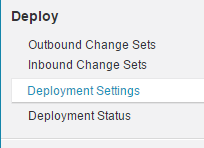
The deployment connection feature was renamed to deployment settings in recent releases. See the configuration interface below:
Once enabled, you can view active jobs and proceed with deployments without stopping them:

Managing Pending Deployments in Salesforce
When this setting is enabled, you can monitor pending deployments alongside active jobs. The deployment queue shows the status of each deployment and any dependencies on running jobs.
Key considerations for pending deployments:
- Deployments may take longer to complete if they depend on active jobs
- Monitor the deployment status in Setup → Deployment Status
- Failed deployments may require manual intervention
- Test deployments thoroughly in sandbox environments first
Best Practices for Production Deployments
While this feature allows deployments with active jobs, follow these best practices:
Pre-Deployment Checklist
- Review all active jobs before deployment
- Ensure test coverage meets the 75% minimum requirement
- Validate deployments in a full sandbox first
- Schedule deployments during low-usage periods
- Have a rollback plan ready
Monitoring During Deployment
- Watch for job failures caused by metadata changes
- Monitor system performance during deployment
- Check debug logs for any errors
- Verify business processes continue normally
Common Deployment Errors and Solutions
Even with active job deployments enabled, you may encounter these issues:
| Error | Cause | Solution |
|---|---|---|
| “Component in use by active job” | Job references metadata being deployed | Enable deployment settings or pause job temporarily |
| “Test coverage insufficient” | Apex classes don’t meet 75% coverage | Add test methods or fix existing tests |
| “Deployment validation failed” | Metadata conflicts or dependencies | Review component dependencies and fix conflicts |
Impact on System Performance
Enabling deployments with active jobs may affect system performance. Consider these factors:
- CPU usage may increase during concurrent operations
- Database locks may cause temporary delays
- Governor limits apply to both deployments and jobs
- Monitor org limits during deployment windows
Integration Considerations
When integrating with Salesforce systems, deployments with active jobs can affect:
- API call limits during deployment
- External system connections
- Data synchronization processes
- Real-time integration patterns
Plan integration testing around deployment schedules to avoid conflicts.
Frequently Asked Questions
How do I bypass deployment errors when Apex jobs are running?
Navigate to Setup → Deployment Settings and enable “Allow deployments of components when corresponding Apex jobs are pending or in progress.” This setting allows deployments to proceed even when active jobs are running.
What happens to pending deployments in Salesforce when jobs are active?
Pending deployments will queue and wait for safe execution windows. The deployment may take longer to complete, but it will proceed without requiring you to stop active jobs manually.
Can deployments cause active Apex jobs to fail?
Yes, deployments can cause active jobs to fail if the metadata changes are incompatible with the running job logic. Monitor job status during deployments and have error handling in place.
Should I stop scheduled jobs before production deployments?
With the deployment settings enabled, stopping jobs is not required. However, for critical deployments, consider pausing non-essential jobs to reduce system load and potential conflicts.
Where can I monitor active jobs during deployment?
Monitor active jobs in Setup → Apex Jobs. You can view job status, execution time, and any errors. Also check Setup → Deployment Status for deployment progress.