Salesforce Winter ’17 release launched in October 2016, introducing significant updates for developers, administrators, and end users. This guide covers the key Salesforce release notes from Winter ’17, with context for how these features evolved in subsequent releases.
What Are Salesforce Release Notes and Why They Matter
Salesforce release notes document new features, enhancements, and changes in each seasonal release. Understanding release notes helps developers plan upgrades, leverage new capabilities, and maintain compatibility across API versions. Winter ’17 marked API version 38.0 and introduced several foundational features still used today.
Enhanced Search Capabilities in Winter ’17
The Winter ’17 release significantly improved global search functionality across both Lightning Experience and Salesforce Classic:
Spell Correction for Custom Objects
Users could now see search results that matched their intended terms, even with minor spelling errors. This feature improved user experience when searching custom object records.
Expanded Searchable Objects
Winter ’17 added search support for multiple objects:
- Contract (Lightning Experience only)
- Knowledge Article (Lightning Experience only)
- Operating Hours
- Resource Absence (Salesforce Classic only)
- Service Appointment
- Service Resource
- Service Resource Skill (Salesforce Classic only)
- Service Territory
- Service Territory Member (Salesforce Classic only)
Person Account Search Enhancements
The release improved search accuracy for Person Accounts, making it easier to find the right records when dealing with individual customers.
Search Index Encryption
Organizations could now encrypt their search index for enhanced data security, addressing compliance requirements in regulated industries.
Deployment and Testing Improvements
Extended Quick Deployment Window
Winter ’17 extended the quick deployment window from 4 days to 10 days for successful validations. This change gave development teams more flexibility in their deployment schedules and reduced the need to re-run validations.
Apex Test Suite Enhancements
The release introduced several testing improvements:
- Deploy Apex Test Suites using Metadata API
- Global Value Sets available for Change Set deployments
- Test Suite Manager’s new Rename Suite button for easier test organization
Integrated AppExchange Experience
Winter ’17 brought AppExchange directly into Salesforce orgs. Users with “Download AppExchange Packages” permission could search and browse apps without leaving their org environment. This integration streamlined the app discovery and installation process.
Custom Metadata Types Enhancements
The release expanded Custom Metadata Types functionality with several key improvements:
- Metadata Relationship Fields: Full support for relationship fields in custom metadata
- Enhanced List Views: Metadata relationship fields to Entity Definition displayed as clickable links
- Custom Metadata Loader: Improved tools for bulk metadata management
- Deletion Management: Better handling when deleting objects referenced by metadata records
- View Filtering Changes: Updated filtering behavior on metadata relationship fields
- Recovery Options: Ability to restore deleted metadata relationship fields
- SOQL Limitations: Documented constraints when querying Custom Metadata Types
Platform Cache Monitoring with New Apex Methods
Winter ’17 introduced new Apex methods for monitoring Platform Cache performance:
- Average get time: Monitor cache retrieval performance
- Average item size: Track memory usage patterns
- Maximum get time: Identify performance bottlenecks
- Maximum item size: Monitor large cache entries
- Key miss rate: Measure cache effectiveness
- Total number of keys: Track cache utilization
These monitoring capabilities helped developers optimize cache usage and troubleshoot performance issues.
Improved Apex Test History in Lightning Experience
The Lightning Experience gained enhanced Apex test monitoring through Setup → Apex Test History. This interface provided detailed information about test runs, including:
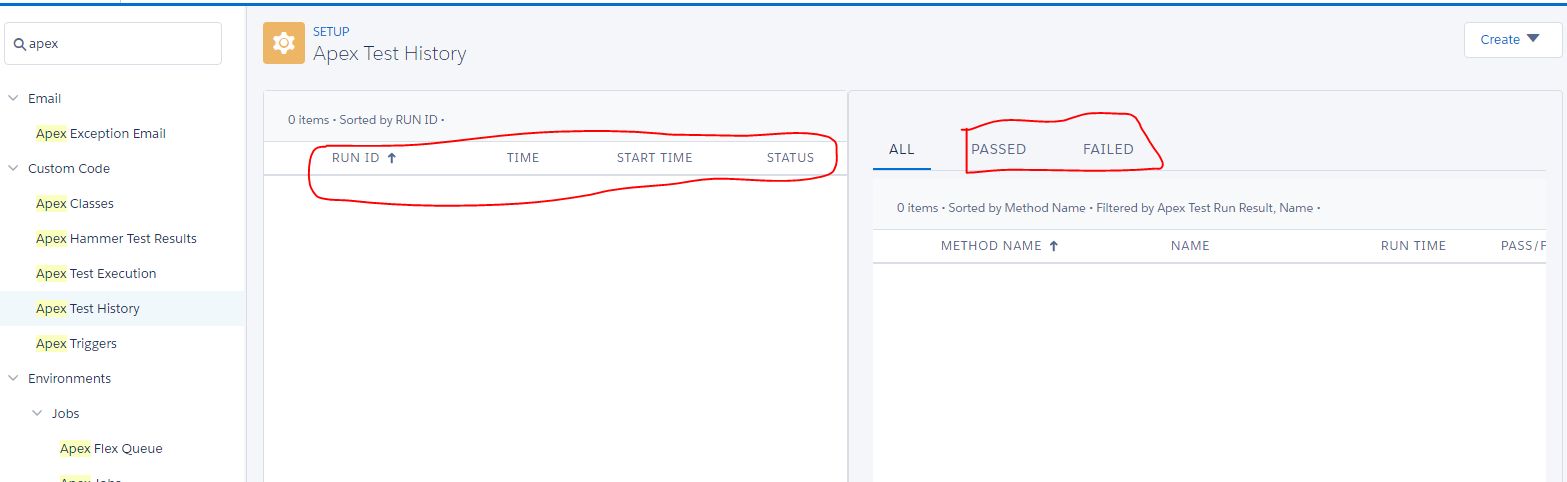
The new interface made it easy to see the number of passed and failed test classes, providing better visibility into code quality and deployment readiness. This feature was exclusive to Lightning Experience.
How Winter ’17 Features Evolved in Later Releases
Many Winter ’17 features became foundations for later enhancements:
- Search improvements led to Einstein Search and enhanced global search in current releases
- Custom Metadata Types expanded significantly, now supporting triggers and more complex relationships
- Platform Cache monitoring evolved into comprehensive performance monitoring tools
- AppExchange integration became the standard experience across all Salesforce interfaces
Accessing Complete Winter ’17 Release Documentation
The features covered here represent key highlights from Winter ’17. For comprehensive details, refer to the official Salesforce Winter ’17 release notes documentation.
Current Salesforce releases continue building on these foundational improvements. For the latest release information, visit Salesforce Help documentation.
Frequently Asked Questions
Where can I find current Salesforce release notes?
Current Salesforce release notes are available at help.salesforce.com. Each seasonal release (Spring, Summer, Winter) publishes comprehensive documentation 2-3 months before the release date.
What is the Salesforce release schedule for 2026?
Salesforce follows a predictable seasonal release schedule: Spring releases in February, Summer releases in June, and Winter releases in October. The exact Salesforce release dates are published on the Salesforce Trust site and release notes pages.
How do I prepare for Salesforce release upgrades?
Review release notes 60-90 days before each release. Test new features in a sandbox environment, update custom code for API version compatibility, and train users on interface changes. Create a deployment checklist based on the features your org uses.
Are Winter ’17 features still available in current Salesforce releases?
Most Winter ’17 features remain available, though some have evolved significantly. Search enhancements, Custom Metadata Types, and Platform Cache monitoring are still core platform capabilities. Check current release notes for the latest feature status and enhancements.