The Salesforce ANT Migration Tool (Another Neat Tool) is a Java-based command-line utility that automates metadata deployment between Salesforce environments. ANT executes tasks defined in XML configuration files, enabling developers and administrators to streamline deployment processes and maintain version control of Salesforce metadata.
ANT reads instructions from a build.xml file that contains task definitions and dependencies. When you execute an ANT command, it searches for the specified target in build.xml and executes the corresponding tasks. This XML-based approach functions as a domain-specific language for deployment automation.
What is the Salesforce ANT Migration Tool?
The Salesforce ANT migration tool is a Java application that facilitates metadata transfer between local directories and Salesforce organizations. It uses XML configuration files to define deployment tasks, making it possible to:
- Retrieve metadata from source organizations
- Deploy metadata to target organizations
- Automate repetitive deployment processes
- Maintain local copies of metadata for version control
The tool operates through two primary configuration files: build.xml (defines tasks and targets) and build.properties (contains environment-specific settings like org credentials).
ANT Tool Advantages for Salesforce Deployment
The ANT migration tool provides several key benefits over manual deployment methods:
| Advantage | Description |
|---|---|
| Automated Metadata Retrieval | Downloads metadata locally from source organizations, enabling offline modifications and version control |
| Bulk Deployment Capability | Deploys multiple components simultaneously, reducing deployment time and manual errors |
| Repeatable Processes | Execute the same deployment multiple times across different environments with consistent results |
| Extended Component Support | Migrates components not available through Change Sets, including custom settings and certain configuration elements |
| Command-Line Integration | Integrates with CI/CD pipelines and automated build processes through command-line interface |
| Local File Management | Stores metadata as XML files locally, enabling diff comparisons and collaborative development |
Downloading and Installing the ANT Migration Tool
To download the Salesforce ANT migration tool, access your Salesforce organization and navigate to the developer tools section.
Step 1: Access Developer Tools
In your Salesforce org, go to Setup → Developer → Tools (in Lightning Experience) or Setup → Develop → Tools (in Classic).
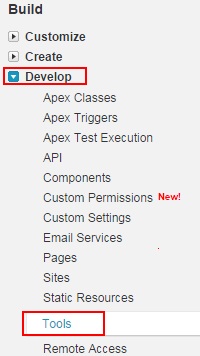
Step 2: Download the Migration Tool
Click on the Tools section to access available developer tools.
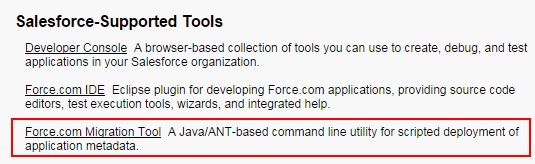
Click on the Force.com Migration Tool link to download the ZIP file containing the ANT libraries and sample configuration files.
Setting Up Your ANT Environment
Before using the ANT migration tool, configure your development environment with the necessary prerequisites:
Prerequisites
- Java Development Kit (JDK): Install JDK 8 or later
- Apache ANT: Download and install Apache ANT 1.9 or later
- Salesforce Migration Tool: Extract the downloaded ZIP file
Configuration Files Setup
Create two essential configuration files in your project directory:
Build.properties File
This file contains environment-specific settings and credentials:
# Salesforce org credentials
sf.username = your-username@company.com
sf.password = your-password-and-security-token
sf.serverurl = https://login.salesforce.com

# Deployment settings
sf.maxPoll = 20
sf.checkOnly = false
sf.rollbackOnError = true
Build.xml File
This file defines deployment tasks and targets:
<?xml version="1.0" encoding="UTF-8"?>
<project name="Sample usage of Salesforce Ant tasks" default="test" basedir="." xmlns:sf="antlib:com.salesforce">
    <property file="build.properties"/>
    <property environment="env"/>

    <target name="retrieveUnpackaged">
        <sf:retrieve username="${sf.username}" password="${sf.password}" serverurl="${sf.serverurl}" maxPoll="${sf.maxPoll}" retrieveTarget="metadata" unpackaged="package.xml"/>
    </target>

    <target name="deployCode">
        <sf:deploy username="${sf.username}" password="${sf.password}" serverurl="${sf.serverurl}" maxPoll="${sf.maxPoll}" deployRoot="metadata" rollbackOnError="${sf.rollbackOnError}"/>
    </target>
</project>
Common ANT Migration Tool Use Cases
Metadata Retrieval
Use ANT to download metadata from your Salesforce org for local development:
ant retrieveUnpackagedThis command downloads metadata components specified in your package.xml file to the local metadata directory.
Deployment to Target Org
Deploy local metadata changes to a target Salesforce organization:
ant deployCodeThe deployment includes validation checks and can be configured to rollback on errors.
Validation-Only Deployment
Test deployments without making actual changes:
ant deployCode -Dsf.checkOnly=trueBest Practices for ANT Salesforce Deployment
- Version Control Integration: Store build.xml and metadata in version control systems like Git
- Environment-Specific Properties: Use separate build.properties files for different environments (dev, staging, production)
- Incremental Deployments: Deploy only changed components to reduce deployment time and risk
- Backup Before Deployment: Always retrieve current metadata before deploying changes
- Test Coverage Validation: Ensure adequate test coverage before production deployments
- Error Handling: Configure rollback options and monitor deployment logs
Limitations and Considerations
While the ANT migration tool is powerful, be aware of these limitations:
- Component Dependencies: Some metadata components have dependencies that must be deployed in specific order
- Manual Configuration Required: Certain features like Territory Management require manual setup in target orgs
- API Version Compatibility: Ensure your ANT tool version supports the API version of your target org
- Governor Limits: Large deployments may hit API call limits in high-volume environments
Note: The ANT Migration Tool uses the Metadata API, which has specific limitations. Not all Salesforce components are deployable via metadata. Consult the Metadata API Developer Guide for current component support.
Troubleshooting Common ANT Deployment Issues
Authentication Failures
If authentication fails, verify:
- Username and password are correct
- Security token is appended to password
- IP restrictions allow access from your location
- Two-factor authentication settings
Deployment Errors
Common deployment errors include:
- Missing Dependencies: Deploy dependent components first
- Validation Failures: Check test class coverage and compilation errors
- Permission Issues: Ensure deploying user has necessary permissions
Frequently Asked Questions
What is the difference between ANT migration tool and Change Sets?
ANT migration tool provides command-line automation and supports more metadata types than Change Sets. Change Sets work through the Salesforce UI and are limited to specific component types. ANT enables version control integration and CI/CD pipeline automation.
Can I use ANT for Salesforce data migration?
ANT migration tool is designed for metadata deployment, not data migration. For data migration, use tools like Data Loader, Workbench, or third-party ETL tools. ANT handles configuration and code components, not record data.
How do I handle ANT deployment failures in production?
Configure rollbackOnError=true in your build.properties to automatically revert failed deployments. Always test deployments in sandbox environments first. Monitor deployment logs and have a rollback plan ready. Consider using checkOnly=true for validation before actual deployment.
What are the security considerations for ANT tool deployment?
Store credentials securely using environment variables or encrypted property files. Never commit passwords to version control. Use dedicated integration users with minimal required permissions. Enable IP restrictions and monitor API usage. Consider using OAuth for authentication in production environments.
Which Salesforce components cannot be deployed using ANT migration tool?
Components not supported include: Territory Management settings, some Einstein Analytics configurations, certain Community settings, and organization-wide defaults for some objects. Check the Metadata API documentation for the complete list of supported components in your API version.
Summary
The Salesforce ANT migration tool provides a robust solution for automating metadata deployments across Salesforce environments. By leveraging XML configuration files and command-line execution, teams can implement consistent, repeatable deployment processes that integrate with modern DevOps practices. While the tool has limitations, it remains essential for organizations requiring automated Salesforce deployment capabilities.