Cloud services form the foundation of modern Salesforce implementations, enabling organizations to deploy CRM solutions without managing physical infrastructure. This comprehensive guide covers cloud service fundamentals, Salesforce Service Cloud tutorial concepts, and how cloud architecture supports features like Lightning Data Service, cases, profiles, and integration patterns.
What Are Cloud Services in Salesforce Context
Cloud services deliver computing resources over the internet, eliminating the need for on-premises hardware and software management. In Salesforce’s multi-tenant architecture, cloud services provide the platform for Service Cloud, Sales Cloud, and other applications that serve millions of users globally.
Consider a typical enterprise scenario: A company needs to deploy a customer service application within three months. Traditional on-premises deployment requires hardware procurement, operating system setup, application development, and testing—often taking six months or more. By the time deployment completes, competitors may have already captured market share.
Salesforce Service Cloud eliminates these delays by providing pre-built customer service functionality on a cloud platform. Organizations can configure cases, knowledge bases, and service processes within weeks rather than months.
Salesforce Service Cloud Tutorial: Core Components
Service Cloud operates on Salesforce’s cloud infrastructure and includes several key components that demonstrate cloud service principles:
What Are Cases in Salesforce
Cases represent customer service requests in Salesforce. Each case contains fields like Subject, Description, Priority, and Status. Cases demonstrate cloud service scalability—organizations can handle thousands of cases simultaneously without infrastructure concerns.
Case management leverages cloud services through:
- Automatic case assignment using assignment rules
- Escalation rules that trigger based on time or criteria
- Email-to-case functionality that creates cases from customer emails
- Web-to-case forms that capture cases from websites
What Is Lightning Data Service in Salesforce
Lightning Data Service (LDS) provides a client-side caching layer for Salesforce data in Lightning components. LDS demonstrates cloud service efficiency by reducing server requests and improving user experience.
Key Lightning Data Service features:
- Automatic data caching and synchronization
- CRUD operations without Apex controllers
- Sharing rule and field-level security enforcement
- Optimistic UI updates for better performance
Cloud Service Platform Architecture
A cloud service platform provides infrastructure, development tools, and runtime environment for cloud applications. Salesforce Platform (formerly Force.com) exemplifies this concept by offering:
- Multi-tenant database architecture
- Metadata-driven development model
- Declarative configuration tools
- Programmatic customization through Apex and Lightning
What Are Profiles in Salesforce
Profiles control user access to objects, fields, and functionality within Salesforce’s cloud platform. Profiles demonstrate cloud service security by providing centralized access control across the entire organization.
Profile components include:
- Object permissions (Create, Read, Edit, Delete)
- Field-level security settings
- Tab visibility and app access
- Administrative permissions
- Login IP restrictions and login hours
Evolution of Cloud Services
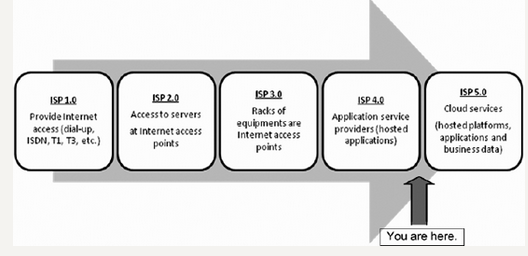
The evolution of Internet Service Providers (ISP) into cloud service platforms occurred across five distinct eras:
ISP 1.0 Era: Network Infrastructure
Companies like AOL, NetZero, Comcast, and Time Warner focused on building internet connectivity for customers and businesses. This era established the network foundation for future cloud services.
ISP 2.0 Era: Web Hosting
ISPs began offering server access and basic web hosting services. Customers could host websites with limited functionality and storage capacity.
ISP 3.0 Era: Colocation Services
The colocation concept allowed businesses to house their own servers in ISP data centers, providing better connectivity and power management while maintaining hardware ownership.
ISP 4.0 Era: Application Service Providers
Application Service Providers (ASPs) emerged, offering scalable business software services and managed data centers for enterprises. This era introduced the concept of software-as-a-service.
ISP 5.0 Era: Cloud Platform Services
ISP infrastructure matured into scalable, on-demand platforms called “cloud.” These platforms support building and hosting business applications with elastic scaling and pay-per-use pricing models.
What Are Integration Patterns in Salesforce
Integration patterns define how Salesforce connects with external systems in cloud environments. Common patterns include:
- Request-Reply: Synchronous communication using REST or SOAP APIs
- Fire-and-Forget: Asynchronous messaging through Platform Events
- Batch Data Synchronization: Bulk API for large data volumes
- Remote Call-In: External systems calling Salesforce APIs
- Remote Call-Out: Salesforce calling external web services
What Are CRM Databases
CRM databases store customer relationship data in structured formats optimized for sales, service, and marketing processes. Salesforce uses a multi-tenant database architecture where:
- Multiple organizations share physical database resources
- Logical data separation ensures security and privacy
- Metadata defines custom objects, fields, and relationships
- Query optimization handles millions of records efficiently
What Are Change Sets in Salesforce
Change sets enable metadata deployment between Salesforce orgs in cloud environments. They package customizations like custom objects, fields, workflows, and Apex code for migration from development to production environments.
Change set limitations include:
- Cannot deploy data records, only metadata
- Require deployment connection between orgs
- Limited to 10,000 files per change set
- Cannot delete components in target org
Cloud Service Advantages
Cloud services provide several advantages over traditional on-premises solutions:
- Rapid Deployment: Applications deploy in weeks rather than months
- Scalability: Resources scale automatically based on demand
- Cost Efficiency: Pay-per-use pricing eliminates upfront hardware costs
- Maintenance: Cloud providers handle infrastructure updates and security
- Accessibility: Users access applications from any internet-connected device
- Disaster Recovery: Built-in backup and recovery capabilities
Frequently Asked Questions
What is the difference between Salesforce Service Cloud and other cloud services?
Salesforce Service Cloud is a specific application built on the Salesforce cloud platform, focused on customer service management. Other cloud services may provide infrastructure (IaaS), platforms (PaaS), or different software applications (SaaS). Service Cloud includes pre-built functionality for cases, knowledge management, and service analytics.
How do Lightning Data Service and traditional Apex controllers differ?
Lightning Data Service provides client-side data caching and automatic CRUD operations without custom Apex code. Traditional Apex controllers require server-side processing for each data operation. LDS improves performance by reducing server requests and provides automatic sharing rule enforcement.
What are the main integration patterns used in Salesforce cloud implementations?
The main integration patterns include Request-Reply (synchronous API calls), Fire-and-Forget (asynchronous messaging), Batch Data Synchronization (bulk operations), Remote Call-In (external systems calling Salesforce), and Remote Call-Out (Salesforce calling external services). Each pattern serves different use cases based on data volume and timing requirements.
How do profiles control access in Salesforce cloud environments?
Profiles define user permissions at the object, field, and system level within Salesforce orgs. They control what users can see and do, including object CRUD permissions, field-level security, tab visibility, and administrative functions. Profiles work with permission sets to provide flexible access control in multi-tenant cloud environments.
What are the limitations of change sets for cloud deployments?
Change sets can only deploy metadata, not data records. They require a deployment connection between source and target orgs, are limited to 10,000 files per set, and cannot delete components in the target org. For complex deployments, organizations often use Salesforce CLI or third-party deployment tools.