Salesforce campaigns are marketing project records that help organizations track, plan, and measure the effectiveness of their marketing initiatives. This guide covers everything you need to know about implementing and managing campaigns in your Salesforce org.
What Is Campaign in Salesforce
In Salesforce, campaigns are objects that represent marketing projects or initiatives. They serve as containers for tracking leads, contacts, and opportunities generated from specific marketing efforts. Campaigns help organizations measure return on investment (ROI) and analyze which marketing activities drive the most business value.
Key characteristics of Salesforce campaigns:
- Track both leads and contacts as campaign members
- Measure campaign influence on opportunities and revenue
- Support hierarchical campaign structures for complex marketing programs
- Integrate with marketing automation tools and email platforms
- Provide detailed reporting and analytics capabilities
Salesforce Campaign Management Best Practices
Effective campaign management requires following proven practices that maximize data quality and reporting accuracy:
Campaign Hierarchy and Organization
Structure campaigns using parent-child relationships to track multi-touch marketing programs. For example, create a parent campaign for “Q1 2026 Product Launch” with child campaigns for “Email Series,” “Webinar,” and “Trade Show.”
Campaign Member Status Management
Configure meaningful campaign member statuses that reflect your marketing funnel stages. Default statuses like “Sent,” “Responded,” and “Attended” should align with your lead qualification process.
Marketing Campaign Data Model
The Salesforce campaign data model includes several key objects and relationships:
| Object | Purpose | Key Fields |
|---|---|---|
| Campaign | Main campaign record | Name, Type, Status, Start/End Date, Budget |
| Campaign Member | Junction object linking leads/contacts to campaigns | Status, First Responded Date, Lead/Contact ID |
| Campaign Influence | Tracks campaign impact on opportunities | Influence %, Revenue, Opportunity ID |
How to Create a Campaign in Salesforce
Before creating campaigns, ensure users have the Marketing User checkbox enabled in their user record and appropriate campaign permissions in their profile.
Step-by-Step Campaign Creation Process
- Navigate to Campaigns Tab – Access campaigns from the App Launcher or tab bar

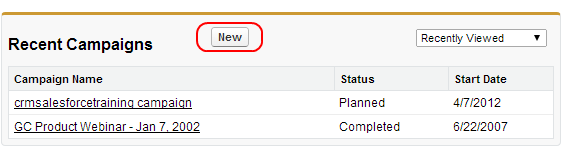
- Click New Campaign – Select the “New” button to start campaign creation
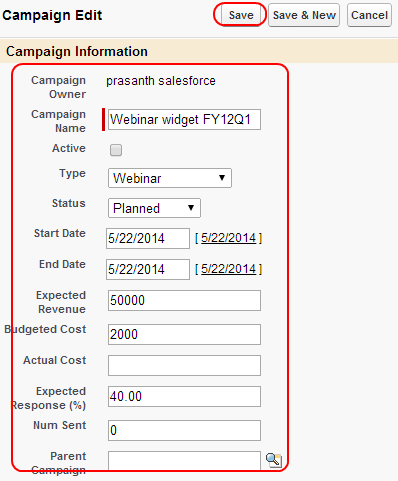
- Complete Campaign Information – Fill in required and optional fields
Essential Campaign Fields
- Campaign Name – Use descriptive naming conventions (e.g., “2026-Q1-Webinar-Product-Demo”)
- Type – Select from picklist values like Email, Webinar, Trade Show, Advertisement
- Status – Track campaign lifecycle: Planned, In Progress, Completed, Aborted
- Start Date / End Date – Define campaign duration for accurate reporting
- Expected Revenue – Set revenue targets for ROI calculations
- Budgeted Cost – Track marketing spend against results
SFDC Campaign Management Features
Salesforce provides several advanced features for comprehensive campaign management:
Campaign Member Import
Use Data Import Wizard or Data Loader to bulk import leads and contacts into campaigns. This feature supports CSV files and maintains data integrity through field mapping validation.
Campaign Influence Tracking
Enable Campaign Influence to track how multiple campaigns contribute to opportunity creation and revenue. This feature supports both automatic and manual influence attribution models.
Campaign Hierarchy
Create parent-child campaign relationships to track integrated marketing programs. Parent campaigns aggregate statistics from child campaigns for comprehensive reporting.
Campaign Reporting and Analytics
Salesforce campaigns provide extensive reporting capabilities through standard and custom reports:
Standard Campaign Reports
- Campaign Performance – Shows response rates, costs, and ROI metrics
- Campaign Member Analysis – Tracks member status changes and conversion rates
- Campaign Influence – Measures campaign impact on opportunities and revenue
Key Performance Indicators
Monitor these essential campaign metrics:
- Response Rate = (Responded Members / Total Members) × 100
- Cost Per Lead = Total Campaign Cost / Number of Leads Generated
- ROI = (Campaign Revenue – Campaign Cost) / Campaign Cost × 100
- Conversion Rate = Converted Leads / Total Campaign Members × 100
Campaign Integration Considerations
Modern Salesforce campaigns integrate with various marketing tools and platforms:
Marketing Cloud Integration
Salesforce Marketing Cloud automatically creates campaign members when contacts engage with email campaigns, providing seamless attribution tracking.
Pardot Integration
Pardot prospects sync with Salesforce campaigns, enabling lead scoring and nurturing based on campaign engagement.
Third-Party Marketing Tools
Many marketing automation platforms integrate with Salesforce campaigns through APIs, maintaining consistent attribution across systems.
Common Campaign Management Challenges
Organizations often encounter these challenges when implementing Salesforce campaigns:
Data Quality Issues
Duplicate campaign members and inconsistent naming conventions reduce reporting accuracy. Implement validation rules and naming standards to maintain data integrity.
Attribution Complexity
Multi-touch attribution requires careful campaign hierarchy design and influence model configuration. Consider using Salesforce’s attribution features or third-party solutions for complex scenarios.
User Adoption
Marketing teams may resist campaign tracking if processes are complex. Simplify workflows and provide clear training on campaign benefits.
Frequently Asked Questions
What is the difference between campaigns and marketing lists in Salesforce?
Campaigns are marketing project records that track responses and measure ROI, while marketing lists are static collections of leads and contacts. Campaigns provide analytics and influence tracking capabilities that lists do not offer.
Can I add the same lead or contact to multiple campaigns?
Yes, leads and contacts can be members of multiple campaigns simultaneously. This supports multi-touch attribution and helps track how different marketing efforts influence the same prospect.
How do I enable campaign influence in my Salesforce org?
Navigate to Setup > Feature Settings > Marketing > Campaign Influence. Enable the feature and configure influence timeframes and attribution models. Note that this feature requires additional licenses in some Salesforce editions.
What permissions do users need to create and manage campaigns?
Users need the Marketing User checkbox enabled in their user record and appropriate campaign object permissions (Create, Read, Edit, Delete) in their profile or permission set. System administrators can manage these settings in Setup.
How do I measure campaign ROI in Salesforce?
Calculate ROI using the formula: (Campaign Revenue – Campaign Cost) / Campaign Cost × 100. Use campaign reports to track actual revenue from influenced opportunities and compare against budgeted costs.