An opportunity in Salesforce represents a potential or existing sale that your organization wants to track through the sales process. Opportunities are the foundation of sales management in Salesforce, allowing teams to forecast revenue, track deal progress, and manage the entire sales pipeline from initial contact to closed-won deals.
What is an Opportunity in Salesforce?
Opportunities are records that represent past or pending sales for an account. They serve as the central hub for tracking all sales-related activities, from initial prospect engagement through deal closure. Each opportunity contains critical information including deal value, close date, sales stage, and probability of winning.
Key characteristics of Salesforce opportunities include:
- Opportunities represent sales and potential sales for your organization
- They enable accurate sales forecasting and revenue prediction
- Opportunities are one of the most widely used and heavily customized objects on the Salesforce platform
- They allow tracking of individual products (opportunity line items), quotes, proposals, and orders
- Opportunities support sales team collaboration with role-based access and opportunity splits
In Salesforce, opportunity owners can configure sales teams with users assigned to specific roles such as account executive or pre-sales consultant, each with defined access privileges. The platform also supports opportunity splitting to distribute credit among multiple team members. Forecasting capabilities help estimate quarterly revenue based on your opportunity pipeline.
Opportunity Object Structure and Key Fields
The Opportunity object contains several standard fields that are essential for sales tracking:
| Field Name | Type | Required | Purpose |
|---|---|---|---|
| Opportunity Name | Text | Yes | Identifies the deal |
| Close Date | Date | Yes | Expected close date |
| Stage | Picklist | Yes | Current sales stage |
| Amount | Currency | No | Deal value |
| Probability | Percent | No | Win likelihood |
| Account Name | Lookup | No | Related account |
How to Create New Opportunity in Salesforce
Creating a new opportunity in Salesforce occurs when a customer contacts a salesperson about a product and expresses purchase interest. The salesperson then creates an opportunity record with account information, contact details, and deal specifics. This opportunity can be linked to campaigns to track marketing effectiveness.
Follow these steps to create a new opportunity:
Step 1: Navigate to Opportunities Tab
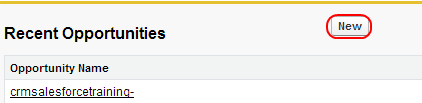
To create a new opportunity in Salesforce, go to the Opportunities tab.

Step 2: Click New Button
Select the Opportunities tab as shown above and click the New button.
Step 3: Complete Required Fields
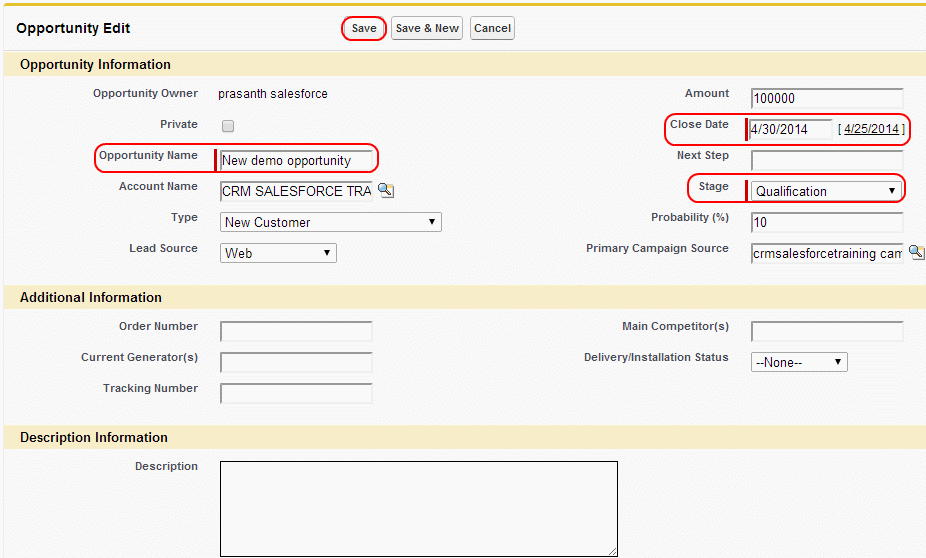
To create a new opportunity in Salesforce, you must complete the required fields: Opportunity Name, Close Date, and Stage. Optional fields can be populated based on your organization’s requirements and sales process.
Step 4: Save the Opportunity
Click the Save button to create the opportunity record.
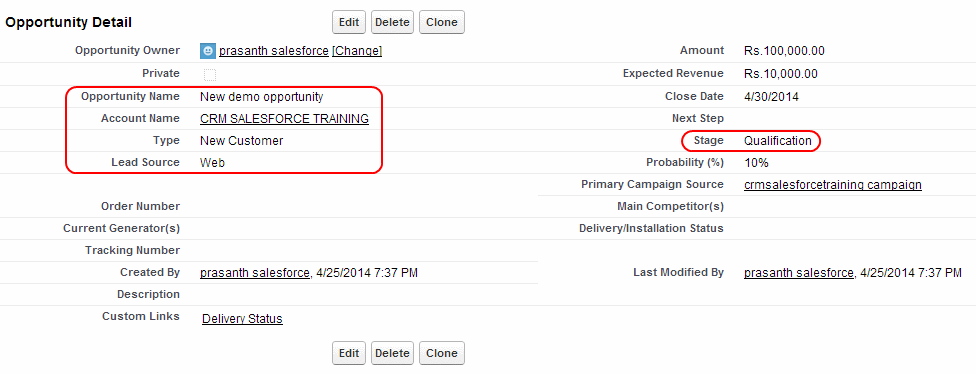
After saving the opportunity, you are redirected to the detailed view of the opportunity record. Notice the fields displayed in the layout above. When creating opportunities in Salesforce, you can configure stage and probability fields to estimate the likelihood of completing a successful sale. The probability percentages for various stages can be customized by your Salesforce administrator.
Opportunity Sales Process and Stages
Salesforce opportunities follow a defined sales process with multiple stages that represent the progression of a deal. Common opportunity stages include:
- Prospecting – Initial contact and qualification
- Qualification – Needs analysis and budget confirmation
- Needs Analysis – Solution design and proposal development
- Value Proposition – Presenting solution value
- Negotiation/Review – Contract terms and pricing discussions
- Closed Won – Deal successfully completed
- Closed Lost – Deal lost to competitor or no decision
Each stage has an associated probability percentage that helps with forecasting accuracy. Administrators can customize stages and probabilities to match your organization’s specific sales methodology.
Opportunity Management Best Practices
Effective opportunity management requires following established best practices:
Data Quality and Consistency
- Maintain accurate close dates and update them as deals progress
- Use consistent naming conventions for opportunity records
- Regularly update opportunity stages to reflect current status
- Ensure amount fields are populated for forecasting accuracy
Sales Process Adherence
- Follow your organization’s defined sales stages
- Document key activities and next steps in opportunity records
- Use opportunity products (line items) for detailed tracking
- Link opportunities to campaigns for ROI measurement
Forecasting and Reporting
- Review opportunity pipeline regularly with sales teams
- Use probability percentages that reflect realistic win rates
- Generate opportunity reports for sales performance analysis
- Track conversion rates between sales stages
Integration with Other Salesforce Objects
Opportunities integrate with multiple Salesforce objects to provide comprehensive sales management:
- Accounts – Every opportunity is typically associated with an account record
- Contacts – Link key decision makers and influencers to opportunities
- Products – Add specific products or services being sold
- Quotes – Generate formal pricing proposals
- Cases – Track post-sale support issues
- Campaigns – Measure marketing campaign effectiveness
This integration enables a complete view of the customer relationship and sales process within the Salesforce platform.
Frequently Asked Questions
What is the difference between an opportunity and a lead in Salesforce?
A lead represents a potential customer who has shown interest but hasn’t been qualified yet. An opportunity represents a qualified sales deal with a specific account, amount, and close date. Leads are converted to opportunities once they meet qualification criteria.
Can I create opportunities without an associated account?
While the Account field is not technically required, Salesforce best practices recommend associating every opportunity with an account. This ensures proper data relationships and enables comprehensive reporting across the sales process.
How do opportunity stages affect forecasting in Salesforce?
Each opportunity stage has an associated probability percentage that determines how the opportunity amount contributes to sales forecasts. Higher probability stages contribute more to forecast totals, while early-stage opportunities have minimal forecast impact.
What are opportunity line items and when should I use them?
Opportunity line items (also called opportunity products) represent specific products or services being sold within an opportunity. Use them when you need to track individual products, quantities, and pricing details for complex deals with multiple components.
How can I automate opportunity management processes?
Salesforce provides several automation tools for opportunities including workflow rules, process builder, and flow. You can automate stage updates, field calculations, task creation, and email notifications based on opportunity changes or criteria.